 WordPress
The context
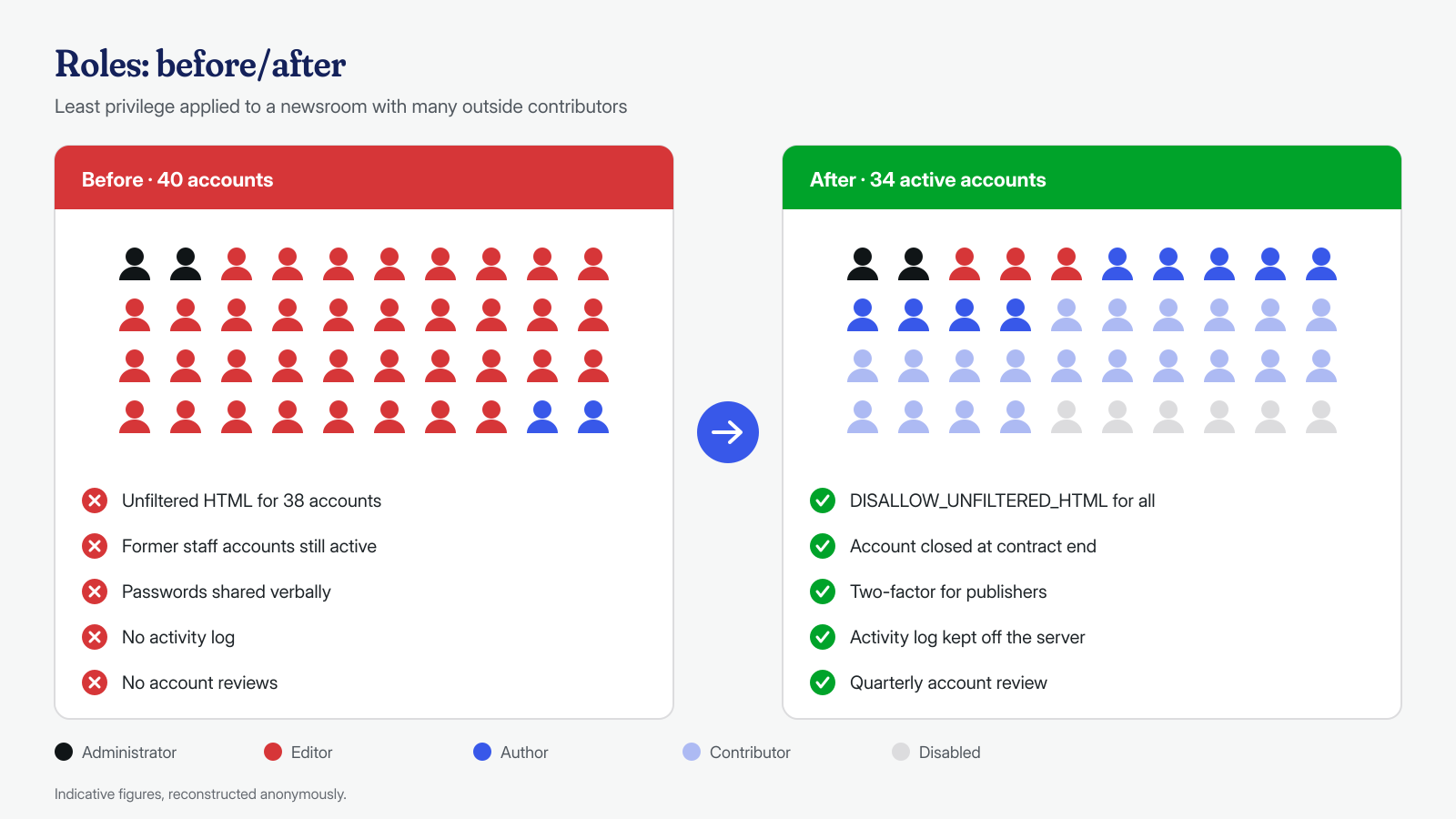
A local online newspaper, with a newsroom of about ten journalists and a network of outside contributors who write from home. The site is a well-maintained WordPress install, on a virtual server managed by an IT supplier: core and plugins up to date, daily backups, an application firewall. There were about forty accounts and, “to avoid wasting time with permissions”, almost all of them had the Editor role, including occasional contributors. For confidentiality, the name of the paper, the area and any detail that would allow the people involved to be identified have been omitted or changed.
The symptoms
Since mid-June the paper had suffered seven episodes that everyone called “defacement”. Always at night, between one and four a.m.: banners with offensive remarks about the city administration and about the newsroom itself appeared in some old articles, and on two occasions the titles of the featured articles on the homepage had been rewritten in a provocative tone. In the morning someone would notice, fix it by hand, and the next day everything seemed back to normal, until the next episode.
The supplier had done everything that is usually done: changed the administrator’s password, reinstalled the plugins, run two different scanners, restored a backup. The scanners found nothing, and the episodes continued. Everyone was convinced a group of outside attackers was behind it, skilled enough to leave no traces. At the end of July the paper contacted us for the within-24-hours service, asking us to find the backdoor.
What we found at the application level
First of all, what we did not find. The core and plugins matched the official packages exactly, there were no misplaced PHP files in uploads, no files in the mu-plugins folder, no database option with hidden code, no unknown administrators, such as those described in the article on ghost administrators. In the logs there was no trace of attempts to exploit vulnerabilities on the nights of the episodes.
# Integrity of core and plugins against the official packages
wp core verify-checksums
wp plugin verify-checksums --all

# Who can publish and write unfiltered HTML
wp user list --role=editor --fields=ID,user_login,user_registered
wp user list --role=administrator --fields=ID,user_login,user_registered
The answer was in a place scanners don’t look: the revisions. WordPress saves a revision at every change to an article, and the revision also records the user who made it. All the changes of the seven nights had been made by a single account, with the Editor role: that of an outside contributor whose contract had not been renewed at the end of May. The account had never been deactivated, and the Editor role, on a single-site install, includes the unfiltered_html capability, which according to the WordPress documentation on roles allows inserting HTML and even JavaScript into content. The banners were not an injection: they were HTML blocks inserted by the editor, exactly as a newsroom editor would do.
This also explains why weeks of searching had led nowhere. A scanner looks for malicious code in files and in the database, and here the “code” was an ordinary HTML block saved by a user authorized to do so. Changing the administrator’s password didn’t touch the account used, and restoring a backup put the articles right but left the account active, ready for the next episode. The choice of timing had also contributed to the misunderstanding: aggressive-toned changes made at night look like a typical outside attack, and nobody had thought to look at who appeared as the author of the changes.
# Revisions created by a user, in date order
wp post list --post_type=revision --author=27 --fields=ID,post_parent,post_date --orderby=date --order=ASC

# The user's still-valid sessions: login time, expiry, IP, browser
wp user session list 27 --fields=login_time,expiration_time,ip,ua

# Application passwords, which would stay valid even if the password is changed
wp user application-password list 27
What we found at the system level
At the system level too the server was clean: no foreign entries in the crontabs, no anomalous processes, no unknown SSH keys, no suspicious outbound connections. It is as important a result as the others, because it explained why the search for a backdoor led nowhere: none was needed.
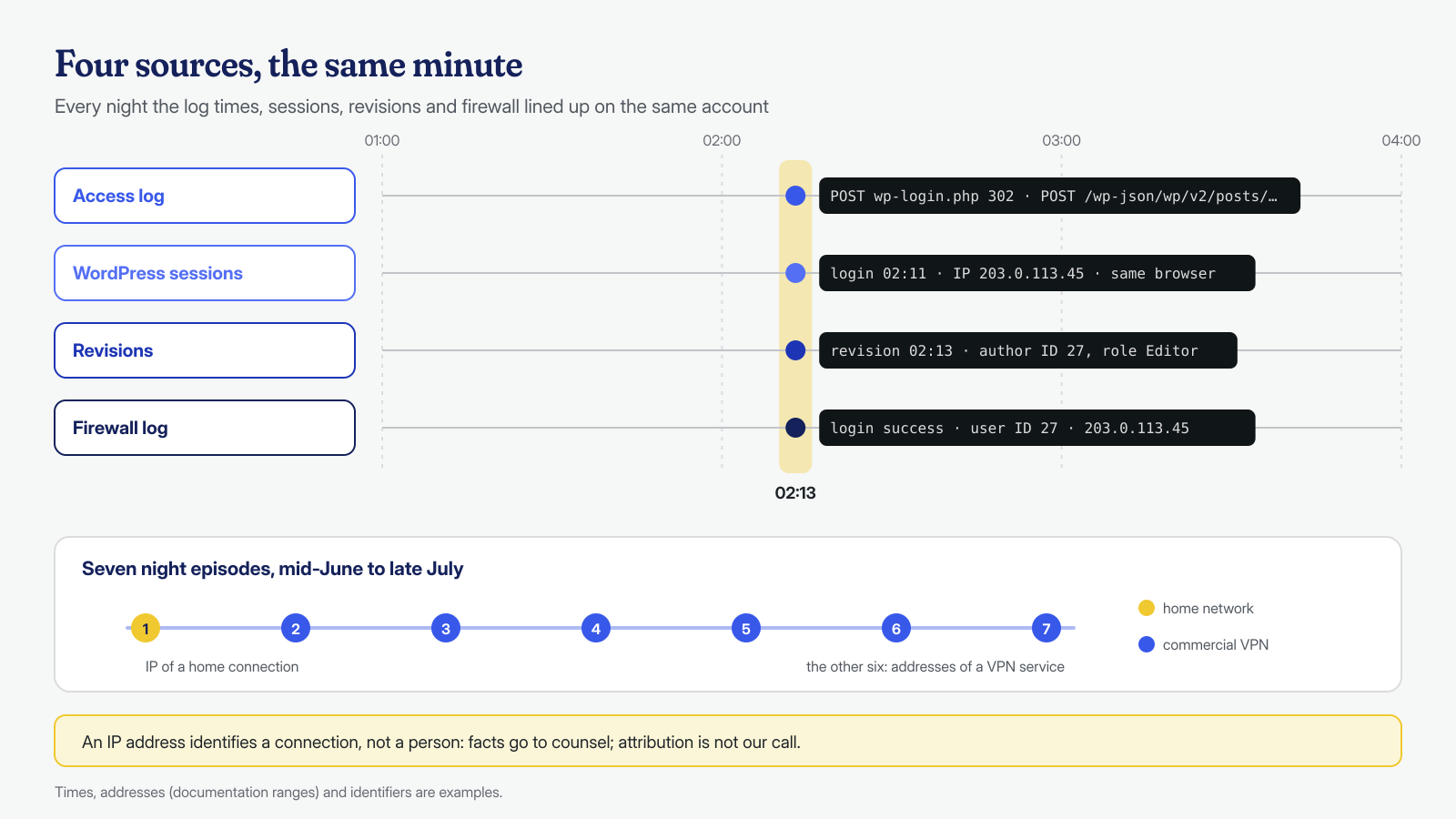
The system, however, kept the evidence. We cross-referenced four sources, each with its own timestamps, after converting them all to the same time zone:
- the web server access logs, in which every night a
POSTtowp-login.phpwith a redirect response appeared, meaning a successful login, and shortly afterward a series ofPOST /wp-json/wp/v2/posts/…requests, which is how the block editor saves articles; - the WordPress sessions, stored in the user’s metadata, with the login date, IP address and browser of each session still valid;
- the revisions, with the author and time of each change;
- the application firewall logs, which recorded the successful logins to the admin area with user and address.
The method is the same one described in the article on access logs, applied to an attack that uses no vulnerability. In six episodes out of seven the requests came from addresses of a commercial VPN service, always with the same browser. In the first episode, in mid-June, the login had instead come from an address on an Italian operator’s home connection; from the next one on, only VPN. The username, the browser and the sequence of actions were the same in every case.
How we handled the discovery
At this point the technical work became delicate. What the data proves is that the changes were made with the credentials of a certain account, from certain addresses, at certain times. They don’t prove who was sitting at the keyboard: the credentials could have been shared, written down somewhere or stolen, and an IP address identifies a connection, not a person. Attributing an action to someone is not our job, and in our communications we never named or suspected anyone.
We therefore did three things, in this order:
- preserved the evidence before touching anything: copies of the logs, a database dump, an export of the revisions and of the account’s metadata, each with its own cryptographic fingerprint and a note of who collected it, when and from where. The originals were not modified;
- delivered a factual report to the paper’s management and its lawyer: a chronology of events with the sources for each line, without conclusions about people. Legal assessments, including whether to file a complaint, were left entirely to them;
- closed the access, in agreement with the lawyer, right after the evidence was collected: blocking the account earlier would have risked losing the still-active sessions, which were themselves evidence.
The actual closure was quick. The account was demoted to no role and its sessions destroyed; since passwords circulated by word of mouth in the newsroom, we had them changed for all users with publishing permissions. The modified articles were restored to the revision prior to the tampering, checking the result one by one.
# Removes every role from the account and closes all its sessions
wp user remove-role 27 editor
wp user session destroy 27 --all

# Restores a post to the given revision (revision ID)
wp eval 'wp_restore_post_revision( 18342 );'
The hardening
The underlying problem was not technical but organizational, and the hardening was mostly that:
- roles reviewed on the principle of least privilege: outside contributors became Authors, who can edit only their own articles, or Contributors, whose texts go through an editor before publication. The Editor role was kept for three section editors;
- unfiltered HTML disabled for everyone with the
DISALLOW_UNFILTERED_HTMLconstant inwp-config.php; the few blocks that require code, such as poll widgets, go through a dedicated block managed by the administrator; - an offboarding procedure tied to administration: on the day a contract ends the account is deactivated, content reassigned and sessions closed, with a quarterly review of all accounts;
- two-factor authentication mandatory for anyone who can publish, and personal passwords, never shared;
- an activity log that records logins, changes and role changes and sends them off the server, with an alert when a homepage article is modified at night.
The result
The analysis, the securing of the account and the restoration of the articles were all completed within the 24 hours provided by the service. No further episode has occurred since, and the activity log has not flagged any unexpected nighttime changes. The paper received two separate documents: the factual report with the evidence for its lawyer, and a technical report with the interventions and the new role rules, to share with the newsroom.
The IT supplier, which for weeks had been looking for malware that wasn’t there, has also adopted the offboarding procedure for its other clients.
What this case teaches
Not all compromises go through a vulnerability. A legitimate account, with more permissions than necessary and left active after the end of a relationship, does the same damage as a webshell, and on top of that no scanner will find it, because from the software’s point of view there is nothing anomalous. That is why, when a site is “attacked” without any malicious files turning up, the first questions to ask concern the accounts: who has access, with what role, since when and until when.
The second lesson concerns method: faced with a possible inside case, the temptation is to block everything immediately and name a name. Preserving the evidence first, describing only the facts and leaving the assessments to those competent to make them protects the company, the people involved and the value of the evidence itself.
Malwarecleanup.com is the WordPress cleanup service of Managed Server S.r.l., a company active since 2005 in server and hosting management. We analyze the application and the system, even when the problem is not malware, with guaranteed times of 6, 12 or 24 hours per installation, counted from receipt of access. For a similar case you can contact us.