 WordPress
The background
A small-town volunteer association with about a hundred members and thirty or so active volunteers, which organizes rides for elderly people to medical appointments and a food drive twice a year. No employees, a budget of a few thousand euros, a board that meets one evening a month. The website, built on WordPress, had been created seven years earlier by a volunteer with a passion for computers: presentation pages, a calendar of activities, the form to become a member and the instructions for the Italian 5 per mille tax donation. Then the volunteer moved to another region for work, and the site stayed where it was, “it works anyway”. For confidentiality, the association’s name, location and any details that would identify it have been omitted or changed.
The symptoms
In September a member, searching Google for the phone number to book a ride, found a series of strange results under the association’s name: pages in Japanese and English advertising designer bags and supplements, all carrying the site’s address. Next to the main result appeared the warning “This site may have been compromised”. Opening the site from a computer, everything looked normal, which at first suggested a Google mistake.
The president asked the board who had the site’s passwords. Nobody. Nobody even knew exactly where it was hosted, in whose name the domain was registered or whether anyone received Google’s notifications. It is a far more common situation than you might think, and not only in the nonprofit sector: the site exists, but it has no owner.
Getting the keys back
The treasurer contacted us asking for a quote to “remove the virus”. The first thing we explained to him was that our turnaround time starts when we receive the access credentials, and that the first job therefore fell to the association: finding the keys again. We helped him take inventory with a few simple questions, and the reconstruction took a week.
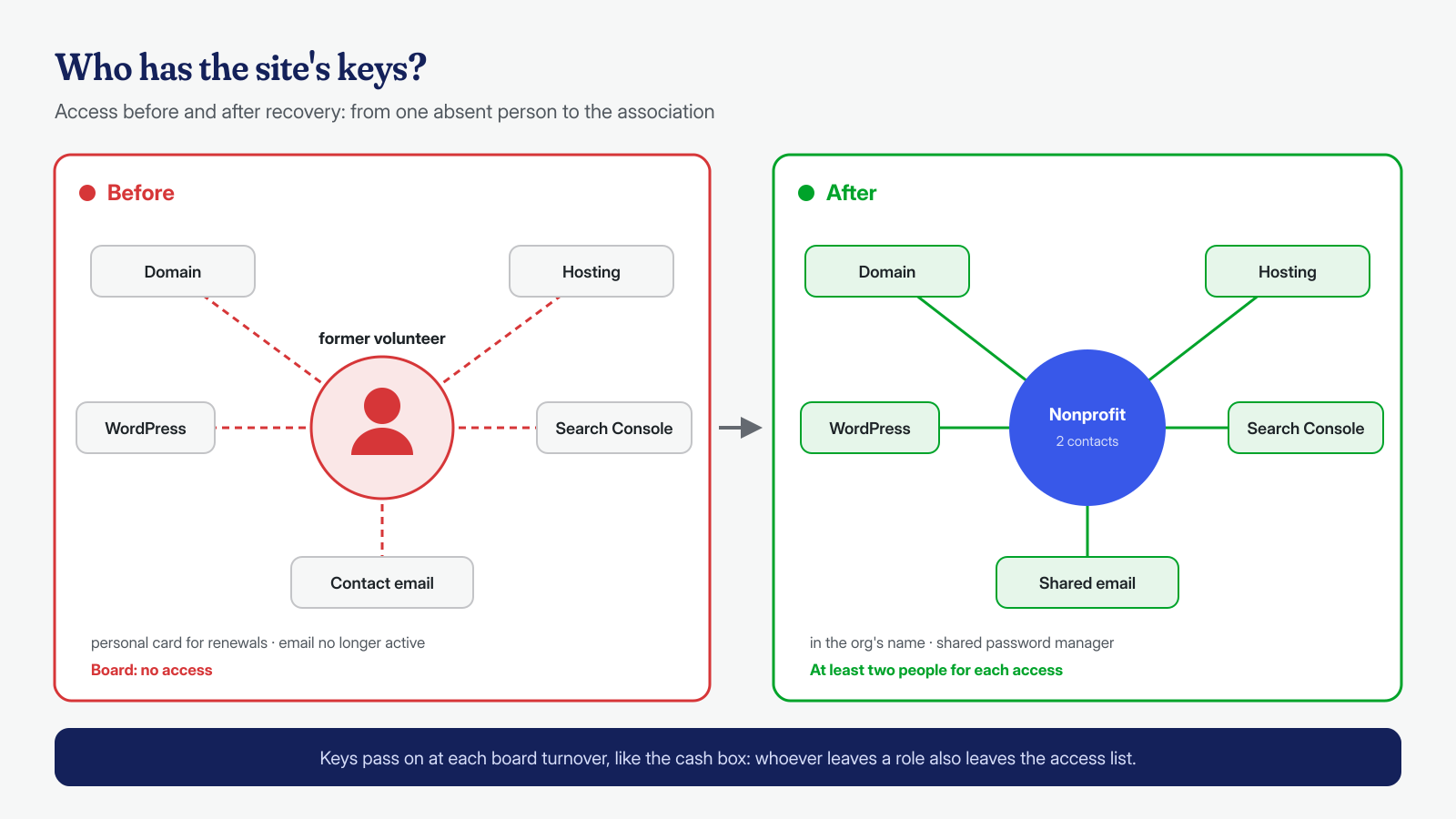
- The domain. A search in the public domain name database showed the registrar, but not the registrant. The association’s old bank statement did the rest: the annual renewal was charged to the volunteer’s personal card, and the board managed to track him down. The domain was registered to him, as an individual. With his cooperation, the registrar’s procedure for changing the registrant to the association was started, using the organization’s tax code and a shared board email address.
- The hosting. It was a small shared plan, on the same registrar account and with the same personal email. Once the contact address was changed, the president was able to reset the panel password and download the SFTP and database access details.
- WordPress. The only known administrator was the volunteer, who didn’t remember the password and used an email address that was no longer active. With access to the panel we were able to create a new administrator in the association’s name.
- Search Console. Ownership of the site was verified only with the volunteer’s account. With DNS access, the association added the verification record for its own Google account and finally saw the security issues report: months of warnings that nobody had ever read.
With the access finally in hand, the association chose the service with a turnaround within 24 hours, the best fit for a site with no e-commerce and a volunteer budget.
What we found at the application level
The site was running a six-year-old version of WordPress, an unmaintained theme and eleven plugins, seven of which hadn’t been updated in years and two of which had been pulled from the official directory over security problems. It was an easy target, and indeed it had not been hit just once.
The main infection was a classic Japanese SEO spam: a group of files hidden among those of a forms plugin generated thousands of advertising pages, visible only when the request came from a search engine. To normal visitors the site showed its usual pages, which is why nobody had noticed. An extra sitemap, created in the site root, told Google about the new pages. Alongside it were the remains of at least two older infections: backdoors in the uploads with dates from different years and three unknown administrators, two of which had never been used, as often happens with hidden administrators. The membership form, based on one of the withdrawn plugins, was in all likelihood the initial way in.
There was also one aspect the board cared about more than anything: the members’ data. The membership requests received through the form were stored in the database, with names, addresses and phone numbers of more than two hundred people. We found no signs that those tables had been exported, but with backdoors active for months it couldn’t be ruled out; we therefore gave the association the elements to assess, with its own advisor, the obligations that apply in the event of a personal data breach.
What we found at the system level
On shared hosting the room to act at the system level is limited, but not nil. In the panel there was a scheduled task, created by the attacker, that called one of the spam files every six hours to regenerate the sitemap. In the account’s main folder, next to the site, there was also an old test WordPress installation, forgotten by the volunteer years earlier: also infected and, sharing the same user as the main site, able to rewrite its files. This is the problem described in the article on cross-site contamination on shared hosting. The provider, when contacted, confirmed that the other accounts on the server were not involved.
How we removed it
After saving a complete copy of files, database and logs, we:
- deleted the scheduled task and the test installation, after keeping a copy of them;
- reinstalled the latest version of WordPress and a maintained theme from official sources, adapted to preserve the look of the site;
- cut the plugins from eleven to four, replacing the withdrawn ones with maintained alternatives, including a new membership form that no longer stores data in the database but sends it to the board’s email address;
- copied back from the uploads only images and documents, after checking them, and removed the backdoors and the fake sitemap;
- deleted the unknown administrators and the volunteer’s, and changed all credentials: WordPress, database, SFTP, panel, keys and salts;
- made the spam pages return a 410 code, which tells Google they no longer exist, and verified the result by simulating search engine requests.
Then, together with the treasurer, we followed the procedure described in the article on removal from Google blacklists from Search Console: we submitted the corrected sitemap, flagged the addresses to be removed and requested a review of the security issues, with a short description of what had been found and what had been done.
Hardening
For an association with no technical staff, the best hardening is the kind that needs no ongoing work. We enabled automatic updates for WordPress and the four remaining plugins, blocked PHP execution in the uploads and file editing from the dashboard, enabled two-factor authentication for the two administrators and a daily backup stored outside the hosting, with thirty days of history. File integrity monitoring sends an alert to the board’s shared address if a new PHP file appears.
A tailored maintenance plan
The real cause of the problem was not a plugin, but the absence of anyone responsible for the site. So we agreed with the board on a simple plan, designed for volunteers with little time and no technical skills, and with modest costs: the domain, a hosting plan with backups included and a password manager with a free or nonprofit-discounted plan.
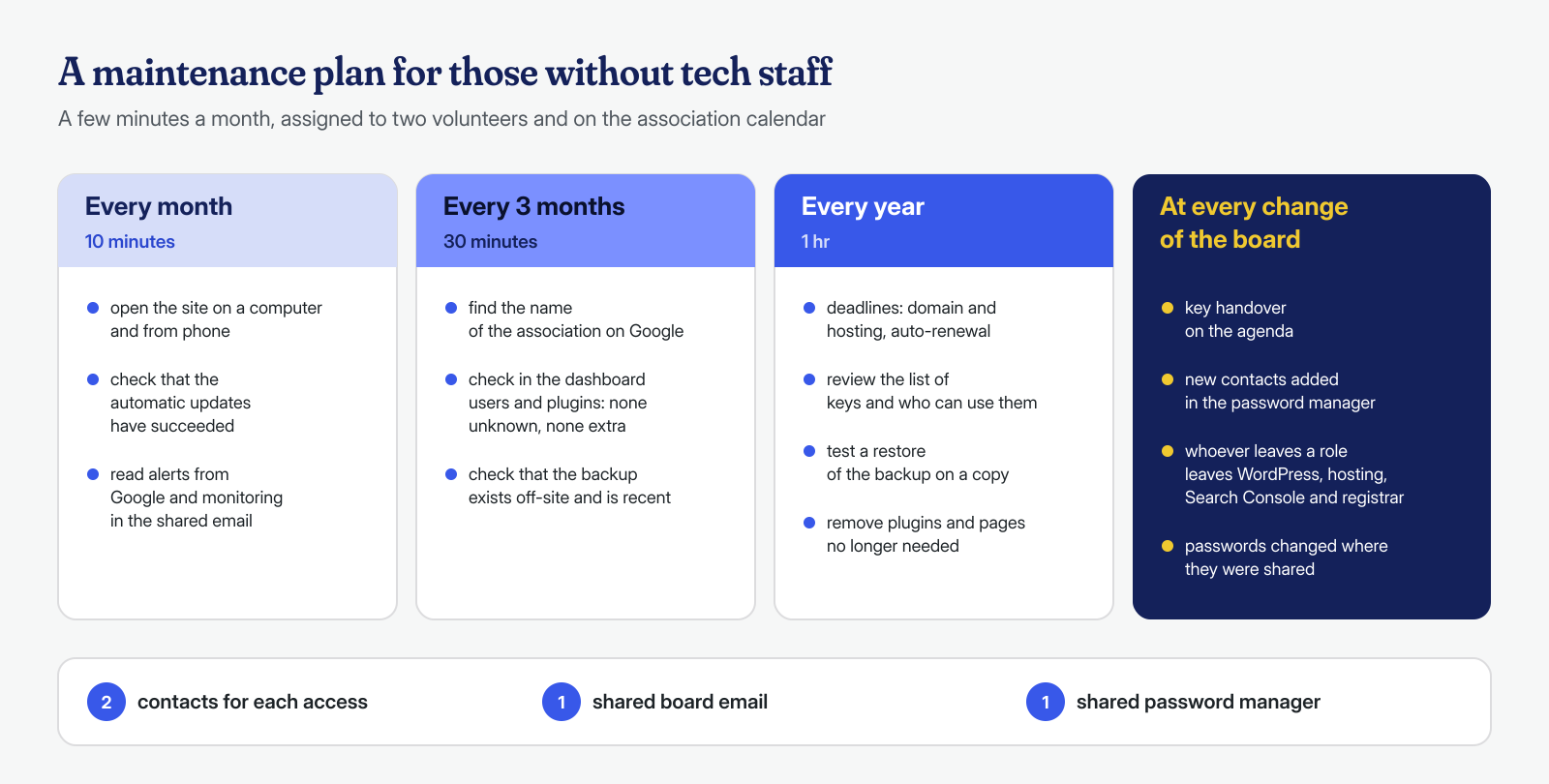
There are three basic rules. Every access is registered to the association, not to a person, and goes through a shared board email address, so that communications from the registrar, the provider and Google always reach someone. Every key is kept in a shared password manager and at least two people can use it. And at every board renewal, the handover of the keys is an agenda item, like handing over the cash box: whoever leaves a role also leaves the access.
The result
The site was declared clean within the 24 hours provided by the service. Google accepted the review request in four days and the warning next to the result disappeared; the spam pages dropped out of the index within a month, and today anyone searching for the association’s name once again finds the number to book a ride. In the following two months the monitoring recorded no unauthorized changes. The association received a report with the causes, the actions taken and the maintenance plan, written so that it can be read by people who don’t work in IT.
What this case teaches
A forgotten site doesn’t stand still: it ages, and sooner or later someone notices, often not the owner. In this case the longest part was not the cleanup, but finding the keys again, because everything depended on one generous person who had built the site as a personal favor and then, as is normal, moved on with his life. You don’t need an IT department to avoid this: you need access registered to the organization, two people who know where it is, and a small recurring appointment on the calendar.
Malwarecleanup.com is the WordPress malware removal service of Managed Server S.r.l., which has been running servers and hosting since 2005. We work on both the application and the system, with guaranteed turnaround times of 6, 12 or 24 hours for every WordPress installation, counted from the receipt of the access credentials. If your association’s site shows strange results on Google, or if you are no longer sure who holds the keys, you can contact us.