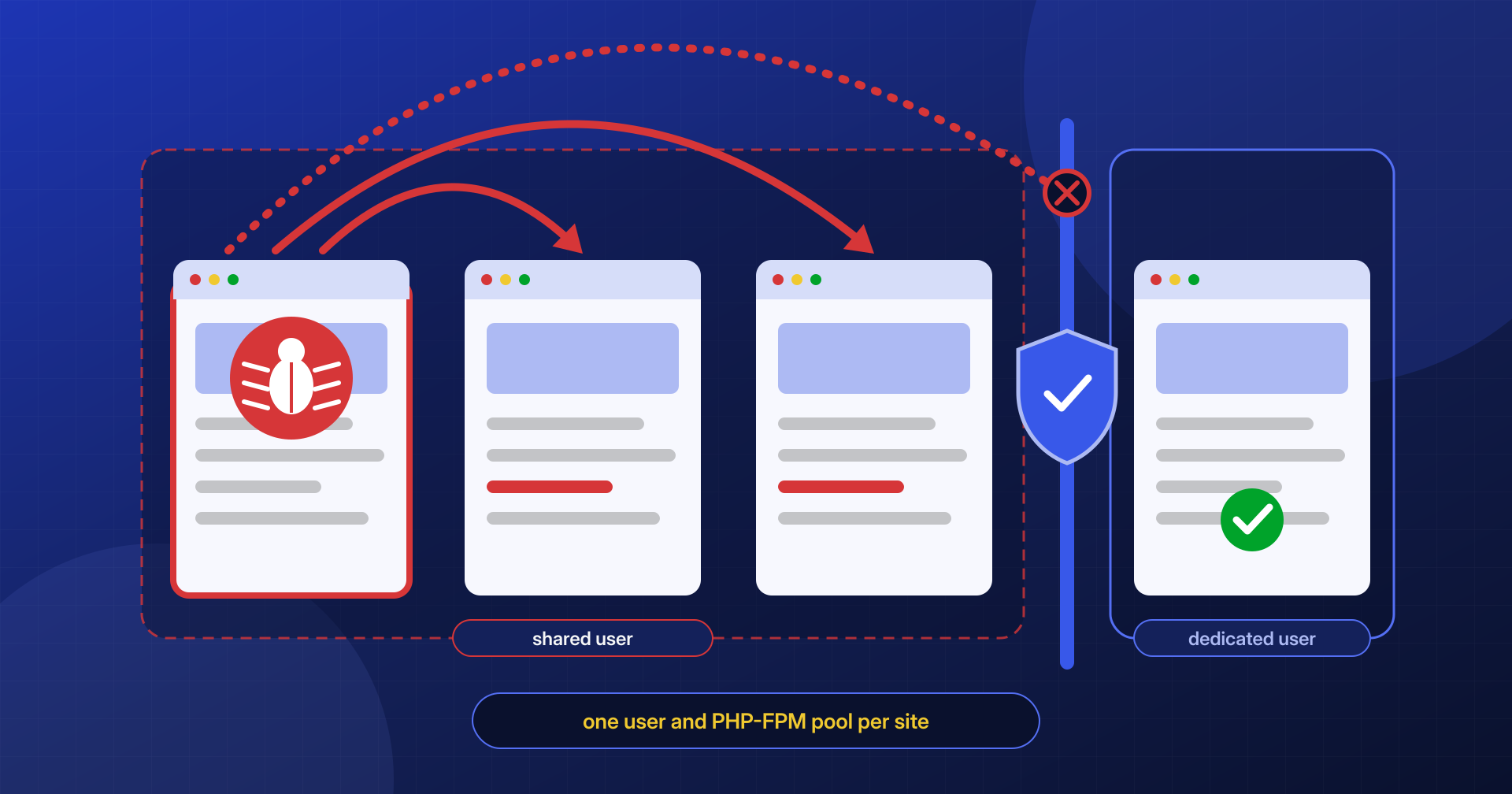
An agency runs about twenty of its clients’ WordPress sites on a single hosting account. One of them, an old brochure site nobody has updated in years, is compromised through an abandoned plugin. The site is carefully cleaned, but a week later the malware shows up on three different sites, then on five more. Every time one is fixed, another gets sick. It isn’t bad luck, and it isn’t a new attack every day: it’s cross-site contamination, and it comes from how the account and the server are organized.
On a shared account the perimeter of the infection is not the site: it’s everything the site’s system user can read and write.
In this article we look at why an infection jumps from one site to another, which configurations make it possible (a single system user, shared PHP pools, overly broad permissions, forgotten installations) and how to plan a cleanup that doesn’t leave the door open from the site next door.
One system user, many sites
On Linux every process runs with the identity of a user, and file permissions say what that user can do. When PHP runs WordPress, it does so as a specific user: it can be www-data or apache in the simplest setups, or the hosting account’s user when the server uses PHP-FPM, suEXEC or LiteSpeed with one process per account. Any PHP code run by that site, including a webshell’s, has exactly the same rights.
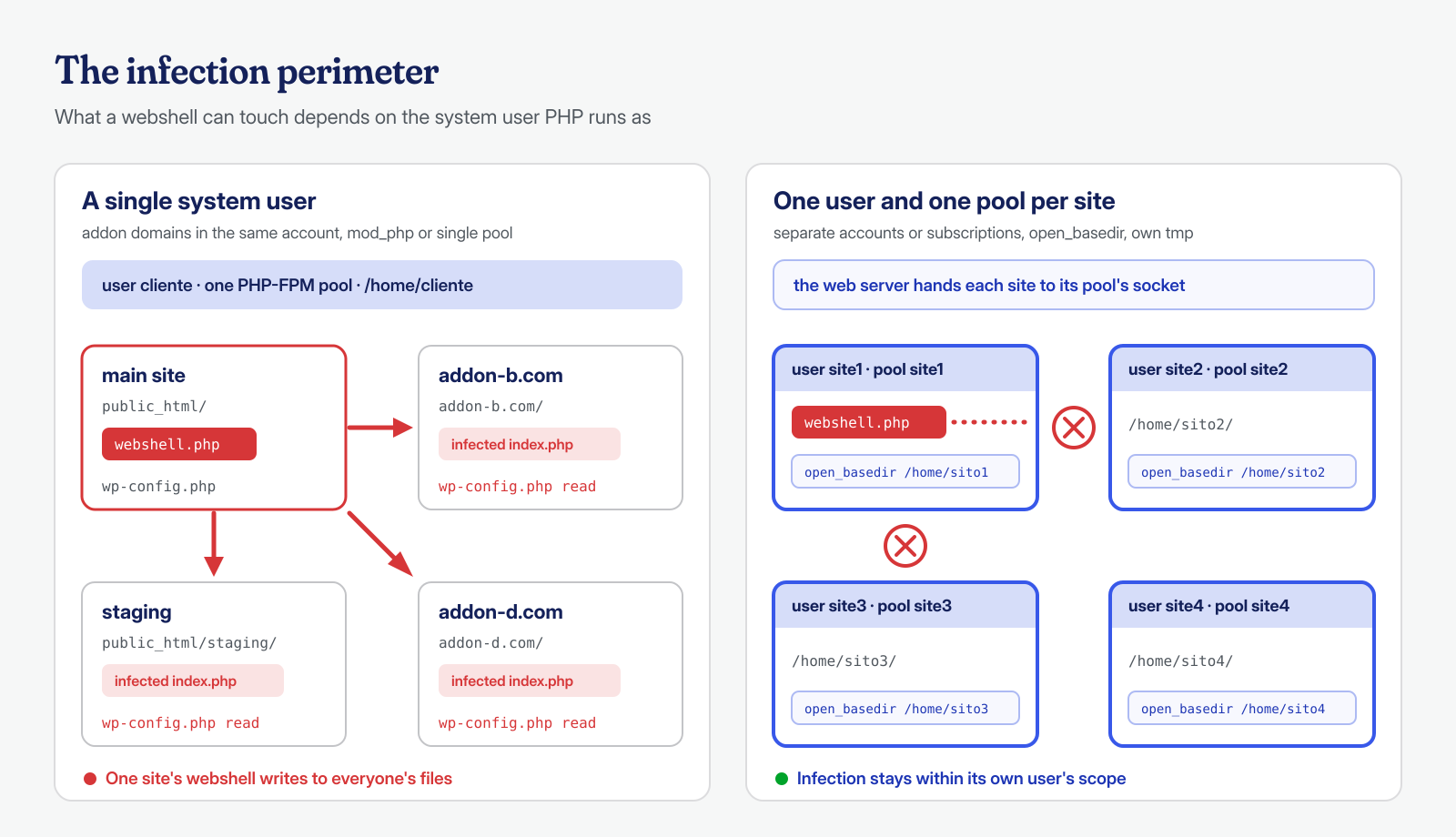
If ten sites belong to the same user, a webshell uploaded to any one of them can read and modify the files of all ten. No further vulnerability is needed, no privilege escalation: to the operating system they’re simply files with the same owner. Many WordPress malware kits know this well and, as soon as they run, look for every wp-config.php file reachable from the home folder, read each site’s database credentials and inject code into the index.php files, themes and plugins of every installation they find.
The same holds, on a larger scale, for badly configured servers where every site of every client runs as www-data: there the perimeter isn’t the account, it’s the entire machine. It’s a setup you still run into on hand-built VPSs, where Apache with mod_php or a single PHP-FPM pool serves dozens of virtual hosts.
How cPanel and Plesk accounts are built
In the most common hosting panels the boundary between system users doesn’t necessarily coincide with the boundary between sites, and it’s worth knowing where it falls.
In cPanel each account corresponds to a system user with its own home, usually /home/username/. The main domain lives in public_html, but the additional domains (addon domains) and subdomains created from the same account also live under that home, often in subfolders of public_html itself, and they all run as the same user. A cPanel account with fifteen addon domains is, from a security standpoint, a single site with fifteen entrances.
In Plesk the unit of isolation is the subscription: each subscription has its own system user, while the domains and subdomains added inside the same subscription share that user. Splitting sites into separate subscriptions is therefore the way to get different users. On both panels, server choices also matter: with PHP-FPM each account normally has its own pool, while older handlers or custom configurations can make everything run as the web server’s user.
The first step of any shared hosting analysis is therefore to draw the map: which sites exist, under which user, with which PHP process. A useful command to see which users the PHP-FPM processes run as:
# PHP-FPM processes grouped by user and by pool
ps -eo user:20,args | grep '[p]hp-fpm: pool' | sort | uniq -c

# Pools defined in the configuration (typical path on Debian and Ubuntu)
grep -H -E '^\[|^user|^listen ' /etc/php/*/fpm/pool.d/*.conf
Forgotten installations
In the cross-contamination cases we analyze, the entry point is very often a site the owner didn’t remember having. The forms are always the same: a staging copy created years ago in public_html/staging or public_html/test, the previous version of the site renamed to old or vecchio after a redesign, a test installation left half-finished, a .zip archive of the site containing a readable wp-config.php, an expired domain whose WordPress is still on disk.
These copies have three characteristics that make them ideal for an attack: nobody updates them, they often contain plugins that have since become vulnerable, and if they’re reachable from the web even just through the main domain’s path, they can be scanned like any other site. Once inside, the attacker is in the same home as the well-maintained, up-to-date sites.
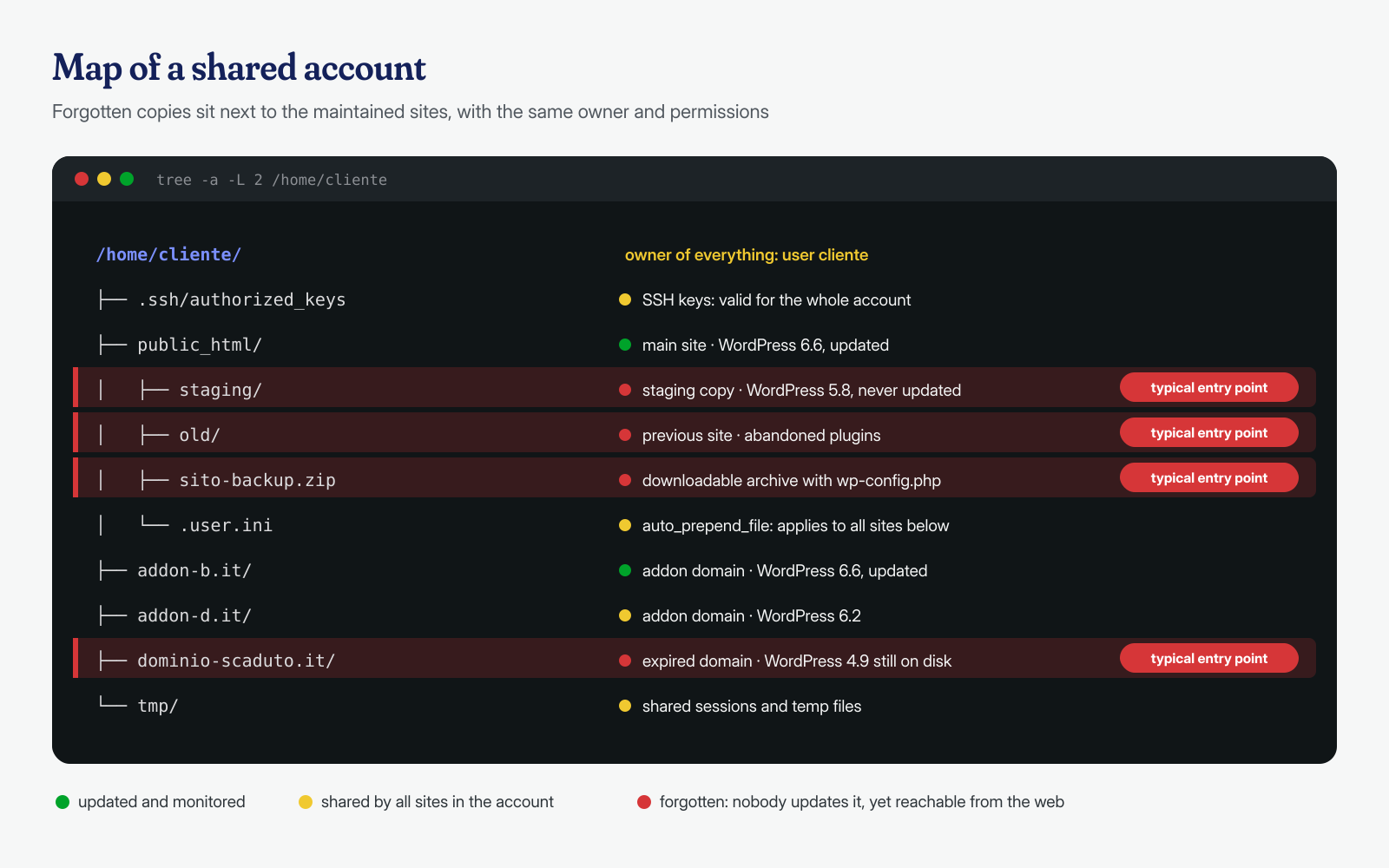
To take inventory you can’t trust the list of domains in the panel: you have to look for installations on disk. The following commands find every WordPress present in a home, the archives that might contain credentials and the core version of each installation:
# All WordPress installations under the account's home
find /home/cliente -name wp-config.php -not -path '*/node_modules/*' 2>/dev/null

# Core version of each one
find /home/cliente -path '*/wp-includes/version.php' -exec grep -H '^\$wp_version' {} \;

# Forgotten archives and dumps in public folders
find /home/cliente -type f \( -name '*.zip' -o -name '*.tar.gz' -o -name '*.sql' -o -name '*.sql.gz' \) \
  -path '*public_html*' -printf '%TY-%Tm-%Td %10s %p\n' | sort
Permissions, owners and open_basedir
When sites belong to different users, the separation holds only if permissions respect it. A home with 755 permissions lets all of the server’s users list its contents; a wp-config.php with 644 permissions is readable by anyone who can reach it, and with it the database credentials. The basic rules are simple: homes at 711 or 750 (depending on how the web server accesses the files), folders at 755, files at 644 and wp-config.php at 600 or 640, always with the correct owner. We covered this in detail in the article on hardening wp-config and permissions.
A file with 777 permissions or a folder writable by everyone cancels any separation between users. Finding them is quick:
# Files and folders writable by anyone
find /home -xdev \( -type f -o -type d \) -perm -0002 -not -type l 2>/dev/null

# Files inside a home that don't belong to its user
find /home/cliente -not -user cliente -printf '%u %p\n' 2>/dev/null | head -50

# wp-config.php files readable by the rest of the world
find /home -name wp-config.php -perm -0004 2>/dev/null
Then there’s open_basedir, the PHP directive that limits the paths PHP’s file functions can access. Set for each site to its own folder, it keeps a script from opening another site’s files with fopen() or include. It’s useful, but you need to understand its limit: it applies only to PHP functions. A command launched with exec(), system() or proc_open() is an external process and completely ignores open_basedir. On its own it is therefore not a security boundary: it’s an extra net that only really works alongside separate users and, where possible, disable_functions on the execution functions.
One last detail that’s often overlooked is shared folders: /tmp and the PHP sessions folder. If all the sites write there, a compromised site can read the others’ session files or leave payloads there to be included. Each pool should have its own upload_tmp_dir and session.save_path, inside the site’s home.
One PHP-FPM pool per site
On servers we manage directly, or on a VPS, the structural solution is to give each site its own system user and PHP-FPM pool. The web server (NGINX, Apache with mod_proxy_fcgi or LiteSpeed) passes PHP requests to the right pool’s socket, and each pool runs with its own user and its own restrictions. An example pool for one site:
; /etc/php/8.3/fpm/pool.d/sito1.conf
[sito1]
user = sito1
group = sito1

listen = /run/php/php8.3-fpm-sito1.sock
listen.owner = www-data
listen.group = www-data
listen.mode = 0660

pm = ondemand
pm.max_children = 10
pm.process_idle_timeout = 30s

php_admin_value[open_basedir] = /home/sito1/:/usr/share/php/
php_admin_value[upload_tmp_dir] = /home/sito1/tmp
php_admin_value[session.save_path] = /home/sito1/sessions
php_admin_value[disable_functions] = exec,passthru,shell_exec,system,proc_open,popen
php_admin_flag[allow_url_include] = off
Directives set with php_admin_value can’t be changed by the site through ini_set() or a .user.ini file, which is what makes them reliable. The disable_functions list needs adapting: some backup or image optimization plugins use execution functions and should be tested in staging first. On the NGINX side, the virtual host block points to the pool’s socket:
location ~ \.php$ {
    include snippets/fastcgi-php.conf;
    fastcgi_pass unix:/run/php/php8.3-fpm-sito1.sock;
}
With Apache, besides the pool, it’s worth replacing Options FollowSymLinks with SymLinksIfOwnerMatch: a classic attack in shared environments is to create, from the compromised site, a symbolic link to another user’s wp-config.php and have the web server serve it as text. On commercial shared hosting these problems are often solved by solutions like CloudLinux with CageFS, which gives each user a virtualized file system; still, it’s worth checking what your own provider offers instead of taking it for granted.
Why cleaning one site at a time doesn’t work
Back to the agency from the beginning. The problem wasn’t the quality of the cleanup on individual sites, but the order of operations. While the first site was being cleaned, the others, still infected, had write access to the same files: a single request to one of their backdoors, or a scheduled task, was enough to reinfect the one just fixed. Every partial intervention was bound to last only a few hours.
There are also elements that belong to the user and not the site, so no cleanup of an individual WordPress touches them: the system user’s crontab, PHP processes left in memory even after the file that started them was deleted, the SSH keys in ~/.ssh/authorized_keys, modified .bashrc or .profile files, and the .htaccess and .user.ini files in parent folders, which apply to all the sites below. An auto_prepend_file set in a .user.ini at the root of public_html, for example, makes a PHP file run before every script of every site under that folder.
# PHP and .htaccess directives that apply to multiple sites
find /home/cliente -maxdepth 3 \( -name '.user.ini' -o -name 'php.ini' -o -name '.htaccess' \) \
  -exec grep -H -i -E 'auto_prepend_file|auto_append_file|php_value' {} \;

# PHP files recently modified across the whole home, not just one site
find /home/cliente -name '*.php' -newermt '2026-08-01' -printf '%TY-%Tm-%Td %TH:%TM %p\n' | sort

# Core integrity of every installation found
for cfg in $(find /home/cliente -name wp-config.php); do
  d=$(dirname "$cfg"); echo "== $d"
  sudo -u cliente wp --path="$d" core verify-checksums --quiet || true
done
Databases deserve attention too: if all the sites use the same MySQL user, whoever has read one site’s credentials can write into the others’ databases, for example by creating hidden administrators or inserting payloads into options. Each site should have its own database user with privileges limited to its own schema.
A six-step isolation plan
Cleaning up a shared account should be treated as a single intervention across the user’s entire perimeter, not as a series of interventions on individual sites. The approach we follow is this:
- Inventory. All installations on disk, all databases, all system users and pools involved, the domains pointing to the account. Copies that are no longer needed are archived outside the public folder and then deleted.
- Freeze. The common persistence points are stopped: the user’s crontab, running processes, unrecognized SSH keys. Where possible the account is put into maintenance mode, so no backdoor can be called during the work.
- Simultaneous cleanup. All of the same user’s sites are cleaned in the same work window: core and plugins replaced with original copies, foreign files removed, databases checked, before reopening any site.
- Separation. One system user, one PHP-FPM pool and one database user per site, with their own
open_basedir, temporary folders and sessions; on cPanel and Plesk, separate accounts or subscriptions. - Credentials. All passwords are changed after the cleanup, not before: database, WordPress administrators, FTP and SFTP, hosting panel; the salts in each
wp-config.phpare regenerated. - Monitoring. File integrity and log checks for the following weeks, because a reinfection, if it comes, comes in the first few days.
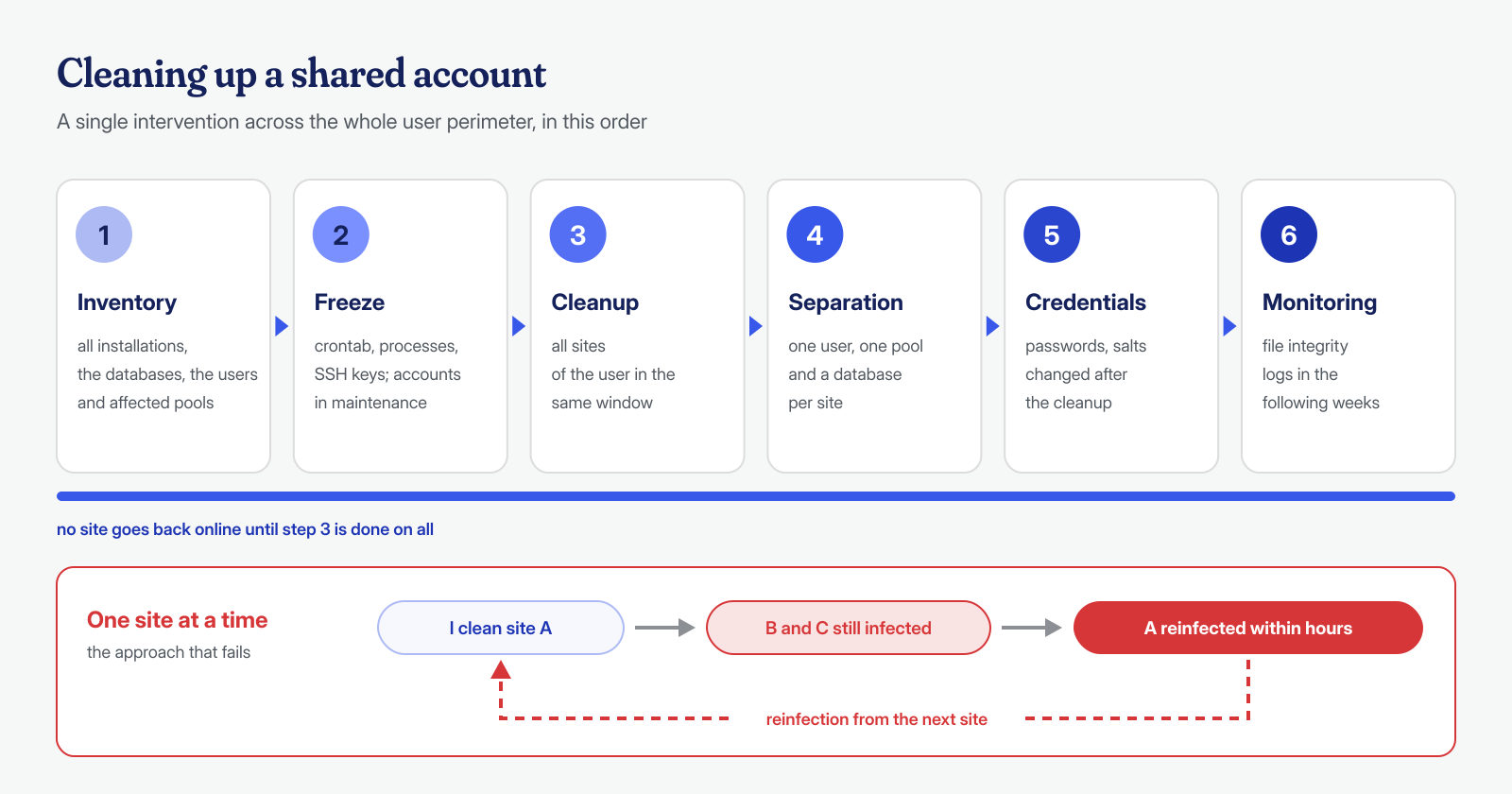
Order matters. Changing passwords before removing the backdoors is pointless, because the attacker doesn’t need them to get back in; separating users before cleaning means distributing infected files into new accounts; cleaning without having stopped the cron means working while someone puts everything back the way it was.
When you can’t change the hosting
You don’t always control the server. On cheap shared hosting there’s a single user and you can’t create pools; in that case you have to work on the attack surface: keep the number of sites in the same account to a minimum, eliminate every non-essential installation, block PHP execution in upload folders, keep everything that remains updated and remove abandoned plugins. If the sites belong to different clients, the most sensible choice is to move them to separate accounts: the cost of one more account is almost always lower than that of a chain reinfection.
When we step in on an infection, the first question we ask ourselves is exactly this: how many sites share the same user? We work at the system level, not just the application level, so we check the crontab, processes, permissions and PHP configuration of the entire account, in addition to the WordPress files. The guaranteed cleanup in 6, 12 or 24 hours applies to each WordPress installation, and on a shared account it includes analysis of the shared elements that could reinfect it. If you manage several sites on the same hosting and one of them has been compromised, contact us before you start cleaning them one by one.
