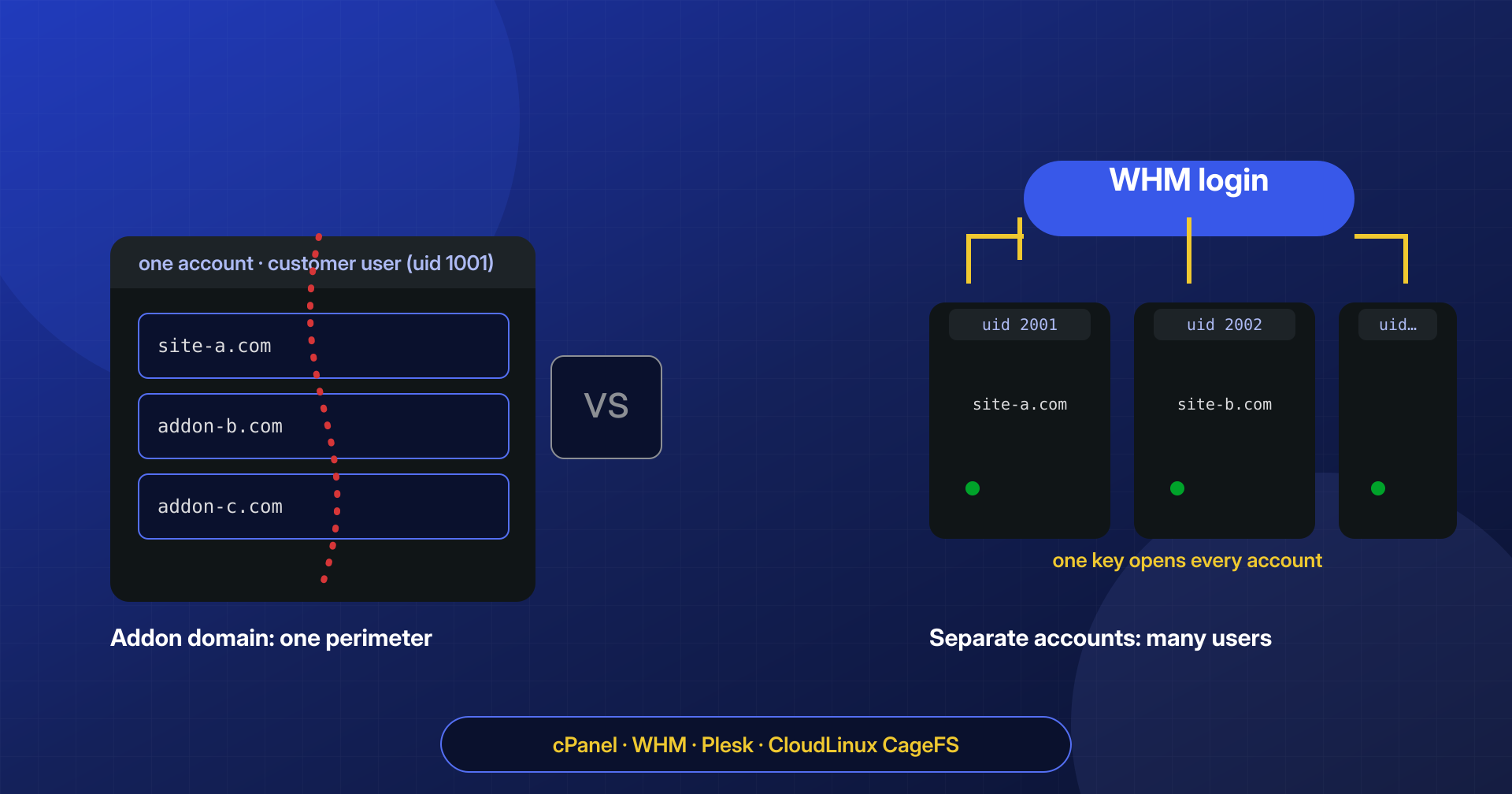
“The sites are separate, each one has its own domain and its own folder.” We hear this often when we ask how a hosting account with several WordPress sites is organized, and almost every time the sentence describes what the control panel shows, not what the operating system sees. Ten domains added to the same cPanel account have ten different folders but a single owner. Ten accounts created by a reseller have ten distinct owners, but a single person who can log into all of them. In the panel the two situations look alike; during an infection they behave in opposite ways.
The boundary that matters is not the domain’s folder but the Unix user PHP runs as. Anything that user can write, a webshell can write.
In the article on cross-contamination on shared hosting we saw how an infection jumps from one site to another when they share the system user. Here we go one step further: we compare the cPanel and WHM models, the Plesk equivalent and CloudLinux isolation, and look at how to tell which situation you are in and how to plan the migration from addon domains to separate accounts without carrying the malware along.
Addon domains: one user, many sites
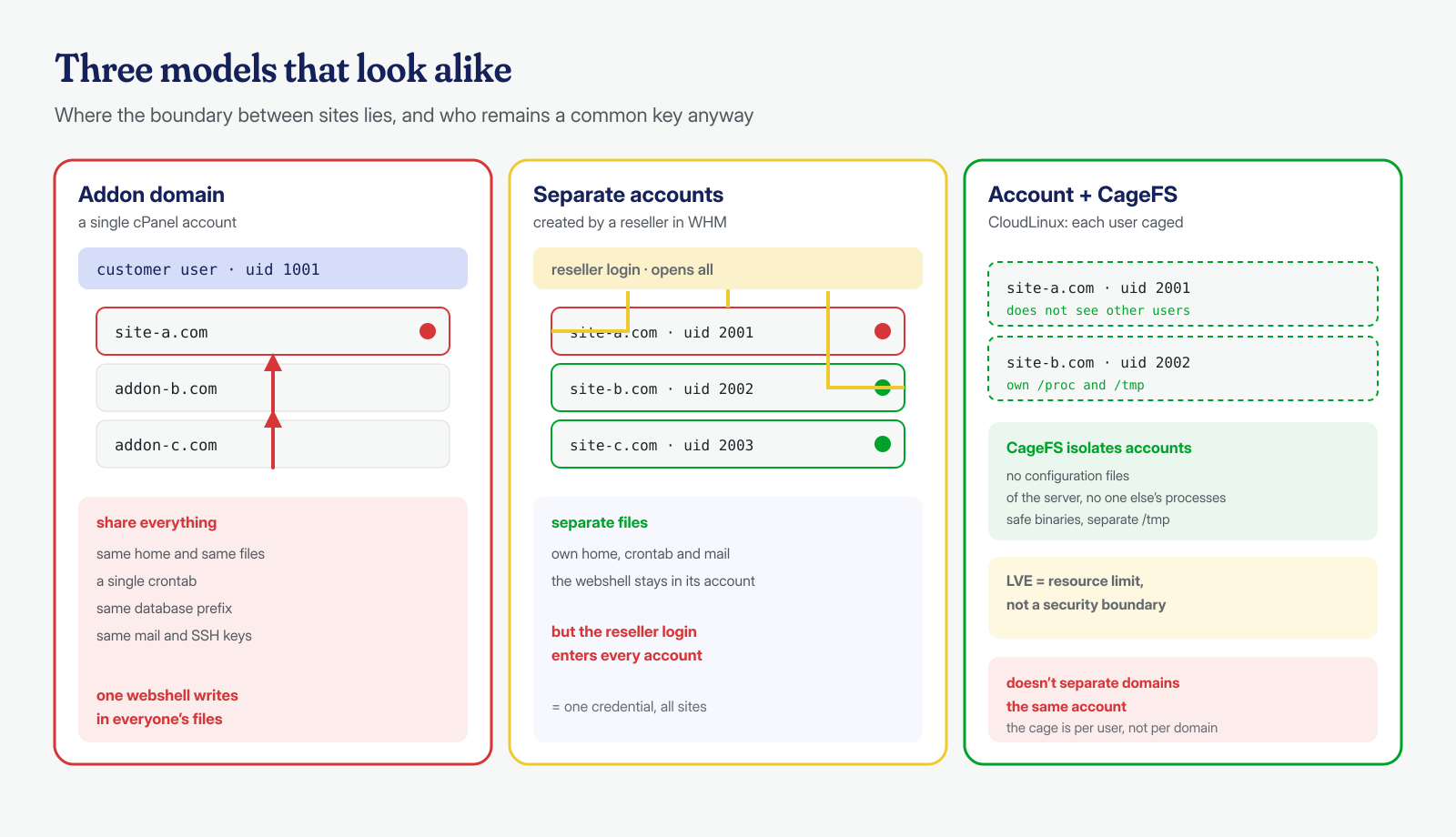
In cPanel every account corresponds to a Linux user with its own home directory, normally /home/username. From the Domains interface the account owner can create additional domains, the addon domains, and subdomains: each gets its own document root, often a subfolder of the home directory or of public_html, but they all stay inside the same account. The panel shows them as separate sites; to the kernel they are files with the same owner.
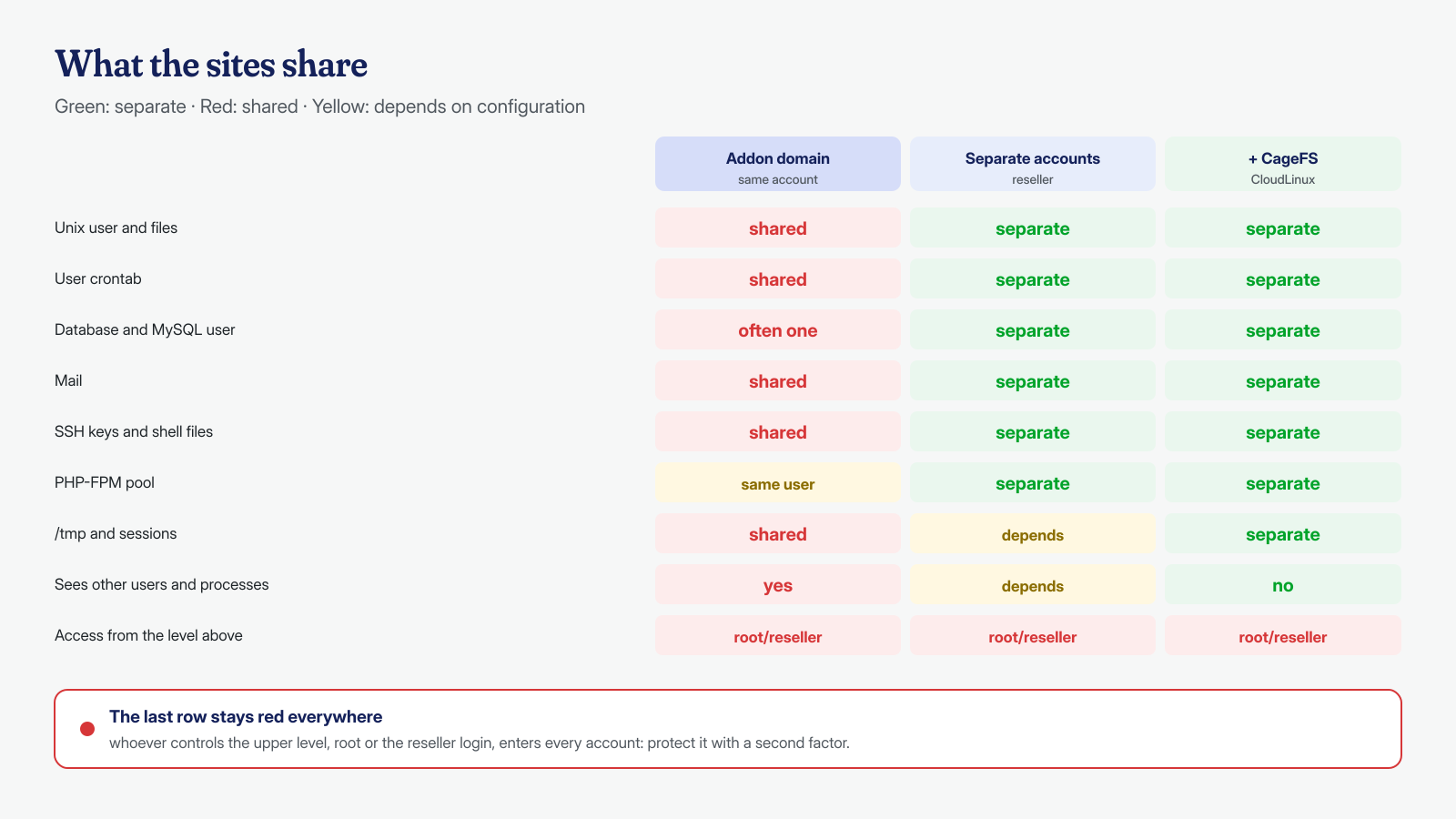
The consequences go well beyond files. The user has a single crontab, so a scheduled task planted by a compromised site runs with the permissions needed to rewrite all the others, as we describe in the article on backdoors hidden in cron jobs. The databases all share the same prefix, username_, and often the same MySQL user, created once and reused for convenience. Mailboxes live in /home/username/mail, readable by the same user. Authorized SSH keys, the .bashrc and .profile files, temporary folders and PHP sessions, unless configured otherwise, are common to all the domains in the account.
The PHP-FPM pool can also be defined per domain, but it still runs as the account user: it separates PHP resources and settings, not permissions. The same goes for open_basedir, which restricts PHP’s file functions but not external commands launched with exec() or system(). In practice, a cPanel account with fifteen addon domains is a single site from a security standpoint, with fifteen entry points: one vulnerable plugin in any of them is enough to expose all the others.
The reseller: separate accounts, one shared key
A reseller, as defined in the cPanel guide to reseller accounts, is the owner of an account who in turn sells cPanel accounts to others. Every site created from WHM as its own account gets its own Linux user, its own home directory, its own crontab, its own databases with a different prefix and its own mailboxes. Here the privilege separation is real: a webshell on customer A’s site runs as user A and cannot write to customer B’s files, barring wrong permissions or a system vulnerability.
The weak point moves higher up. From WHM’s List Accounts interface, the reseller can open the cPanel of any of their accounts with one click, using their own password, thanks to a temporary session created by the single sign-on system. It is a convenient feature for anyone managing customers’ sites, and it is also the reason a stolen WHM credential is worth as much as all the individual account credentials put together. From there files are uploaded, cron jobs are created and passwords are reset in every account owned.
The same cPanel guide is explicit about the privileges not to grant: it advises against enabling the All Features option of the Root Access category for resellers, which bypasses the limits and lets them see all the accounts on the server, and the so-called Super Privileges. A reseller with those privileges is no longer a boundary between customers; it is a server administrator under another name. For an agency the reseller is the right model only if WHM access is treated as administrative: a unique password, a second factor, no sharing among colleagues. We cover the second factor in the article on two-factor authentication; credentials saved in clients and stolen by infostealers, which also apply to WHM, are the subject of the article on stolen FTP credentials.
Plesk: subscriptions and additional domains
Plesk uses different words for the same distinction. The customer documentation says that for every hosting subscription Plesk creates a system user, and that domains added to the same subscription share its resources. A subscription with five domains is therefore the equivalent of a cPanel account with five addon domains: one user, one perimeter. To truly separate two sites you have to put them in two subscriptions, even if they belong to the same customer, and the documentation cites the wish not to share resources between sites as a reason to buy an additional plan.
In Plesk too the upper level is a shared key. The administrator’s guide describes, for example, the Log In as Reseller button, which lets the administrator enter a reseller’s panel and change its plans, customers and subscriptions, while the reseller in turn manages their customers’ subscriptions without knowing their passwords. The reasoning is the same as for WHM: separation between subscriptions protects one site from another, not anyone from whoever has administrative access to the panel.
CloudLinux: what CageFS and LVE add
Many cPanel-based shared hosts use CloudLinux, which adds two components that are often confused. The first is CageFS, a virtualized file system that, according to the CloudLinux documentation, locks each user in a cage of their own: the user cannot see other users or their names, cannot access server configuration files such as Apache’s, has a restricted view of /proc and cannot see other people’s processes, has only binaries considered safe, and has a /tmp folder of their own. Against a compromised site trying to explore the server or read other accounts’ files, it is a concrete defense.
The second is LVE, and this is where the misunderstanding is common. The documentation on limits describes it as a cgroup-based kernel technology whose purpose is to keep a single site from bringing the server to its knees: it limits CPU, physical memory, I/O, operations per second, entry processes and number of processes. It is a resource limit, not a security boundary. It serves, for example, to stop a cryptominer in one account from slowing down all the others, but it does not stop a webshell from writing to its own user’s files.
Above all, neither CageFS nor LVE separates the domains inside the same account. The cage is per user: ten addon domains of the same user sit in the same cage, with the same crontab and the same files. CloudLinux strengthens the boundary between accounts; it does not create a new one where there was none before.
How to tell which situation you are in
Before planning a cleanup or a migration you need a verified map, not a remembered one. With SSH access to the account, three commands say almost everything: which user you are working as, which domains belong to it according to cPanel, and which WordPress installations are actually on disk.
# User and groups you are working as (the same one PHP runs as)
id
# Account domains according to cPanel: main, addon, subdomains, aliases
uapi --output=jsonpretty DomainInfo list_domains
# WordPress installations actually present in the home directory
find ~ -name wp-config.php -not -path '*/node_modules/*' 2>/dev/null
# The user's scheduled tasks: they apply to all the account's domains
crontab -l
Whoever administers the server sees the full picture. cPanel keeps the association between each domain and its owning user in /etc/userdomains, and the association between each account and whoever owns it, that is root or a reseller, in /etc/trueuserowners. Counting domains per user quickly reveals the accounts that gather many sites; filtering by owner shows each reseller’s perimeter, that is how many sites are exposed if that credential is stolen.
# As root: how many domains per user (busiest first)
awk -F': ' '{print $2}' /etc/userdomains | sort | uniq -c | sort -rn | head
# All the domains of one user
awk -F': ' '$2=="cliente" {print $1}' /etc/userdomains
# Accounts owned by a reseller: its perimeter if the login is stolen
awk -F': ' '$2=="agenzia" {print $1}' /etc/trueuserowners
# The same via the WHM API
whmapi1 listaccts want=user,domain,owner
# On CloudLinux: users with CageFS enabled
cagefsctl --list-enabled
Two checks complete the map. The first concerns databases: if several sites in the same account use the same MySQL user, the password read from one wp-config.php opens all the databases, and a compromise can pass through the database even when the files are separate, for example by creating ghost administrators. The second concerns home directory permissions: on a server without CageFS, a home directory with 755 permissions lets any user list its contents, and a world-readable configuration file nullifies any separation between accounts.
# As root: which MySQL users have access to the account's databases
mysql -e "SELECT User, Host, Db FROM mysql.db WHERE Db LIKE 'cliente\\_%' ORDER BY User"
# World-readable home directories and wp-config.php readable by "others"
stat -c '%a %U %n' /home/*/ | awk '$1 !~ /^7[15]0$|^711$/'
find /home/*/ -name wp-config.php -perm -o=r 2>/dev/null
From addon domains to separate accounts
Separating the sites is the structural fix, and cPanel offers a dedicated tool: Convert Addon Domain to Account, in WHM’s Transfers section. According to the documentation it moves to the new account the contents of the document root, the virtual host include files, the SSL certificate, mailboxes, forwarders and autoresponders, the databases (with a choice between copying and moving), the database users, the FTP and Web Disk accounts and custom DNS records. It requires the rearrange-accts privilege, free space equal to several times the size of the domain, and prior deletion of the addon domain’s subdomains.
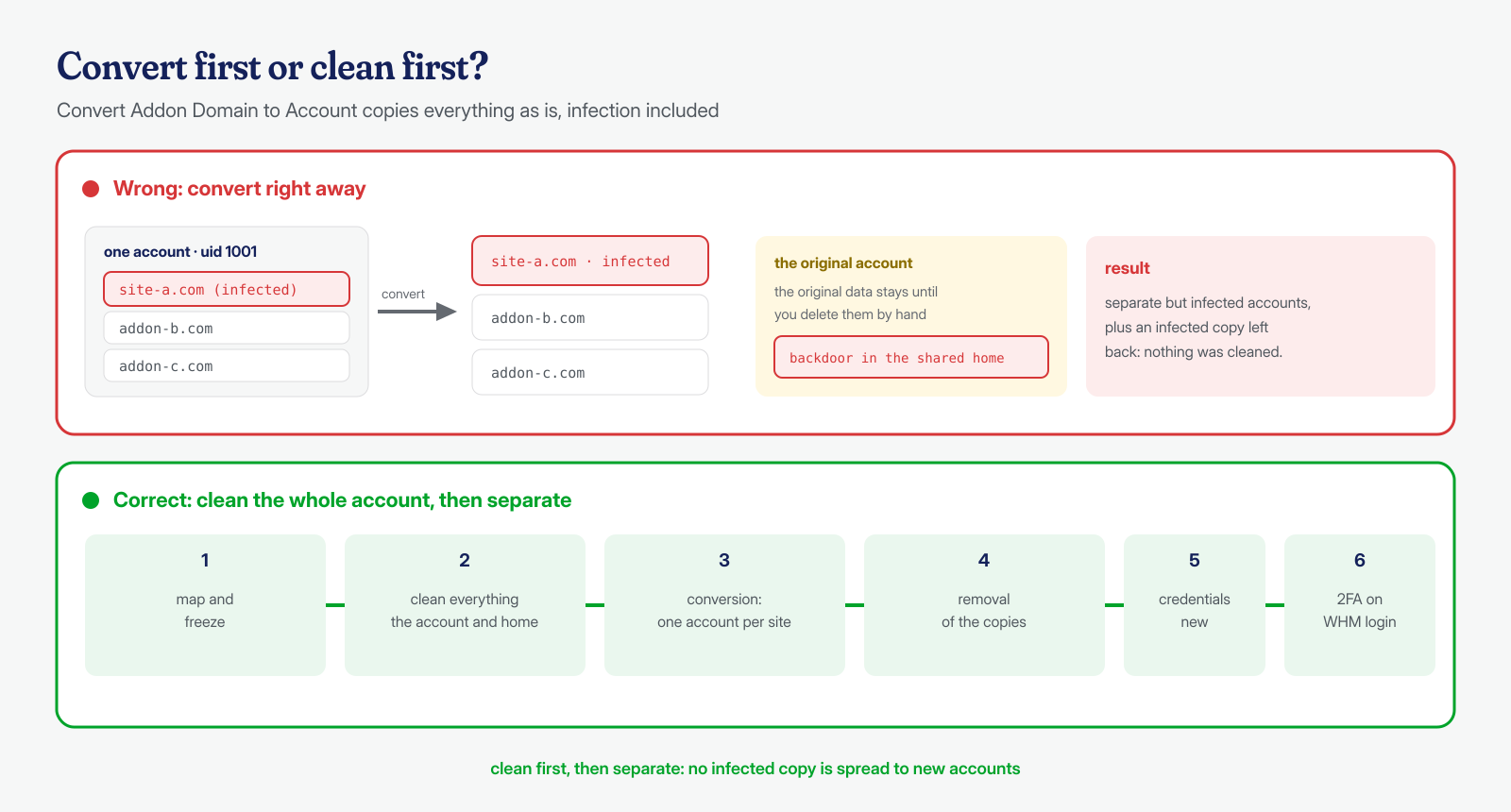
Two details in the documentation have direct security consequences. The new account applies its own prefix to the databases, so names and users change and wp-config.php must be updated. And the original data stays in the source account until it is deleted by hand: a complete copy of the site, with any backdoors it contains, keeps living next to the other domains.
The most common mistake is converting before cleaning. The converter copies files and databases as they are, so an infected site becomes a separate but still infected account, and a backdoor hidden in the shared home directory, outside the document root, stays where it was, available to the other sites. That is why the order we follow is always the same:
- Map and freeze. Inventory of domains, installations, databases and MySQL users; suspension of the user’s crontab and running processes, as we explain in the article on PHP processes that stay in memory.
- Clean the whole account. All sites in the same working window, together with the home directory:
.ssh, shell files,.htaccessand.user.iniin the parent folders. - Convert. One account per site, with distinct MySQL users, checking that each site works in the new account before moving on.
- Remove the copies. Deletion of the original data left in the source account and of installations that are no longer needed.
- Credentials. New passwords for databases, WordPress administrators, FTP, cPanel and WHM, new keys and salts in every
wp-config.php. - Upper-level access. Second factor on the reseller or panel administrator, no unnecessary Root Access or Super privileges.
What changes for the cleanup
The hosting model decides the scope of the work before a single file is opened. With addon domains the perimeter is the whole account: all the sites must be considered compromised until proven otherwise, and cleaned together, because any site left behind can reinfect the others within minutes. With separate accounts the perimeter narrows to the single account, provided you verify that the boundary held: no files owned by another user, no 777 permissions, no world-readable home directories, no MySQL user shared between accounts.
When the entry point is the reseller login, on the other hand, the perimeter is again everything the reseller owns, and the investigation changes nature. You no longer look for the vulnerable plugin but for actions taken with valid credentials: files uploaded from the File Manager, cron jobs created from the interface, passwords reset. The cPanel and WHM access logs, in /usr/local/cpanel/logs/access_log, and the File Manager logs become the main source; the reconstruction techniques are those described in the article on the audit log. A restore from backup, in this scenario, does little good if the login stays in the attacker’s hands, as we explain when discussing malware that survives a restore.
When each model makes sense
Addon domains make sense for sites belonging to the same entity, maintained the same way, that would accept going down together: the main site and its blog, for example. They do not make sense for different customers’ sites, for an e-commerce store next to old, unpatched brochure sites, or for test installations nobody follows. The reseller, or one account per site created directly by the administrator, is the right choice for an agency, as long as its login is treated as the key to all the sites that it is. On shared servers, CageFS adds a useful layer between accounts; on a dedicated server or VPS, one user and one PHP-FPM pool per site achieve the same principle even without a panel, as described in the post-cleanup hardening checklist.
If you are handling an infection on an account with many domains, or on several accounts of a reseller, the first job is to work out how far the perimeter extends. When we step in we map users, domains, databases and panel access, along with cron jobs and in-memory processes, and we clean every WordPress installation in the account in the same working window, with a guaranteed cleanup in 6, 12 or 24 hours per installation. If you would like an opinion on your situation, write to us.
