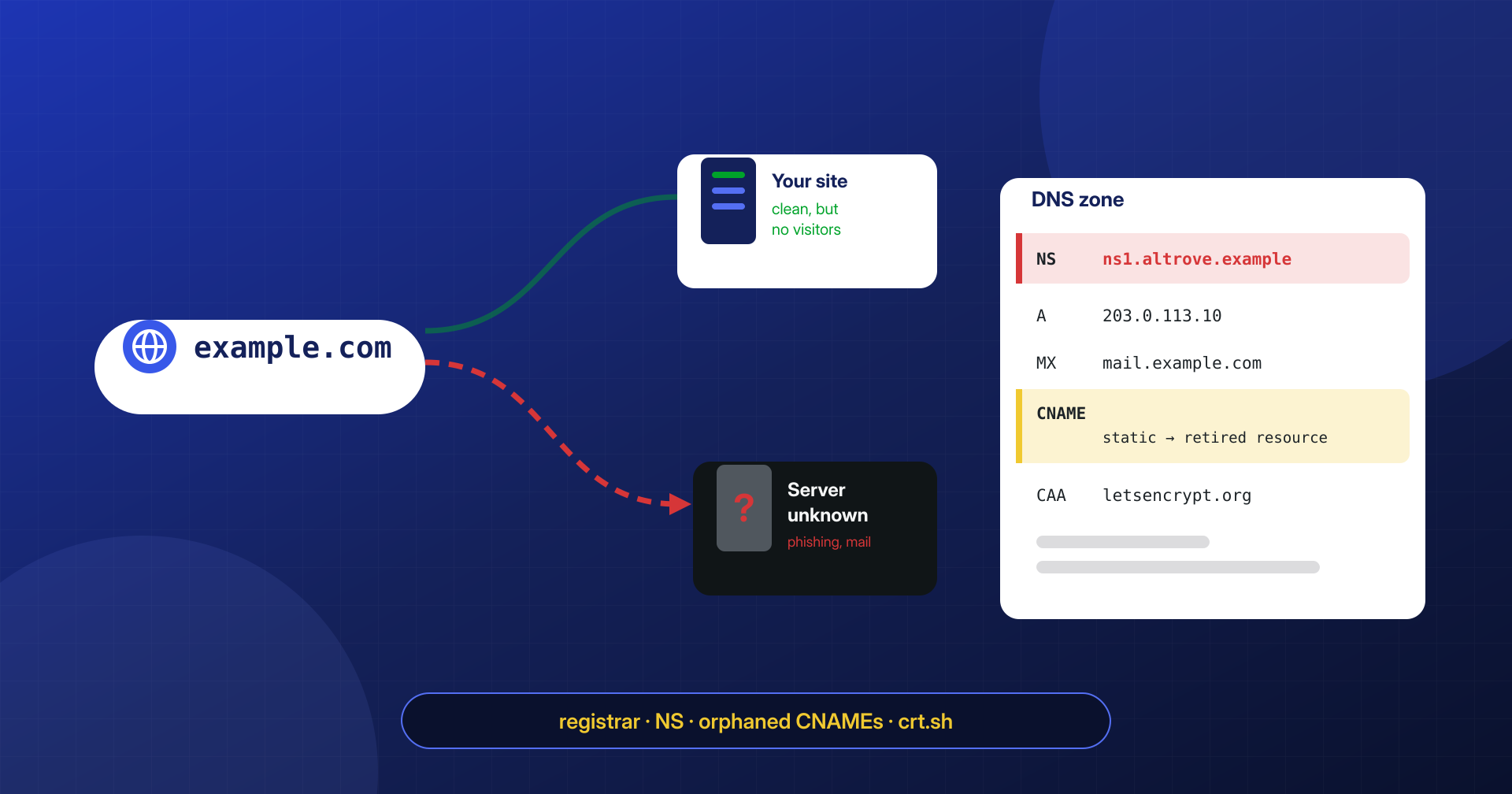
Every so often a client calls convinced their site is infected: visitors end up on a phishing page, or the browser flags a certificate different from the usual one, or password reset emails stop arriving. We check the files, the database, the processes on the server, and find nothing. The site is clean. The problem is upstream: someone has changed where the domain name leads.
The domain name is the first dependency of a WordPress site, and the least monitored. Whoever controls the DNS decides where visitors go, who receives the mail, and to whom a certificate authority issues a valid certificate.
In this article we look at the two most common forms of attack that do not go through the site: DNS hijacking via the registrar account, and takeover of subdomains left pointing to decommissioned resources. Then how to check records with dig, how to use CAA and Certificate Transparency, why email is the most sensitive target, and what to do in the first hours if it happens.
When the site is clean but visitors end up elsewhere
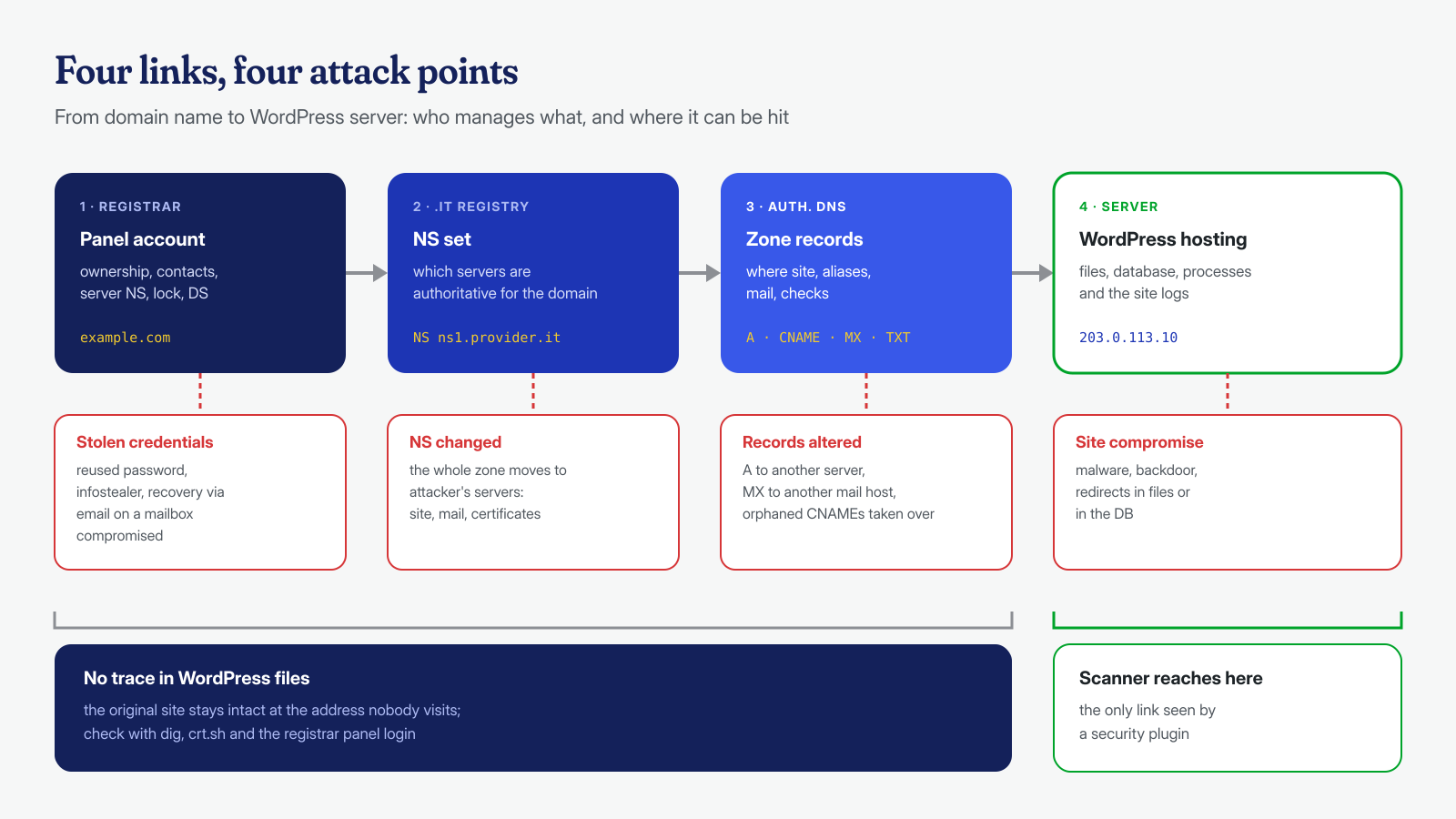
To reach a site, a browser goes through a chain of links, each managed by a different party. The registrar, the provider where the domain is registered, tells the top-level domain registry which authoritative DNS servers to use, the NS records. Those servers answer with the domain’s records: A and AAAA for addresses, CNAME for aliases, MX for mail, TXT for SPF, DMARC and various verifications. Only at the end of the chain is the server that hosts WordPress.
A security scanner installed in the site, however good, sees only the last link. If an attacker changes an A record or, worse, the NS records, visitors reach a different server that can show a copy of the site, harvest the credentials of administrators and customers, or distribute malware, while the original site keeps running, intact, at an address nobody visits any more.
The registrar account is the key to everything
The most direct way to hijack a domain is to get into the registrar’s or DNS provider’s dashboard. No technical vulnerability is needed: all it takes is the password, stolen by an infostealer or reused elsewhere, or access to the mailbox used to recover the password. This is the scheme documented in CISA’s January 2019 emergency directive ED 19-01: attackers, with valid credentials for DNS accounts, modified records to direct traffic to their own infrastructure and obtained valid certificates for the targeted domains, so that they could intercept traffic with no browser warnings. The campaign described by Cisco Talos as Sea Turtle used the same technique, in some cases going as far as compromising registrars and registries themselves.
For a WordPress site the targets are less exotic but the dynamics are the same. Registrar accounts held by an agency that no longer works with the client, passwords shared by email, a single recovery address that may well sit on the very domain to protect: if the domain is hijacked, the mail used to recover the account ends up with the attacker too. The bare minimum is a second factor on the dashboard, preferably a passkey or a hardware key, as we explain in the article on two-factor authentication, and a recovery address on a different domain.
Lock, 2FA and DNSSEC: what really protects
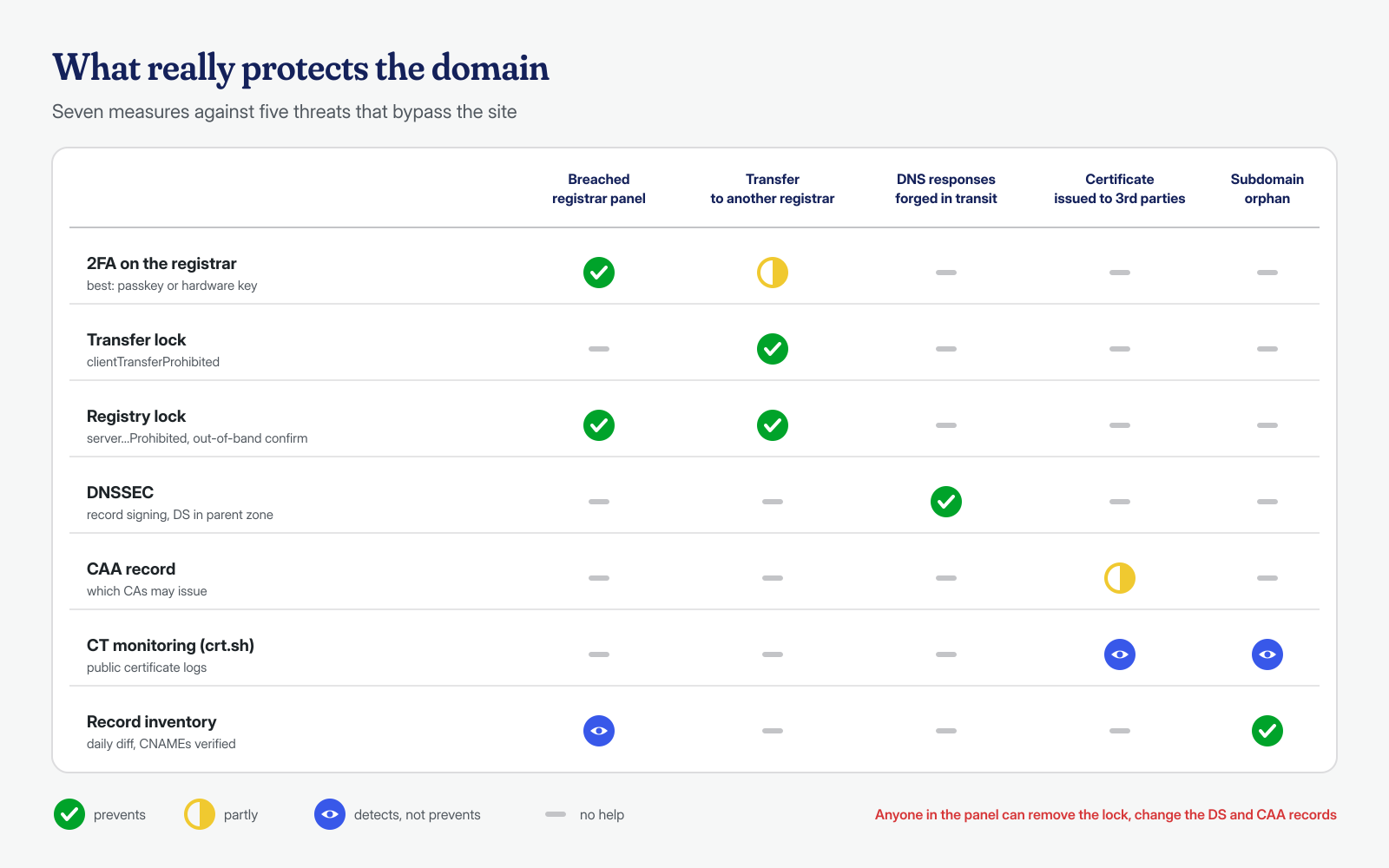
The available protections are often confused with one another. The clientTransferProhibited status, which many dashboards simply call “lock” or “transfer lock”, prevents the domain from being transferred to another registrar, as the ICANN page on EPP statuses explains. It is useful, but it does not stop someone who has gotten into the dashboard from changing the NS records or removing the lock. The clientUpdateProhibited status also blocks updates. The strongest level is the registry lock, with the server…Prohibited statuses set by the registry: changes require an out-of-band procedure, for example a phone confirmation, and an attacker who only has the dashboard password cannot complete them. Not all registries and registrars offer it, and it usually costs extra.
DNSSEC cryptographically signs the records, so that a resolver that validates it can discard responses forged along the path. It protects against cache poisoning and in-transit manipulation, not against account theft: whoever controls the registrar dashboard can change or remove the DS record along with the NS servers. It should be enabled, but it does not replace the second factor and the lock.
Orphaned subdomains and takeover
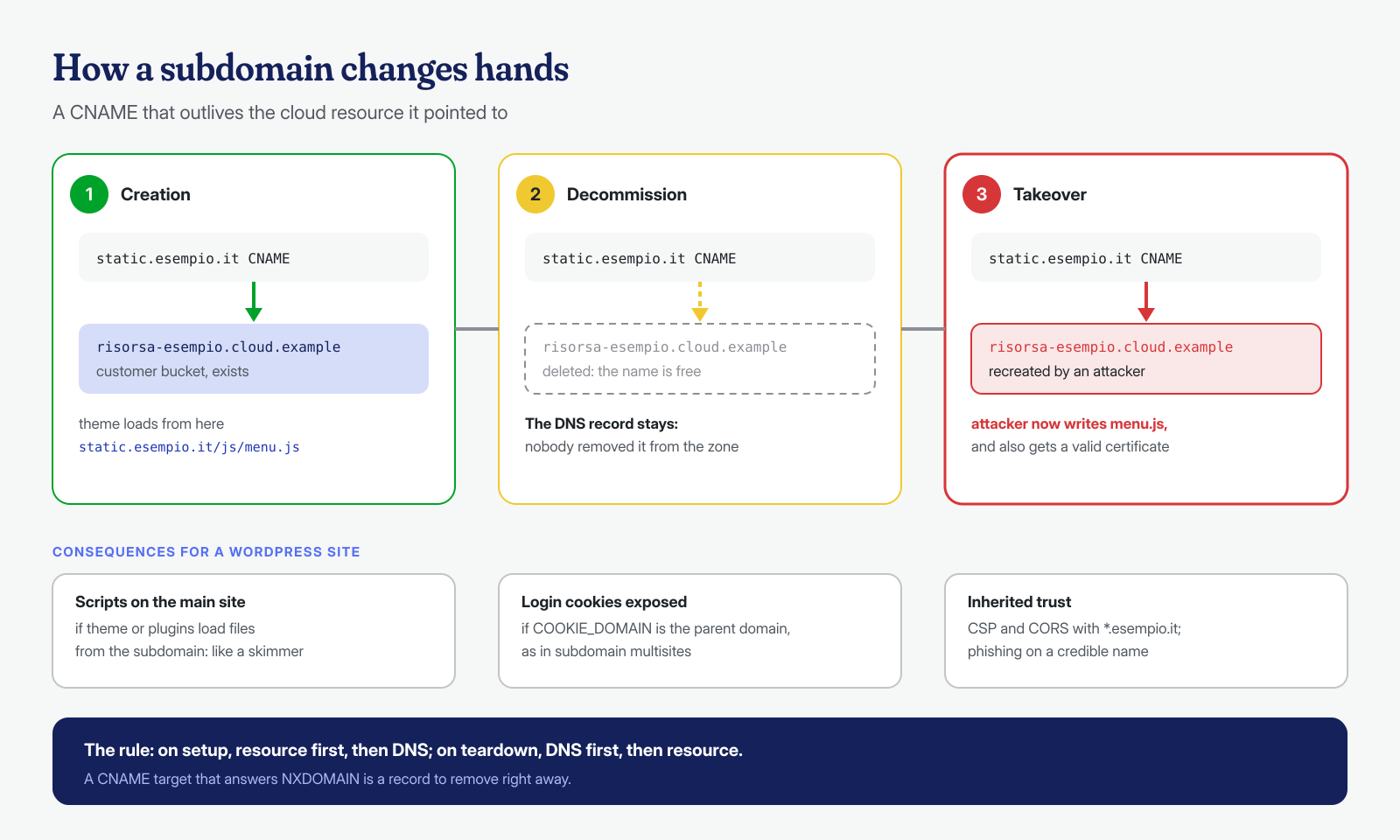
The second attack requires no credentials at all. A subdomain, for example shop.esempio.it or static.esempio.it, is pointed with a CNAME at a resource on a cloud service: an app on a hosting platform, a storage bucket, a CDN distribution, a landing page on a marketing service. Years later the resource is deleted, but nobody removes the DNS record. If the service lets anyone create a resource with the same name, an attacker creates it and from that moment controls the content served on the subdomain. This is the subdomain takeover described by MDN, and Microsoft documents its full lifecycle for its own resources in the guide on dangling DNS records.
The consequences for a WordPress site depend on what that subdomain can do. If the theme or a plugin loads scripts from static.esempio.it, whoever controls the subdomain runs their own JavaScript on the main site, with effects similar to skimmers at checkout. If COOKIE_DOMAIN is set to the parent domain, as the core does by default on subdomain multisite installations, login cookies are also sent to the hijacked subdomain. And if the Content Security Policy or CORS rules allow *.esempio.it, the subdomain inherits that trust. Even without any of this, what remains is a phishing page hosted on a credible name, with a valid certificate the attacker can obtain precisely because they control the content.
Prevention, as MDN notes, is a matter of order of operations: when you enable a service, first create the resource and then the DNS record; when you decommission it, first delete the record and then the resource. The can-i-take-over-xyz project collects, service by service, the typical responses for an unclaimed resource and whether takeover is possible.
Checking records with dig
A periodic check of records requires no special tools. The first check is the delegation: the NS servers announced by the top-level domain registry must be the expected ones, and match those declared in the zone. Then the main records, to compare against a reference export kept safe:
# The delegation as seen by the .it registry, without intermediate caches
dig +norecurse NS esempio.it @$(dig +short NS it. | head -1)

# The main records, from the authoritative server
AUTH=$(dig +short NS esempio.it | head -1)
for t in A AAAA MX TXT CAA; do
  echo "== $t"; dig +short "$t" esempio.it @"$AUTH"
done
dig +short DS esempio.it   # the DS lives in the parent zone: ask a resolver
dig +short A www.esempio.it @"$AUTH"
dig +short TXT _dmarc.esempio.it @"$AUTH"
Saving this output every day and comparing it with the previous day’s, with a simple diff in cron, gives you minimal but effective monitoring. Two precautions make it reliable: it must run from a machine other than the site’s server, and the alert must go to an address that is not on the monitored domain, because if the attacker has changed the MX record the alarm would end up with them. Some registrars also send a notification when NS records change: check that it is active and who receives it.
For orphaned subdomains you need the complete list of names, which you get from the zone export in the DNS provider’s dashboard or, from the outside, from issued certificates, as we will see shortly. For each CNAME, check whether the target still exists: an NXDOMAIN response on the target is the clearest sign of a record to remove immediately.
# sottodomini.txt: one name per line
while read -r sub; do
  dest=$(dig +short CNAME "$sub" | tail -1)
  [ -z "$dest" ] && continue
  stato=$(dig A "$dest" +noall +comments | grep -o 'status: [A-Z]*' | cut -d' ' -f2)
  echo "$sub -> $dest [$stato]"
done < sottodomini.txt | grep -v 'NOERROR'
Not every case produces an NXDOMAIN: some services keep resolving the name and respond over HTTP with an error like “resource does not exist”. For these, the only reliable check is to open the subdomain and compare the response with those collected in can-i-take-over-xyz.
CAA and Certificate Transparency
A well-executed DNS hijacking comes with a valid certificate, because without one the browser would show a warning. Two tools help. The CAA record indicates which certificate authorities may issue certificates for the domain; CAs check it at issuance time. With Let’s Encrypt you can restrict issuance further to a validation method or a specific ACME account, as described in the documentation. The limit is obvious: whoever controls the DNS can also change the CAA record. CAA reduces accidental issuance or issuance by unexpected CAs; it does not stop an attacker who has the dashboard.
esempio.it.  3600  IN  CAA  0 issue "letsencrypt.org"
esempio.it.  3600  IN  CAA  0 issuewild ";"
esempio.it.  3600  IN  CAA  0 iodef "mailto:sicurezza@esempio-altro.it"
Certificate Transparency, on the other hand, is the detection tool: public CAs record the certificates they issue in public, verifiable logs, and services like crt.sh let you query them. Monitoring new certificates for your domain is one of the actions required by the CISA directive cited above, and it has a useful side effect: the list of names in certificates is an excellent inventory of subdomains, including ones nobody remembered.
# All names that have appeared in the domain's certificates
curl -s "https://crt.sh/?q=%25.esempio.it&output=json" \
  | jq -r '.[].name_value' | tr 'A-Z' 'a-z' | sort -u > nomi-ct.txt

# Certificates issued in the last few days, with issuer
curl -s "https://crt.sh/?q=esempio.it&output=json" \
  | jq -r '.[] | select(.not_before > "2026-10-20") | [.not_before, .issuer_name, .name_value] | @tsv'
crt.sh is a free service and is sometimes slow or unreachable; for continuous monitoring, use a dedicated service or a daily check that does not treat a network error as “nothing new”. A certificate issued by a CA you do not use, or for a name you do not know, must always be explained.
Email: MX, SPF and password resets
The most sensitive target is not the site but the mail. A modified MX record, even for a few hours, sends the domain’s emails to the attacker, including password reset emails: for WordPress, the registrar, the hosting dashboard, cloud services. A DNS attack thus becomes, in a few steps, the theft of all linked accounts. This is also why the recovery address for the registrar account should not be on the domain it protects.
The TXT records also need a careful re-read. An include: in the SPF record pointing to the domain of a decommissioned sending service, or to a domain left to expire, can authorize someone else to send mail on your behalf; the same goes for a DKIM CNAME that points to a provider no longer in use. We covered SPF, DKIM and DMARC in the article on the server sending spam: DMARC aggregate reports are also a good alarm system, because they show who is sending mail with your domain.
If it happens: the first moves
If the domain has been hijacked, the priority is to regain control of the registrar account by contacting its support with proof of ownership, and immediately afterward enable the second factor, change the password and verify the recovery address. Then restore the records from the reference export, knowing that resolver caches will keep serving the fake ones for the duration of the TTL. Look on crt.sh for certificates issued during the hijacking and ask the CA to revoke them. Finally, all credentials that may have been entered on the domain during that window should be considered compromised: WordPress administrators, mailboxes, possibly customers, with an assessment of the obligations described in the article on data breaches.
For a hijacked subdomain, the first step is to remove the orphaned DNS record, then work out what was served and to whom, and whether scripts or cookies of the main site were exposed. In both cases it is worth checking the site too: an attacker who had the administrators’ credentials for a few hours may have used them to leave a backdoor, and at that point the problem goes back to passing through the files and the database, as described in the article on the first two hours. If you find yourself in this situation, or want to rule out that the site was touched after a hijacking, contact us: we analyze the site at the application and system level, with a guaranteed cleanup in 6, 12 or 24 hours for each WordPress installation.
