The first sign usually doesn’t come from the website, but from email. Quotes sent to customers land in the spam folder, a few recipients reply with an error message talking about “reputation”, the hosting provider writes that the account has been suspended for mass mailing. The site seems to work normally, yet thousands of emails that nobody in the company wrote are leaving that server.
A spam script is invisible in the browser: you see it in the mail logs, in the server queue and, too late, in the domain’s reputation.
A compromised WordPress site is a valuable tool for anyone sending spam or phishing: it has an IP address with a good history, a real domain and, often, DNS records that make the messages credible. In this article we look at how to recognize the problem, how to trace the script that is sending, how to handle the Postfix and Exim queues, what to do when SMTP credentials are being abused, and how to recover the reputation of the domain and the IP.
Symptoms of a server that sends spam
Some signs are obvious, others you only notice if you know where to look:
- the server’s mail queue holds hundreds or thousands of messages, many in deferred status because recipients rejected them;
- the sender’s mailbox receives many delivery failure messages (bounces) for emails never sent by real people;
- legitimate emails, including WooCommerce transactional ones, end up in spam or are rejected with codes that mention blocklists or poor reputation;
- server load grows without a matching increase in web traffic, with many PHP or
sendmailprocesses active; - the provider reports abuse, restricts port 25 or suspends the account.
Before thinking about malware, rule out the most mundane explanation: an unprotected contact form, used by a bot to send messages through the “send me a copy” feature. The result is similar, but the fix is different (a CAPTCHA or removing that feature). If instead the messages have subjects and contents the site could never generate, such as fake bank notices, drugs or cryptocurrencies, we are almost certainly dealing with a script uploaded by an attacker.
Where the mail comes from: three routes
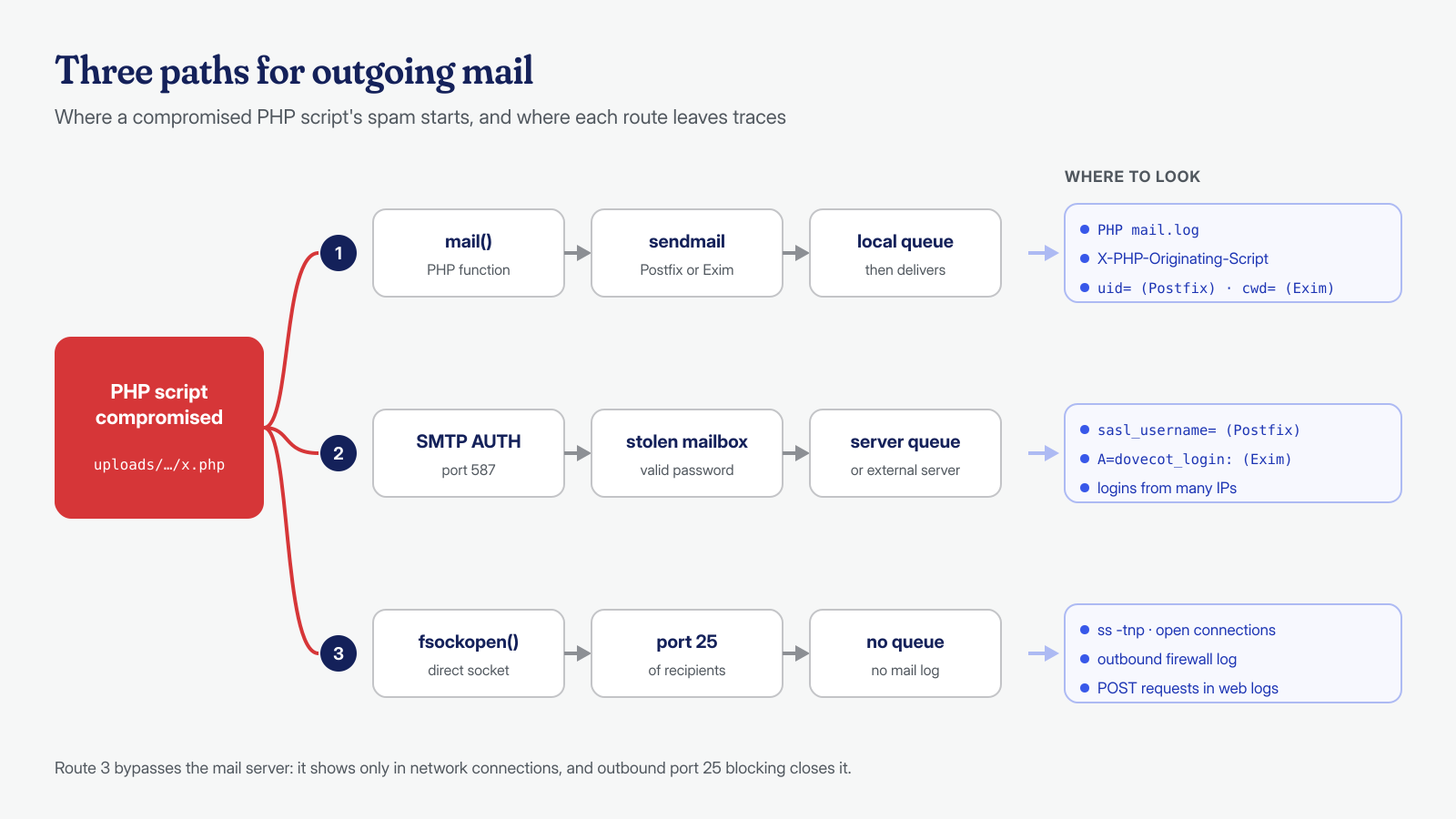
A malicious PHP script can send mail in three ways, and each leaves traces in different places. The first is PHP’s mail() function, which passes the message to the system’s sendmail program (provided by Postfix or Exim), from which it enters the local queue: it is the simplest route and the one that leaves the most traces. The second is an authenticated SMTP connection, to the server itself or to an external server, using stolen credentials: often those of a mailbox on the domain, read from an SMTP plugin or guessed. The third is a direct connection to port 25 of the recipient servers, which bypasses the local mail server entirely and is visible only in network connections.
The most common spam kits are PHP scripts of a few hundred lines, often obfuscated and hidden in plugin folders or in uploads, which receive the recipient list and the text from outside, perhaps through a POST request, and send them at a controlled pace. Others bundle a copy of PHPMailer and use SMTP; still others are simple webshells with a built-in sending function.
Finding the script that is sending
For the mail() route PHP offers two directives made for this. mail.add_x_header adds the X-PHP-Originating-Script header to every message, with the UID and the name of the file that called mail(). mail.log writes every call to mail() to a file, with the script path, the line number and the recipients. Both are disabled by default, as the PHP documentation states, and it is best to enable them at the PHP-FPM pool level, where the site cannot change them:
; in the site's PHP-FPM pool, e.g. /etc/php/8.3/fpm/pool.d/sito1.conf
php_admin_flag[mail.add_x_header] = on
php_admin_value[mail.log] = /home/sito1/logs/php-mail.log
If the queue already holds messages, the header lets you trace the script after the fact, provided it was active when they were generated. With Postfix you read a queued message with postcat; with Exim, with exim -Mvh:
# Postfix: headers of a queued message
postcat -h -q 4F2A91C0B3 | grep -i -E '^(from|to|subject|x-php-originating-script):'

# Exim: headers of a queued message
exim -Mvh 1tXyZa-0001Ab-Cd | grep -i x-php-originating-script
Even without that header, the mail logs say a lot. Postfix records messages entered through sendmail with a line from the pickup process that reports the system user’s UID: knowing which user sent narrows the search to a single site or account. For locally generated messages, Exim on cPanel servers records the script’s working directory (cwd=), which often points directly to the folder where the malicious file lives.
# Postfix: messages entered through sendmail, grouped by UID
grep 'postfix/pickup' /var/log/mail.log | grep -o 'uid=[0-9]*' | sort | uniq -c | sort -rn
getent passwd 1004    # which user the most active UID maps to

# Exim (cPanel): directories from which the most messages were sent
grep 'cwd=' /var/log/exim_mainlog | grep -v '/var/spool' \
  | grep -o 'cwd=[^ ]*' | sort | uniq -c | sort -rn | head

# In the access logs, the PHP scripts that receive many POST requests
awk '$6 ~ /POST/ {print $7}' /var/log/nginx/access.log | cut -d'?' -f1 \
  | sort | uniq -c | sort -rn | head -20
The last command cross-references mail with web traffic: a spam script is almost always called from outside, and an unknown PHP file receiving thousands of POST requests from a handful of IP addresses is a strong candidate. On very large logs, or when requests are spread across many sources, this correlation is the kind of work where log analysis with local AI models helps us. Finally, searching the files for typical functions helps find any other scripts that are still dormant:
grep -rl --include='*.php' -E 'mail\s*\(|fsockopen|PHPMailer|smtp_(host|pass)' \
  /home/sito1/public_html/wp-content/uploads /home/sito1/public_html/wp-content/plugins \
  | xargs -r ls -la
Inspecting and flushing the mail queue
Once you have found and stopped the script, the queue is still full of messages that the server will keep trying to deliver for days, worsening its reputation with every attempt. It has to be emptied, but carefully: legitimate emails may be mixed in, such as order confirmations or replies to customers. Before deleting, put the queue on hold and count the messages by sender.
# ── Postfix ──
postqueue -p | tail -n 1                 # summary: how many messages and how many KB
postsuper -h ALL                         # puts the whole queue on hold
postqueue -p | awk '/^[0-9A-F]/ {print $7}' | sort | uniq -c | sort -rn | head

# Delete only the messages from a given sender
postqueue -p | awk 'BEGIN {RS = ""} /mittente-abusato@dominio\.it/ {print $1}' \
  | tr -d '*!' | postsuper -d -

postsuper -H ALL                         # releases what remains

# ── Exim ──
exim -bpc                                # number of messages in the queue
exim -bp | exiqsumm | sort -rn | head    # summary by recipient domain
exiqgrep -i -f 'mittente-abusato@dominio\.it' | xargs -r exim -Mrm
The postsuper -d ALL command, which deletes everything, is a last resort, to be used only after checking that there are no messages worth saving. And before deleting, keep a few sample messages with full headers: you will need them to work out where the spam came from and, later, for blocklist removal requests.
When SMTP credentials are being abused
If in the logs the spam messages don’t go through pickup but come from authenticated connections, the problem isn’t just a script on the site: someone has the password of a mailbox. They may have read it from the settings of an SMTP plugin saved in the database, from an exposed wp-config.php, or obtained it with brute-force attacks against the mail server. In Postfix the authenticated username appears in the sasl_username field; in Exim, on cPanel servers, in the A=dovecot_login: or A=dovecot_plain: field.
# Postfix: messages sent per authenticated user and per source IP
grep 'sasl_username=' /var/log/mail.log | grep -o 'sasl_username=[^ ,]*' | sort | uniq -c | sort -rn
grep 'sasl_username=info@dominio.it' /var/log/mail.log | grep -o 'client=[^,]*' | sort | uniq -c | sort -rn | head

# Exim: authenticated logins per mailbox
grep -o 'A=dovecot_[a-z]*:[^ ]*' /var/log/exim_mainlog | sort | uniq -c | sort -rn | head
A mailbox used from dozens of IP addresses in different countries within a few hours is compromised. The response is to change the password immediately, close open sessions, check the mailbox’s forwarding rules (attackers often add one to receive a copy of the mail) and verify where that password was stored: if it was in a plugin’s settings, the site’s database must also be considered compromised, and you should look for any hidden admin users.
SPF, DKIM and DMARC: what they protect and what they don’t
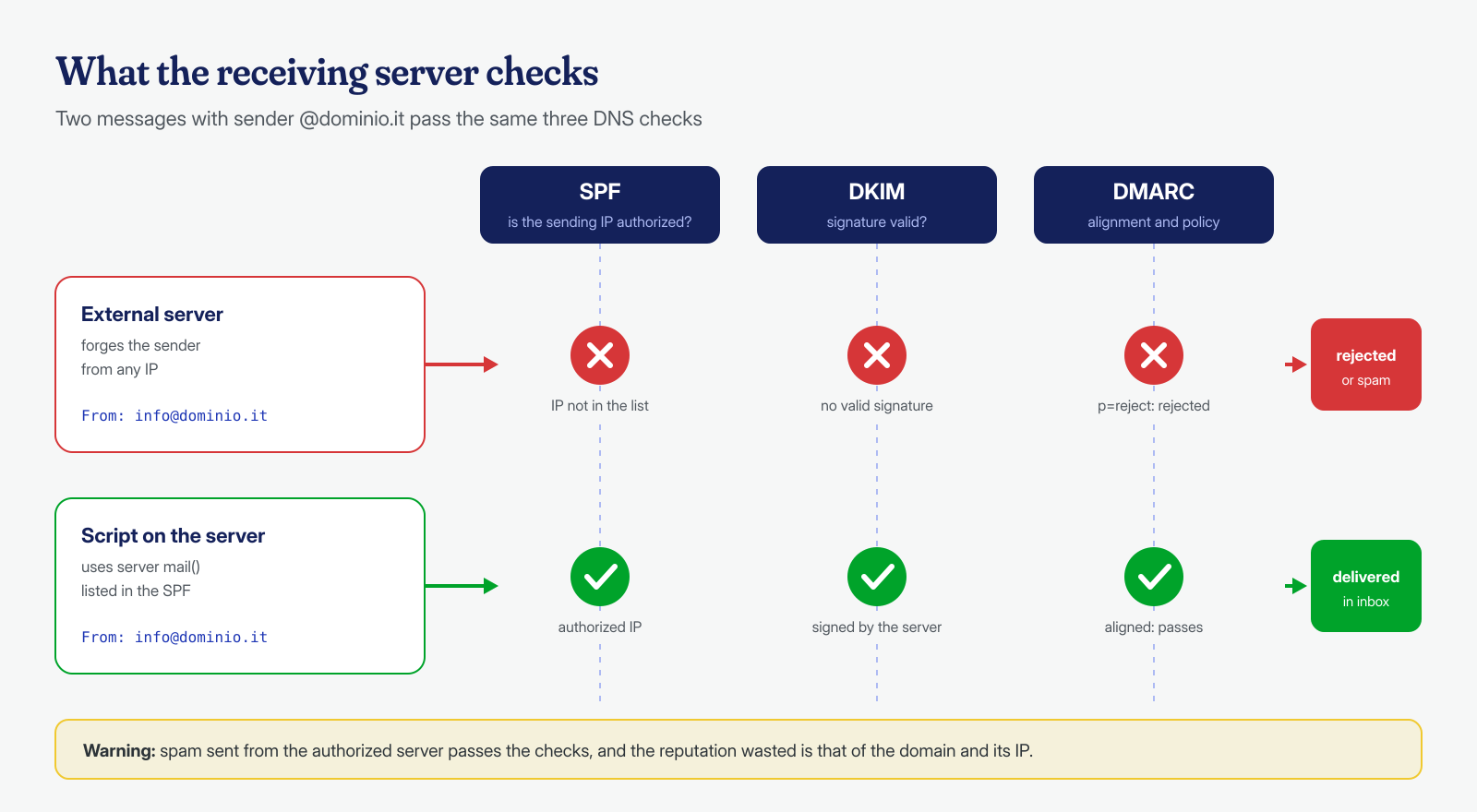
The three email authentication mechanisms tell receiving servers which messages truly belong to the domain. SPF lists in DNS the IP addresses authorized to send for the domain; DKIM signs each message with a private key whose public part is published in DNS; DMARC tells the recipient what to do with messages that fail SPF or DKIM aligned with the sender’s domain, and where to send reports. Since February 2024 Google requires anyone sending more than 5,000 messages a day to Gmail accounts to have all three, as stated in the sender guidelines.
# Check the published records
dig +short TXT dominio.it | grep spf1
dig +short TXT selettore._domainkey.dominio.it
dig +short TXT _dmarc.dominio.it

# Example records
dominio.it.         TXT "v=spf1 ip4:203.0.113.10 include:_spf.provider.example -all"
_dmarc.dominio.it.  TXT "v=DMARC1; p=quarantine; rua=mailto:dmarc@dominio.it; adkim=s; aspf=s"
The point to understand is that these records protect the domain from anyone sending from other servers while pretending to be it, not from a script running on the authorized server. If the malware uses mail() on the server listed in the SPF, or a mailbox with valid credentials, its messages will pass the checks, will be DKIM-signed and will directly damage the domain’s reputation. SPF, DKIM and DMARC are therefore essential, but they don’t replace cleanup. Aggregate DMARC reports, on the other hand, are an excellent diagnostic tool: they show which IPs send messages on behalf of the domain and with what outcome, and often reveal abuse before the blocklists do.
Blocklists and removal requests
After a spam episode, the server’s IP and sometimes the domain end up on one or more blocklists, lists that mail servers query in real time to decide whether to accept a message. The most widely used are Spamhaus, SpamCop and Barracuda; each has its own site with a lookup tool and a removal procedure. You can also run the check from the command line, by reversing the octets of the IP:
# IP 203.0.113.10 → 10.113.0.203
dig +short 10.113.0.203.zen.spamhaus.org
dig +short 10.113.0.203.bl.spamcop.net
dig +short 10.113.0.203.b.barracudacentral.org
# no answer = not listed; 127.0.0.x = listed (the code indicates the list)
One caveat: Spamhaus does not answer correctly to queries coming from public DNS resolvers such as Google’s or Cloudflare’s, and returns error codes in the 127.255.255.x range that do not mean “listed”. For a reliable result, run the query from your own resolver or through the web tool.
Only request removal after you have eliminated the cause. The procedures ask you to confirm the problem is fixed, and a delisted IP that starts sending spam again is relisted, sometimes with longer removal times. For the big mail providers there are dedicated tools: Google Postmaster Tools for reputation with Gmail, Microsoft SNDS for Outlook and Hotmail. If the site’s domain has also ended up on safe-browsing lists, the procedure is the one described in the article on removing a site from the Google blacklist.
Limiting the damage next time
No site is immune to vulnerabilities, but you can make sure a compromise doesn’t turn into thousands of emails. The most effective measures work at the server level, where the site cannot change them:
- Sending limits per user or per domain. cPanel lets you set a maximum number of emails per hour per domain; with Postfix you use a policy service to limit messages per sender, with Exim the
ratelimitrules in the ACLs. A site that normally sends twenty emails a day has no reason to be able to send a thousand in an hour. - Outbound port 25 blocked for site users and allowed only to the mail server, so a script cannot contact recipient servers directly.
- mail.add_x_header and mail.log always on, to know in seconds which file sent what.
- Transactional mail on a dedicated SMTP service, with its own limited credentials, separate from staff mailboxes; and
mail()disabled in the PHP pool if the site doesn’t use it. - Queue monitoring, with an alert when it exceeds a threshold: it is often the earliest sign of a compromise.
# Block outbound port 25 for the site's user (iptables, owner module)
iptables -A OUTPUT -p tcp --dport 25 -m owner --uid-owner sito1 -j REJECT

# Periodic Postfix queue check: alert above 200 messages
n=$(postqueue -j | wc -l); [ "$n" -gt 200 ] && echo "Coda di posta: $n messaggi" | mail -s "Allarme coda $(hostname)" admin@dominio.it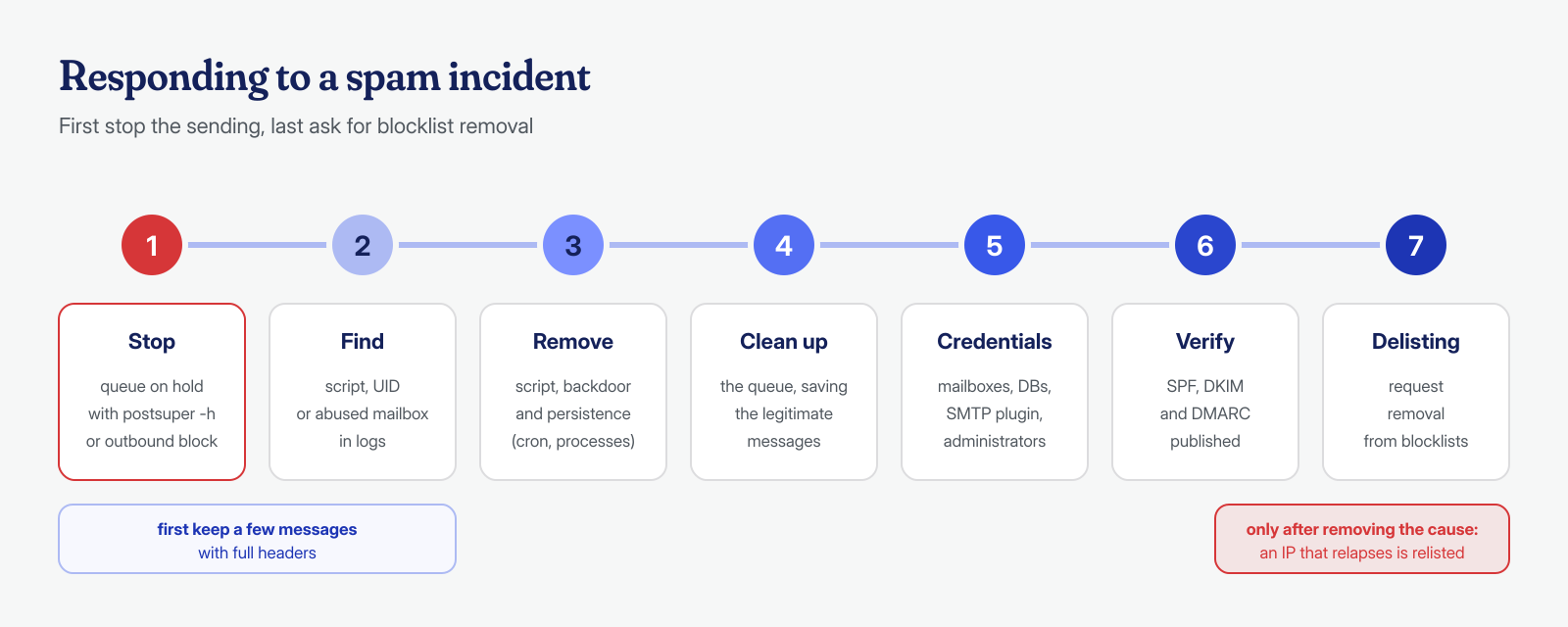
A server that sends spam is almost always the symptom of a broader compromise: the sending script got in through a vulnerability, and alongside it there are usually backdoors, scheduled tasks or stolen credentials. In our engagements we treat mail as part of the system analysis: mail and access logs, queues, PHP pools and mail server configuration, in addition to the WordPress files and database. The guaranteed cleanup in 6, 12 or 24 hours per installation includes finding the script and its entry points; if your domain has started landing in spam for no apparent reason, write to us with a few sample headers.
