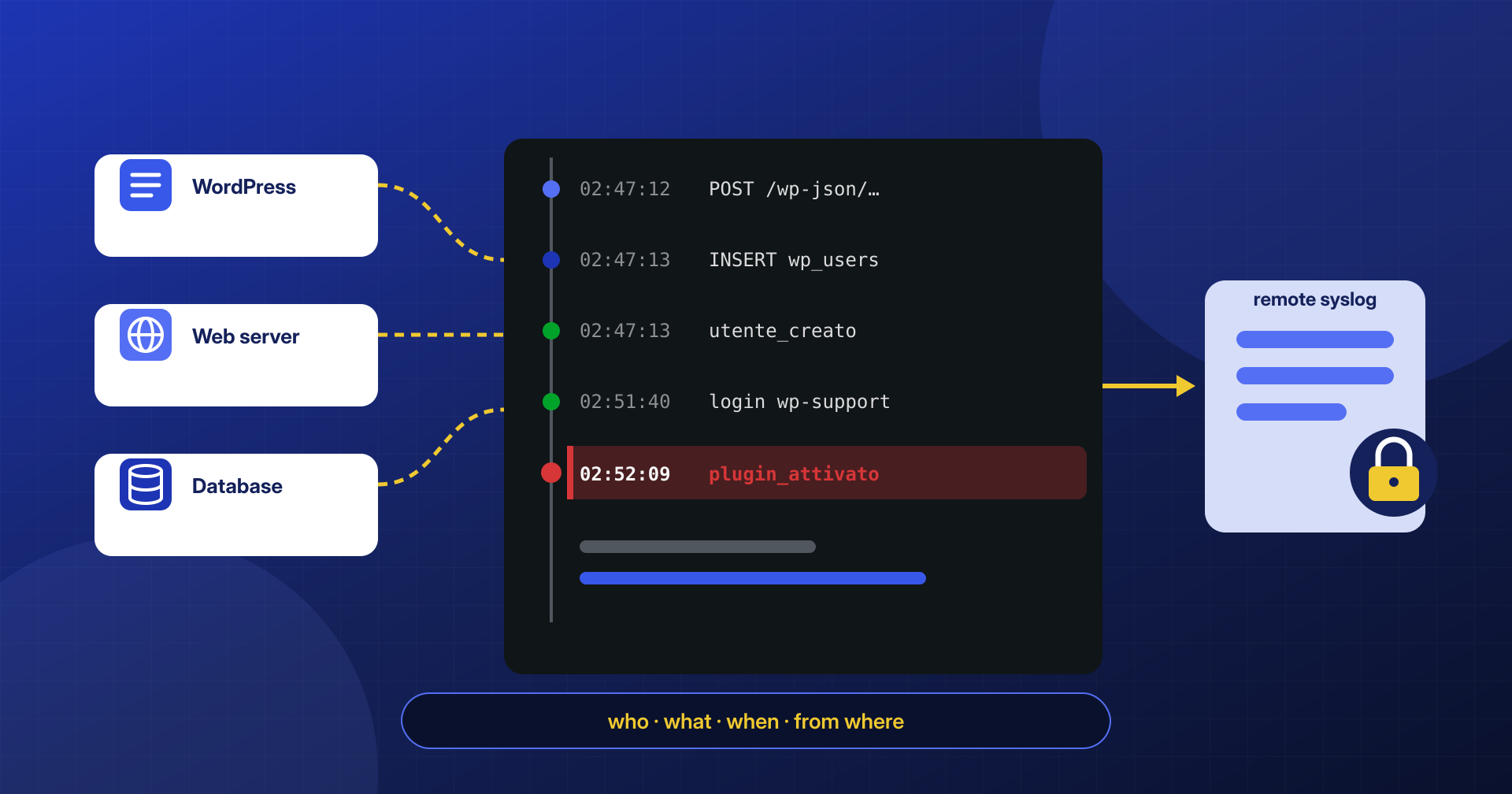
The first question we get during a cleanup is almost always the same: “how did they get in, and when?” The answer depends on one thing only: how much the site was logging before the incident. Far too often the honest answer is: not much. A web server access log rotated after seven days, no trace of logins, no trace of installed plugins or created users. And when a log did exist, it lived in the same database the attacker had access to.
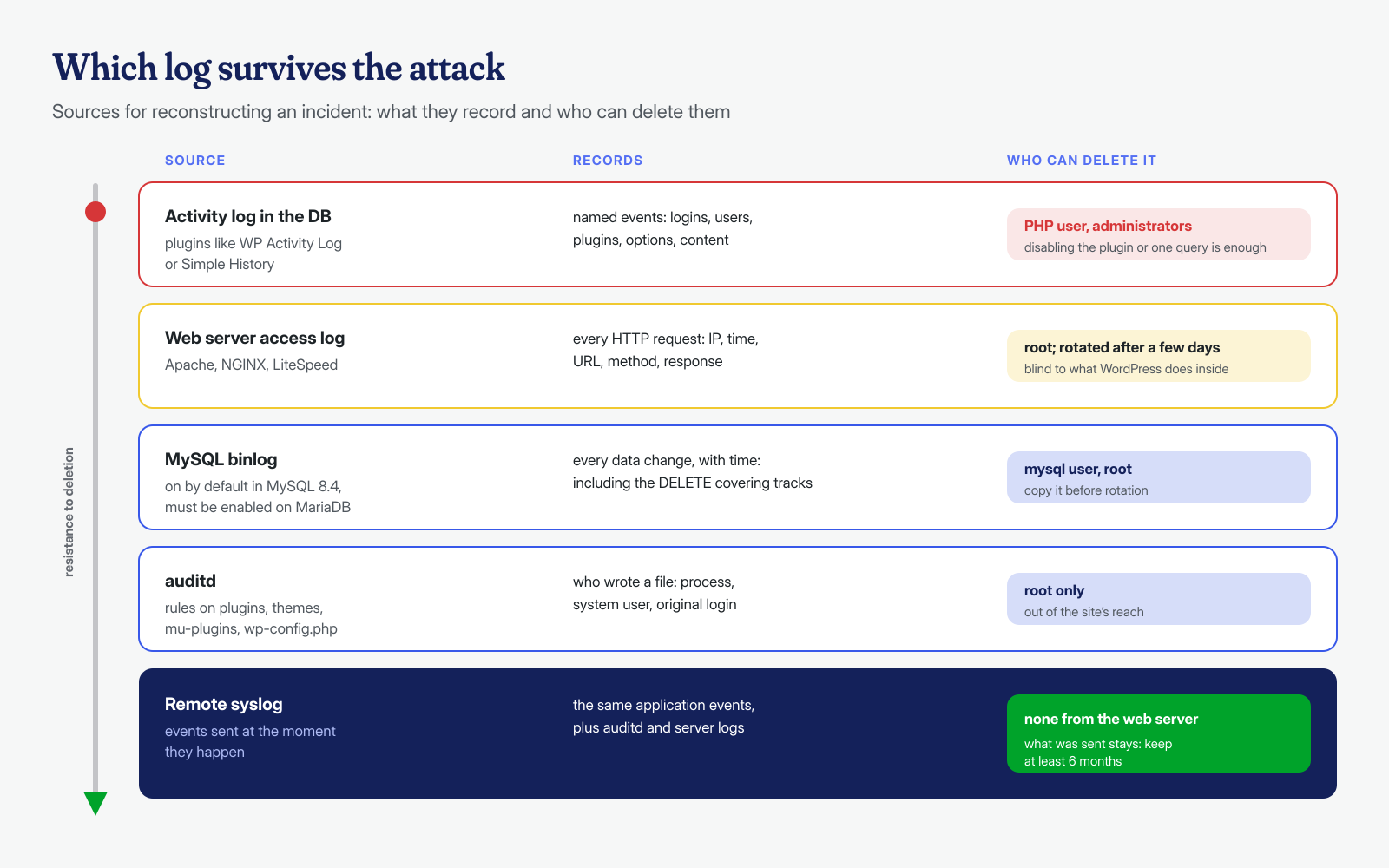
An audit log is worth as much as its distance from the attacker. If whoever compromises the site can also delete the log, the log only tells you what the attacker decided to leave behind.
In this article we look at what WordPress logs on its own and what it doesn’t, what activity log plugins add, how to move events off the site with syslog, how to cross-reference them with web server, MySQL and auditd logs, how long to keep them while respecting the GDPR and, finally, how a sequence of events is actually reconstructed.
What WordPress doesn’t log
By default, WordPress keeps no activity log at all. It doesn’t record successful or failed logins, who installed or activated a plugin, who created a user or changed a role, or who modified an option. Some indirect traces exist: post revisions with their author, user registration dates, active sessions stored in user metadata. But that data is designed for running the site, not for investigation, and an attacker with database access can change it at will.
Outside WordPress, there is usually the web server access log, which records every HTTP request but doesn’t know who the user was or what happened inside the application, and the PHP error log. The former is valuable, and we explained how to read it in the article on Apache, NGINX and LiteSpeed access logs; its limitation is that a POST to /wp-admin/admin-ajax.php can mean a thousand different things. You need application events, with a name: “user created”, “plugin activated”, “role changed”.
A warning about the error log: enabling WP_DEBUG_LOG without specifying a path writes errors to wp-content/debug.log, inside the public folder, where anyone can download it along with server paths and, at times, user data. If you need it, point it to a file outside the docroot; we cover this in the article on files exposed by mistake.
WP Activity Log and Simple History
The two most widely used activity log plugins cover this level well. WP Activity Log, developed by Melapress, logs logins and changes to content, users, plugins, themes and settings; according to the plugin page, the free version logs the same events as the paid one, while notifications, reports and the ability to store logs in an external database or forward them to services such as syslog, Papertrail or AWS CloudWatch are in the premium editions. Simple History takes a lighter and more readable approach, with a timeline interface, CSV and JSON export, WP-CLI commands and, in the premium version, forwarding of events to local files, syslog servers, external databases and other services.
# Simple History from the command line: one night's events, as CSV
wp simple-history event list --date_from="2026-10-14 00:00:00" --date_to="2026-10-14 08:00:00" \
  --count=500 --format=csv > eventi-notte.csv
Both do their main job well, and on a site with no log at all, installing one is already a big step forward. They do share a limitation, though, which has nothing to do with code quality: in their default configuration they store events in the WordPress database, and they keep the log for a limited period, which for Simple History is thirty days unless you change the setting.
The log in the attacker’s own database
Think about what someone can do after taking control of an administrator account or, worse, uploading a webshell that runs as the site’s PHP user. They can deactivate the logging plugin, and the “plugin deactivated” event will be the last one the plugin writes. They can delete the rows for their own actions straight from the table, using the credentials read from wp-config.php. They can wipe everything. In investigations we sometimes find logs that are perfectly intact up to a certain evening and then empty, or logs that are missing exactly the hours we care about.
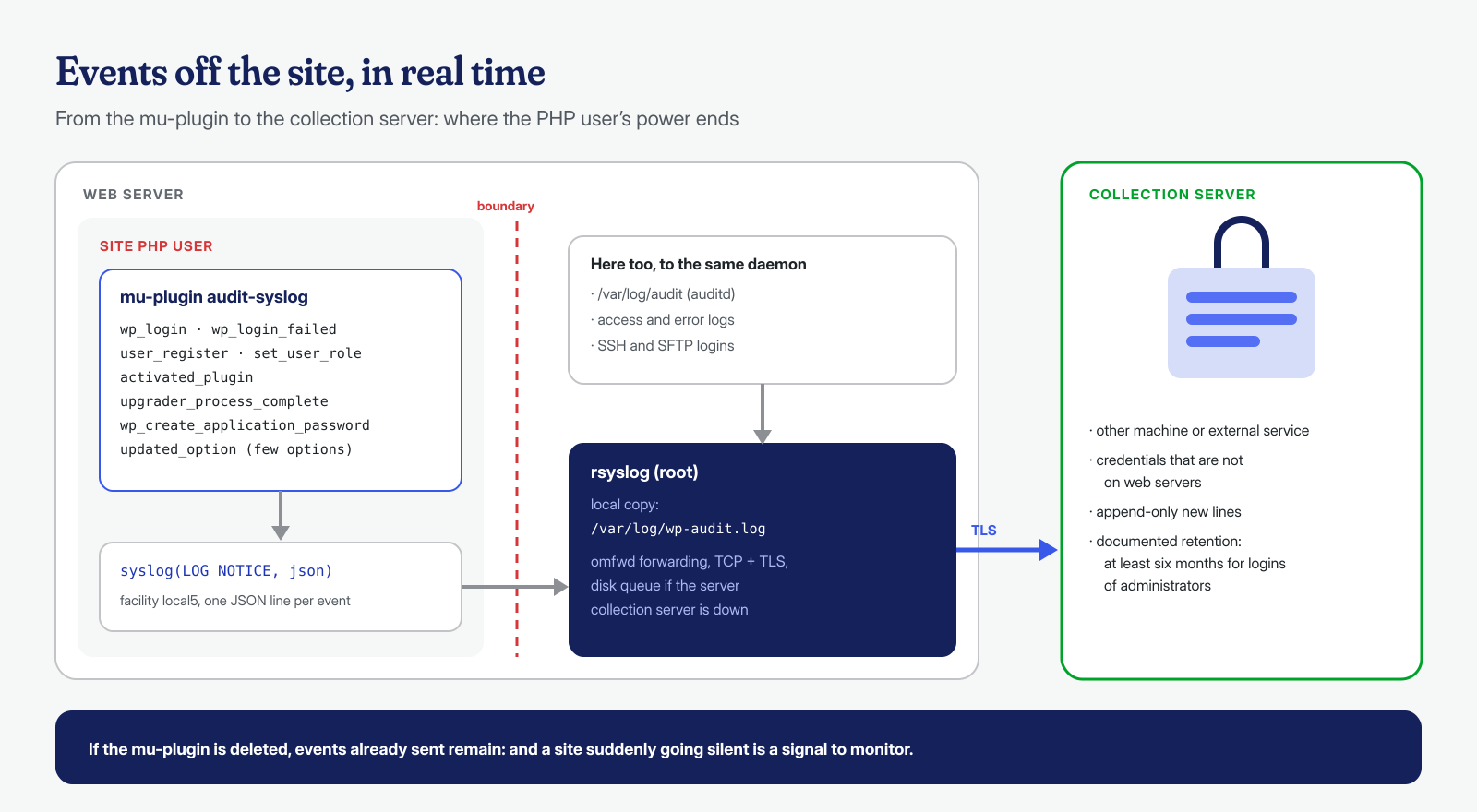
The resulting rule is simple: every event must leave the server the moment it happens, bound for a destination where the site’s user has no write or delete permissions. The local log stays useful for day-to-day lookups; the remote one is the source you rely on when things go wrong.
Moving events off the site with syslog
If you don’t want to depend on a premium feature, the most important events can be sent to syslog with a mu-plugin of a few lines. PHP writes to the local syslog daemon, which in turn forwards them to a collection server; the PHP user has no way to alter what has already left. The events worth logging are few and high-value: logins, users and roles, plugins, updates, application passwords and the options an attacker touches most often.
<?php
// wp-content/mu-plugins/audit-syslog.php
function rmw_audit( $evento, $dati = array() ) {
	$utente = wp_get_current_user();
	$riga   = wp_json_encode( array_merge( array(
		'sito'   => wp_parse_url( home_url(), PHP_URL_HOST ),
		'evento' => $evento,
		'utente' => $utente->exists() ? $utente->user_login : '-',
		'ip'     => $_SERVER['REMOTE_ADDR'] ?? 'cli',
	), $dati ) );
	openlog( 'wp-audit', LOG_PID, LOG_LOCAL5 );
	syslog( LOG_NOTICE, $riga );
	closelog();
}

add_action( 'wp_login', fn( $login ) => rmw_audit( 'login', array( 'login' => $login ) ) );
add_action( 'wp_login_failed', fn( $login ) => rmw_audit( 'login_fallito', array( 'login' => $login ) ) );
add_action( 'user_register', fn( $id ) => rmw_audit( 'utente_creato', array( 'id' => $id, 'ruoli' => get_userdata( $id )->roles ) ) );
add_action( 'set_user_role', fn( $id, $ruolo, $vecchi ) => rmw_audit( 'ruolo_cambiato', array( 'id' => $id, 'nuovo' => $ruolo, 'vecchi' => $vecchi ) ), 10, 3 );
add_action( 'activated_plugin', fn( $plugin ) => rmw_audit( 'plugin_attivato', array( 'plugin' => $plugin ) ) );
add_action( 'deactivated_plugin', fn( $plugin ) => rmw_audit( 'plugin_disattivato', array( 'plugin' => $plugin ) ) );
add_action( 'upgrader_process_complete', fn( $u, $extra ) => rmw_audit( 'installazione_aggiornamento', $extra ), 10, 2 );
add_action( 'wp_create_application_password', fn( $id, $item ) => rmw_audit( 'password_applicativa_creata', array( 'id' => $id, 'nome' => $item['name'] ) ), 10, 2 );
add_action( 'updated_option', function ( $opzione ) {
	if ( in_array( $opzione, array( 'siteurl', 'home', 'admin_email', 'users_can_register', 'default_role', 'active_plugins' ), true ) ) {
		rmw_audit( 'opzione_modificata', array( 'opzione' => $opzione ) );
	}
} );
# /etc/rsyslog.d/60-wp-audit.conf — local copy and forwarding with a disk queue
local5.* /var/log/wp-audit.log
local5.* action(type="omfwd" target="log.esempio.it" port="514" protocol="tcp"
queue.type="LinkedList" queue.filename="wp_audit_fwd"
action.resumeRetryCount="-1")Volume needs to be considered: during a brute-force attack, wp_login_failed can generate thousands of lines in a few minutes, and it’s best if the collection server can handle them or the forwarding rule samples them. The disk queue means that if the collection server is unreachable, events are kept and sent as soon as possible. If the traffic crosses a public network, it must be encrypted, using the TLS driver supported by the rsyslog omfwd module. Behind a proxy or CDN, REMOTE_ADDR contains the proxy’s address: in that case the real IP must be read from the header set by the proxy, trusting it only if the request really comes from there. An attacker who gains file access can delete the mu-plugin, of course; but the events already sent remain, and a site that suddenly stops producing events is itself a signal worth monitoring.
The collection server, for its part, must be genuinely separate: another machine or an external service, with credentials that appear on none of the web servers, that only accepts appended lines and applies rotation according to the retention period you decided on. If the web server can connect to the log server over SSH, an attacker who has gained root access can do the same, and the separation exists only on paper.
Correlating with the web server and MySQL
An application event tells you what happened; the access log tells you where the request came from; the database tells you what was written. The first requirement for putting them together is trivial and often overlooked: clocks. The nginx log reports local time with the time zone, syslog usually local time, WordPress stores dates in both local time and UTC, and MySQL depends on its configuration. Before building a sequence, convert everything to UTC and verify that the server is synchronized via NTP.
For the database there are two very different logs. The general query log records every statement received, including reads: useful for a short, targeted investigation, too heavy to keep on in production. The binary log, on the other hand, records only data changes and is designed for replication and recovery: in the MySQL 8.4 documentation it is enabled by default, while on MariaDB it must be explicitly enabled. When it exists, it lets you see the exact moment a user appeared or an option changed, even if the attacker later erased the evidence from the site:
# Changes to the user tables in a 30-minute window
mysqlbinlog --base64-output=DECODE-ROWS -vv \
  --start-datetime="2026-10-14 02:40:00" --stop-datetime="2026-10-14 03:10:00" \
  /var/lib/mysql/binlog.000123 | grep -A15 -E 'INSERT INTO `[^`]*`\.`wp_(users|usermeta)`'
The binlog is managed by the mysql user and is not accessible to the site’s PHP user, which can at most send SQL statements: even a DELETE issued to cover tracks ends up in the binlog itself. Just remember that it is rotated and removed after a configurable period, and that it’s best to copy it right away when you open an investigation, along with the other logs, as described in the article on the first two hours after an attack.
auditd: who wrote that file
The last layer is the operating system. The Linux audit subsystem, with the auditd daemon, can record every write or attribute change on chosen files and folders, along with the process that performed it, the system user and the user who originally logged in. That is the difference between knowing that functions.php changed and knowing whether it was written by PHP-FPM, meaning the site itself, or by an SFTP session using a contractor’s credentials. The auid field, the audit user ID, stays that of the original login even after a sudo or a user switch, and is often the decisive piece of information:
# /etc/audit/rules.d/wordpress.rules — only the folders where code should not change
-w /var/www/esempio.it/public_html/wp-config.php -p wa -k wp-config
-w /var/www/esempio.it/public_html/wp-content/plugins -p wa -k wp-codice
-w /var/www/esempio.it/public_html/wp-content/themes -p wa -k wp-codice
-w /var/www/esempio.it/public_html/wp-content/mu-plugins -p wa -k wp-codice

# Load the rules and query the log
augenrules --load
ausearch -k wp-codice -i --start today | grep -E 'name=|exe=|auid='
The rules, described in the auditctl manual, should be limited to folders where code should not change except through an update: watching uploads and cache would produce a pointless volume of events. The log is written by root, out of reach of the site’s user, and pairs well with file integrity monitoring: integrity tells you a file changed, auditd tells you who changed it. /var/log/audit can also be forwarded to the collection server.
How long to keep logs, and the GDPR
Logs contain personal data, such as IP addresses, usernames and sometimes emails, and must be treated as such. The GDPR, in recital 49, recognizes network and system security as a legitimate interest of the controller, within the limits of what is strictly necessary and proportionate. In practice: log what security requires and no more, limit access to the logs to those who need to consult them, define and document a retention period, and delete at expiry.
In Italy there is a specific reference: the decision of the Italian Data Protection Authority (Garante) on system administrators of November 27, 2008 requires logging administrators’ logical access to systems that process personal data, with complete, unalterable and verifiable records, kept for an adequate period of no less than six months. For a site with a members area, an online store or a management system, six months is therefore a reasonable minimum for WordPress administrative access logs as well, and a remote collection server is the simplest way to guarantee they are unalterable. The data protection implications of an incident are the subject of the article on the hacked site as a data breach.
A reconstruction example
Let’s see how the sources complement each other, using a case modeled on the ones we encounter. The client reports an unknown plugin that appeared in the dashboard. The activity log in the database shows nothing for that night: the rows were deleted. The remote syslog, however, reports a utente_creato event with the administrator role at 02:47 UTC, a login by that user at 02:51 and the plugin activation at 02:52, all from the same IP address.
With the IP and the time, the nginx log shows a POST at 02:47 to a REST route of an import plugin, followed a minute later by the user creation in the binlog. auditd confirms that the new plugin’s files were written by PHP-FPM, not via SFTP: the way in is the application, not a contractor’s credentials. What remains is to check the REST route involved, using the method described in the article on the REST API and exposed endpoints, and to look through the security advisories for a known vulnerability in the import plugin.
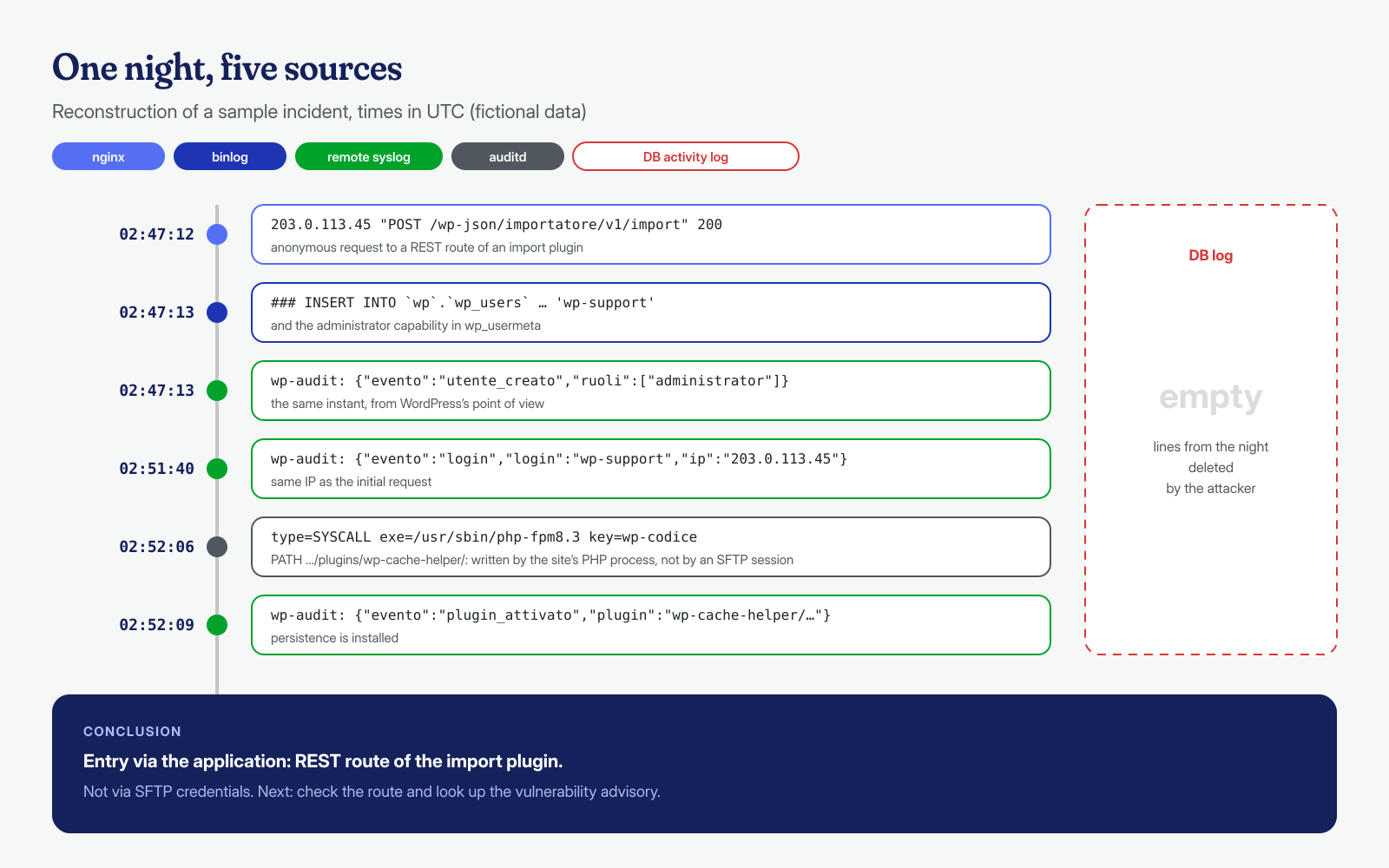
Without the remote syslog and the binlog, in this case, we would have had only an unknown plugin and an empty log. With those sources, in under an hour you go from symptom to entry point, and the entry point is what decides whether the cleanup will hold. If you are facing a compromised site and incomplete logs, we can help you reconstruct the sequence from what remains, from web server logs to correlation assisted by AI models run locally: get in touch. Cleanup, at both the application and system level, is guaranteed in 6, 12 or 24 hours for every WordPress installation.
