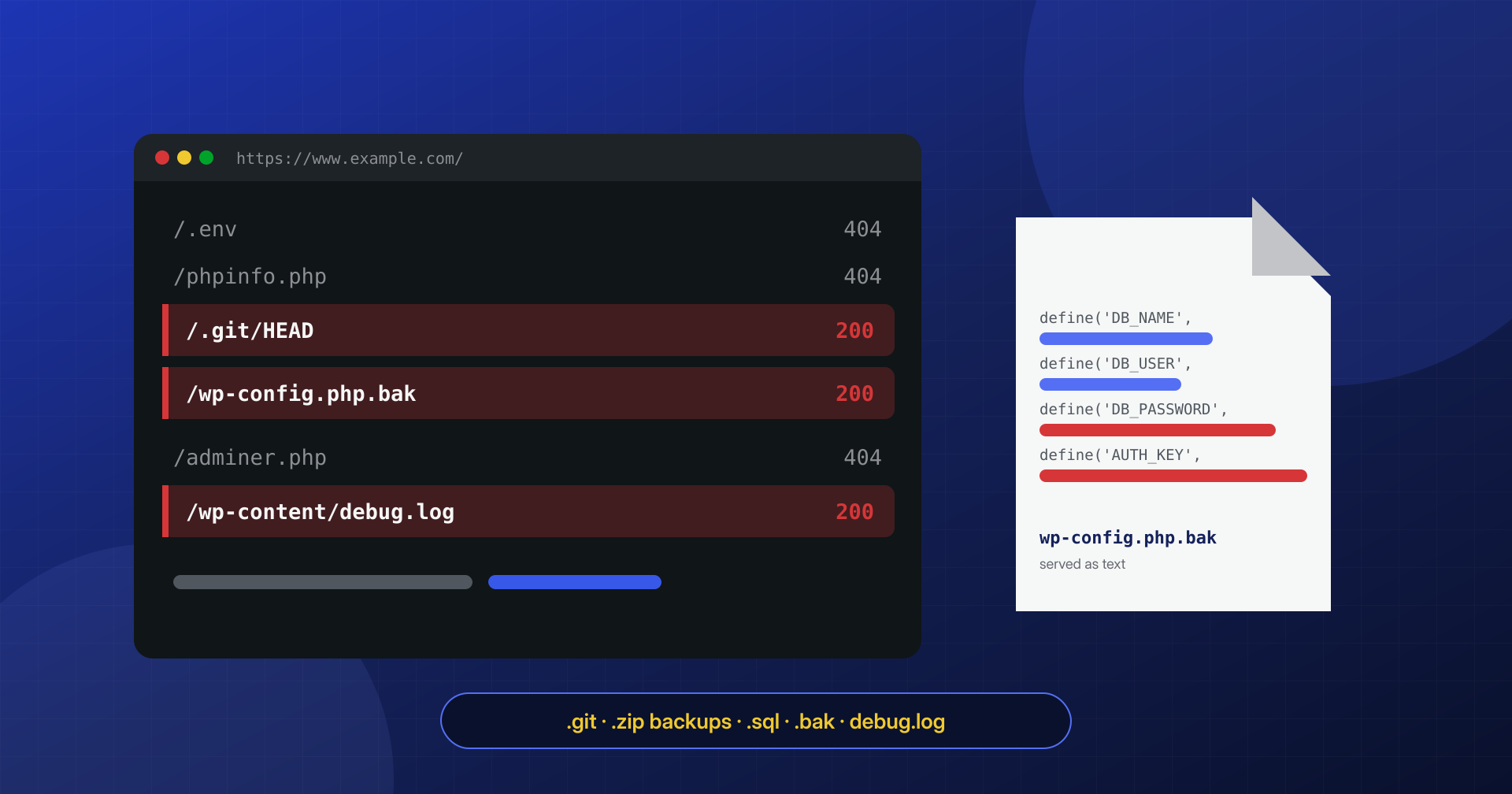
Not every incident starts with an exploit. Some start with a file nobody remembered leaving there: a copy of wp-config.php saved before an edit, the site’s zip archive created during a move, the .git folder from a deploy, the debug.log turned on for a problem solved months ago. These are files the web server hands to anyone who asks for them, and someone is always asking.
A file forgotten in the docroot does not need a vulnerability to be read. All it takes is knowing its name, and the names are always the same.
In this article we look at which files end up exposed by mistake, what they reveal, how to find them on your own server and from the outside, how to block them in NGINX and Apache configuration, and what to do if you discover they were accessible: removing them is not enough, because what they contained may already have been copied.
How attackers look for them
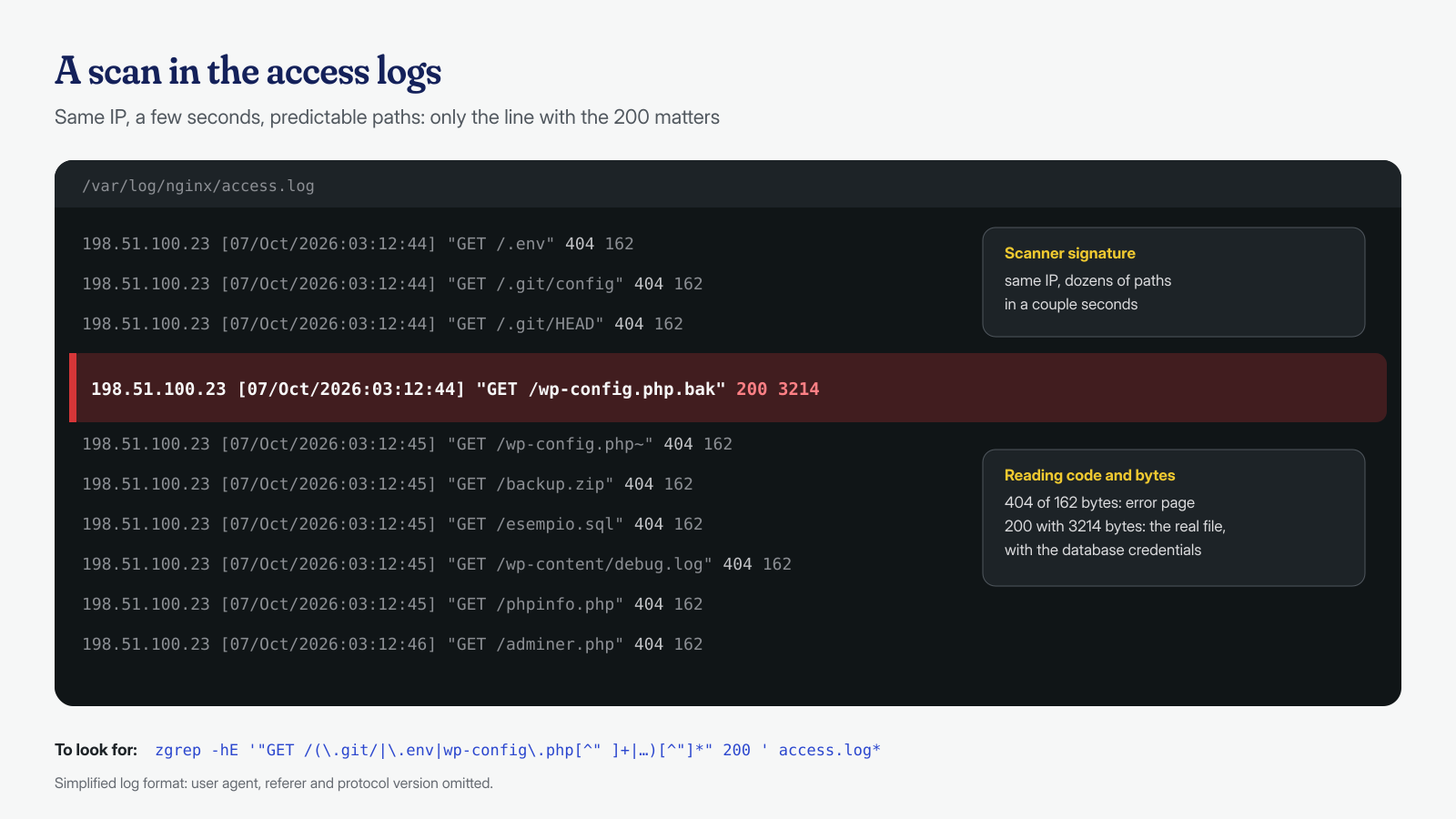
Nobody has to guess. Automated scanners sweep the internet with lists of known paths, and anyone who has read the access logs of a public site has seen them: requests to /.env, /.git/config, /wp-config.php.bak, /backup.zip, /phpinfo.php, one after another, from the same address, milliseconds apart. Almost all of them get a 404. The one that matters is the single one that gets a 200.
The lists are built by watching habits: editors that save copies with a tilde or the .swp extension, FTP clients that rename to .old, hosting panels and backup plugins that create archives with predictable names, the names anyone would pick for a database dump, such as db.sql or sitename.sql. That is why the right question is not whether someone will find the file, but when.
The .git folder: the site’s entire history
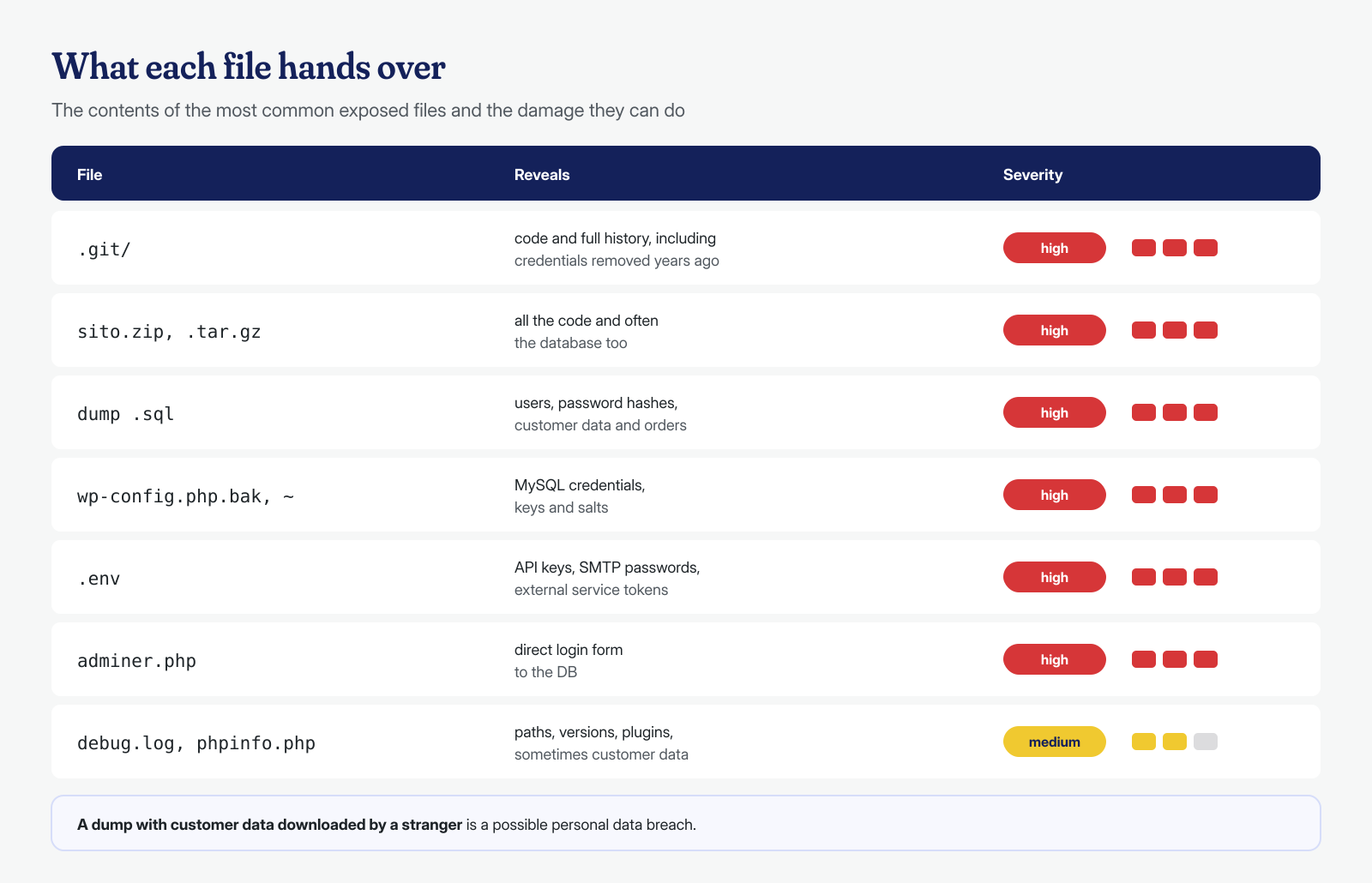
Deploying with git pull directly in the docroot is convenient and widespread, and it leaves the .git folder inside the site. If the web server does not block it, anyone can download it. The file listing does not even need to be enabled: public tools such as git-dumper start from .git/HEAD, derive the references and download the repository objects one by one, until they have rebuilt it entirely.
The damage lies less in the theme code, which is often public anyway, than in the history. A database password in a wp-config.php committed by mistake years ago and later removed, an API key in a configuration file, the SMTP credentials of an old plugin: everything that was ever in the repository stays in the objects, and the git log -p command shows it in seconds. The structural fix is to keep the repository outside the docroot, as we describe in the article on file integrity monitoring, or to publish with git archive or rsync --exclude=.git.
If the folder was exposed, it is worth looking at the history through the attacker’s eyes. The command git log -p -S 'DB_PASSWORD' --all, run in the repository, lists every commit that added or removed that string; the same goes for AUTH_KEY, SMTP, api_key or token. Every secret found must be treated as public, even if it was removed ten commits ago: rewriting history serves to avoid repeating the mistake, not to fix the one already made. The same applies to the .svn and .hg folders of older projects.
# Repository outside the docroot, working files in the docroot
git --git-dir=/srv/repo/esempio.git --work-tree=/var/www/esempio.it/htdocs checkout -f main

# Or: publish only the tracked files, without .git
git archive main | tar -x -C /var/www/esempio.it/htdocs
Backups, dumps and copies of wp-config.php
The second group is copies. A .zip or .tar.gz archive of the site left in the docroot after a move contains everything: code, configuration, often a database dump too. An .sql file contains users with their password hashes, customers’ email addresses, orders. If the site is an e-commerce store or collects data through forms, a dump downloaded by a stranger is in every respect a personal data breach, with the obligations we describe in the article on a hacked site and data breaches.
Copies of wp-config.php are the most insidious case. The original file is safe because the web server passes it to PHP, which executes it and returns nothing. But wp-config.php.bak, wp-config.php.old, wp-config.php~ or wp-config.php.save do not end in .php: the server treats them as text files and delivers them as they are, with the database name, user, password and security keys. Copies come from terminal editors, from edits made “just in case” before touching the file, from FTP clients that do not overwrite. The same goes for any PHP file with an added suffix, and for backup copies that some plugins save in public folders inside wp-content. Then there are backup plugins that save archives in a wp-content folder protected only by an .htaccess: on Apache it works, but if the site is migrated to NGINX that file is ignored and the archives become downloadable overnight, without anyone having touched anything. For backups in general, and where to keep them, see the article on immutable backups.
debug.log, phpinfo, .env and adminer
The third group is forgotten diagnostic tools. With WP_DEBUG_LOG set to true, WordPress writes errors to wp-content/debug.log, as the official debugging documentation states, that is in a folder served by the web server. The file reveals absolute paths, the system user name, installed plugins and their versions, sometimes query fragments with customer data. For an attacker it is a map of the site, and it can grow to several gigabytes. On cPanel servers there is a close relative: the error_log files that PHP creates in the folder of the script that generated the error, scattered across the whole site and also served as text. And with WP_DEBUG_DISPLAY on, the same messages end up directly in the pages, visible to every visitor.
A phpinfo.php or info.php created for a check shows the exact PHP version, the modules, the disabled functions, the paths and the environment variables, which on some configurations include credentials. A .env file, common in Bedrock-based projects or in applications running alongside the site, is by definition a list of secrets. And adminer.php, the single-file database management tool, left in the docroot after a job, offers a MySQL login form to anyone: with a weak password, or with the password read from one of the copies above, the attacker has the database in hand.
Finding them on your own server
Searching from the inside is the most complete, because it also sees files with names no scanner would try. Three commands cover most cases: versioning folders and environment files, archives and copies by extension, diagnostic tools by content. It is worth printing the date and size too, because a two-gigabyte archive from last year is recognizable at a glance.
cd /var/www/esempio.it/htdocs

# Repositories and environment files
find . \( -name .git -o -name .svn -o -name .hg -o -name '.env*' \) -printf '%TY-%Tm-%Td  %p\n'

# Archives, dumps, backup copies and logs
find . -type f \( -iname '*.zip' -o -iname '*.tar' -o -iname '*.tar.gz' -o -iname '*.tgz' \
  -o -iname '*.rar' -o -iname '*.7z' -o -iname '*.sql' -o -iname '*.sql.gz' \
  -o -iname '*.bak' -o -iname '*.old' -o -iname '*.orig' -o -iname '*.save' \
  -o -iname '*.swp' -o -name '*~' -o -iname '*.log' -o -name error_log \) \
  -printf '%TY-%Tm-%Td  %10s  %p\n' | sort

# phpinfo and adminer, even under different names
grep -rlE --include='*.php' 'phpinfo[[:space:]]*\(' . | grep -v '^./wp-\(admin\|includes\)/'
grep -rli --include='*.php' 'adminer' . | head
The output will also include legitimate files, for example zip archives uploaded as attachments in the uploads folder or plugin logs protected by an .htaccess. Each line still needs checking: a legitimate file can be exposed all the same, if the protection it relies on does not work on the server in use, as happens with .htaccess files under NGINX.
A search done once protects you until the next urgent change. The same commands, put in a script run weekly by cron and configured to send an email only when the output is not empty, turn the check into a habit that does not depend on anyone’s memory. Anyone who already has a file integrity check can add these patterns to the list of new files to flag.
Checking from the outside, as a scanner would
The outside check answers a different question: not “is the file there?”, but “does the web server deliver it?”. A curl loop over the same paths scanners try, printing status code and size, is enough to uncover most problems. The size matters because many sites answer 200 even for nonexistent pages, showing the theme’s 404 page: a 200 with the same size as the home page is a false alarm, a 200 of 3 KB on wp-config.php.bak is not.
SITO=https://www.esempio.it
for p in .git/HEAD .git/config .env wp-config.php.bak wp-config.php.old wp-config.php~ \
         wp-config.php.save wp-content/debug.log backup.zip sito.zip database.sql \
         phpinfo.php info.php adminer.php; do
  printf '%s  %s\n' "$(curl -s -o /dev/null -w '%{http_code} %{size_download}' "$SITO/$p")" "$p"
done

# An exposed .git answers with the reference to the current branch
curl -s "$SITO/.git/HEAD"
ref: refs/heads/main
The loop must be repeated for every domain name served by the same server, subdomains included. The worst surprises come from there: a staging. created for a redesign and never shut down, a /vecchio/ or /old/ folder with a complete copy of the previous site, never updated. These are not just exposed files: they are entire WordPress installations, with plugins stuck on vulnerable versions, sharing the server and often the database with the main site.
Blocking them in the web server
Deleting the files is necessary, but it does not stop new ones from appearing at the next hasty change. A web server rule makes future ones harmless. On NGINX it goes in the server block before the location that passes PHP files to FPM, because regular-expression locations are evaluated in the order they appear and the first match wins:
# NGINX: hidden files (except .well-known), copies, archives, dumps and logs
location ~ /\.(?!well-known/) { deny all; }
location ~* \.(bak|old|orig|save|swp|sql|sql\.gz|log|zip|tar|tgz|tar\.gz|rar|7z)$ { deny all; }
location ~ ~$ { deny all; }
location ~ /error_log$ { deny all; }
# Apache 2.4, in the virtual host configuration or in .htaccess
RedirectMatch 404 /\.(git|svn|hg|env)
<FilesMatch "(\.(bak|old|orig|save|swp|sql|log|zip|tar|tgz|gz|rar|7z)|~)$">
Require all denied
</FilesMatch>
<Files "error_log">
Require all denied
</Files>If the site legitimately offers zip files for download, the extension must be removed from the list or the rule limited to paths outside the uploads. phpinfo.php and adminer.php cannot be blocked by extension, because they are valid PHP: they must be deleted. For the debug log the right solution is not to write it in the docroot. WP_DEBUG_LOG also accepts a file path, and in production errors must never appear in the pages:
// wp-config.php: log outside the docroot, errors never shown to visitors
define( 'WP_DEBUG', true );
define( 'WP_DEBUG_LOG', '/var/log/php/esempio.it-debug.log' );
define( 'WP_DEBUG_DISPLAY', false );
The log folder must be writable by the site’s PHP user and, once the diagnosis is done, WP_DEBUG must be set back to false. All these rules fit alongside the others in the hardening checklist.
If they were exposed: removing is not enough
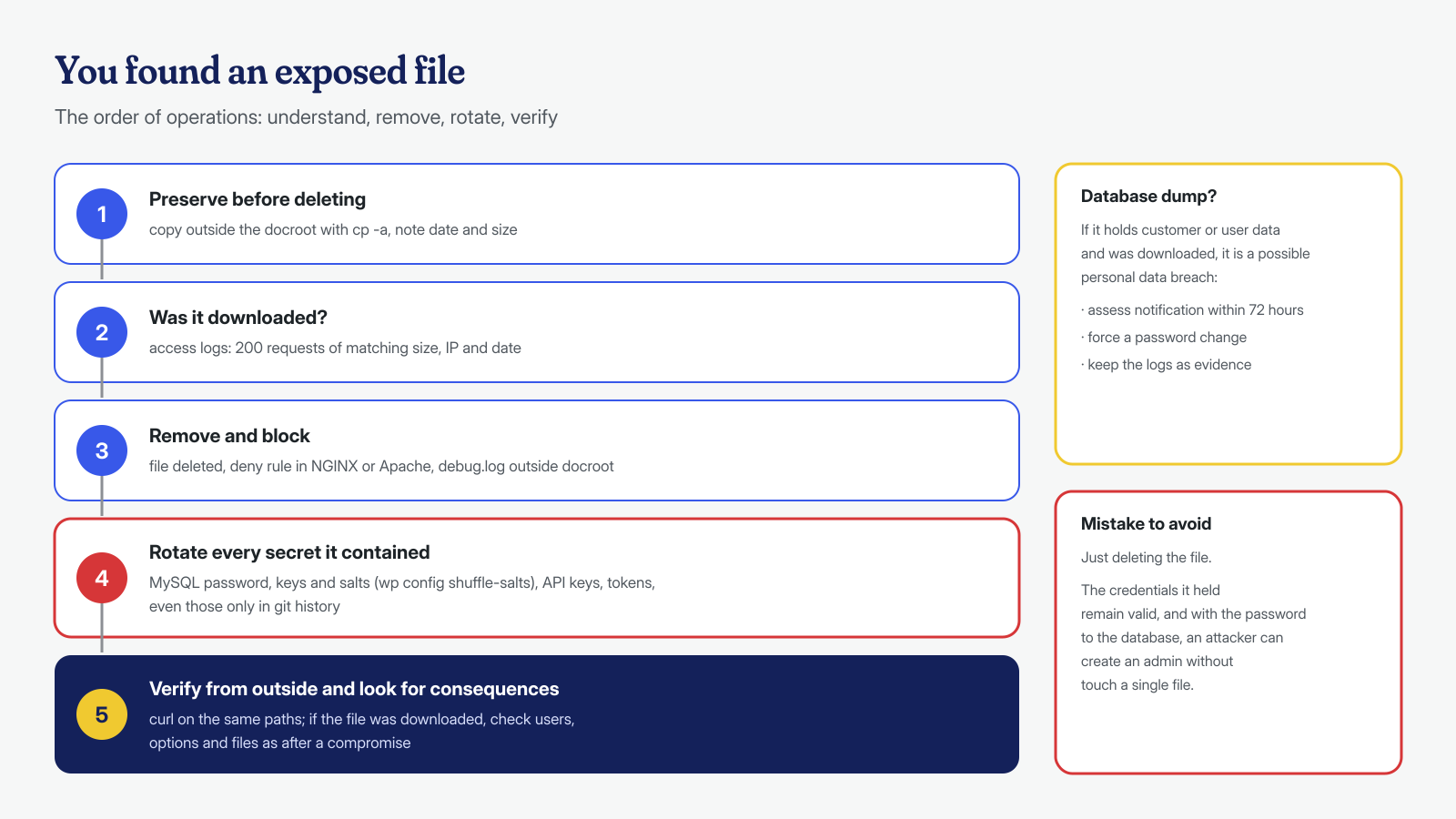
When the search finds an exposed file, the first temptation is to delete it and move on. First it is worth answering one question: did anyone download it? The access logs will tell you, if they are kept long enough. Look for requests to those paths with a 200 code and a size consistent with the file:
# Successfully served requests to sensitive paths: IP, date, path, bytes
zgrep -hE '"GET /(\.git/|\.env|wp-config\.php[^" ]+|wp-content/debug\.log|[^" ]*\.(sql|zip|tar\.gz))[^"]*" 200 ' \
  /var/log/nginx/access.log* | awk '{print $1, $4, $7, $10}'
If the file contained secrets, everything it contained must be considered compromised, even if the logs show no download: logs may have been rotated, or the request may have come through a different path. For a copy of wp-config.php that means changing the MySQL user’s password and regenerating the keys and salts, for example with wp config shuffle-salts, as we explain in the article on wp-config.php and salts. For a .env or a .git it means revoking every API key and token present in the history, not just in the latest version. For a database dump it means assessing the breach notification and, if the dump contains password hashes, forcing users to change them.
Finally, an exposed file is often the entry point of a later infection: with the database password an attacker can create a ghost administrator or insert code into the options, without touching a single file. If the logs show the file was downloaded, the next step is to check users, options and site files as after any compromise, starting from the first two hours of response.
If you have found files like these on your site and do not know whether anyone has already used them, or if the site already shows signs of compromise, write to us: we analyze logs, files, database and system, cron jobs and processes included, and clean every WordPress installation with a guaranteed cleanup in 6, 12 or 24 hours, leaving the blocking rules in place.
