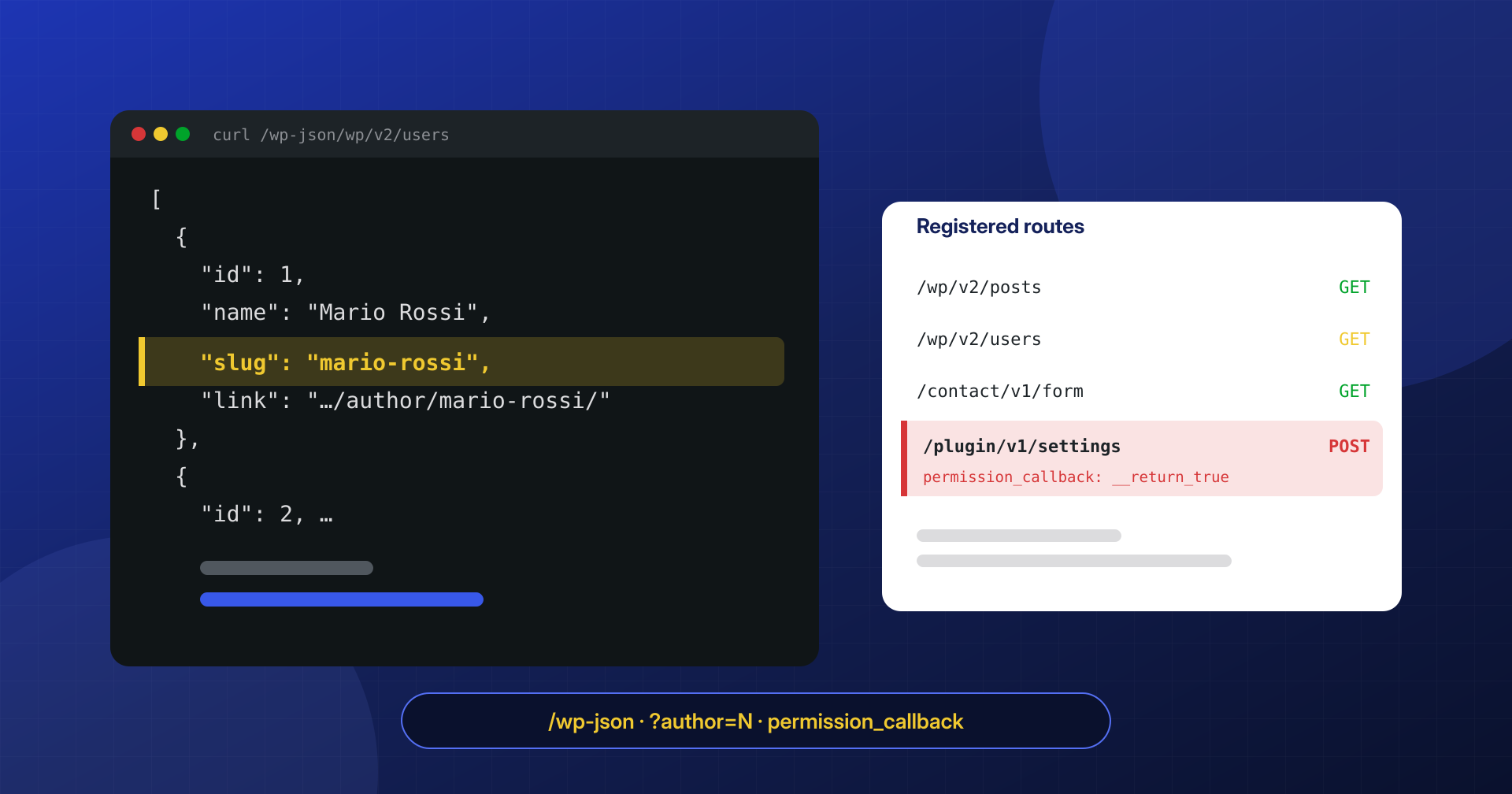
In the logs of almost every WordPress site we analyze, requests to /wp-json/wp/v2/users and sequences like /?author=1, /?author=2, /?author=3 show up at regular intervals. These are automated scanners collecting usernames, the first step of many credential attacks. Site owners usually find out when a security report flags “user enumeration” as a vulnerability, and the instinctive reaction is to disable the REST API. That is the wrong move, for reasons we will get to.
Hiding usernames does not protect an account with a weak password, and a well-protected account does not become vulnerable because its name is public. Enumeration is noise to reduce; REST routes without permission checks are the real risk.
In this article we look at what the REST API exposes to anonymous visitors, which other channels reveal usernames, how to map every route registered by core and plugins, how to limit the user list without breaking the block editor, and where it makes sense to add rules at the web server level.
What an anonymous visitor sees in the REST API
The REST API has been part of core since version 4.7 and is used by the dashboard itself: the block editor, the media library, many settings screens. The official documentation is explicit: it should not be disabled, because admin features would break. What you can do is decide what people who are not logged in get to see.
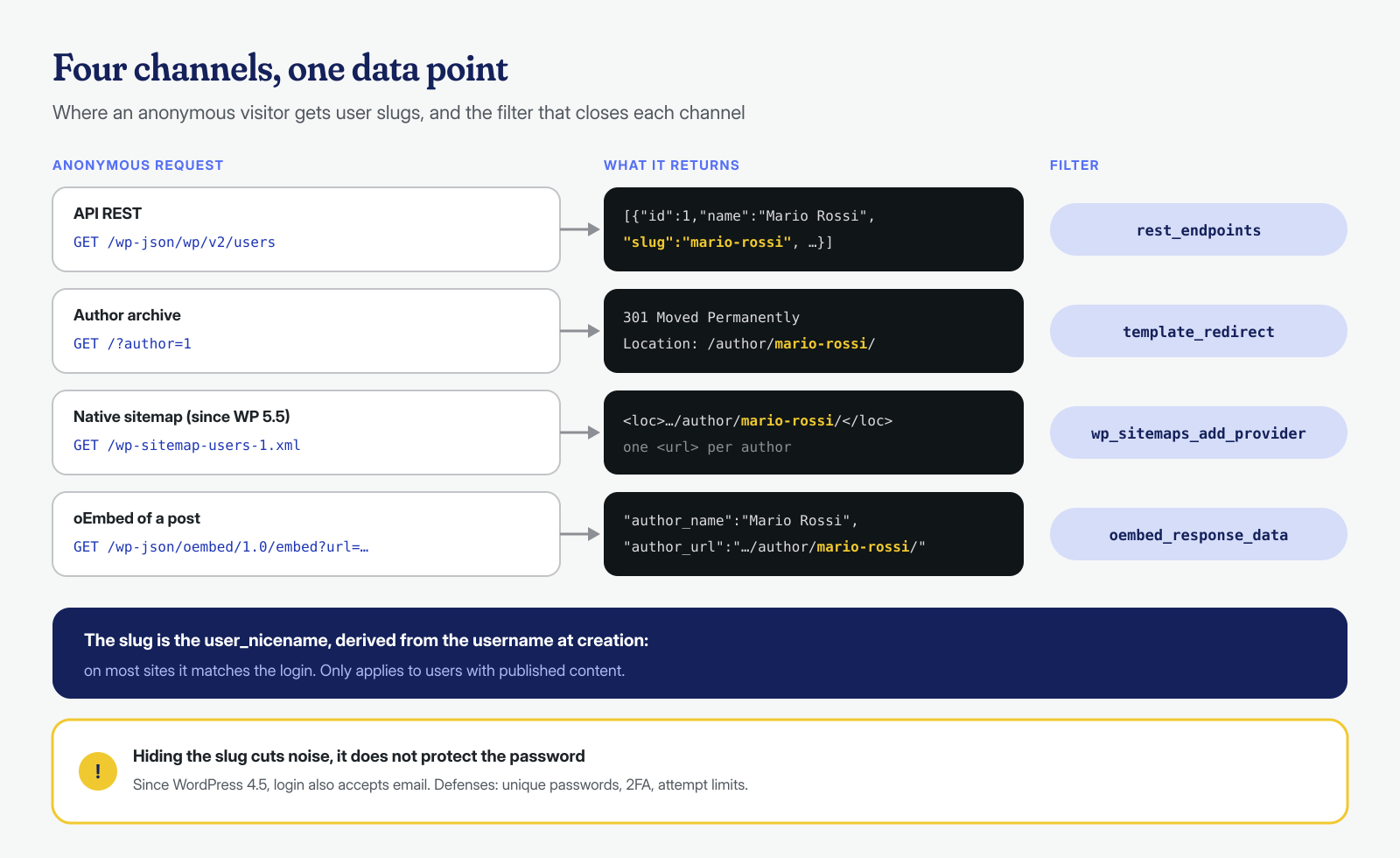
By default, the users endpoint also answers anonymous requests, but with precise limits: the users controller returns only users who have published at least one item of a post type that is visible in the API, and only public fields: ID, display name, description, URL, avatar and slug. Email, role and registration date are reserved for those with the list_users capability. The field scanners care about is the slug, that is the user_nicename, which WordPress derives from the username when the account is created and which therefore, on most sites, matches the login.
# What the site returns to an anonymous visitor
curl -s https://www.esempio.it/wp-json/wp/v2/users | jq '.[] | {id, name, slug}'

# The same route without pretty permalinks: don't forget it in your filters
curl -s "https://www.esempio.it/?rest_route=/wp/v2/users" | jq '.[].slug'
Users are not the only information available. Every post returned by /wp/v2/posts contains the numeric ID of its author, and the index at the root /wp-json/ lists the registered namespaces, which in practice means the plugins that expose routes: a namespace such as nome-plugin/v1 tells a scanner that the plugin is installed, even if it loads no file visible in the pages. For anyone cross-referencing sites with known-vulnerability bulletins, that is more useful than usernames. There is no point in hiding it, because the same information can be obtained in other ways, but it is a good reason not to leave unused plugins installed.
The other channels: ?author=N, sitemaps and oEmbed
Closing only the REST API leaves at least three channels open, all documented in the core code. The oldest is the author parameter: a request to /?author=1 is redirected by the redirect_canonical() function to the /author/slug/ archive, if the user has published anything, and the Location header contains the slug. The second is the native sitemaps, introduced in WordPress 5.5: /wp-sitemap-users-1.xml lists the author archives of all users with published content. The third is the oEmbed endpoint, which returns author_name and author_url for every post, and the latter again contains the slug.
# Author archive redirect
curl -sI "https://www.esempio.it/?author=1" | grep -i '^location'

# Users sitemap (WordPress 5.5 and later)
curl -s https://www.esempio.it/wp-sitemap-users-1.xml | grep -o '<loc>[^<]*'

# oEmbed for any post
curl -s "https://www.esempio.it/wp-json/oembed/1.0/embed?url=https://www.esempio.it/un-articolo/" \
  | jq '{author_name, author_url}'
On top of these come the theme’s own channels: many themes print a link to the author archive under every post, and RSS feeds carry the display name. None of these is a flaw; they are features. The point is to know they exist, so you can decide knowingly whether to close them and which ones.
What enumeration really enables, and what it does not
Knowing the username halves the work of a targeted brute-force attack, because only the password is left to guess, and it makes a phishing message addressed to that person more believable. That is all. It grants access to nothing, and since WordPress 4.5 the login form also accepts the email address in place of the username, which is often public by other means: hiding the slug does not prevent credential stuffing with email and password pairs leaked elsewhere.
In the logs, enumeration is almost always followed by a burst of login attempts with the names just collected, on wp-login.php or xmlrpc.php. In the past xmlrpc.php was the favorite target because the system.multicall method allowed trying many passwords in a single HTTP request; today core stops the attempts after the first failure within the same request, but it remains an entry point that a limit configured only on wp-login.php does not cover. If the site does not use XML-RPC, for example for the mobile app or for Jetpack, blocking it in the web server removes the problem; if it does use it, the limit on attempts must apply there too.
This is why we treat enumeration as a hygiene measure, useful for reducing the volume of automated attempts and the surface of a targeted attack, not as a defense. The defenses are elsewhere: unique passwords, a second factor for users with elevated privileges, a limit on login attempts, a login that is not exposed to XML-RPC if it is not needed. If a security report flags enumeration as a “critical vulnerability”, read it with that yardstick. If instead the user list contains names nobody recognizes, the problem is a different one, and we covered it in the article on ghost administrators.
Mapping the routes: /wp-json/ and WP-CLI
The user list is a detail. The real work, when we assess a site’s exposed surface, is the complete inventory of routes: every plugin can register its own, and each one is an entry point reachable from the Internet. The /wp-json/ root returns the index with all namespaces and routes; from the command line, WP-CLI lets you also see what checks the permissions of each:
# From the outside: namespaces and public routes
curl -s https://www.esempio.it/wp-json/ | jq -r '.namespaces[]'
curl -s https://www.esempio.it/wp-json/ | jq -r '.routes | keys[]' | grep -v '^/wp/v2'
<?php
// rotte.php — usage: wp eval-file rotte.php | grep -v '^/wp/v2'
foreach ( rest_get_server()->get_routes() as $route => $handlers ) {
foreach ( $handlers as $h ) {
$cb = $h['permission_callback'] ?? null;
if ( is_array( $cb ) ) {
$cb = ( is_object( $cb[0] ) ? get_class( $cb[0] ) : $cb[0] ) . '::' . $cb[1];
} elseif ( $cb instanceof Closure ) {
$cb = 'closure';
} elseif ( ! $cb ) {
$cb = 'NESSUNO';
}
printf( "%s\t%s\t%s\n", $route, implode( ',', array_keys( $h['methods'] ) ), $cb );
}
}The output is one line for each combination of route and HTTP method, with the associated permission check. The lines to look at first are those with __return_true or NESSUNO (Italian for “none”) on methods other than GET: a public route that accepts POST or DELETE needs an excellent reason to be so.
Comparing the two views is instructive in its own right. The public index shows the routes the site declares to anyone; wp eval-file loads WordPress in full and also sees routes registered only under certain conditions. Because it runs the code of all plugins, on a site suspected of being compromised it is better to run it on an isolated copy, not in production: a malicious plugin can do anything when it is loaded, even from the command line.
The real risk: overly permissive permission_callbacks
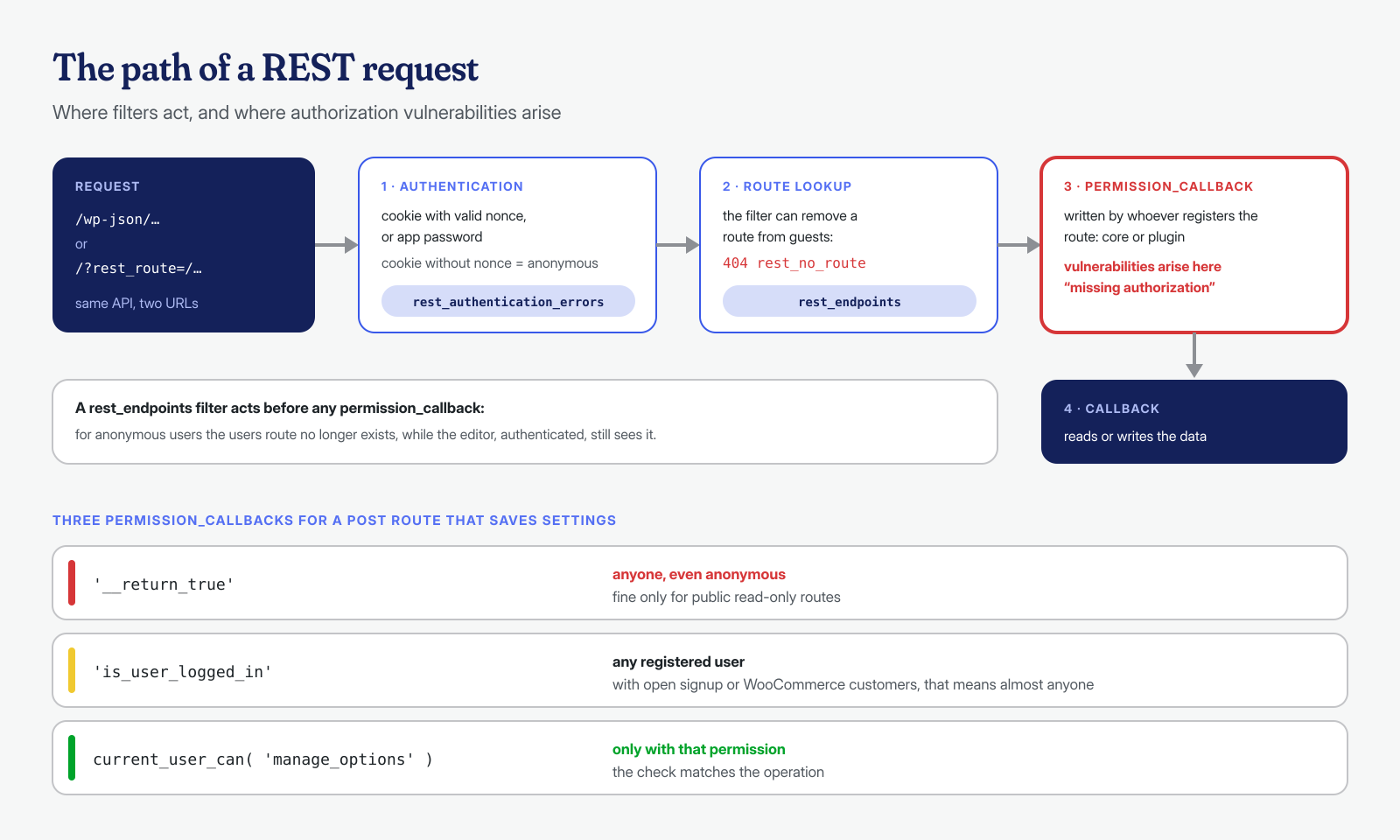
Every route registered with register_rest_route() has a permission_callback, the function that decides whether the request may proceed. Since WordPress 5.5, core raises a notice for routes that do not declare one, and the REST API handbook says to use __return_true for intentionally public ones. The problem arises when __return_true ends up on a route that modifies data or returns confidential information, or when the callback checks only that the user is authenticated, and not that they have permission to perform that specific operation.
It is one of the most frequent families of vulnerabilities in plugin advisories, often classified as missing authorization: an endpoint to import settings, update an option or create a user, reachable by anyone. In the worst cases it is the same vector that leads to a compromise through a 0-day. A search through the installed plugins’ code brings up the candidates in a few seconds:
# Routes declared public in plugins: read them one by one
grep -rn --include='*.php' -A1 -B8 "__return_true" wp-content/plugins/ | grep -E "register_rest_route|methods|__return_true"
The difference between a safe route and a vulnerable one often comes down to a single line:
// Vulnerable: anyone can change the plugin settings
register_rest_route( 'mio-plugin/v1', '/impostazioni', array(
	'methods'             => 'POST',
	'callback'            => 'mio_plugin_salva_impostazioni',
	'permission_callback' => '__return_true',
) );

// Correct: only those who can manage the site options
register_rest_route( 'mio-plugin/v1', '/impostazioni', array(
	'methods'             => 'POST',
	'callback'            => 'mio_plugin_salva_impostazioni',
	'permission_callback' => function () {
		return current_user_can( 'manage_options' );
	},
) );
Even is_user_logged_in() as a check is almost always insufficient: on a site with open registration, or with WooCommerce customers, “authenticated” means anyone who has created an account. A public read route, such as one that returns a store’s opening hours, is normal. A public route that writes to the database or calls update_option() should be reported to the developer and, until it is fixed, filtered. To stay up to date on known vulnerabilities of this kind, see the article on security advisories.
Limiting the user list without breaking the editor
The block editor queries the users endpoint, for example for the author selector, but always as an authenticated user. You can therefore remove the route only for anonymous requests, with a mu-plugin that hooks into the rest_endpoints filter. The filter is applied after the authentication check, so a request with a cookie but no valid nonce is already anonymous at that point, and application passwords work normally:
<?php
// wp-content/mu-plugins/riduci-enumerazione.php

// 1. User list and detail via REST only for logged-in users
add_filter( 'rest_endpoints', function ( $endpoints ) {
	if ( ! is_user_logged_in() ) {
		unset( $endpoints['/wp/v2/users'], $endpoints['/wp/v2/users/(?P<id>[\d]+)'] );
	}
	return $endpoints;
} );

// 2. No redirect from ?author=N to the slug (before redirect_canonical)
add_action( 'template_redirect', function () {
	if ( isset( $_GET['author'] ) && ! is_user_logged_in() ) {
		wp_safe_redirect( home_url( '/' ), 301 );
		exit;
	}
}, 1 );

// 3. No users sitemap
add_filter( 'wp_sitemaps_add_provider', function ( $provider, $name ) {
	return 'users' === $name ? false : $provider;
}, 10, 2 );

// 4. oEmbed without the author archive link
add_filter( 'oembed_response_data', function ( $data ) {
	unset( $data['author_url'] );
	return $data;
} );
An often-recommended alternative is the rest_authentication_errors filter, which the official documentation shows as an example for requiring authentication across the entire API. It works, but it is a much broader measure: it also blocks for anonymous users the routes the site legitimately uses on public pages, such as those of many contact forms, search plugins or the WooCommerce cart. It must be evaluated site by site, checking the public functions one at a time; the targeted filter on the users route alone does not have this problem.
After installing it, the curl commands from earlier should return a rest_no_route error for users, no Location with the slug, and a sitemap without the users section. When logged in, the dashboard and the editor must work as before: that is the check to do right away, by opening a post and changing its author. If the theme shows author archive links and the site does not need them, it is best to remove them from the theme; if instead the author archives are needed, as on a magazine with multiple bylines, the slug is public by editorial choice, and that is fine.
Web server rules: an extra filter, not the only one
Blocking scans before they reach PHP saves resources, especially on servers with many sites. With nginx you can stop the most common anonymous requests; the presence of the login cookie is a hint, not proof, because a cookie can be forged, and for this reason the server rule sits alongside the PHP filter without replacing it:
# nginx, in the site's server block
location ~ ^/wp-json/wp/v2/users {
    if ($http_cookie !~* "wordpress_logged_in_") { return 403; }
    try_files $uri $uri/ /index.php?$args;
}

location = / {
    if ($arg_author ~ "^[0-9]") { return 403; }
    if ($arg_rest_route ~* "^/wp/v2/users") { return 403; }
    try_files $uri $uri/ /index.php?$args;
}
# Apache, in .htaccess before the WordPress rules
RewriteEngine On
RewriteCond %{QUERY_STRING} (^|&)author=[0-9] [NC]
RewriteRule ^$ - [F]Two caveats. The rest_route parameter can arrive encoded, such as %2Fwp%2Fv2%2Fusers, and a text-based rule will not catch it: yet another reason why the check that matters is the one in PHP. And integrations that use the API with an application password have no login cookie: if an external service reads the users, the first nginx rule needs to be adapted. The same rules can be moved even further upstream with a WAF, as we describe in the article on WAFs for WordPress.
To understand how relevant the problem is on your site, even before acting, it is enough to count in the logs who is enumerating and how often. The same addresses usually show up shortly afterward in requests to wp-login.php and xmlrpc.php:
# Who is enumerating users, and how often
grep -E 'wp-json/wp/v2/users|[?&]author=[0-9]|rest_route=(/|%2F)wp(/|%2F)v2(/|%2F)users|wp-sitemap-users'   /var/log/nginx/access.log | awk '{print $1}' | sort | uniq -c | sort -rn | head -20
Defense in depth, not security through obscurity
Reducing enumeration is a small, low-risk intervention that takes some noise out of the logs and withholds a piece of information from someone preparing a targeted attack. It replaces none of the defenses that matter: unique credentials with a second factor, updated plugins, REST routes with correct permission checks, monitoring of access logs. The route inventory, on the other hand, is one of the most useful tools we know for understanding how exposed a site is, and it is the first thing we do when looking for the entry point of an infection. It is also one of the items on the post-cleanup checklist.
The inventory is not a one-time job. Every plugin update can add new routes, and every plugin installed “just to try it” brings more with it. Saving the output of rotte.php and comparing it with the previous month’s, with a simple diff, brings out what is new: a public route that appeared without anyone installing anything is, in itself, an alarm bell worth investigating.
If you find successful requests in the logs to REST routes of a plugin that should not accept data from anonymous users, or if the site already shows signs of compromise, contact us: we analyze the site at both the application and system level, from the logs to the registered routes to the processes on the server, with a guaranteed cleanup in 6, 12 or 24 hours for every WordPress installation.
