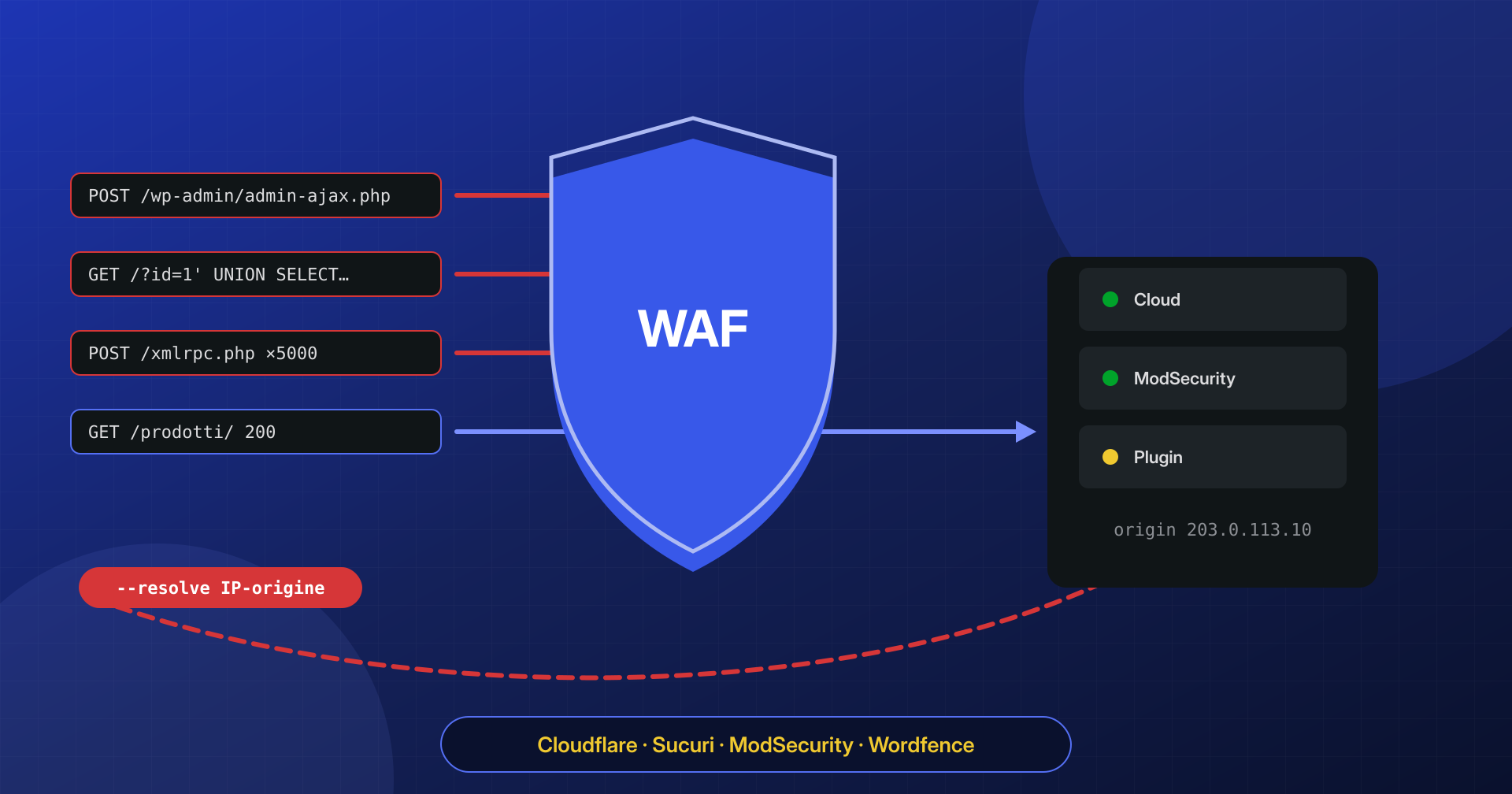
“But we had a firewall.” We hear this a lot at the start of a cleanup, and it is almost always true: the site was behind Cloudflare, or Wordfence was active, or the server had ModSecurity. The web application firewall, or WAF, was doing its job. The problem is that this job covers a specific slice of attacks, and the infection came in another way: a stolen password, an origin reachable without going through the filter, a backdoor installed before the WAF was turned on.
A WAF filters HTTP requests. Anything that is not a suspicious HTTP request, such as a login with valid credentials, a cron job or a file already on disk, simply does not exist as far as the WAF is concerned.
In this article we compare the three families of WAF you meet on WordPress sites, what they actually block and what they cannot see, and above all the risks a WAF introduces when misconfigured: an exposed origin, a spoofable visitor IP address, false positives, and encrypted traffic handed to a third party.
Three families of WAF, three different points on the path
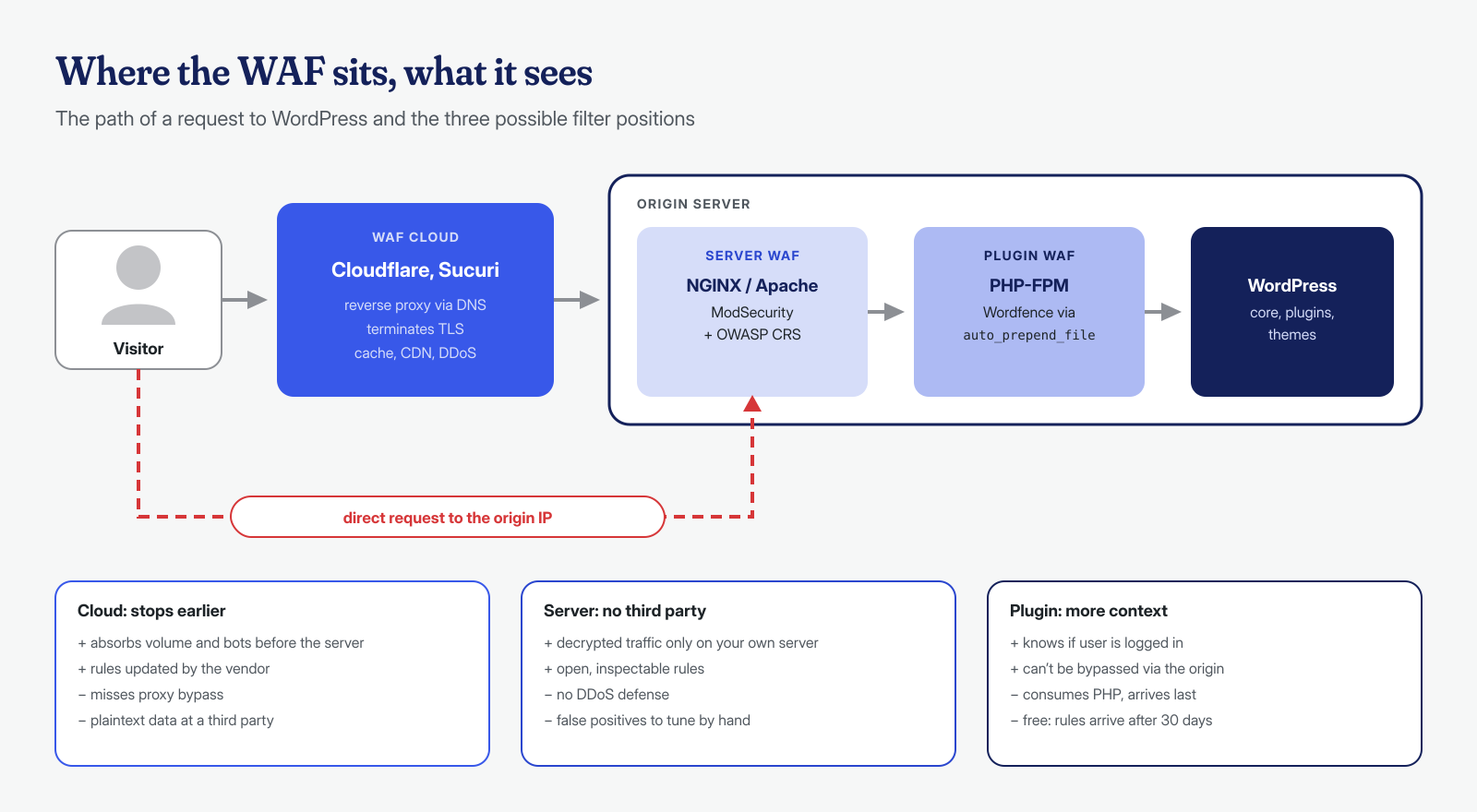
A request to a WordPress site passes through several layers before it reaches the plugin code that handles it, and a WAF can sit at any of them. Its position determines what it sees and what it can do.
A cloud WAF is a reverse proxy in front of the site: the domain’s DNS points to the provider’s servers, which terminate the TLS connection, inspect the request and forward it to the origin server. This is the model of Cloudflare and the Sucuri Website Firewall, whose documentation lists protection against SQL injection, XSS and remote code execution, virtual patching, DDoS mitigation, bot and scanner blocking, and cache and CDN features. Cloudflare offers its Free Managed Ruleset on all plans, while the Cloudflare Managed Ruleset and its version of the OWASP Core Ruleset are reserved for paid plans. The advantage of the cloud model is that hostile traffic, including volumetric attacks, is stopped before it touches the server.
A server WAF is a web server module, and the typical case is ModSecurity with the OWASP Core Rule Set (CRS), a free set of rules that recognize the most common attack families. The ModSecurity repository is now hosted in the OWASP organization on GitHub, with version 2 for Apache and the version 3 library used with NGINX. It sees the already decrypted request on the server you administer, with no third parties, but it stops nothing that has not already reached that far.
An application WAF runs inside PHP. The most widespread case is the Wordfence firewall, which the plugin page describes as an endpoint firewall: in extended mode it loads before WordPress through PHP’s auto_prepend_file directive. It knows the application context, for example whether the user is authenticated, but it consumes the site’s PHP resources and, as the same page notes, the free version receives new rules 30 days later than the paid one.
What they actually block
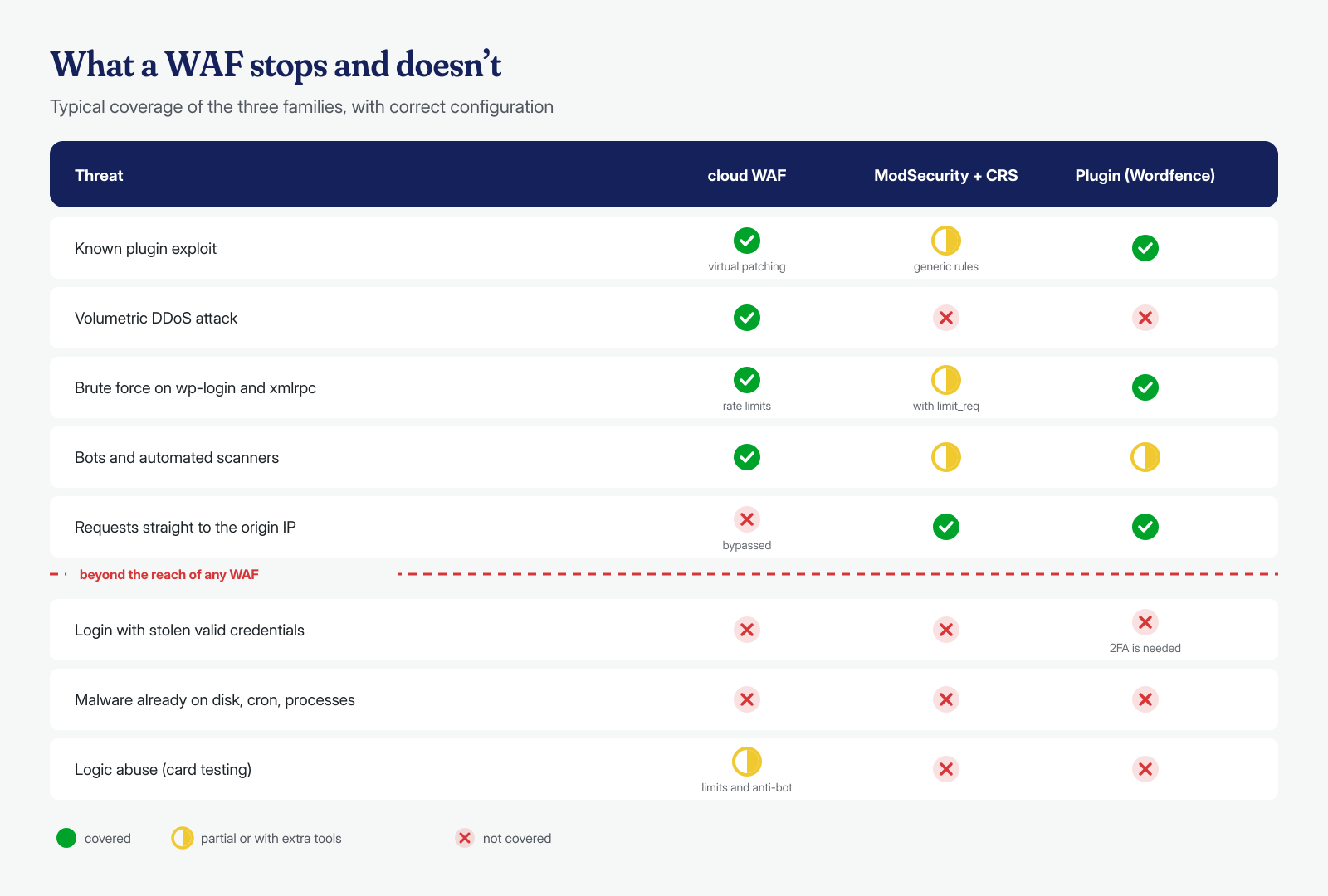
A WAF’s strength is attacks that are recognizable from the shape of the request. Known exploits for plugin vulnerabilities, which reach thousands of sites from the same automated scanners, have recurring parameters, paths and payloads. A rule written after the vulnerability is published stops them even on sites that have not updated yet: this is virtual patching, which we covered in the article on 0-day plugin vulnerabilities, and it is the most valuable service a WAF can provide in the days between the announcement of a flaw and the update.
Then there is automated traffic and volume. A WAF blocks known scanners and bots, rate-limits requests to wp-login.php and xmlrpc.php, and presents a challenge to suspicious clients. Cloud WAFs also absorb DDoS attacks, which a server module or a plugin cannot counter: by the time the request reaches PHP, the bandwidth and connections have already been consumed. Finally, the generic CRS rules recognize SQL injection, XSS or file inclusions even in vulnerabilities never seen before, with a variable success rate and the price of the false positives we discuss below.
What they cannot see
The list of limits matters more than the list of strengths, because that is where infections “despite the firewall” come from. A WAF cannot tell a legitimate administrator from an attacker using that administrator’s password: the requests are identical. Credentials stolen from an infected PC, a scenario we describe in the article on stolen FTP credentials, bypass any WAF, and if access happens over SFTP or SSH it does not even go through the web. The defense in this case is two-factor authentication.
A WAF does not see malware that is already present either. If the backdoor was on disk before the filter was activated, it keeps working: it may respond only to innocent-looking requests, or receive no requests at all, like the cron jobs that re-download the code every night or the PHP processes that stay in memory. The Wordfence firewall comes with a file scanner, but the scanner is a different tool, with the limits we have described. Finally, application logic: card testing on WooCommerce uses perfectly valid checkout requests, and a WAF can only slow it down with rate limits and anti-bot challenges.
Risk number one: a reachable origin
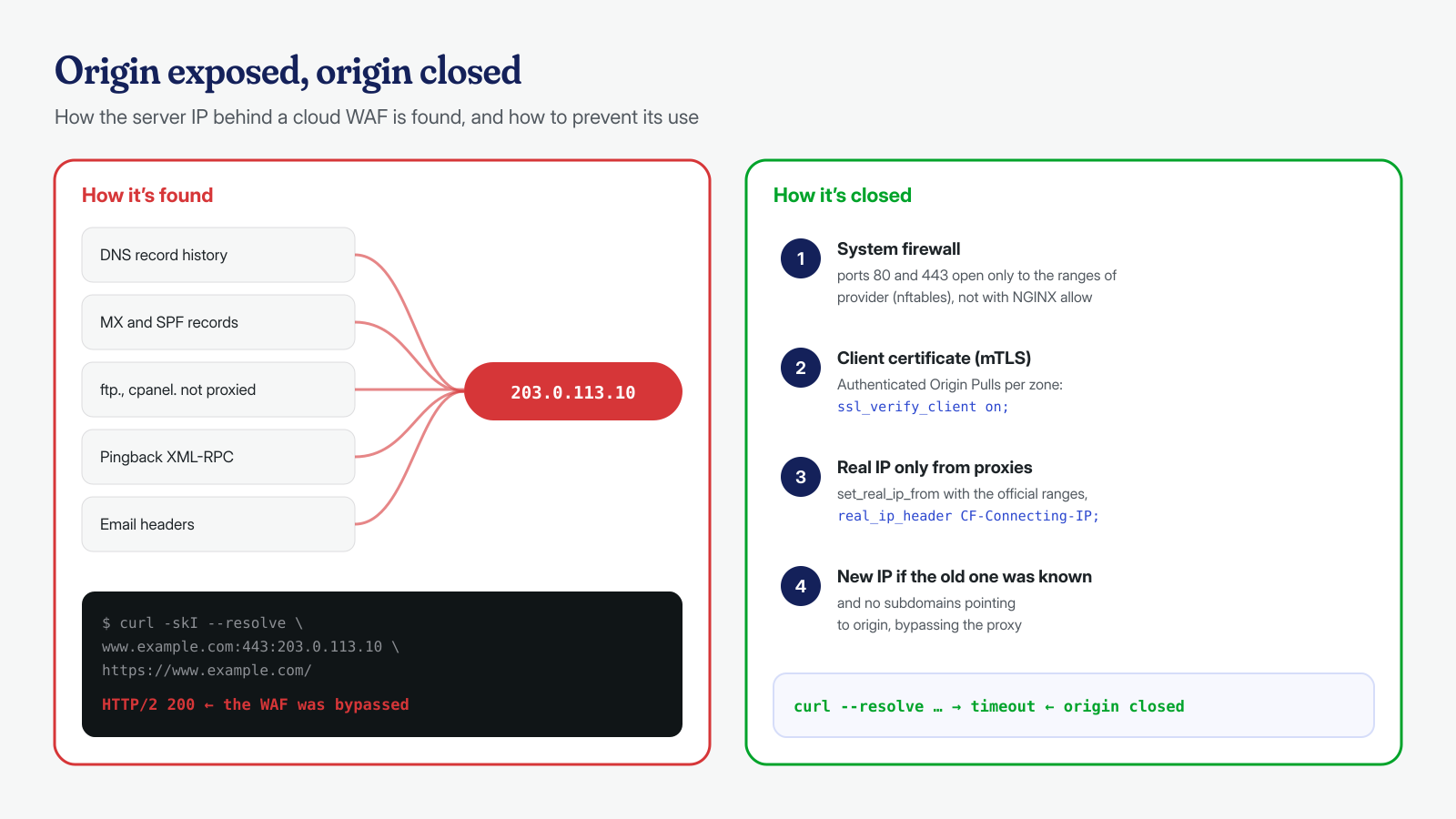
A cloud WAF only protects the traffic that passes through it. If the origin server’s IP address is known and the server accepts connections from anyone, an attacker can send requests straight to the origin, and the WAF becomes decorative. Discovering that address is often easy: historical DNS archives keep the records from before the proxy was enabled, MX and SPF records may point to the same server, an unprotected subdomain such as ftp. or cpanel. reveals it, and an XML-RPC pingback or an email sent by the site exposes it in outbound connections. We also discuss forgotten subdomains in the article on DNS hijacking and subdomain takeover.
Checking whether your origin is exposed takes one command: request the page at the server’s address, forcing the name resolution, from any network. If the site responds, the origin is reachable.
# 203.0.113.10 is the origin server's IP: if the site responds, the WAF can be bypassed
curl -skI --resolve www.esempio.it:443:203.0.113.10 https://www.esempio.it/ | head -3
The fix is to accept HTTP and HTTPS connections only from the provider’s addresses. Cloudflare publishes its ranges at cloudflare.com/ips, also in plain-text format; Sucuri has a page on preventing firewall bypass and provides the list in its dashboard. The right place for the filter is the system firewall, not the web server: with the realip module enabled, as we will see shortly, NGINX’s allow and deny directives evaluate the visitor’s IP and not the proxy’s.
# nftables: ports 80 and 443 open only to Cloudflare's ranges
nft add table inet waf
nft add set inet waf cf4 '{ type ipv4_addr; flags interval; }'
nft add set inet waf cf6 '{ type ipv6_addr; flags interval; }'
nft add element inet waf cf4 "{ $(curl -s https://www.cloudflare.com/ips-v4/ | paste -sd, -) }"
nft add element inet waf cf6 "{ $(curl -s https://www.cloudflare.com/ips-v6/ | paste -sd, -) }"
nft add chain inet waf input '{ type filter hook input priority 0; policy accept; }'
nft add rule inet waf input tcp dport '{ 80, 443 }' ip saddr != @cf4 drop
nft add rule inet waf input tcp dport '{ 80, 443 }' ip6 saddr != @cf6 drop
The ranges rarely change, but they do change: the script must be re-run periodically, and before applying the blocking rules it is wise to add exceptions for monitoring and for administrators’ addresses. Cloudflare adds a more robust layer, Authenticated Origin Pulls: the proxy presents a TLS client certificate and the origin accepts only connections that show it. There is a global certificate shared by all accounts and a per-zone one uploaded by the customer; only the latter guarantees that the request comes from your own Cloudflare configuration and not from anyone else’s.
# NGINX, site server block: only connections with the expected client certificate
ssl_client_certificate /etc/nginx/certs/origin-pull-ca.pem;
ssl_verify_client on;
If the origin’s address was exposed for years before the WAF was activated, changing it during the migration is the cleanest choice: the old DNS records will no longer lead anywhere.
The visitor’s real IP and spoofable headers
Behind a proxy, the server sees the proxy’s address as the client, and the visitor’s IP arrives in an HTTP header: CF-Connecting-IP for Cloudflare, X-Sucuri-ClientIP for Sucuri, X-Forwarded-For in general. But anyone can write headers. According to Cloudflare’s documentation, if the request already arrives with an X-Forwarded-For, Cloudflare appends an address to it instead of replacing it: the first value in the list may therefore have been chosen by the attacker.
The rule is to trust the header only when the connection comes from a proxy address. In NGINX the realip module does this, with the list of ranges in set_real_ip_from, as indicated in Cloudflare’s guide to restoring visitor IPs; in Apache it is done by mod_remoteip with RemoteIPTrustedProxy. A PHP snippet that copies the header into REMOTE_ADDR without checking where the request came from, like the one suggested in Sucuri’s documentation, is safe only if the origin accepts connections exclusively from the firewall.
# Generate /etc/nginx/conf.d/cloudflare-realip.conf from the official ranges
{
  for rete in $(curl -s https://www.cloudflare.com/ips-v4/) $(curl -s https://www.cloudflare.com/ips-v6/); do
    echo "set_real_ip_from $rete;"
  done
  echo "real_ip_header CF-Connecting-IP;"
} > /etc/nginx/conf.d/cloudflare-realip.conf
nginx -t && systemctl reload nginx
Getting it wrong in either direction has concrete consequences. If the server does not restore the IP, the access logs show only proxy addresses and forensic analysis becomes nearly impossible. If it restores it while trusting anyone, an attacker can change IP on every request, get around login attempt limits and have someone else’s address recorded in their place. Security plugins also have a setting for choosing which header to read the IP from, and it must match the actual configuration.
False positives: when the WAF breaks checkout
A WAF that blocks everything that looks like an attack also blocks a lot of legitimate traffic. The block editor saves HTML and JavaScript through the REST API, which look like an injection to an anti-XSS rule; page builders send huge, nested structures; payment gateway webhooks arrive from unusual addresses and with unusual bodies. The typical symptom is a 403 error when saving a post or, worse, a checkout that fails intermittently without anyone noticing right away.
The CRS handles the trade-off with paranoia levels: at level 1 false positives are few, while at higher levels the rules become more aggressive and false positives, by the documentation’s own admission, are expected. For WordPress there is an official exclusions plugin that covers the core, but not page builders and third-party plugins, which must be tuned by hand. The method is always the same: start in detection-only mode, read what would be blocked, and write targeted exceptions for individual rules and parameters, never disabling the WAF on entire paths such as /wp-admin/.
# ModSecurity: first week in detection-only mode
SecRuleEngine DetectionOnly

# Which rules would fire most often (Apache error log)
grep -o '\[id "[0-9]*"\]' /var/log/apache2/error.log | sort | uniq -c | sort -rn | head

# Targeted exception: one rule, one parameter, one path
SecRule REQUEST_FILENAME "@endsWith /wp-admin/post.php" \
    "id:1000100,phase:1,pass,nolog,ctl:ruleRemoveTargetById=941100;ARGS:content"
With cloud WAFs the principle is the same: providers offer a log-only mode for managed rules and the ability to exclude individual rules on specific paths. After every change, a complete test purchase and saving a post in the editor are the minimum test.
TLS to a third party and data protection
To inspect requests, a cloud WAF has to decrypt them. That means login passwords, contact form data, and customers’ addresses and orders pass in cleartext through the provider’s servers before being encrypted again toward the origin. Under the GDPR the provider becomes a data processor, and you need an agreement under Article 28, an entry in the record of processing activities and, if data leaves the European Union, a basis for the transfer. The large providers publish standard agreements: Cloudflare’s, for example, is the Data Processing Addendum, which refers to the standard contractual clauses and the Data Privacy Framework.
This is not a reason to give up on a cloud WAF, but it is a choice to make knowingly and to document, also because in the event of an incident the map of who processes the data is needed right away, as we explain in the article on hacked sites and data breaches. The segment between proxy and origin must be encrypted too, using the “Full (strict)” mode or equivalent: a proxy that talks to the origin in cleartext defeats half the point of HTTPS. Anyone who does not want third parties in the path has a natural alternative in the server WAF, though giving up DDoS mitigation.
One layer, not security
The subtlest risk of a WAF is psychological: the feeling of being protected makes people postpone updates, tolerate abandoned plugins and neglect passwords. A WAF buys time between the publication of a vulnerability and the patch, and reduces the background noise of automated attacks. It does not replace updating, which remains the main defense, nor monitoring the vulnerabilities of installed plugins, which we discuss in the article on security bulletins.
And above all, it does not clean a site that is already compromised. Turning on a WAF on an infected site may block the next attack, but it leaves in place the backdoors, the added administrators and the cron jobs the attacker has already installed. If your site keeps showing signs of infection despite the firewall, contact us: we work on files, database and system, including cron jobs and processes in memory, with a guaranteed cleanup in 6, 12 or 24 hours for each WordPress installation, and we also check that the WAF configuration does not leave the origin exposed.
