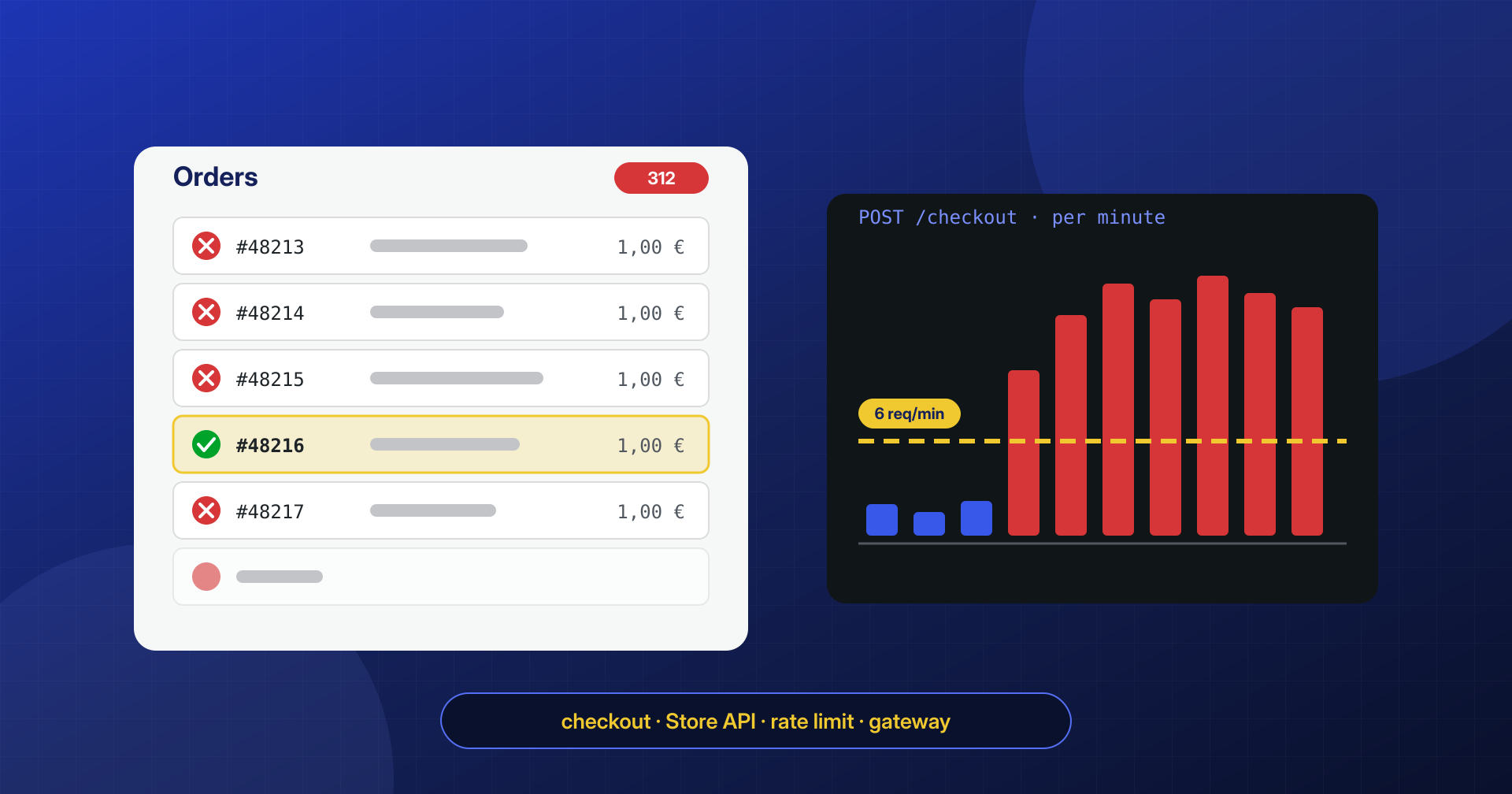
On Monday morning the WooCommerce order list is full: hundreds of failed orders that arrived overnight, all for the same product costing a few euros, with implausible names and nonsensical email addresses. Some went through. A few hours later an email arrives from the payment provider reporting an abnormal increase in declined transactions. The site shows no foreign scripts, the files are clean, and yet the store is under attack.
In carding, the store is not the target but the tool: someone else uses it to find out which stolen cards still work. The store, however, pays the bill.
This is card testing, or carding: the automated use of an online store’s checkout to verify stolen card numbers. In this article we look at how to recognize it, how to tell it apart from an actual infection, which WooCommerce endpoints are used, what defenses WooCommerce, the web server and the payment gateway offer, and how to clean up fake orders and customers without also deleting the traces you need.
What card testing is
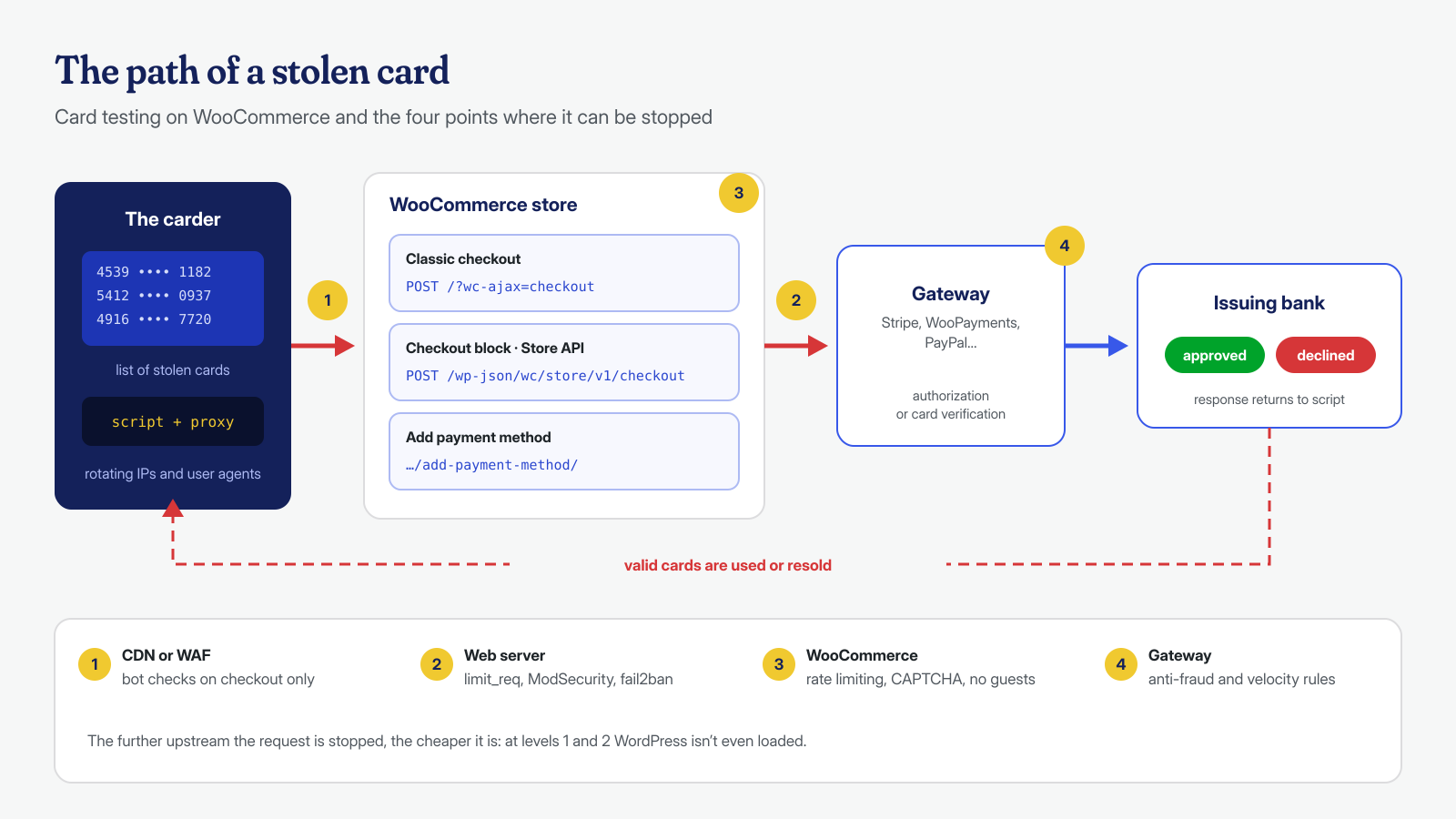
Whoever buys stolen payment card data, from a skimmer, a data breach or a list generated by enumeration, doesn’t know which cards are still valid. To find out, they try them with small payments on any store: if the transaction goes through, the card is good and can be used for larger purchases or resold at a higher price. Stripe’s documentation on card testing describes exactly this pattern: scripts that try large numbers of cards, collect the issuing banks’ responses and keep the valid ones.
A WooCommerce store is a convenient target for several reasons: guest checkout requires no registration, low-priced products or free-amount donations allow minimal charges, and the interface is standard, so a script written for one store works on thousands of others. The store isn’t chosen for what it sells: it’s chosen because it responds.
The consequences are real, though. Successful transactions with stolen cards turn into chargebacks and refunds, often with fees borne by the store; a high decline rate damages the merchant’s reputation with banks, which start declining legitimate payments too; and in the most serious cases the payment provider may suspend the account. On top of all this comes the load on the server, because every attempt is a dynamic request that goes through the entire WordPress stack.
Symptoms to recognize
Card testing has a fairly recognizable look, especially if you view the orders all together instead of one at a time:
- many orders with Failed or Pending payment status within a short interval, often at night;
- the same product, usually the cheapest, or the same amount repeated;
- randomly generated names and email addresses, billing addresses inconsistent with the card’s country;
- in the order notes, a series of gateway messages with generic decline codes, invalid card or insufficient funds;
- alerts from the payment provider, fraud warnings and, in the following weeks, chargebacks on the orders that went through;
- if registration at checkout is enabled, dozens of new customer accounts that were never used.
A wave of fake orders is not always card testing. Bank transfer or cash on delivery orders that stay on hold, with no payment attempts, are usually spam or sabotage; orders that exhaust stock without paying are aimed at your inventory. The distinction matters because the countermeasures are partly different, but the first steps, which means working out which endpoint is being used and by whom, remain the same.
Carding or skimmer?
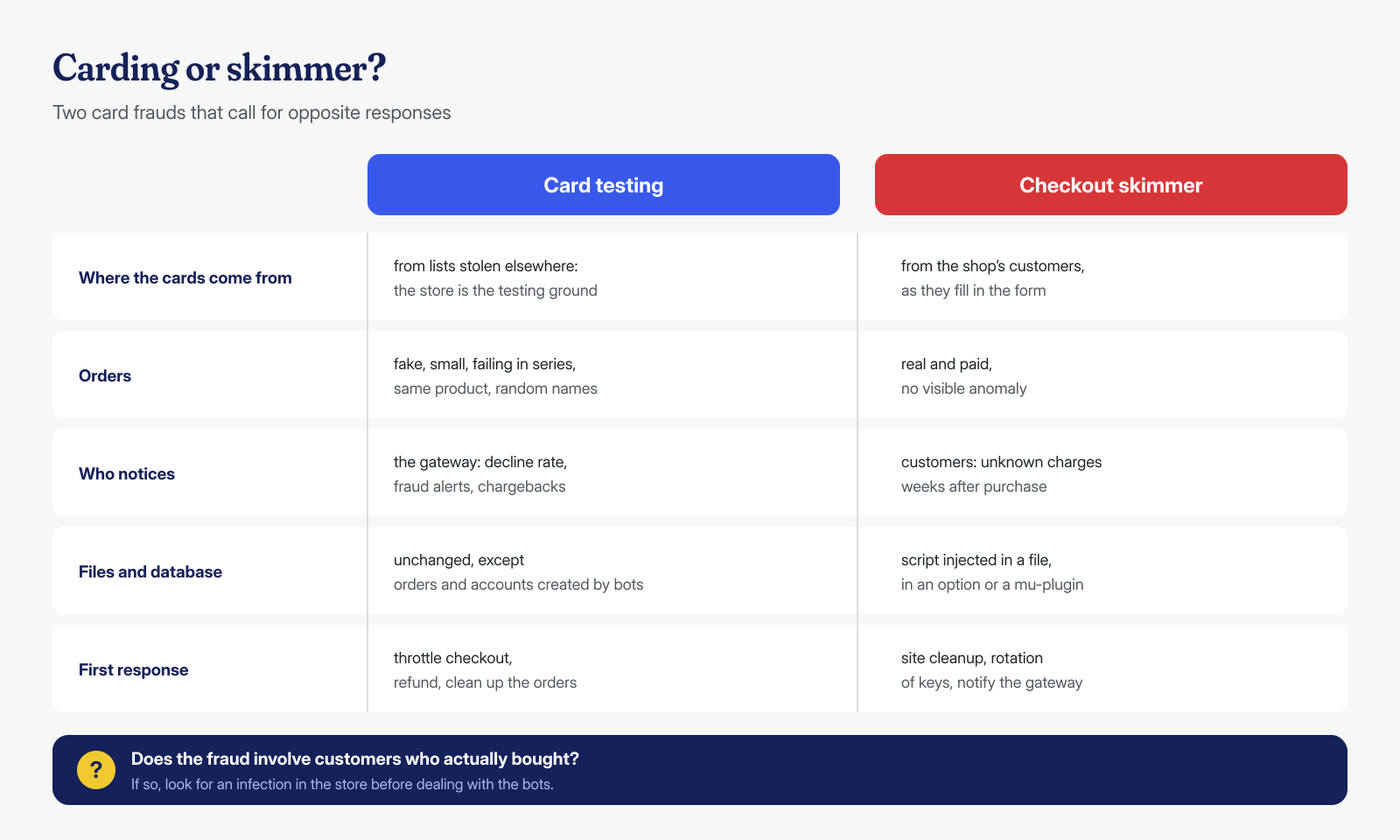
A store that receives card fraud reports should immediately ask itself one question: do the cards come from outside, or were they stolen here? In card testing the numbers are already in the attacker’s hands and the store merely serves as a testing ground: the orders are fake, the customers don’t exist, and the cards belong to people who have never visited the site. In a skimmer infection the opposite happens: the orders are real, the customers are real, and the fraud shows up days or weeks later on the cards of people who really bought.
Carding requires no compromise of the site and changes no files or database, apart from the orders it creates. A skimmer, on the other hand, is malicious code inserted into the store, and finding it takes the tools described in the article on JavaScript skimmers in the checkout. The two can also coexist: a store with an active skimmer exposes its own customers’ data, and those numbers sooner or later end up in the same lists that someone will try on other stores. If the reports concern real customers, look for an infection before dealing with the bots.
The endpoints being targeted
A card testing bot doesn’t fill in the checkout form the way a person would: it sends directly the requests the form would produce. In WooCommerce there are three main entry points. The classic checkout, the shortcode one, submits the order with a POST request to /?wc-ajax=checkout. The Checkout block instead uses the Store API, a public REST interface designed for frontends, with the endpoint /wp-json/wc/store/v1/checkout. Finally, the Add payment method page in the account area lets you save a card without buying anything, and Stripe’s documentation notes that checks performed when setting up a card are particularly attractive, because they usually don’t appear on the cardholder’s statement.
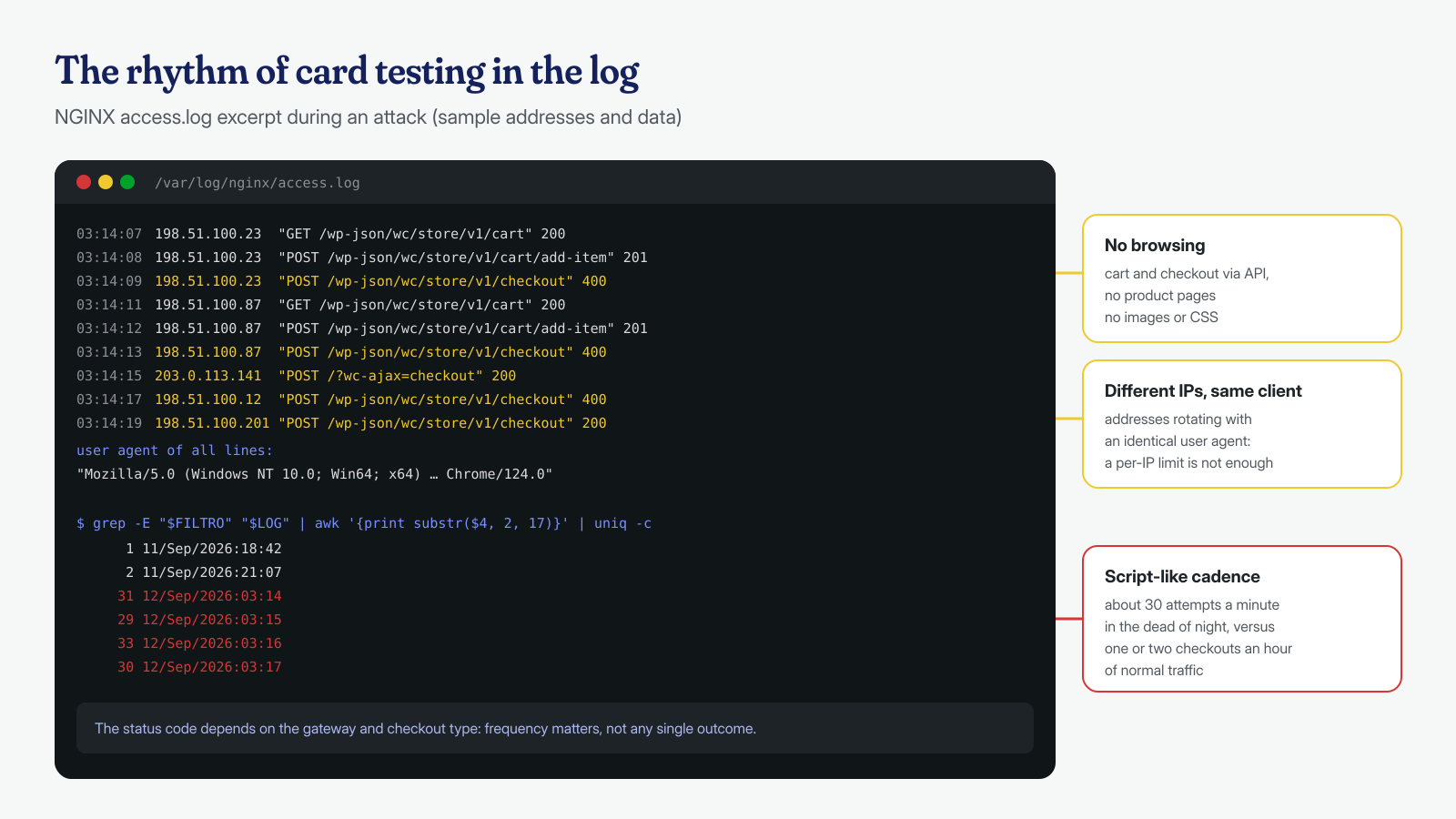
The Store API is convenient for bots because it is documented and predictable: you add a product to the cart, submit the checkout, read the JSON response. The nonce required for write operations is no obstacle, because any client gets it from the response to a simple cart request. The first step is therefore to work out, from the access logs, which of these routes is being used and from how many addresses:
LOG=/var/log/nginx/access.log
FILTRO='POST /(\?wc-ajax=checkout|wp-json/wc/store(/v1)?/checkout|\?rest_route=/wc/store)'

# IP addresses with the most checkout attempts
grep -E "$FILTRO" "$LOG" | awk '{print $1}' | sort | uniq -c | sort -rn | head -20

# Most frequent user agents on the same requests
grep -E "$FILTRO" "$LOG" | awk -F'"' '{print $6}' | sort | uniq -c | sort -rn | head -10

# Attempts per minute: a regular peak is the signature of a script
grep -E "$FILTRO" "$LOG" | awk '{print substr($4, 2, 17)}' | uniq -c | tail -30
The crudest attacks come from a few addresses with conspicuous user agents, such as python-requests or curl, or with an identical browser user agent across thousands of requests. The more sophisticated ones rotate addresses through residential proxies and vary the user agent, and then the signal becomes the cadence: checkout requests without the product page and cart visits a real customer would make first. In the article on Apache, NGINX and LiteSpeed access logs you’ll find how to read these files on other configurations too.
Defenses built into WooCommerce
WooCommerce includes a rate limiting system for the Store API, but, as the developer documentation explains, it is disabled by default. Since version 9.6 you can enable a stricter limit on the checkout alone directly from the admin panel, under WooCommerce → Settings → Advanced → Features, with the entry dedicated to rate limiting for the Checkout block and the Store API: it applies to order submission and allows at most three requests every 60 seconds. For the rest of the Store API the limit is configured with a filter, for example in a must-use plugin:
<?php
// wp-content/mu-plugins/store-api-rate-limit.php
add_filter(
	'woocommerce_store_api_rate_limit_options',
	function () {
		return array(
			'enabled'       => true,
			'proxy_support' => false, // true only behind a CDN or proxy that sets X-Forwarded-For
			'limit'         => 25,    // requests allowed…
			'seconds'       => 10,    // …in this window
		);
	}
);
Two details matter. The limit is calculated per logged-in user or per IP address, and behind a CDN all visitors appear to come from the CDN’s addresses: that’s why proxy_support exists, but it should be enabled only if the site is really behind a trusted proxy, otherwise a bot can write whatever X-Forwarded-For header it likes and change address on every request. And a per-IP limit does little against attacks that rotate addresses: the WooCommerce team itself admits this in an article dedicated to card testing, which from version 9.8 introduces the woocommerce_store_api_rate_limit_id filter to base the limit on a fingerprint other than the address.
The same article points to the second tool, CAPTCHA, with a warning: several CAPTCHA plugins protected the classic form but not the Store API, and a bot using the API bypassed them without even noticing. When choosing a plugin, check that it explicitly protects the Checkout block. The picture is completed by the measures suggested in the WooCommerce guide to card testing: disable guest checkout during an attack, remove or hide very low-priced products and free-amount donations, and restrict saving cards in the account area.
Rate limiting and web server rules
Defenses inside WooCommerce have a structural limitation: every request, even one that will be rejected, loads WordPress, the plugins and the database. During an intense attack it’s better to stop requests earlier, at the web server, where they cost almost nothing. With NGINX you can apply a rate limit to checkout requests only, leaving the rest of the site untouched:
# http {} block: the key is empty for every request that is not checkout,
# and requests with an empty key are not counted
map $request_method $rmw_post {
    POST    1;
    default 0;
}
map "$rmw_post$request_uri" $rmw_checkout {
    default                                        "";
    "~^1/wp-json/wc/store(/v1)?/checkout"          $binary_remote_addr;
    "~^1/\?rest_route=(/|%2F)wc(/|%2F)store"       $binary_remote_addr;
    "~^1/.*[?&]wc-ajax=checkout"                  $binary_remote_addr;
    "~^1/[^?]*/add-payment-method"                 $binary_remote_addr;
}
limit_req_zone $rmw_checkout zone=checkout:10m rate=6r/m;

# server {} block of the store
limit_req zone=checkout burst=3 nodelay;
limit_req_status 429;
Six attempts per minute per address, with a small tolerance, are more than enough for a customer who mistypes the card number twice. The path of the add payment method page depends on the language and the account area settings, so it needs to be adapted to the store. On Apache and LiteSpeed the same result can be achieved with ModSecurity rules or the server’s connection limits, and fail2ban can read the log and block in the firewall the addresses that exceed a threshold.
Against attacks distributed across thousands of addresses, the most effective level is even further upstream: a CDN or a WAF with bot management, which can present a challenge only on checkout pages or only to traffic with a dubious reputation. In an emergency, even a rule that temporarily blocks the checkout Store API, if the store uses the classic checkout and doesn’t need it, closes an entire door.
Payment gateway protections
The gateway sees all of the store’s transactions and, for the larger providers, those of a great many other merchants: it is in the best position to recognize a card that is being tried everywhere. Stripe, for example, describes in the documentation cited above automatic controls against card testing, including rate limits, detection models and CAPTCHAs triggered when it recognizes an attack, provided you use the recommended integrations and pass data such as IP address, email and billing address. With Radar you can then add custom rules, including velocity rules, if your plan includes them: for example, blocking more than a certain number of different cards from the same address within an hour. WooPayments, PayPal and the other providers also offer similar anti-fraud tools, to be configured in the gateway’s dashboard.
There is also an aspect that connects card testing to the security of the site. The gateway’s API keys are stored in the plugin settings, in the database. If the site has been compromised, even months earlier, the secret key may have fallen into the wrong hands, and with it an attacker creates payments directly on the provider’s API, without going through the store and therefore leaving no trace in the site’s logs. If the gateway’s alerts don’t match the WooCommerce orders, the first thing to do is rotate the keys, and the second is to find out where they leaked from.
Cleaning up fake orders and customers
Once the attack is stopped, hundreds of orders and perhaps accounts remain to be cleared out. Resist the temptation to delete everything in bulk: first refund, from the gateway dashboard or from WooCommerce, the payments that went through with stolen cards, as the WooCommerce guide itself recommends, to keep them from turning into chargebacks. Then export the list of suspicious orders, which the payment provider will need, along with any reports you file. With WP-CLI you can extract a list to review, independent of how orders are stored:
<?php
// ordini-sospetti.php — run with: wp eval-file ordini-sospetti.php > sospetti.tsv
$ids = wc_get_orders(
	array(
		'status'       => array( 'failed', 'pending' ),
		'date_created' => '>' . ( time() - 2 * DAY_IN_SECONDS ),
		'limit'        => -1,
		'return'       => 'ids',
	)
);
foreach ( $ids as $id ) {
	$o = wc_get_order( $id );
	printf(
		"%d\t%s\t%s\t%s\t%s\t%s\n",
		$id,
		$o->get_created_via(),
		$o->get_customer_ip_address(),
		$o->get_billing_email(),
		$o->get_total(),
		$o->get_customer_user_agent()
	);
}
# After checking sospetti.tsv by hand: delete the listed orders
cut -f1 sospetti.tsv | xargs -I{} wp wc shop_order delete {} --force=true --user=1
# Customer accounts created during the attack, most recent first
wp user list --role=customer --fields=ID,user_login,user_email,user_registered \
--orderby=registered --order=DESC --number=100
# Delete the ones verified as fake (example IDs)
wp user delete 4812 4813 4814 --yesThe created_via column tells you whether the order came from the classic checkout (checkout) or the Store API (store-api), and helps confirm which door to close. Before deleting, keep a database dump as well: if the payment provider asks for details weeks later, that data can no longer be recovered.
Card testing in itself doesn’t require a cleanup, but it often arrives together with something else: exfiltrated gateway keys, a skimmer that fed the same lists, unknown administrators in a neglected store. If the clues point in that direction too, we analyze files, database and system with a cleanup guaranteed in 6, 12 or 24 hours for every WordPress installation; get in touch with the information you’ve gathered from the logs and the gateway.
