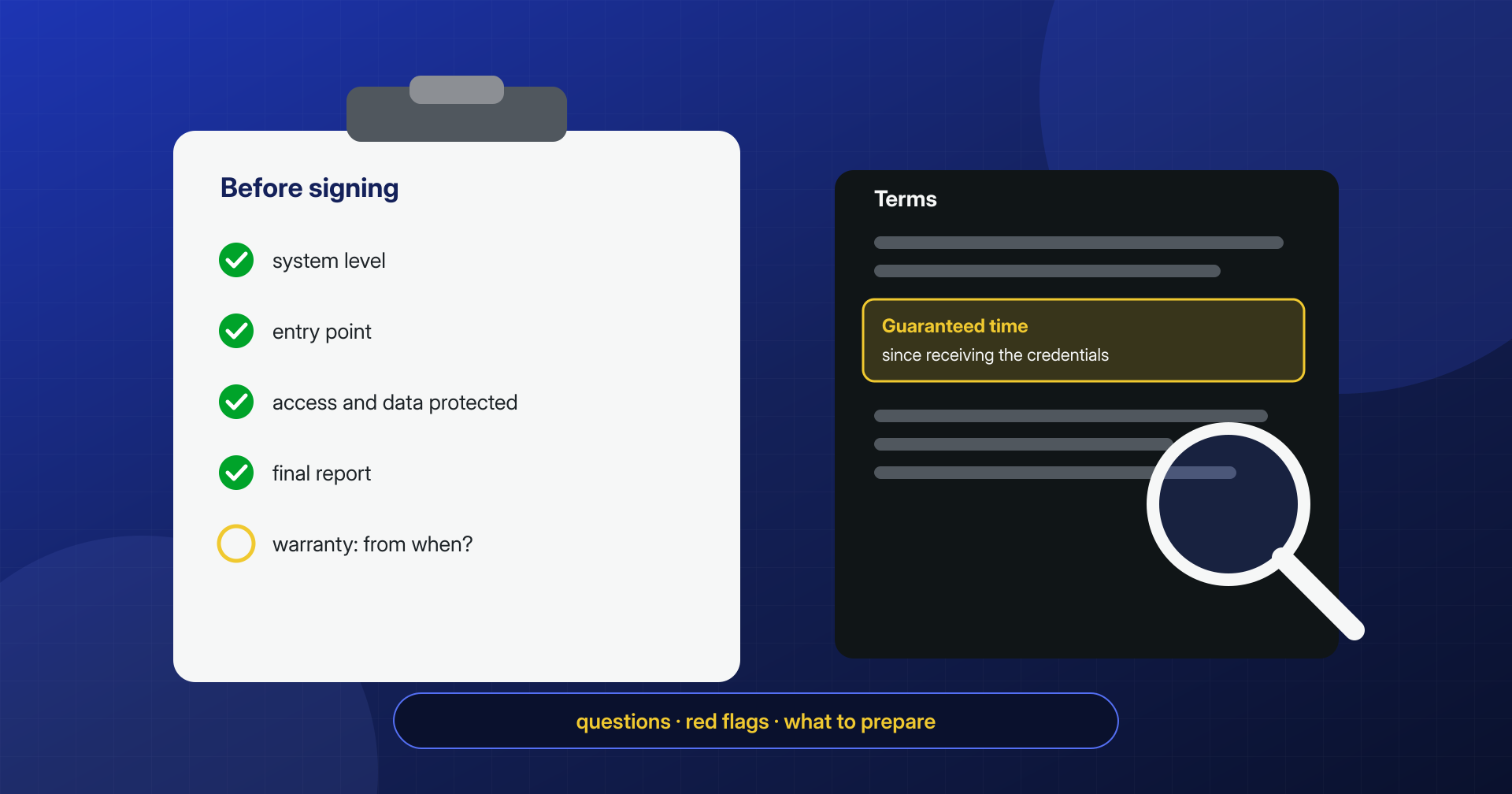
People looking for a malware removal service usually do it at the worst possible moment: the site redirects to scam pages, Google shows a red warning, the hosting provider has suspended the account. Under those conditions the temptation is to trust the first provider who promises a “clean site in an hour” at a low price. Sometimes that works out. Often, a week later, the infection is back exactly as before, because the symptom was removed and not the cause.
A well-done cleanup is not recognized by the site working again, but by three things the client receives at the end: an explanation of how the attacker got in, a list of everything that was found and removed, and a guarantee with clear terms.
This is a guide for people who have to choose, written by people who do this work but meant to be useful whichever provider you pick. It contains the questions to ask before handing over your site, the answers that should reassure you, the warning signs, and what to prepare so you don’t lose time. At the end we say in a few lines how we answer, because it’s only fair that we take the same exam.
What a cleanup must achieve
Before comparing providers, it helps to be clear about the result you are buying. A complete cleanup has four goals: remove the visible malicious code, meaning redirects, spam, and injected scripts; remove the persistence, meaning everything that lets the attacker come back, from backdoors to added users to cron jobs; find and close the entry point; and document what was done, including for any obligations toward customers and authorities. A service that covers only the first point delivers a site that looks clean and isn’t.
The second and third points are what really separate providers, because they require time, experience, and access that goes beyond the WordPress dashboard. They are also the ones the client cannot verify alone by looking at the site, which is why the questions must be asked beforehand.
Do they work at the system level too?
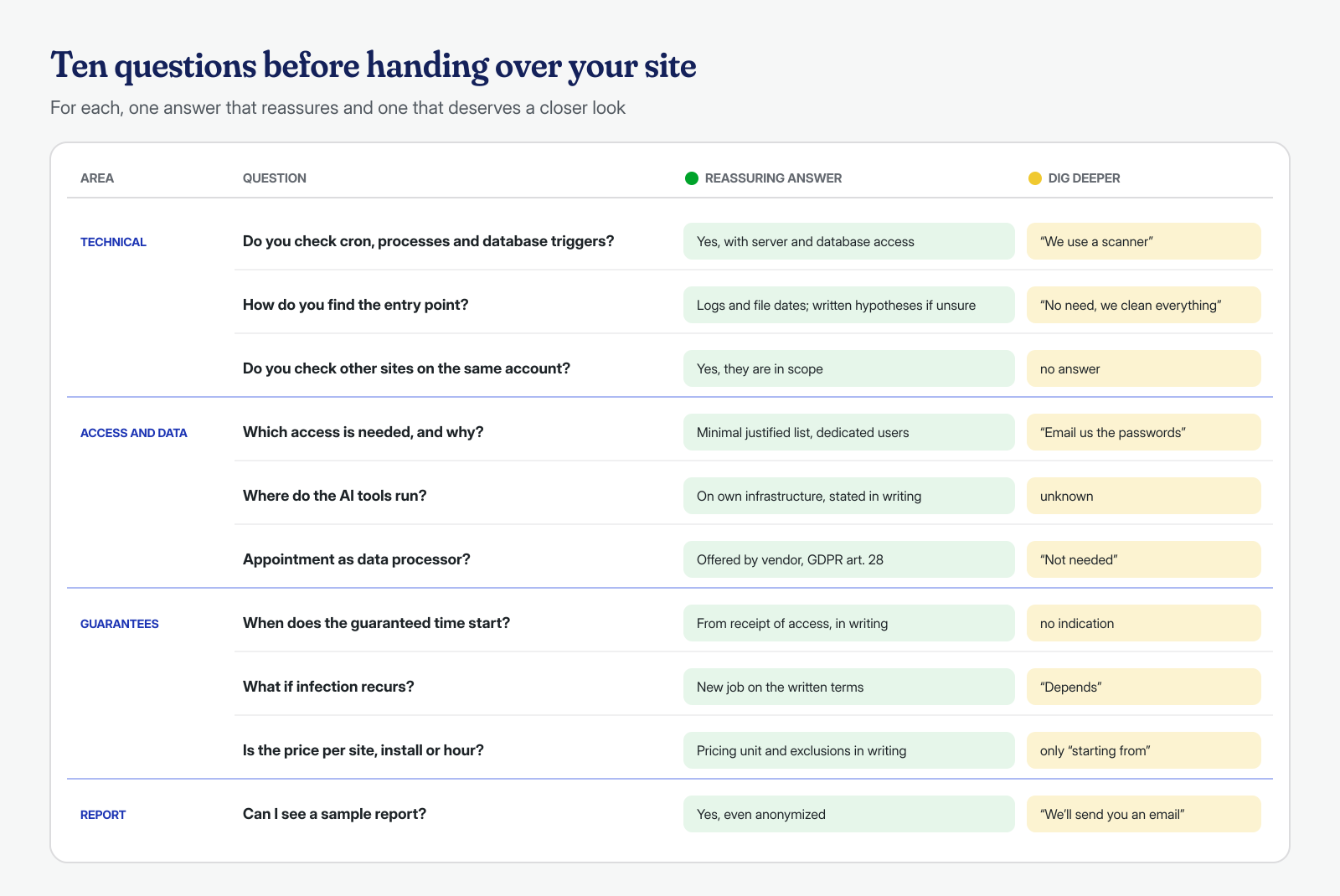
The most important question is how far the inspection reaches. Many infections live only in the WordPress files, and for those a tool that works from the dashboard may be enough. The infections that come back, however, usually have a piece outside WordPress: a system user’s cron job that re-downloads the backdoor every hour, a PHP process left in memory after its file was deleted, a database trigger that recreates an administrator, another site on the same hosting account that reinfects all the others, as we describe in the article on cross-site contamination. None of these is visible to a plugin installed in the site.
The concrete questions are: do you check the user’s crontab and the system ones? Do you check running processes? Do you examine database triggers, procedures, and events, and not just the WordPress tables? Do you look at the other sites on the same account? How do you handle files obfuscated or encrypted with ionCube and similar tools? A serious answer names specific tools and access; a vague answer, or “our scanner finds everything,” points to a check that stops at the application. The reason is explained in the article on the limits of scanners: a scanner is an excellent first step, but it only sees what resembles something already known.
Do they find the entry point?
A cleaned site with the door still open will be reinfected, often by the same automated bots, within days. Identifying the vector requires reading the web server’s access logs, cross-referencing them with file modification dates, comparing plugin versions against known vulnerabilities, and sometimes tracing back to credentials stolen from the computer of whoever manages the site. You don’t always reach certainty, especially if the logs were deleted or kept for only a few days.
That is why the right question is not “do you guarantee to find the vector?”, to which no honest provider can answer yes in absolute terms, but “how do you look for it, and what will you write me if you don’t find it?” A good answer describes the method and, in case of uncertainty, provides a list of the plausible hypotheses with the measures taken to close them all: updating or removing vulnerable components, changing all credentials, server-level blocks.
What access they ask for and how they protect it
System-level work requires real access: SSH or SFTP, the database, the hosting panel, WordPress administration. It is normal for these to be requested, and being wary of a provider who doesn’t ask is more reasonable than being wary of one who does. What matters is the way and the precautions. A careful provider asks for the minimum necessary and explains why each access is needed, suggests creating dedicated users instead of sharing personal ones, names a secure channel for receiving passwords, not plain email or just any chat, and at the end explicitly asks you to revoke or change everything.
The questions to ask: who will actually work on the site, employees or outside contractors? Where are the credentials stored and for how long? Is a copy of the site and data made on your systems, and when is it deleted? The answers to these questions are also the basis for the contractual aspect we cover below.
It is also worth asking how communication works during the job. Who is the point of contact, how do you get updates, what happens if the work requires taking the site offline or disabling a plugin that orders depend on? Work on a company’s site touches different people, from the owner to the agency that manages it to the hosting provider, and a provider used to these situations knows to ask for authorization before making changes that affect the business, not after. If the site sells online or collects leads, agreeing in advance on the windows in which work can be done avoids arguments once the job has started.
Evidence and the final report
The reflex of anyone cleaning a site in a hurry is to delete everything suspicious right away. But the malicious files, their dates, and the log lines are the evidence needed to understand what happened, to assess whether personal data was accessed and, if you decide to file a complaint, to document it. A serious provider keeps a copy of the site and database in the state in which they found them, before intervening, following the same principle described in the article on the first two hours after an attack.
Then, at the end, the report. Ask to see an example, even an anonymized one, before signing. A useful report contains at least: the reconstructed timeline of the incident, the entry point identified or the hypotheses, the list of files and records removed or modified with their paths, the persistence elements found outside WordPress, the credentials to change, guidance on any personal data involved, and recommendations to prevent a repeat. If the site holds customer data, that document becomes the basis for deciding whether to notify the breach, as we explain in the article on GDPR and a hacked site. A “done, the site is clean” in an email is not a report.
Guarantees, timing, and price: read the terms
Timing and guarantees are where commercial promises drift furthest from reality. The questions to ask are precise. From when does the promised time count: from payment, from first contact, or from the moment the provider has received all the necessary access? The third answer is the most honest, because without access nobody can work, but it must be written down together with the list of access required. What happens if the infection comes back: is a new intervention included, within what period, and under what conditions? It is reasonable for the guarantee to lapse if the client doesn’t apply the indicated measures, such as updating a vulnerable plugin or changing a password, but these conditions must be written down beforehand.
On price, the key question is what it is calculated on. Per site, per WordPress installation, per hosting account, hourly? Is a multisite with twenty sites one installation or twenty? Are the review request to Google for blacklist removal, restoring from backup, updating components, and the final hardening included? A low price that excludes half of these items can cost more than a clear one that includes them. Be wary of the opposite too: promises of “lifetime protection” without conditions correspond to nothing a provider can truly guarantee.
Artificial intelligence, personal data, and confidentiality
A WordPress site almost always contains personal data: registered users, orders, contact form messages. Whoever carries out the cleanup processes it on behalf of the owner, and the General Data Protection Regulation provides, in Article 28, that the relationship with a processor be governed by a contract or other legal act with specific content: processing only on documented instructions, confidentiality, security measures, rules for any sub-processors, and deletion or return of the data at the end. A provider used to working with companies proposes the appointment without being asked, and signs a confidentiality agreement if needed.
Today many services use artificial intelligence models to analyze code and logs, and there is nothing wrong with that: they are useful tools for quickly examining obfuscated files or millions of log lines. The question to ask is where they run. If the site’s files, database, or logs are sent to the APIs of an outside provider, the site’s data, including the personal data that logs and dumps contain, leaves the agreed perimeter and that provider effectively becomes a sub-processor. If the models run on the provider’s own infrastructure, as in the approach described in the article on log analysis with local AI, the data stays where it is. In both cases the answer must be clear and in writing.
Warning signs and what to prepare
Some answers should give you pause before you sign. “We install a security plugin and run a scan,” with nothing else, is a check the owner can do alone. “We reinstall everything from scratch” sounds radical, but if it doesn’t include analysis of the database, cron jobs, and the vector, it brings the same problem back online with new files; and if the restore comes from an unverified backup, it can bring the backdoor back too, as we explain in the article on backups that bring the malware back. No written report, guarantees without conditions, no questions about access, full upfront payment without a quote describing the work: all are signs of a superficial job.
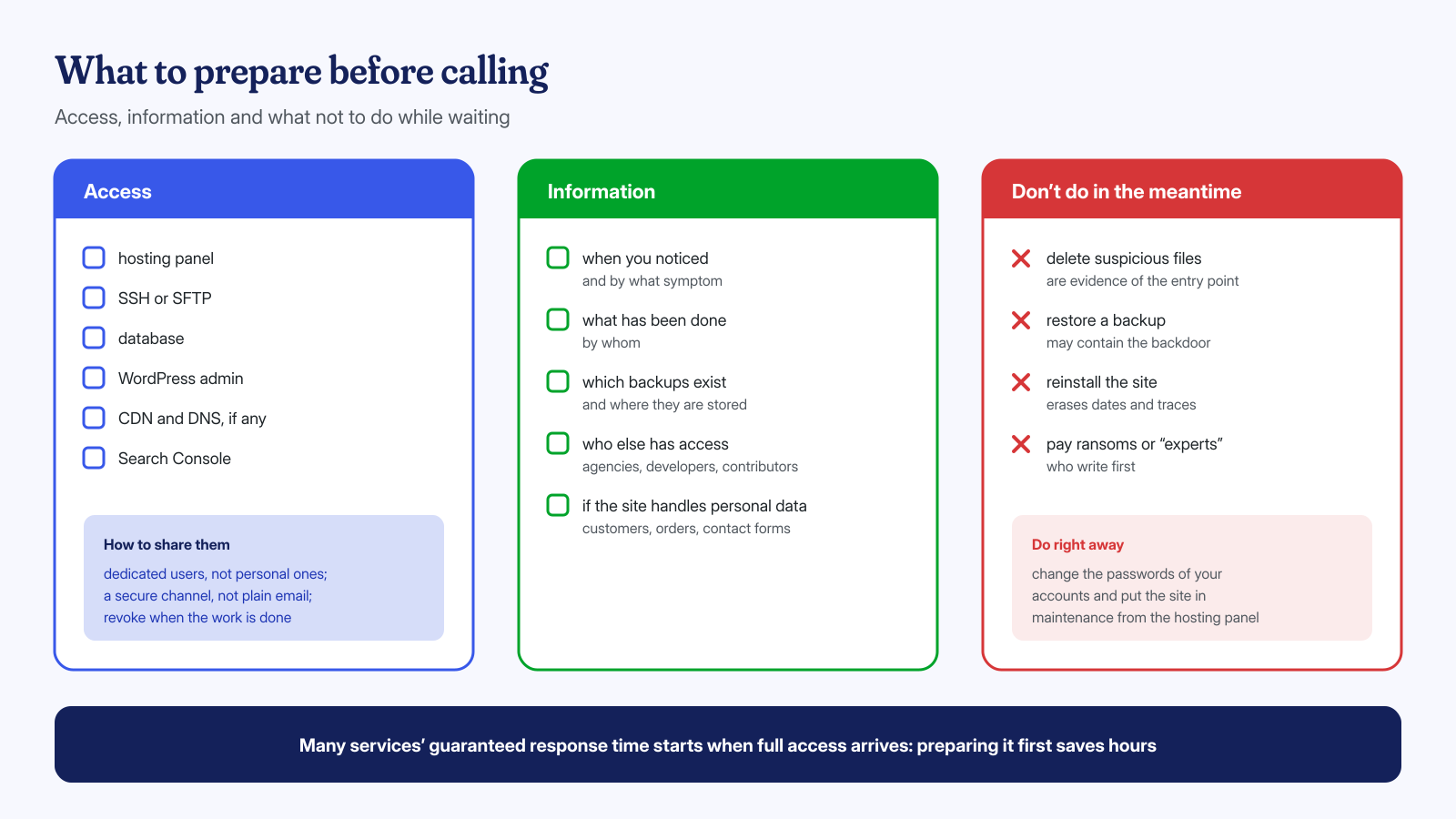
On the other side, the owner can save precious hours by preparing a few things before the first contact. Access, first of all: hosting panel, SSH or SFTP, database, a WordPress administrator, and if present also CDN, DNS, and Search Console. Then information: when and how you noticed the problem, what has already been done and by whom, which backups exist and where they are kept, who else has access to the site, agencies and developers included. And one warning: don’t delete files and don’t restore backups before someone has had a chance to look at the current state.
For completeness, here is how we answer these questions. We work at both the application and system level: files, the database with triggers and events, cron jobs, processes, other sites on the same account. We look for the entry point in the logs and document it, and we preserve the initial state before intervening. We use open-weight artificial intelligence models that run on our own infrastructure, without sending data to third parties. We guarantee the cleanup in 6 hours for €399, in 12 hours for €299, or in 24 hours for €199, plus VAT, per WordPress installation, with the time counting from receipt of the necessary access, and we deliver a technical report. If you want to ask us these questions directly, write to us.
