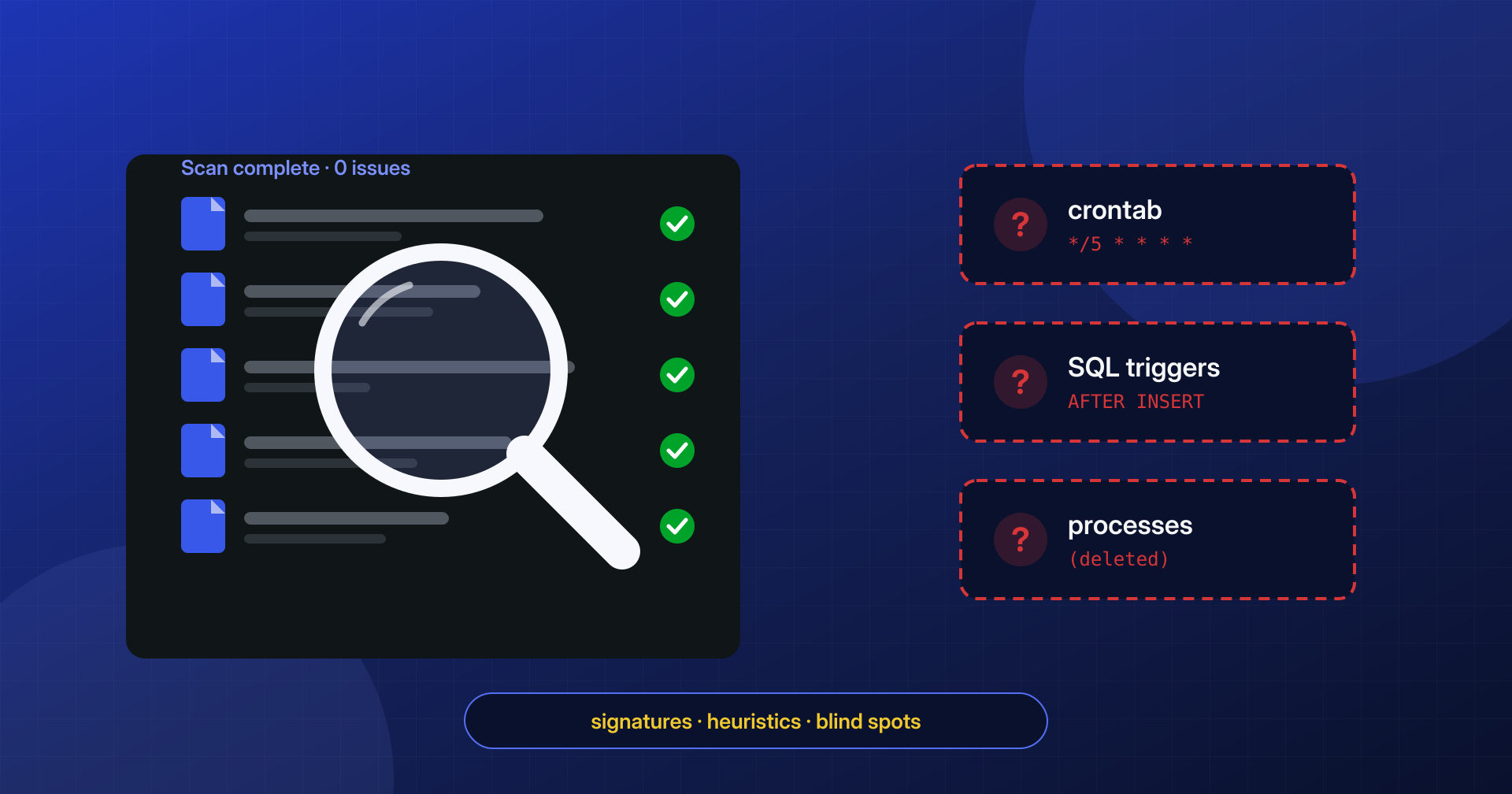
“I ran a scan and it found nothing.” It is one of the phrases we hear most often from people who contact us, usually right before “and yet the site keeps redirecting to a betting site.” It is not a paradox, and it does not mean the installed security plugin is poor quality: it means every scanner has a field of view, and modern malware is written specifically to stay outside that field.
Tools such as Wordfence, Sucuri, MalCare or iThemes Security (now Solid Security) do useful work and block an enormous number of automated attacks every day. Understanding where their reach ends helps you use them better, not throw them away. In this article we look at how they work, why some infections stay invisible and what you need to add before you can consider a site truly clean.
How a signature-based scanner works
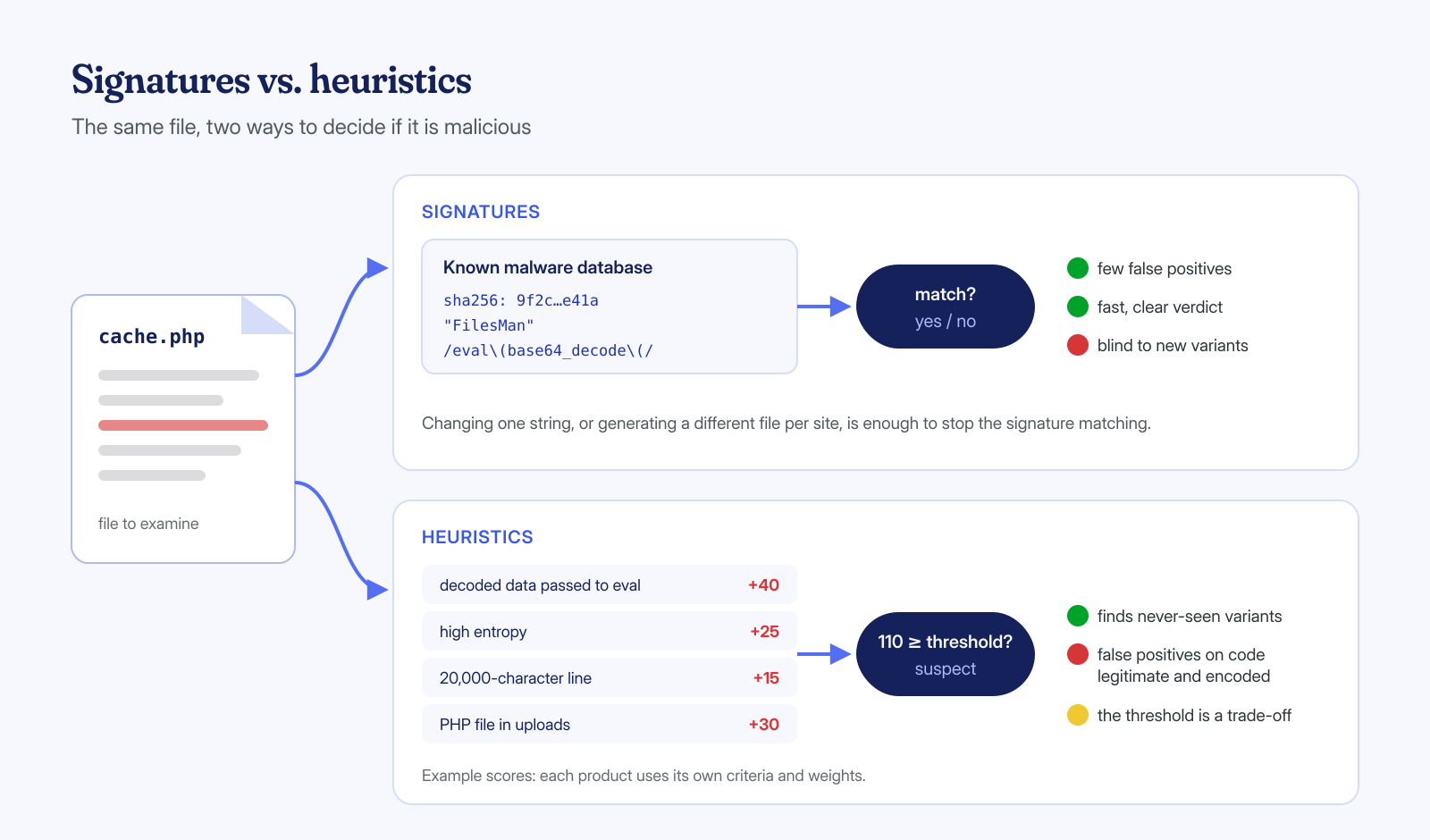
At the heart of most scanners is a database of signatures: fingerprints and patterns that describe malware already seen and analyzed. A signature can be the hash of an entire file, an exact string, or a regular expression that recognizes a family of variants. The scanner reads the site’s files, compares them with the database and reports matches.
Alongside signatures, almost all of them run an integrity check: they compare the WordPress core files, and the plugins and themes published on WordPress.org, with the original versions, and report anything modified or added. It is the same principle as the WP-CLI verification commands, which are worth knowing because they can be run from the command line without installing anything:
# Compare core files with the checksums published by WordPress.org
wp core verify-checksums --skip-plugins --skip-themes

# Same check for plugins in the official repository
wp plugin verify-checksums --all --skip-plugins --skip-themes
The integrity check has a precise scope too. It works only for things that have a public original with published checksums: the core and the components in the official repository. A theme bought on a marketplace or a commercial plugin has no published checksums, and a file added to wp-content/uploads or to a purpose-made folder has no original to be compared with. Moreover, the core verification reports modified or extra files among those of the core, but deliberately leaves out the entire wp-content folder.
This approach has two great advantages: it is fast and produces few false alarms. If a file matches the signature of a known webshell, it is almost certainly a webshell. The drawback is the mirror image: a signature recognizes only what someone has already seen, and only in the form in which they saw it.
Signatures and heuristics: two approaches, two opposite limits
To cover new variants, the more advanced scanners add heuristic rules to signatures: instead of looking for specific code, they look for suspicious characteristics. A decoding function whose result ends up in eval, lines thousands of characters long, high-entropy strings, a PHP file inside wp-content/uploads, a file whose modification date differs from all its neighbors. Each characteristic adds to a score, and above a threshold the file is flagged.
Heuristics find things no signature knows, but they pay a price: legitimate code also uses base64_decode, some commercial plugins are distributed encoded with ionCube or SourceGuardian, and some themes compress their own resources into very long strings. Lowering the threshold means flooding the user with alerts; raising it means letting through malware written with even minimal care. No scanner can afford too many false alarms, because a user who gets twenty a week stops reading them.
Then there is time. Between the appearance of a new variant and the publication of the matching signature, hours or days pass, and not everyone receives signatures at the same moment: Wordfence, for example, states that the free version receives new firewall rules and new malware signatures 30 days after the paid version. It is a legitimate commercial choice, but it should be kept in mind when reading a “clean” result.
The scanner runs inside the compromised application
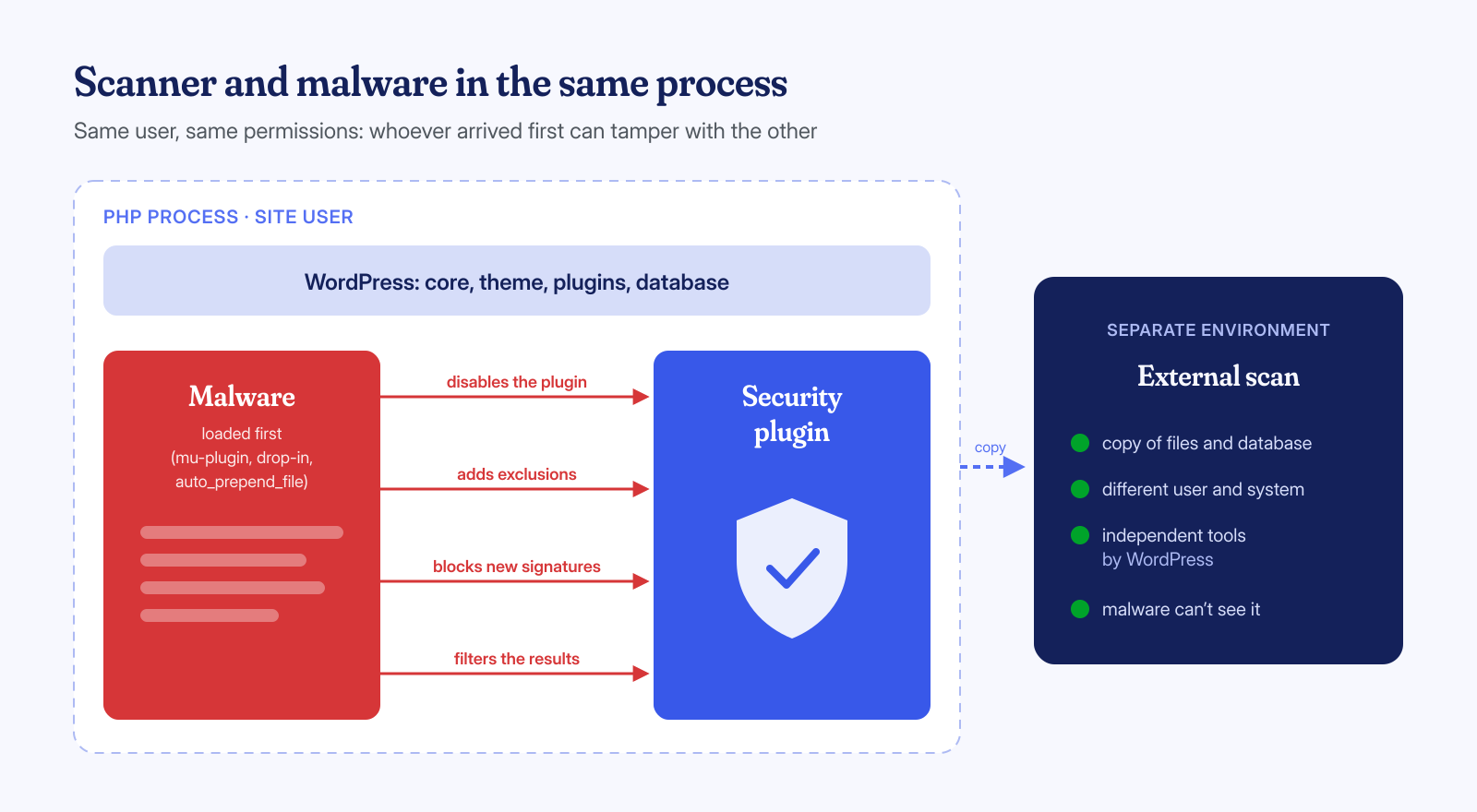
The most underestimated limit is not about signatures but about position. A security plugin is PHP code run by WordPress, with the same system user and the same permissions as the rest of the site. If the attack has gained the ability to run code or write files, it has exactly the same powers as the scanner, and it had them first.
In practice we have seen malware that:
- deactivates the security plugin by modifying the
active_pluginsoption in the database, or makes it inert by renaming its folder; - adds its own files to the exclusion list, or marks alerts already issued as “ignored”;
- intercepts WordPress’s HTTP requests to block the download of updated signatures;
- loads from a mu-plugin or a drop-in, before the regular plugins, and filters what they can see;
- rewrites itself right after being removed, because a scheduled task restores it from a hidden copy.
This is not a flaw of any specific product: it is a structural consequence. For the same reason no serious antivirus trusts an already compromised operating system, and forensic analysis is done on a copy, from a clean environment. When the question is “is this site compromised?”, the most reliable answer comes from a check run outside the site.
Obfuscated, encoded and polymorphic code
Whoever writes WordPress malware knows the signatures of the most widespread scanners, because anyone can install them for free. The simplest way around them is to never write, in the file, the strings the signatures look for. A minimal example of the principle:
// Classic form: any signature recognizes it
eval(base64_decode($_POST['x']));

// Same intent, none of the strings a literal signature looks for
$f = str_rot13('onfr64_qrpbqr');   // becomes "base64_decode"
$p = $_POST[chr(120)];             // equals $_POST['x']
$d = $f($p);                       // the decoded code is then executed elsewhere
Real variants are far more elaborate: chains of gzinflate, str_rot13 and base64_decode repeated dozens of times, variable names generated randomly for each infection, strings split and reassembled, code hidden in an image’s metadata or in a database option and rebuilt on the fly. Polymorphic malware generates a different version for each site, so the hash of one infected file is no use in recognizing the one on the site next door.
Files encoded with commercial encoders such as ionCube, Zend Guard or SourceGuardian are a case apart. A PHP-based scanner cannot read their contents: it can only note that the file is encoded. Since many legitimate plugins are distributed this way, the scanner usually stays silent. As we explain in the article on obfuscated and encoded files, verification means comparing against the vendor’s original package, not reading the file.
What a plugin cannot see
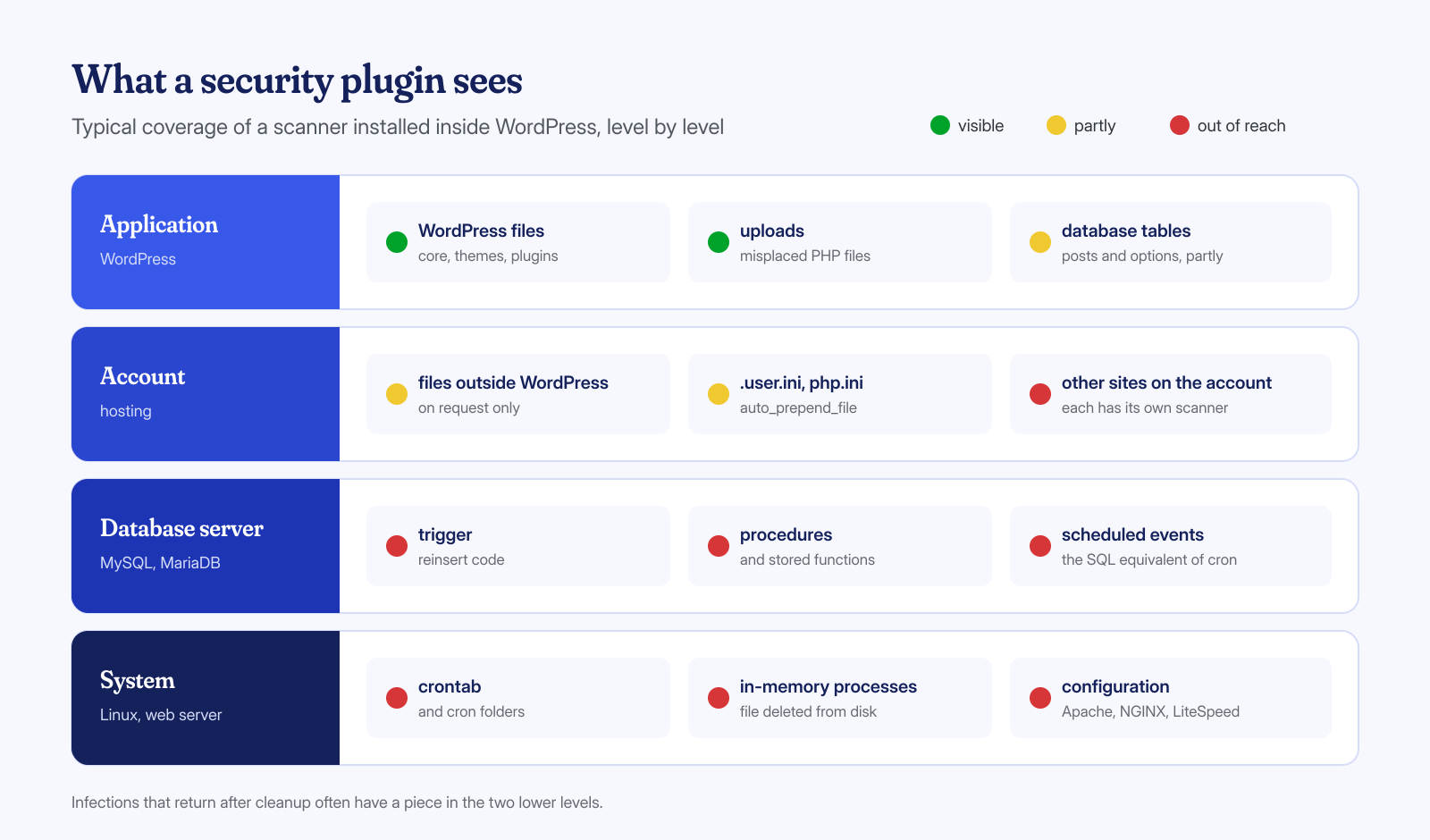
Even the best scanner only looks at what its vantage point lets it reach. A WordPress plugin sees the installation’s files with good precision and, in part, the database content, such as posts and options. Beyond that perimeter, visibility drops quickly:
- files outside the installation: other sites in the same account, folders above the document root,
.user.inifiles withauto_prepend_file. Some scanners, such as Wordfence, can extend the scan beyond the WordPress folder, but the option is off by default and remains limited to the site user’s permissions; - database objects other than tables: SQL triggers, procedures and events that reinsert code or users on every save;
- system scheduled tasks: the user’s crontab and the cron folders, where the backdoors that reinfect the site hide;
- processes in memory: a PHP process that has deleted its own file from disk leaves nothing to scan, as we describe in the article on “deleted” processes;
- server configuration: modified Apache, NGINX or LiteSpeed rules, loaded modules, PHP-FPM configurations.
Remote scanners, such as Sucuri SiteCheck, have yet another field of view: they see pages as the server returns them to a visitor, and so catch redirects, injected scripts and blacklists, but cannot see the files. If the malware shows the malicious content only to certain visitors, for example mobile users or those arriving from Google, the remote scanner may never receive the infected version.
Anyone with command-line access can check these levels directly. Some starting points:
# Triggers and scheduled events in the site database
mysql -e "SELECT TRIGGER_NAME, EVENT_OBJECT_TABLE FROM information_schema.TRIGGERS
          WHERE TRIGGER_SCHEMA = 'nome_db';
          SELECT EVENT_NAME, STATUS FROM information_schema.EVENTS
          WHERE EVENT_SCHEMA = 'nome_db';"

# Scheduled tasks of the site user
crontab -l

# Processes whose executable no longer exists on disk
ls -l /proc/*/exe 2>/dev/null | grep '(deleted)'

# PHP directives that load code before every page
grep -rn 'auto_prepend_file\|auto_append_file' ~ --include='.user.ini' --include='php.ini' --include='.htaccess'
False negatives and false positives
A false negative, an infected file the scanner does not flag, is the most obvious risk: it creates a false sense of security and postpones the real cleanup. But false positives have a concrete cost too. A legitimate file that is flagged and deleted can break the site; an encoded commercial plugin mistaken for malware and removed can take down an e-commerce store. And a user used to false alarms learns to click “ignore” without reading, which is exactly what an attacker needs.
For this reason the result of a scan should be read as a clue, not a verdict. “No problems found” means “none of the things this tool knows how to recognize, in the places where it can look.” A flag, in turn, means “this file deserves a look,” not “this file must be deleted.” The difference is made by whoever interprets the result, with context: how long the file has existed, who created it, whether it matches the original, whether it appears in the logs.
A typical example of the cases that reach us: the scanner flags a file in the cache folder, the site manager deletes it, the next scan comes back clean and the problem seems solved. The next day the file is back, with a different name. The scanner did its job, recognizing the payload; what it could not see was the mechanism that recreated it, in that case a scheduled event in the database. The “clean” result of the second scan was true and, at the same time, misleading.
A clean scan tells you what the scanner did not find, not what the site does not contain.
How to use scanners well
Nothing said above is a reason to uninstall the security plugin. Application firewall, login attempt limiting, two-factor authentication, alerts on file changes and on vulnerable plugins concretely reduce the risk of infection, and they are where these tools do their best work. The point is not to ask them for something they cannot do, namely to certify that an already compromised site is clean again.
A few measures help you get the most out of them:
- use both an internal and an external scanner, because they look at different things;
- complement scans with the WP-CLI integrity check and, for commercial plugins, a comparison against the package downloaded from the vendor’s customer area;
- when you suspect an infection, analyze a copy of the files from a separate environment, with tools that do not depend on WordPress, such as ClamAV, YARA rules or simple searches with
grepandfind; - periodically check the database, crontab and processes, which no plugin covers fully;
- keep the server logs long enough to reconstruct where an attack came in.
Our approach
When we analyze a site we work from the outside: on a copy of files and database, with system access to examine crontab, processes, configurations and logs. Alongside signatures we use integrity checks, entropy and file-structure measurements, recognition of commercial encoders and a comparison with original packages. Cases that match nothing known, including possible not-yet-public vulnerabilities, we triage with open language models run on our own servers, and every hypothesis is then verified by a person.
If your security plugin says everything is fine but the symptoms remain, it is time to look at the levels it cannot see. The cleanup of a WordPress installation is guaranteed within 6, 12 or 24 hours depending on urgency; you can tell us what is happening and we will tell you where we would start.
