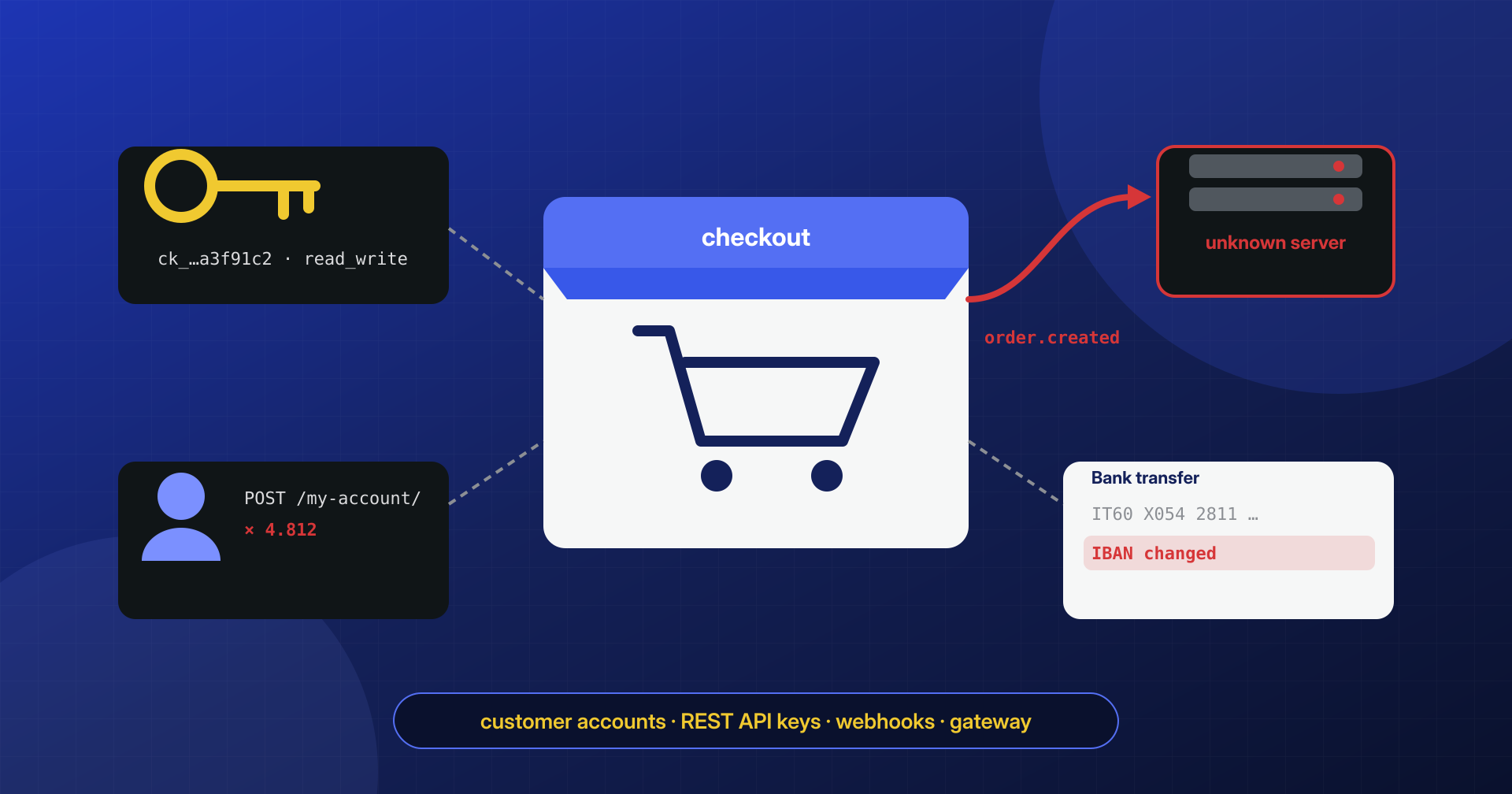
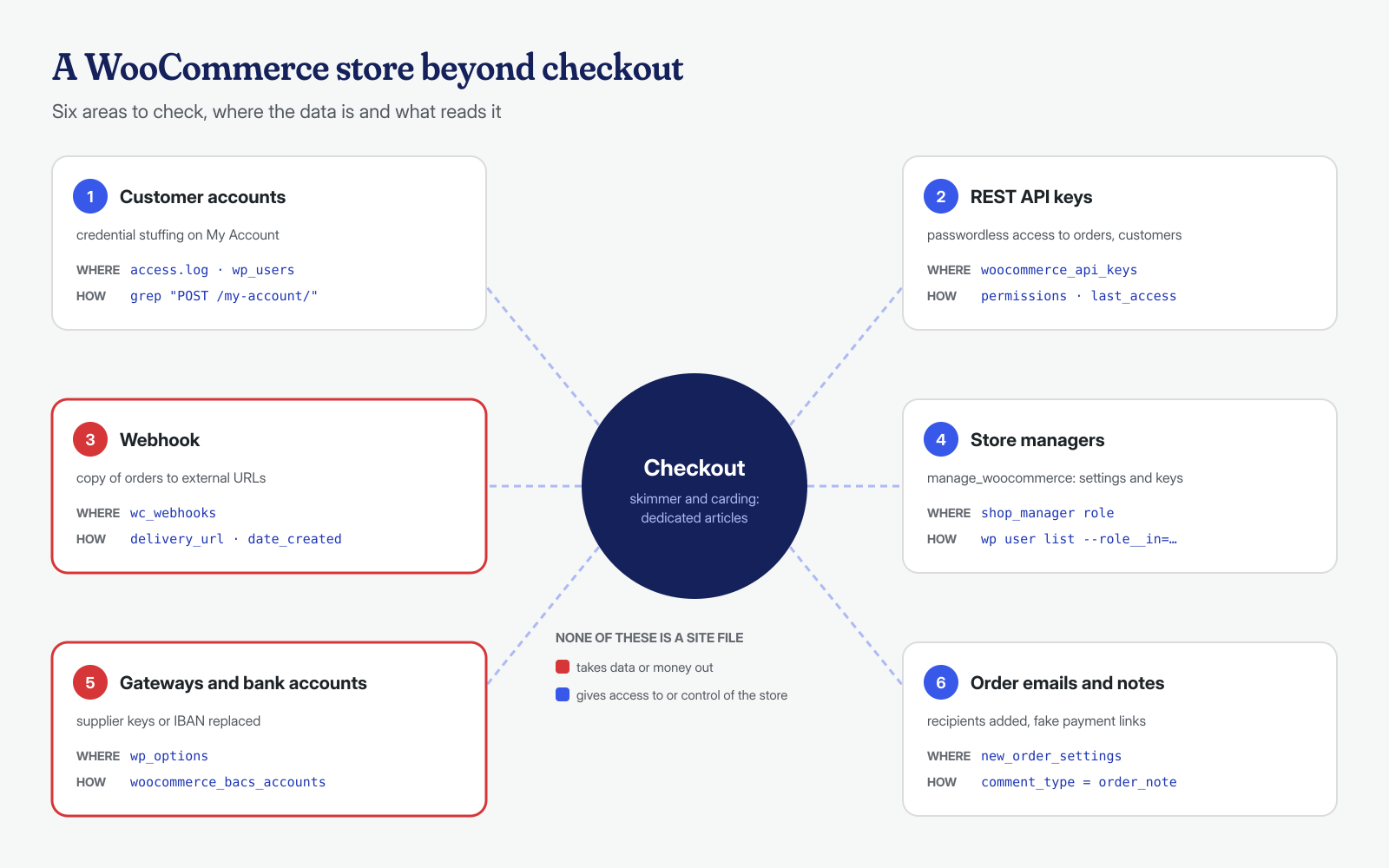
When people talk about the security of a WooCommerce store, nearly all the attention goes to the payment page: skimmers that copy card data, bots that try thousands of stolen cards. These are real risks, but they are not the only ones. An online store is also an archive of customers with passwords, an API that accepts requests from outside, a system that sends copies of orders to other services, and a dashboard used by people with different roles. Each of these parts can be used to steal data or to stay in the site after a cleanup, and none of them goes through the checkout.
An API key with read permissions or an extra webhook makes no noise, modifies no files, and is not flagged by scanners. For an attacker they are the cleanest way to keep receiving the orders of a store that has already been cleaned.
In this article we look at what surrounds the checkout: customer accounts, REST API keys, webhooks, the shop manager role, payment gateway and email settings, and the tables where WooCommerce stores orders. For card data theft on the payment page, see the article on JavaScript skimmers, and for the fake orders used to test cards, the one on carding.
Customer accounts and credential stuffing
WooCommerce’s “My Account” page is a login form exposed to everyone, and it gets the same treatment as wp-login.php: automated attempts with email and password pairs stolen from other services. This is credential stuffing, which OWASP defines as the automated injection of stolen credentials into login forms to break into accounts. It works because many people use the same password everywhere, and a store with thousands of customers surely has some whose password is already on a list.
A compromised customer account exposes addresses, phone numbers, and order history, useful for targeted scams by email or phone, and with some gateways also the saved payment methods, which can be used for new purchases shipped to a different address. The signal in the logs is a volume of POST requests to the account page far out of proportion to normal visits:
# Login attempts on My Account and on wp-login.php by IP address
grep -hE '"POST /(my-account|mio-account)/? |"POST /wp-login\.php' /var/log/nginx/access.log* \
  | awk '{ print $1 }' | sort | uniq -c | sort -rn | head -20

# Customers who logged in recently (WooCommerce records the last activity)
wp user list --role=customer --meta_key=wc_last_active --orderby=meta_value_num --order=DESC \
  --fields=ID,user_email --number=20
The defenses are those of any login, applied to the account page too: rate limiting on the web server or the WAF for POST requests to that address, an anti-bot check on the form, and notifications to the customer when the email or password changes. For administrators and shop managers, two-step verification is not optional: a compromised account of theirs is worth infinitely more than a customer’s.
After an incident that touched the users table, it is also worth forcing customers to change their passwords, or at least invalidating their sessions: password hashes read from the database can be attacked offline, and active sessions stay valid until they expire. An email to customers explaining what happened and asking them to change the password on other services where they reused it is part of the response, not a courtesy.
REST API keys
WooCommerce lets you connect ERP systems, warehouses, marketplaces, and apps through the REST API, authenticated with a pair of keys. According to the WooCommerce documentation, keys are generated from WooCommerce → Settings → Advanced → REST API, are tied to a user, and have one of three permission levels: read, write, read/write. The secret key is shown only once, when it is created.
From an attacker’s point of view, a key with read permission is permanent access to orders and customers that survives changing all passwords: the key does not depend on the password of the user it is tied to, and stays valid until someone revokes it. A write key also allows modifying products, prices, and orders. The keys live in the woocommerce_api_keys table: the consumer key is stored as a hash, while the consumer secret is stored in plain text, and the description, user, permissions, last seven characters of the key, and last access date are readable. Someone who could read the database, for example through SQL injection, therefore does not have ready-to-use keys in hand, but someone with dashboard access or write access to the database can create new ones at will:
# All keys with the associated user and last use (adjust the wp_ prefix)
wp db query "SELECT k.key_id, u.user_login, k.description, k.permissions,
  k.truncated_key, k.last_access
  FROM wp_woocommerce_api_keys k LEFT JOIN wp_users u ON u.ID = k.user_id
  ORDER BY k.last_access DESC;"

# Revoke an unrecognized key (equivalent to the Revoke link in the dashboard)
wp db query "DELETE FROM wp_woocommerce_api_keys WHERE key_id = 7;"
There are three questions to ask for each row. Who created it, and for which service? A generic or empty description, or a user that no longer exists, are red flags. Are write permissions really needed? Many integrations only need to read. When was it last used? A key unused for a year can be revoked; a key used last night by a service nobody recognizes should be revoked immediately, and the IP address its requests come from should be looked up in the access logs, filtering for requests to /wp-json/wc/.
When there are few integrations and they have fixed IP addresses, as is often the case with an ERP or a shipping service, you can also restrict access to the /wp-json/wc/ endpoints to those addresses directly on the web server. It does not replace reviewing the keys, but it makes a stolen key useless to someone connecting from another network. Do it carefully: the filter should be applied only to the versions used by the integrations, such as /wp-json/wc/v3/, and never to /wp-json/wc/store/, which serves the cart and block-based checkout for all customers; the dashboard and some plugins also call these endpoints from the administrator’s browser, so test the filter in a staging environment before going to production.
Webhooks: a copy of every order sent to an unknown address
Webhooks are the mechanism by which WooCommerce notifies an external service when something happens: an order created, a customer registered, a product changed. They are configured in WooCommerce → Settings → Advanced → Webhooks and, as the webhooks documentation describes, each has a status, a topic, a delivery URL, and a secret used to sign the messages. On every event, WooCommerce sends the full contents of the object to the URL: for an order, names, addresses, emails, phone numbers, products, and amounts.
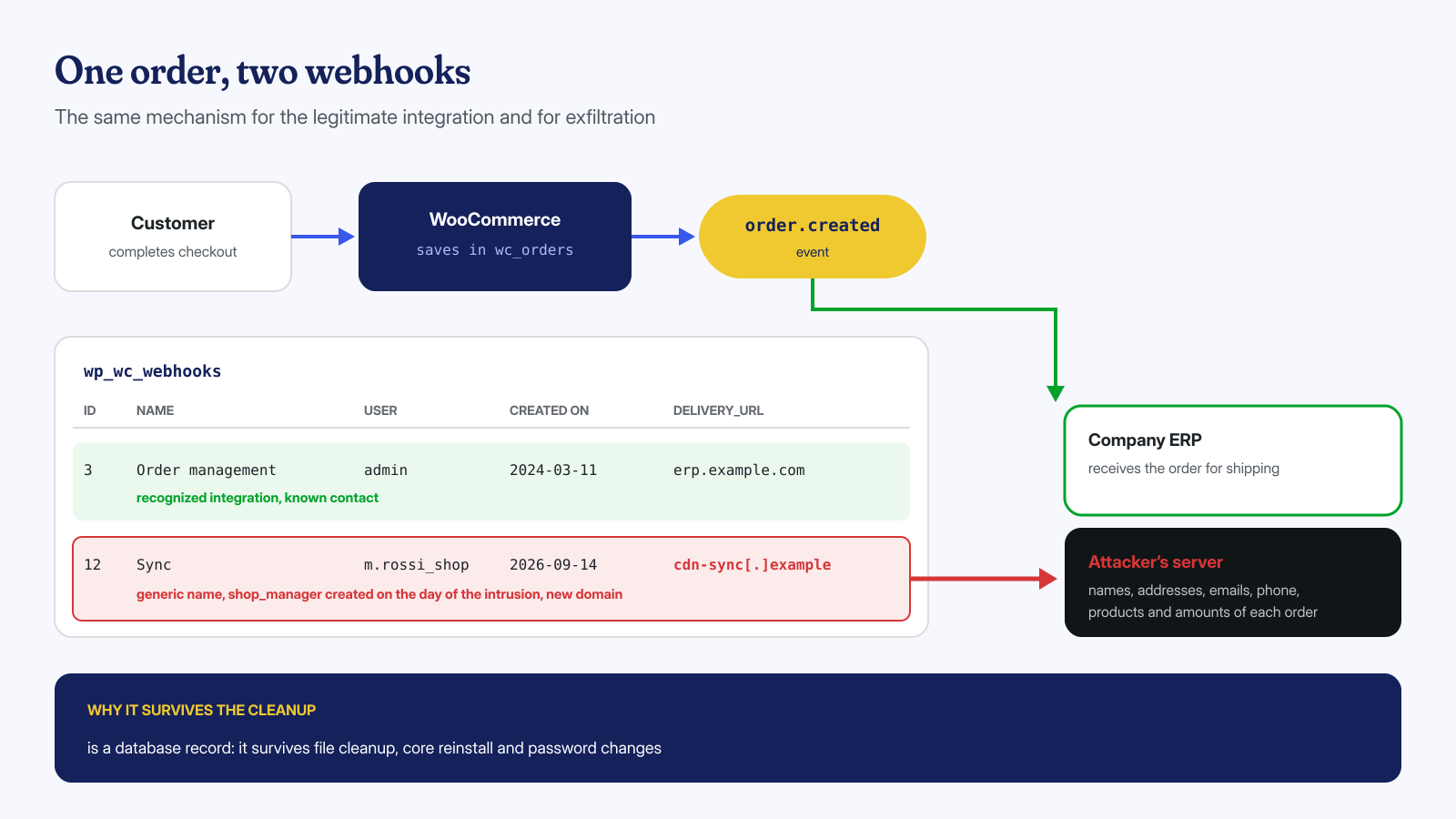
A webhook on “Order created” pointing to an attacker’s domain is therefore a perfect exfiltration system. It needs no files on the server, injects no code into the page, and is not seen by scanners. It survives the cleanup of files, the reinstallation of WordPress, and password changes, because it is data in the database. And it uses a legitimate feature, with outgoing traffic identical to that of a real integration. This is why a store can keep losing customer data even after a properly done file cleanup, without a single malicious file left on disk.
# Webhooks with destination, topic, author, and creation date
wp db query "SELECT webhook_id, status, name, user_id, topic, delivery_url,
  date_created, failure_count FROM wp_wc_webhooks ORDER BY date_created DESC;"

# Alternatively with WP-CLI (wc commands require --user with an administrator)
wp wc webhook list --user=1 --fields=id,name,status,topic,delivery_url

# Disable immediately, delete after saving the data for analysis
wp wc webhook update 12 --status=disabled --user=1
wp wc webhook delete 12 --force=true --user=1
For each webhook, verify that the destination domain belongs to a service the store really uses, and that the creation date does not coincide with the period of the compromise. WooCommerce also keeps delivery logs, available from the Status → Logs menu, useful for understanding since when the data has been leaving and how many orders were sent: essential information for assessing the breach, as we explain in the article on GDPR and data breaches.
The shop manager role
WooCommerce adds the shop_manager role, intended for people who manage orders and products without being administrators. It is a powerful role: it has the manage_woocommerce capability, which in the WooCommerce code controls access to the store settings, and therefore also to creating API keys, webhooks, and configuring payment gateways. It also has WordPress capabilities such as edit_theme_options, import, and export, and can edit users with the customer role.
For an attacker, creating a shop manager is often smarter than creating an administrator: many post-incident checks look only for hidden administrators, and a shop_manager user with a plausible name goes unnoticed. For the same reason, a real manager with a weak password is a valuable target.
The principle of least privilege applies here too. People who fulfill orders or update the catalog do not need to touch payment settings: for them a narrower role is better, created with a role management plugin or a few lines of code, leaving manage_woocommerce to those who actually configure the store. Accounts for contractors, agencies, and interns should be removed when the relationship ends, not when someone remembers to do it.
# Shop managers and administrators, with registration date
wp user list --role__in=administrator,shop_manager \
  --fields=ID,user_login,user_email,roles,user_registered
Payment gateways, bank accounts, and email
With access to the settings, the most direct attack is to change where the money goes. Each gateway’s settings are saved in wp_options with names like woocommerce_ID_settings: payment provider keys, destination account, return URLs. Offline bank transfer saves accounts in a separate option, woocommerce_bacs_accounts: an IBAN replaced in that option appears in the confirmation emails of every order paid by bank transfer, and customers pay the attacker without anything looking out of place.
Less conspicuous, but just as useful to someone stealing data, is the email configuration. The “New order” email for the administrator has a recipient field saved in woocommerce_new_order_settings: an address added there receives a copy of every order. Order notes, saved as comments of type order_note, should also be checked: a note sent to the customer with an alternative payment link is a scam that starts from the store’s own domain.
# Bank transfer accounts and recipients of the New order email
wp option get woocommerce_bacs_accounts --format=json
wp option pluck woocommerce_new_order_settings recipient

# Gateway settings: compare keys and accounts with the provider's
wp db query "SELECT option_name FROM wp_options WHERE option_name LIKE 'woocommerce\_%\_settings';"

# Order notes that contain links
wp db query "SELECT comment_post_ID, comment_date, LEFT(comment_content, 120)
  FROM wp_comments WHERE comment_type = 'order_note' AND comment_content LIKE '%http%'
  ORDER BY comment_date DESC LIMIT 30;"
Gateway keys should be compared with those shown in the payment provider’s dashboard, not just read: a public key replaced with one from another account has the same format as the right one. When in doubt, regenerate them from the provider’s dashboard and update them in the store.
Orders and HPOS tables: where to look
Since version 8.2, according to the developer documentation, new stores use High-Performance Order Storage (HPOS), with dedicated tables: wc_orders, wc_order_addresses, wc_order_operational_data, and wc_orders_meta. Older stores may still use the posts tables, or both in compatibility mode. Knowing which storage is authoritative avoids looking in the wrong place:
# yes = the authoritative orders are in the HPOS tables
wp option get woocommerce_custom_orders_table_enabled

# Where orders come from: checkout, admin, rest-api...
wp db query "SELECT created_via, COUNT(*) FROM wp_wc_order_operational_data GROUP BY created_via;"
A spike of orders created via rest-api that does not match a known integration, or orders modified by a user who should not be handling them, are traces to cross-check against the API keys and the logs. Order metadata deserves a look too: some skimmers save the collected data right there, in fields with plausible names. Finally, in compatibility mode the same data exists in two copies: fixes made by hand via SQL do not go through WooCommerce’s synchronization, so they should be made with WooCommerce’s tools or on both copies, otherwise the two versions diverge.
A periodic check, before and after the cleanup
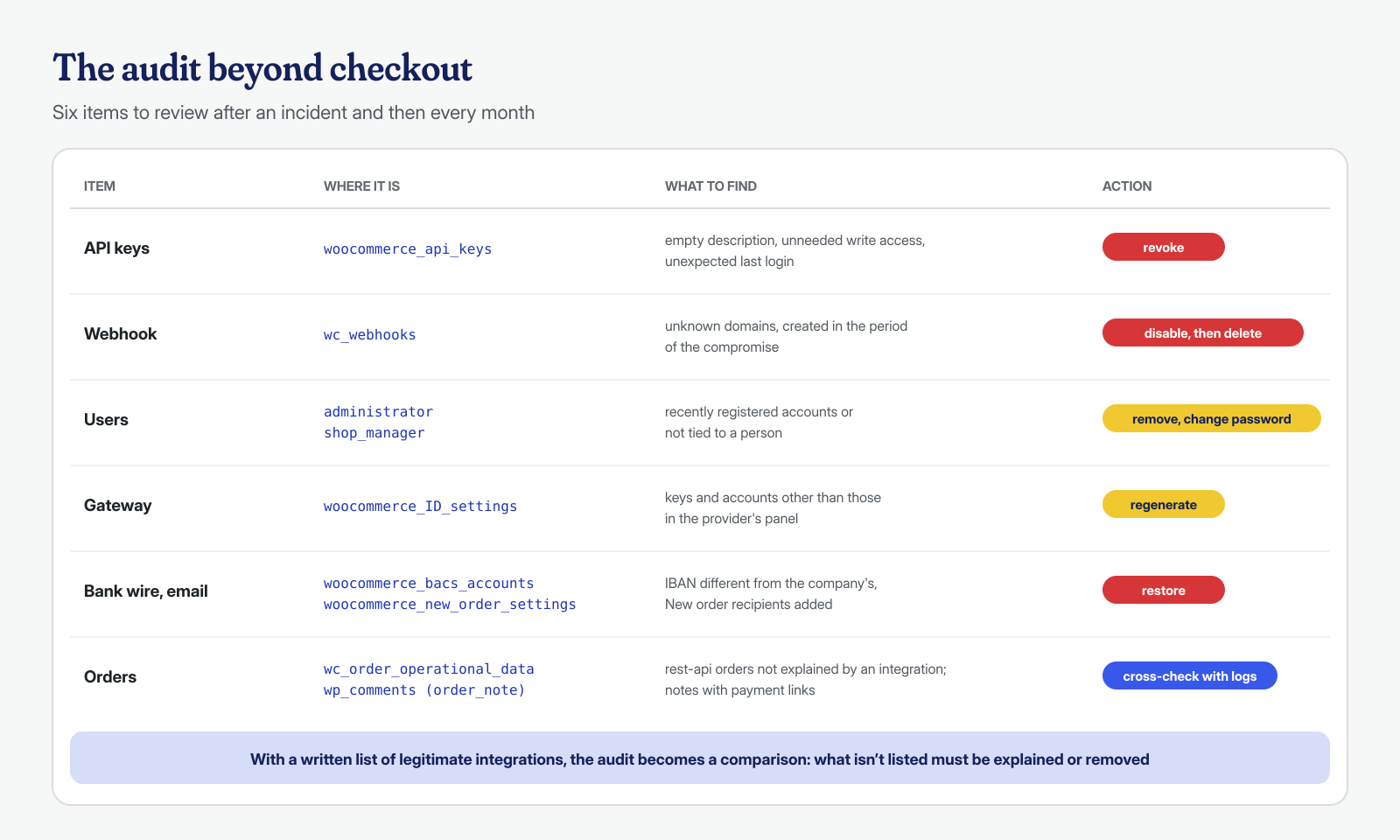
All the checks above are quick reads, and together they form an audit that takes a few minutes. It is best done at three moments: right after a compromise, before declaring the cleanup closed, and then at regular intervals, for example every month along with updates. Keeping a written list of legitimate integrations, with the key, webhook, and contact person for each, turns the audit into a comparison: anything not on the list must be explained or removed.
These items should be read together with the cleanup of files and the system, not instead of it: a stolen API key tells you how the attacker reads the data, not how they got in. For the rest of the hardening, the post-cleanup hardening checklist and audit logs help keep track of who changes settings and users. If you manage a compromised store or suspect customer data is leaking out, contact us: we check files, system, and database, including keys, webhooks, and gateways, with a guaranteed cleanup in 6, 12, or 24 hours per installation from receipt of access.
