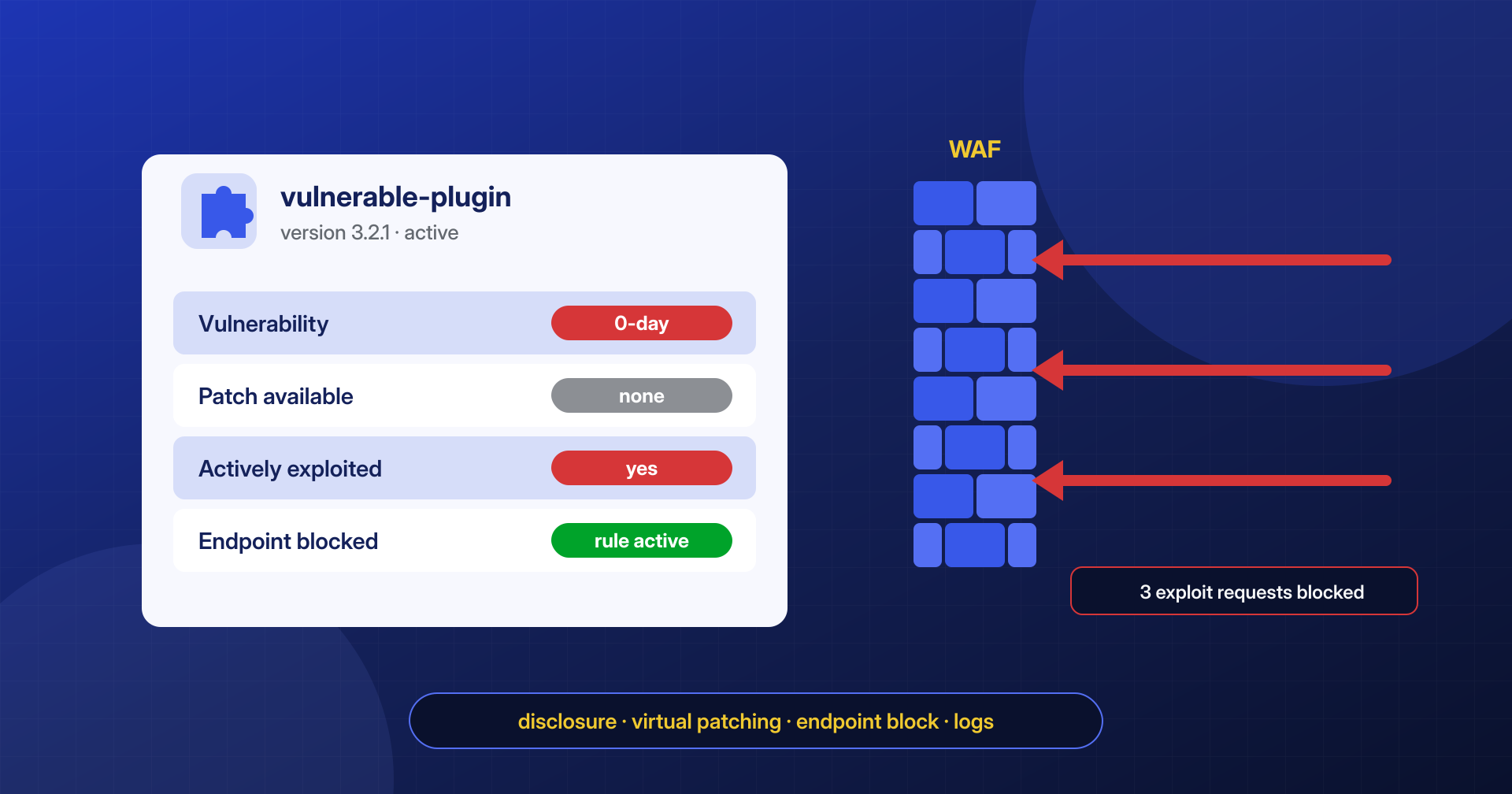
On a Monday morning an advisory arrives: a plugin installed on dozens of sites has a vulnerability that can be exploited without authentication, someone is already using it, and the developer has not yet published a fixed version. There is no “Update now” button, because there is nothing to update to. Plenty of WordPress administrators find themselves in this situation every year, and it is the one where the decisions made in the first hours matter more than everything else.
When no patch exists, the goal is not to fix the plugin: it is to stop the exploit request from reaching the vulnerable code, and to know whether it already has.
In this article we look at how a vulnerability’s lifecycle unfolds, how to tell whether a site is exposed, which temporary countermeasures really work (and which do not), and how to read the logs to find out whether the attack has already succeeded.
What “0-day” really means for a WordPress site
Strictly speaking, a 0-day vulnerability is a flaw that is exploited before the software’s maintainers have released a fix: the developers have had “zero days” to respond. In the WordPress ecosystem the term is often used more loosely, for any publicly known vulnerability that still has no patch. The practical distinction that matters to whoever runs a site is a different one: is there a plugin version that closes the problem, or not?
In the ideal path, coordinated disclosure, whoever finds the flaw reports it to the developer or to an intermediary program, the developer publishes the fix, and only then does the public advisory come out, with the CVE identifier and the technical details. The real path often departs from this: the developer does not respond, the plugin is abandoned, or the vulnerability is found by someone who exploits it rather than someone who reports it. Patchstack’s State of WordPress Security in 2025 report counts 7,966 new vulnerabilities in the WordPress ecosystem in 2024, 96% of them in plugins; 43% were exploitable without authentication and 33% had not yet been fixed at the time of public disclosure.
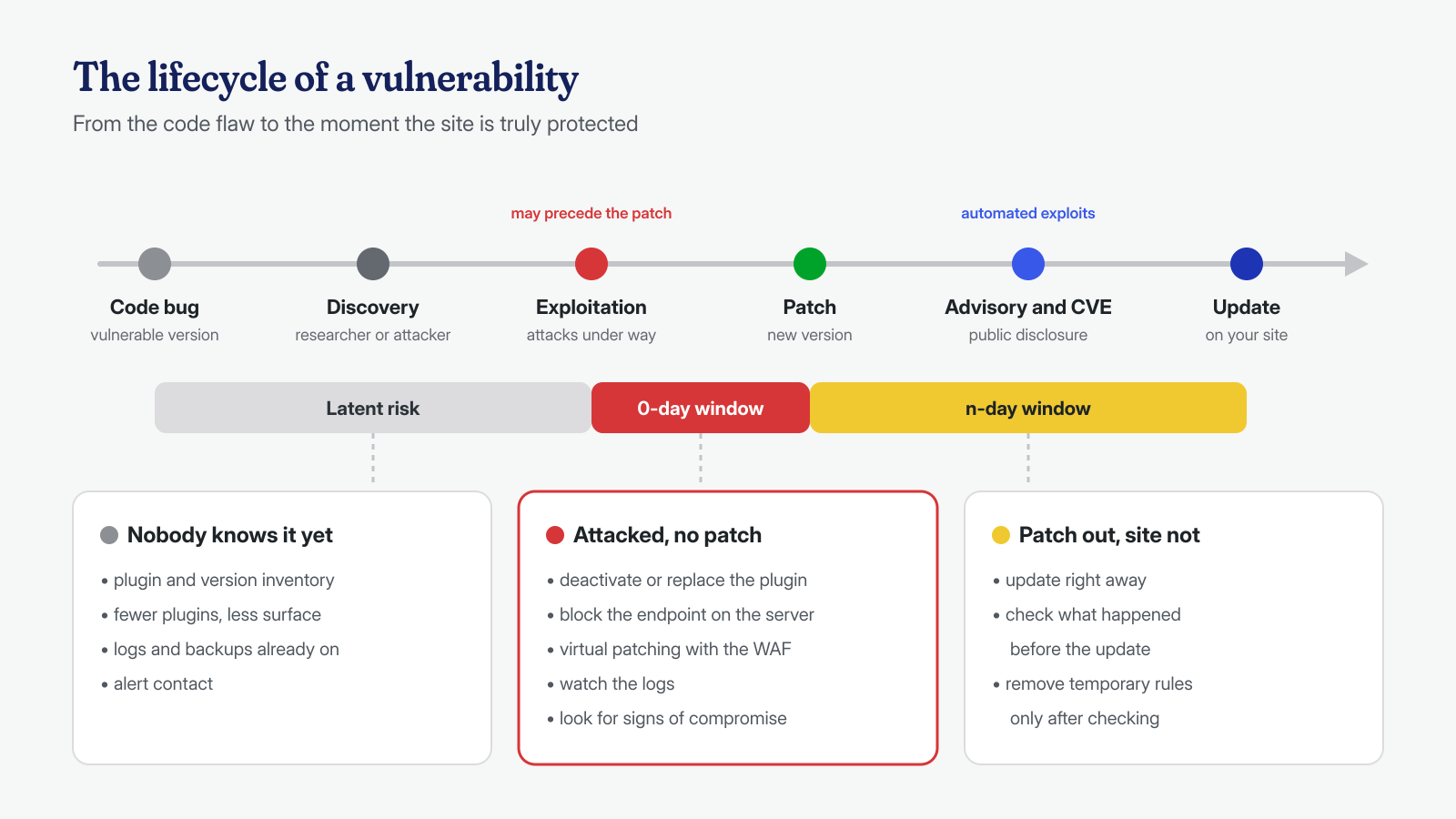
The second figure is the one that weighs most: in one case out of three, on the day the vulnerability becomes public there is no update to install. And from the moment of publication time is short, because the advisory almost always describes the endpoint involved, and from there it is a short step to an automated scanning script. In the same report Patchstack recounts that, for the code execution vulnerability in Bricks Builder, automated exploitation campaigns started a few hours after disclosure.
How to tell whether you are exposed
The first question is not “how do I defend myself?” but “does this affect me?” To answer you need two things: the exact list of installed plugins, with versions, and a reliable source of advisories. The most widely used sources are the WPScan database, Patchstack’s, Wordfence Intelligence, and, for vulnerabilities with an assigned CVE, the NVD database.
With WP-CLI the inventory takes a few seconds, even across many sites:
# Plugin, version, status, and available updates
wp plugin list --fields=name,version,status,update --format=table

# On a server with several installations: where is the plugin present?
find /var/www -maxdepth 6 -type d -path '*/wp-content/plugins/plugin-vulnerabile'

# Version declared in the main file's header
grep -m1 -i '^[ *]*Version:' /var/www/*/wp-content/plugins/plugin-vulnerabile/plugin-vulnerabile.php
Watch out for deactivated plugins: WordPress does not load a deactivated plugin, but its files stay on disk. If the vulnerability is in a PHP file that can be called directly from the browser, and that does not check that it is running inside WordPress, the deactivated plugin is as exploitable as the active one.
Then you need to read the advisory, paying attention to the details that change the assessment: which versions are affected, whether an account is required (and at what level: a subscriber on a site with open registration is not much of an obstacle), which endpoint or parameter is vulnerable, and what exploiting it gets the attacker. An arbitrary file upload or unauthenticated code execution calls for immediate action; an XSS vulnerability that requires an administrator account can wait a few days with lighter measures.
Deactivate, replace, or keep the plugin
The most effective countermeasure is also the simplest: if the vulnerable code is not there, it cannot be exploited. When the plugin is not essential, or an alternative exists, the best choice is to remove it entirely, not just deactivate it, for the reasons seen above.
# Deactivate the plugin on a single site
wp plugin deactivate plugin-vulnerabile

# On a multisite network, when activated network-wide
wp plugin deactivate plugin-vulnerabile --network

# Also remove the files (keep a copy first for the analysis)
tar czf /root/plugin-vulnerabile-$(date +%F).tar.gz wp-content/plugins/plugin-vulnerabile
wp plugin delete plugin-vulnerabile
Making a copy before deleting is not a detail: if the site turns out to be compromised, the plugin files, with their modification dates and any foreign files added to its folder, are part of the evidence.
Often, though, the plugin cannot be removed: it handles payments, contact forms, the catalog. In these cases the aim is to take out of the picture only the vulnerable part, leaving the rest working. This is where virtual patching and blocking the endpoint on the web server come in, two measures with the same purpose that work at different levels.
Virtual patching with a WAF
Virtual patching means writing a rule in the web application firewall that recognizes requests aimed at the vulnerable point and blocks them before they reach WordPress. The plugin’s code stays as it is, but the dangerous request does not reach it. Commercial WAF services and some security plugins distribute these rules automatically; on a managed server they can be written by hand, for example with ModSecurity or Coraza and the OWASP CRS rule set.
Suppose the advisory points to an unauthenticated file upload through the AJAX action pv_upload. A targeted ModSecurity rule might look like this:
# Block the vulnerable AJAX action, in both the query string and the POST body
SecRule REQUEST_FILENAME "@endsWith /wp-admin/admin-ajax.php" \
    "id:1009001,phase:2,deny,status:403,log,\
    msg:'Virtual patch: plugin-vulnerabile pv_upload',chain"
    SecRule ARGS:action "@streq pv_upload" "t:none,t:lowercase"
The rule works in phase 2, when ModSecurity has already read the request body, and uses ARGS, which covers both query string and POST parameters. This is an important point: many WordPress exploits pass the action name in the body, and a rule that looks only at the URL would not see them.
Virtual patching has limits you should know about. A rule must describe the vulnerability, not the published exploit: if it blocks only the exact string of the proof of concept, changing a capital letter or an encoding is enough to bypass it. If, on the other hand, it is too broad, it also blocks legitimate use of the plugin. And a rule must always be tested, by sending a harmless test request that triggers it and checking in the logs that the block happened.
Blocking the vulnerable endpoint on the web server
If there is no WAF, or in addition to one, you can block the vulnerable point directly in the NGINX, Apache, or LiteSpeed configuration. The principle is the same: the request is rejected with a 403 before it reaches PHP-FPM, so the plugin’s code is not even loaded.
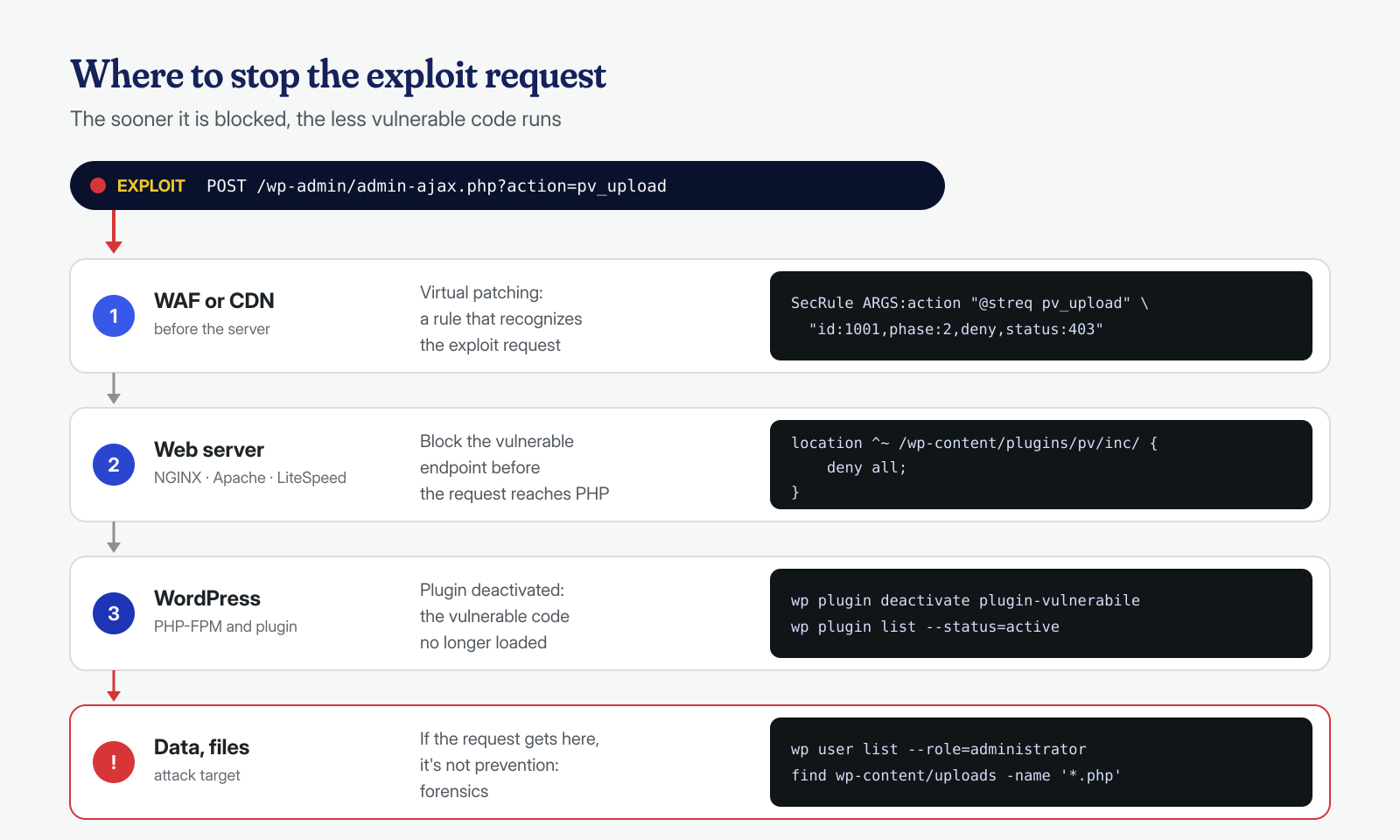
The simplest case is a plugin PHP file that can be called directly, or a REST API route. With NGINX the rule goes in the virtual host, before the block that passes PHP files to PHP-FPM:
# Plugin file called directly
location ^~ /wp-content/plugins/plugin-vulnerabile/includes/ {
    deny all;
}

# Vulnerable REST route, including the ?rest_route= form
location ^~ /wp-json/pv/v1/ {
    return 403;
}
if ($arg_rest_route ~* "^(/|%2F)pv(/|%2F)v1") {
    return 403;
}
The second block reflects a detail that is often forgotten: WordPress also answers REST calls through the rest_route parameter, without going through /wp-json/. Blocking only the path leaves the other door open. With Apache, and with LiteSpeed, which reads .htaccess files, the same result is achieved with mod_rewrite, placed before the WordPress rules:
<IfModule mod_rewrite.c>
RewriteEngine On
RewriteCond %{REQUEST_URI} ^/wp-json/pv/v1/ [NC,OR]
RewriteCond %{QUERY_STRING} (^|&)rest_route=(/|%2F)pv(/|%2F)v1 [NC,OR]
RewriteCond %{REQUEST_URI} ^/wp-content/plugins/plugin-vulnerabile/includes/ [NC]
RewriteRule ^ - [F]
</IfModule>
AJAX actions are the hardest case. They all go through admin-ajax.php, so you cannot block the file without breaking half the site, and the action name usually travels in the POST request body, which NGINX and Apache without extra modules do not inspect. You can block the action when it arrives in the query string (with NGINX, if ($arg_action = "pv_upload") { return 403; } inside location = /wp-admin/admin-ajax.php), but covering the body too requires a WAF. As with virtual patching, every rule must be tested: first with a request that must be blocked, then by browsing the site to confirm the plugin’s legitimate functions still work.
Reading the logs: has the attack already happened?
Countermeasures protect from the moment they are applied. But if the plugin had been vulnerable for months, and exploitation began before the advisory, you have to ask whether someone has already got in. The web server logs are the first place to look, provided you kept them long enough.
# Requests to the vulnerable endpoint, including rotated and compressed logs
zgrep -h 'pv_upload\|/wp-json/pv/v1\|rest_route=%2Fpv' /var/log/nginx/access.log* | less

# Only successful POSTs, grouped by IP
zgrep -h 'POST .*admin-ajax.php' /var/log/nginx/access.log* \
  | awk '$9 == 200 {print $1}' | sort | uniq -c | sort -rn | head -20

# PHP files that appeared after the date of the first attempt
find /var/www/sito -type f -name '*.php' -newermt '2026-09-01' -ls
One limitation to keep in mind is that the access log does not record the body of POST requests: you can see that someone called admin-ajax.php, but not which action they invoked or what they sent. That is why the other sources matter: the WAF audit log, if there is one, the PHP-FPM error log, and above all the traces a successful exploit leaves on the site. The most common are PHP files in uploads (we covered them in the article on web shells in uploads), administrators created in secret, files in the mu-plugins folder, and scheduled tasks added to cron.
If you find even one of these traces, the problem is no longer the vulnerability but the compromise: blocking the endpoint prevents new entries, but it does not remove what has already been installed.
Unknown payloads and local AI: help with triage
When a vulnerability is truly new, there are no signatures or lists of indicators of compromise. The logs hold thousands of requests to the endpoint involved, and you have to separate harmless scans from failed attempts and successful ones. It is repetitive work, and language models are useful in it when used as assistants: they group similar requests, decode base64 or URL-encoded parameters, and recognize typical patterns such as a .phtml file in an upload field or an eval(base64_decode(…)) chain in a parameter.
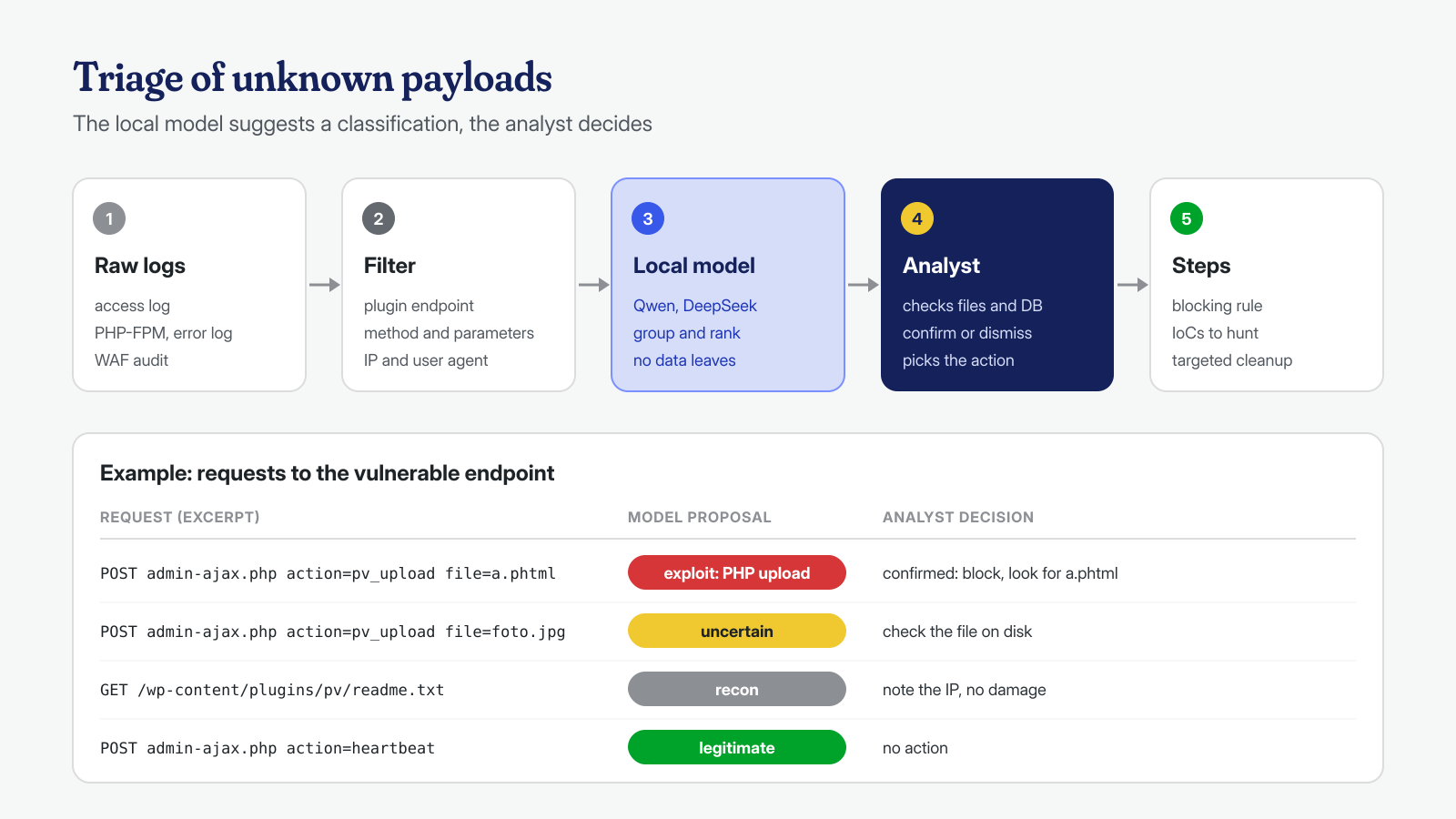
In our work we use open-weight models, such as Qwen and DeepSeek, run on our own hardware. The main reason is confidentiality: logs contain IP addresses, emails, and sometimes parameters with personal data, and it makes no sense to send them to an external service to be classified. We described the approach in detail in the article on log analysis with local AI.
The limit needs to be stated clearly: a model can be wrong, and it is wrong with the same confidence with which it is right. A request classified as “exploit” is a hypothesis to verify on disk and in the database, not a conclusion; a request classified as “legitimate” rules nothing out. The model cuts the time needed to reach the interesting requests, but the one who decides which rules to write and what to look for is a person who knows WordPress and the system it runs on.
When the patch arrives
On the day the developer publishes the fix, the 0-day window closes and another opens: the patch exists, but until the site is updated the risk remains, and in fact grows, because comparing the old and new versions shows anyone where the flaw was. It is therefore advisable to:
- update the plugin as soon as possible, with
wp plugin update plugin-vulnerabileor from the dashboard, after checking in the changelog that the version really fixes the reported vulnerability; - check the integrity of the plugin files against the official version, for example with
wp plugin verify-checksums plugin-vulnerabile, which works for plugins published in the WordPress.org directory; - repeat the compromise checks for the period before the update, because the patch does not remove what was installed earlier;
- remove the temporary rules only after these checks, and document them: a forgotten rule can block a legitimate function months later, with nobody remembering why.
One last lesson remains, and it concerns what comes before more than what comes after. Someone who knows exactly which plugins they have installed, keeps logs for a few weeks, receives security advisories, and already has a way to apply a rule on the server deals with a 0-day in an hour. Someone who has to rebuild everything on the spot takes days, and meanwhile the site is exposed. Basic hardening measures do not stop an unknown vulnerability, but they limit what a successful attack can do.
If a vulnerability that still has no patch has already hit your site, the job is a complete cleanup: finding every file and database entry added by the attack, including system-level persistence, and closing the entry point. We do it with guaranteed times of 6, 12, or 24 hours per WordPress installation; for details you can write to us.
