 WordPress
Background
A food company with a WordPress site: corporate pages, a product catalog, a recipe blog updated every week and a contact form for resellers. The site is hosted on a server managed by Managed Server, the company Malwarecleanup.com is part of, with NGINX in front of PHP-FPM. There was no sign of compromise: updates up to date, no suspicious files, no search engine warnings. For confidentiality, the company’s name, the domains involved and any detail that would allow them to be identified have been omitted; in the examples we use made-up names such as example.it and copia-uno.example.
Let us say it up front: this is not a malware removal case. The site was not infected, and the engagement was handled as hosting and security support. We tell it because the problem, a site cloned in real time on someone else’s domains, is increasingly common, and because the most intuitive solution was the wrong one.
The client’s request
One morning the company’s marketing manager called support. A reseller had pointed out a strange address, and searching online he had found others: three unknown domains in all. Two had the same name as the brand with a different extension, .info and .pro; the third had no apparent connection to the company. Opened in the browser, they showed the company’s site, identical in every respect: menu, photographs, product pages, even the recipe published that same morning. Hovering over the links, though, none led to the real site: all of them pointed to the unknown domain. The request was clear: “block them by referrer”.
The concern was well founded. A faithful copy of a site, on a domain that echoes its brand, is a tool ready for many uses: all it takes is adding a form or changing an email address to turn it into a phishing page or a fake store that collects orders that are never shipped, as described in the article on phishing kits. Even without modifications, clones siphon off visits and put duplicate content into circulation: Google’s spam policies describe scraping as the practice of taking content from other sites, often automatically, and republishing it to manipulate rankings. And if someone is scammed on a copy, the reputational damage falls on the original brand.
Why blocking by referrer was not enough
The referer is a header that the browser adds when a visitor follows a link or when a page loads an image or a stylesheet: it tells the server which page the request comes from. Blocking by referer works well against anyone embedding a site’s images in their own pages. Here, however, the content appeared on the unknown domain already complete and with rewritten links, which suggests a different mechanism: a reverse proxy, that is, a server that receives the visitor’s request, downloads the page from the original site on its own behalf, modifies it and returns it.
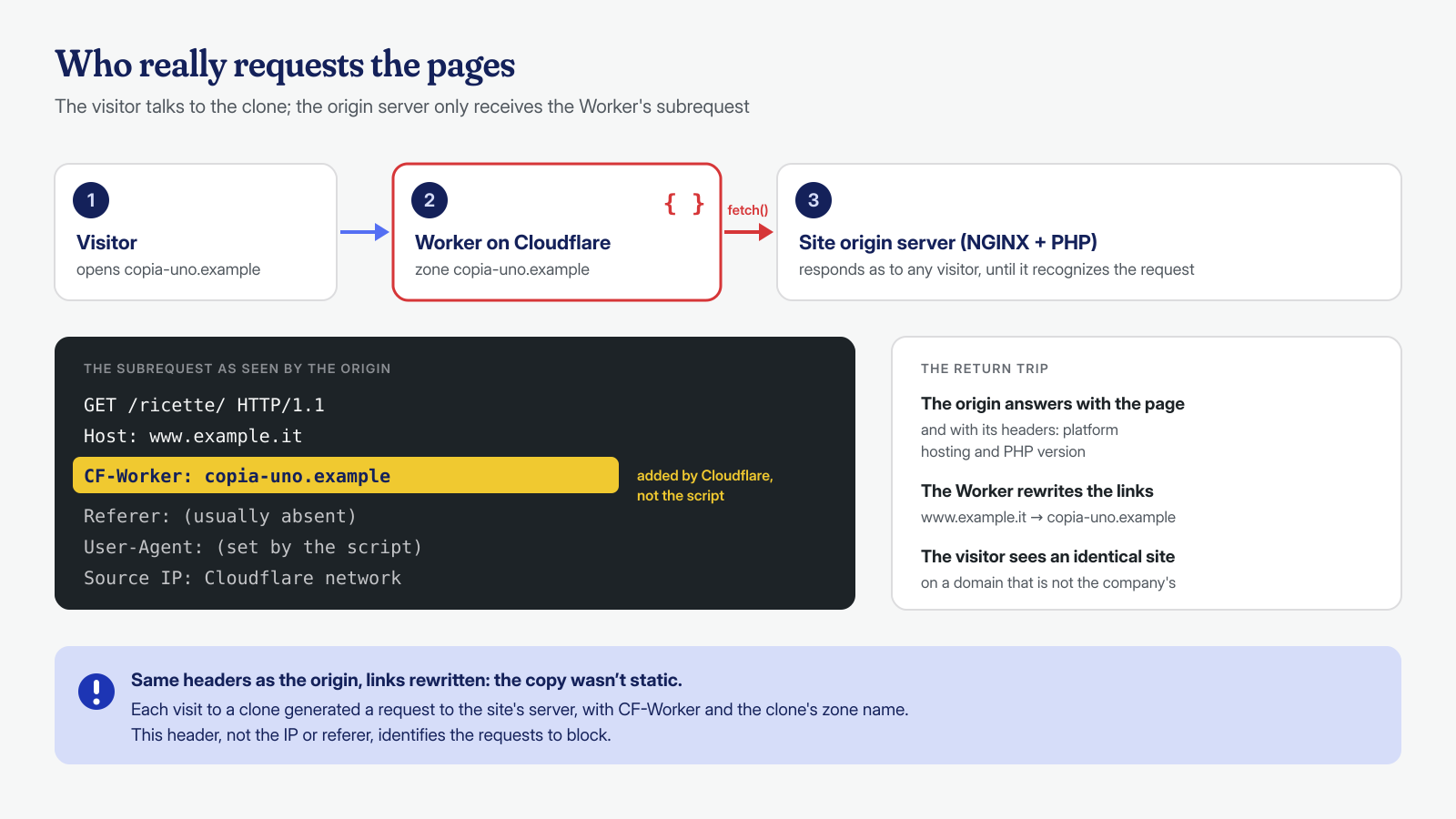
In that setup the request reaching the original site does not originate from the visitor’s browser but from the clone’s server, which normally sends no referer at all, or sends whatever it prefers. A referer block would not have stopped it. Before writing a rule, then, we had to find something that truly identified those requests, and to do that we had to understand how they were being made.
The investigation
The first question was simple: a static copy or a real-time copy? A static copy, downloaded once and published elsewhere, cannot be blocked from the original server: it can only be reported. A real-time copy, on the other hand, has to go through our server on every visit. We requested the response headers of the three domains:
# Response headers of a clone (made-up names)
curl -sI https://copia-uno.example/ | grep -iE '^(server|x-powered-by|x-)'
The answer was eloquent. All three clones returned the header that our hosting platform adds to the responses of the sites it hosts, and the same header with the PHP version of the original site. A static copy on another server would have had that server’s headers. Together with the rewritten links, it was proof that the pages were being fetched live from the origin server and modified on the fly.
The next step was the access logs, to see where those requests came from. Here we made a mistake, and we tell it because it is instructive: on the server the site also had a second virtual host, used for backups, and we opened that one’s logs first. There was nothing useful, and for a few minutes the proxy theory seemed to waver. Then we realized we were looking at the wrong file and switched to the main virtual host’s logs, where the requests were, matching exactly our visits to the clones. It is the kind of slip that access log analysis teaches you to avoid: before drawing conclusions, check that you are reading the right log.
The requests came from Cloudflare IP addresses, that is, from the ranges published by Cloudflare itself and shared by an enormous number of sites. Blocking them would have meant blocking legitimate traffic, and in any case the addresses change: it was not a workable path. The most concrete theory was a Cloudflare Worker, a small program that runs on Cloudflare’s network and, on every visit to the clone’s domain, downloads the corresponding page from the original site, rewrites its links and returns it to the visitor.
To confirm it we enabled a temporary diagnostic log, recording some request headers, and visited the clones:
# Temporary diagnostic log (in the http context)
log_format diag_intestazioni '$remote_addr [$time_local] "$request" '
                             'cf_worker="$http_cf_worker" referer="$http_referer" '
                             'ua="$http_user_agent"';

# In the site’s server block, only for the duration of the check
access_log /var/log/nginx/example.it-diag.log diag_intestazioni;
The result left no doubt: every request coming from the clones carried the CF-Worker header, with the name of the clone’s domain. Cloudflare’s documentation on HTTP headers explains that CF-Worker is added to all subrequests that a Worker sends with fetch() and contains the name of the zone, that is, the domain, that owns the Worker. This is an important detail: the header is added by Cloudflare’s platform, not by the script of whoever built the clone. It is not an absolute guarantee for the future, but it is a far more reliable signal than a referer or a User-Agent, which the script can set to anything.
The block
At that point the criterion was clear: reject requests that carry a CF-Worker header different from the site’s own zone. The exception for its own zone is not a detail: if the site later moved to Cloudflare and used Workers of its own, their subrequests would carry the site’s domain name and must not be blocked.
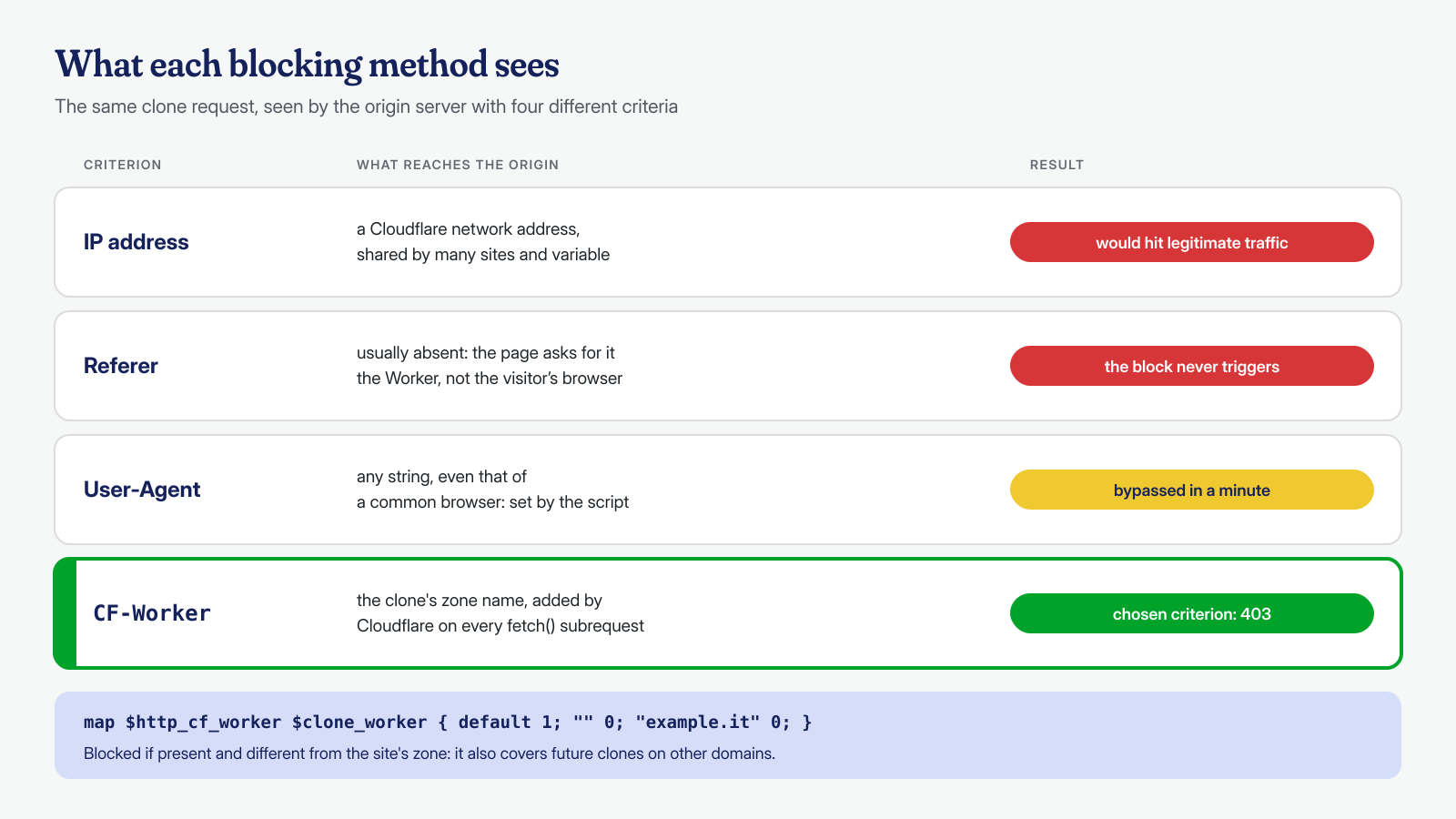
Before touching anything we saved a copy of the virtual host. Then we created a new configuration file, included in NGINX’s http context, with two map directives. The first reads the header through the $http_cf_worker variable: as the NGINX documentation explains, every request header is available as $http_ followed by the lowercase name with hyphens replaced by underscores. The second, as reinforcement, checks the referer for the three domains, for any resources that a visitor’s browser might request directly from the original site starting from a cloned page.
# /etc/nginx/conf.d/blocco-cloni.conf (http context)

# 1 if the request comes from a Cloudflare Worker of another zone
map $http_cf_worker $clone_worker {
    default      1;   # CF-Worker present and from a foreign zone
    ""           0;   # no CF-Worker header
    "example.it" 0;   # Worker of the site’s own zone
}

# Reinforcement: 1 if the referer is one of the known clone domains
map $http_referer $clone_referer {
    default 0;
    "~*^https?://([^/]+\.)?copia-uno\.example(/|$)"  1;
    "~*^https?://([^/]+\.)?copia-due\.example(/|$)"  1;
    "~*^https?://([^/]+\.)?copia-tre\.example(/|$)"  1;
}
In the site’s HTTPS server block, two lines were enough. With the if directive a variable is false when it is empty or equals 0, so normal requests pass at no cost:
server {
    listen 443 ssl;
    server_name example.it www.example.it;
    # ...

    if ($clone_worker)  { return 403; }
    if ($clone_referer) { return 403; }

    # ... rest of the configuration
}
Finally, the usual sequence: nginx -t to check the syntax, reloading the service without interrupting connections, and removing the diagnostic log, which was no longer needed and must not stay active.
Verification
We checked every domain, on both pages and a stylesheet, and the real site with and without www:
# Response code for each address
for u in https://copia-uno.example/ https://copia-uno.example/wp-content/themes/tema/style.css \
         https://copia-due.example/ https://copia-due.example/wp-content/themes/tema/style.css \
         https://copia-tre.example/ https://copia-tre.example/wp-content/themes/tema/style.css \
         https://www.example.it/ https://example.it/; do
  printf '%-70s %s\n' "$u" "$(curl -s -o /dev/null -w '%{http_code}' "$u")"
done

# Domain              Pages    CSS
# copia-uno.example   403      403
# copia-due.example   403      403
# copia-tre.example   403      403
# www.example.it      200      200
# example.it          200      200
The three clones answered 403 on pages and stylesheets, while the real site answered normally. There is also a useful side effect: the CF-Worker rule does not depend on the names of the three domains. If someone built a new clone with the same system on a fourth domain tomorrow, it would be blocked without changing the configuration. The referer map, by contrast, covers only the known domains and is just reinforcement.
The block stops the copying, but the domains stay registered and the Workers stay active. We therefore advised the client to report them to Cloudflare’s abuse service, so that they are suspended at the source, and offered to prepare and send the report ourselves. The whole matter, from the phone call to the verification, was closed the same day.
Hardening
The site had not been breached, but the episode suggested some measures, useful on any other site as well:
- less information in headers: software versions should not leave the server. In NGINX,
server_tokens offremoves the version from theServerheader and from error pages; in PHP,expose_php = Offremoves theX-Powered-Byheader with the version. In this case the headers helped us understand, but to an attacker they say exactly which vulnerabilities to look for; - absolute canonical tags on all pages, pointing to the real domain. Google treats them as a strong signal, not a command, and a clone that rewrites links can rewrite these too: they help with crude copies, they do not replace the block;
- monitoring of lookalike domains: publicly trusted certificates end up in Certificate Transparency logs, searchable with services such as crt.sh. A periodic search on the brand name shows new domains using it, often before anyone reports them;
- regular checks on who reaches the origin: a site that does not use Cloudflare should not receive Worker subrequests, and a periodic check of the logs for
CF-Worker, proxies or spikes from hosting networks brings new clones to light before a reseller does.
As for dealing with providers, the owner has several avenues. Cloudflare states that when it is the provider hosting the content, as with Workers, it can remove it or disable access to it if it violates its terms of service. Registrars accredited by ICANN are required to publish an abuse reporting contact and to review reports. For domains that copy the brand there are also domain name dispute procedures, which should be evaluated with a lawyer: they are not a technical matter, and not our field.
What this case teaches
The first lesson is that a block should be built on what truly identifies the request, not on what is easiest to write. The referer was the intuitive solution, the IP address the most drastic: the first would have stopped nothing, the second would have blocked a part of the internet. The right solution came only after understanding the mechanism, by observing real requests instead of assuming them.
The second concerns method. Checking the clones’ headers first, then the logs, then the individual request headers turned a theory into proof in a short time. And the backup virtual host mistake is a reminder that even a short investigation needs an elementary check: being sure you are looking at the right system before ruling out a theory. We use the same approach in cleanups, where a wrong conclusion costs far more.
Malwarecleanup.com is the WordPress and WooCommerce malware removal service of Managed Server S.r.l., active since 2005 in server and hosting management. We analyze files, database, configuration and system, with the help of artificial intelligence models run locally, and guarantee cleanup within 6, 12 or 24 hours per installation, counted from receipt of access. If your site shows up on domains you don’t know, or you suspect something is wrong, you can contact us.