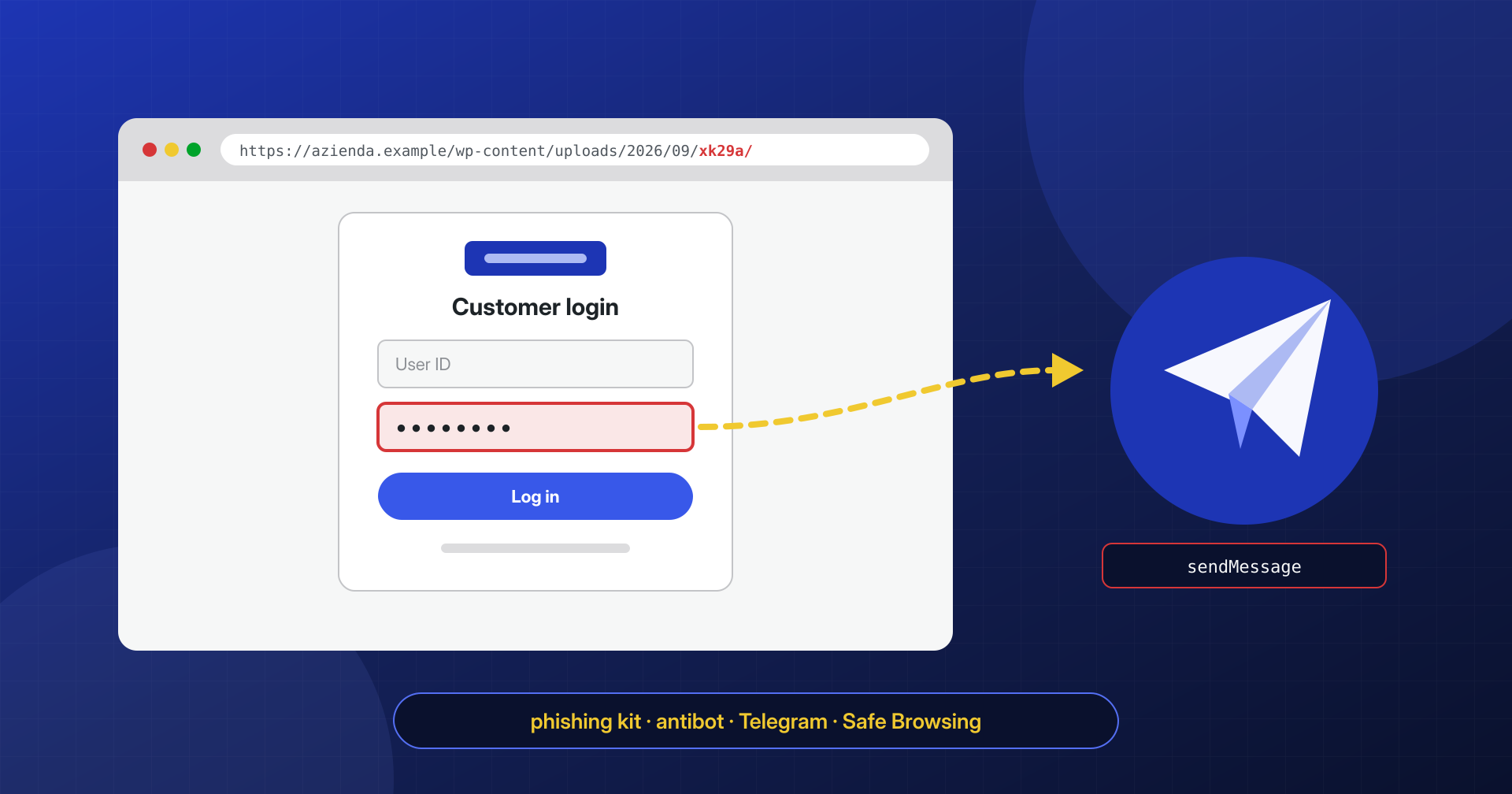
The first news almost always comes from outside. An email from the host about an abuse report, a notice from a CERT, the red Chrome warning screen that a customer photographs and forwards. The site, opened from the home page, looks the same as ever. Yet at an address nobody has ever seen, something like /wp-content/uploads/2026/09/xk29a/, there is a perfect copy of a bank’s login page or a courier’s tracking page, and for a few days it has been harvesting credentials from people who have never heard of the site hosting it.
A phishing kit doesn’t damage the site that hosts it: it uses it. The damage is suffered by the victims, and by the domain’s reputation.
In this article we look at how a phishing kit ends up on a WordPress site, what it is made of, how to find it with a few commands, why you should preserve evidence before deleting, and how to close the matter with the host, with whoever sent the report, and with Google.
Why a WordPress site
Whoever runs a phishing campaign needs web addresses that aren’t already blacklisted, that have a valid HTTPS certificate and that stay online for at least a few days. Registering new domains costs money and exposes them to filters that check domain age; using compromised legitimate sites solves all three problems. A business domain with years of history, a valid certificate and a good reputation is the ideal place to hide a page that has to get past the spam filters of mailboxes.
For this reason the host site is touched as little as possible. No defacement, no redirects from the home page, no visible changes: the kit lives in a separate folder and the rest of the site has to keep working, because an owner who notices nothing is an owner who deletes nothing. This is an important difference from other infections, such as SEO spam or conditional redirects, which at least leave symptoms that site visitors can observe.
How it arrives: a zip extracted into any folder
A phishing kit is usually a zip archive with everything needed: HTML and PHP pages, images and stylesheets copied from the original site, scripts that send the data. To install it the attacker needs to write files to the server, and the routes are those of any compromise:
- a webshell uploaded earlier, often by another group that resells access;
- stolen or weak administrator credentials, used to install a file manager plugin or to upload a fake plugin that contains the kit;
- an upload vulnerability in a plugin, which allows files to be uploaded without authentication;
- FTP or hosting panel credentials, such as those stolen from the developer’s PC.
Once uploaded, the zip is extracted with PHP’s ZipArchive class or with a system command, into a folder with a random or plausible name: a subfolder of the month’s uploads, a folder inside a rarely used plugin, or .well-known, which exists on many sites for certificates and which rarely anyone opens. The zip often stays right there, and its date is an excellent starting point for reconstruction.
Anatomy of a kit: clone page, filters and data exfiltration
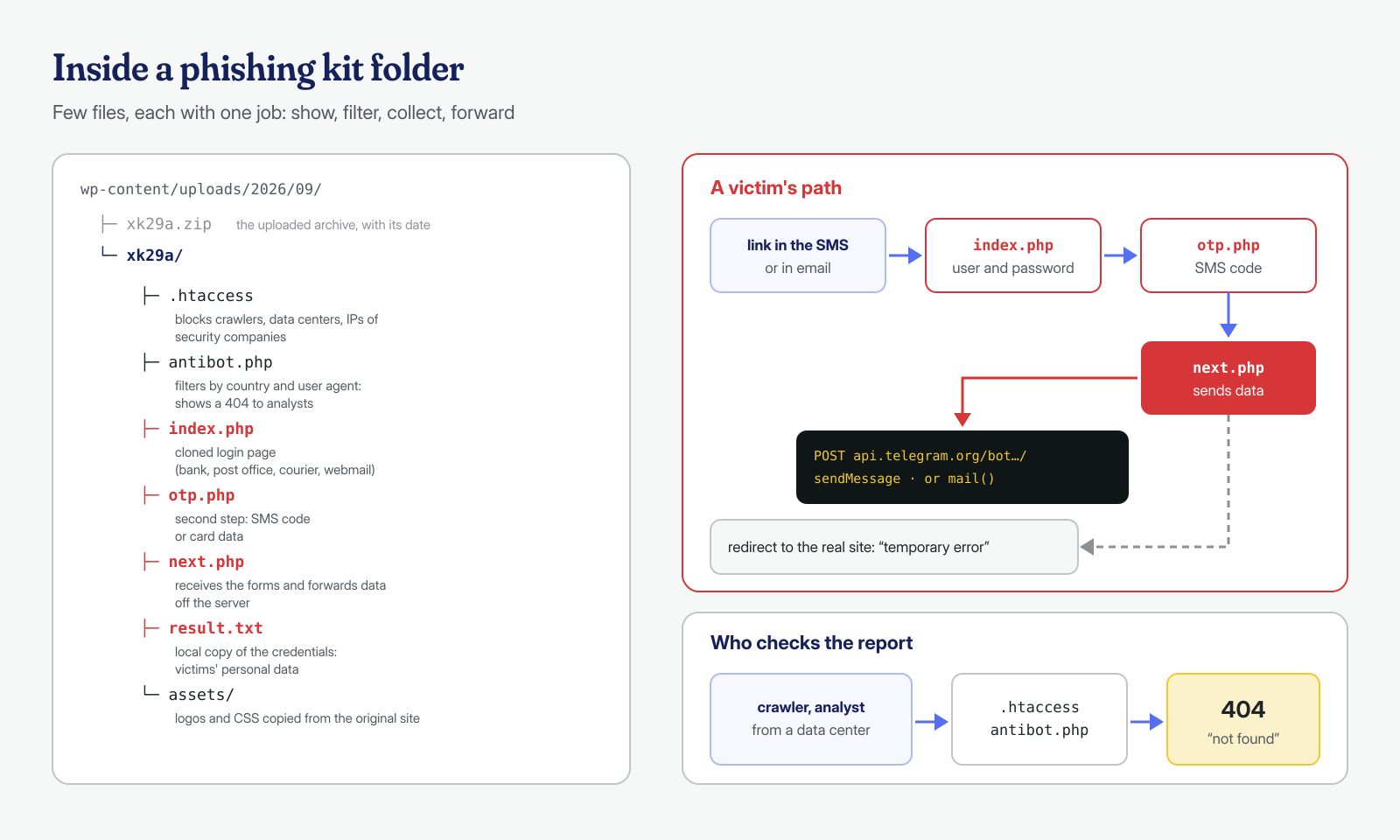
Kits change from campaign to campaign, but the structure is recurring. There is an entry page that imitates a well-known service (bank, post office, courier, webmail, streaming platforms), often with several steps: first username and password, then the code received by SMS, then the card details. Each form sends its data to a local PHP script, which forwards it and moves on to the next page, finishing with a redirect to the real site so that the victim thinks it was a temporary error.
Then there are the filters. A .htaccess in the kit’s folder and one or more “antibot” scripts try to show the page only to victims: they block IP addresses of security companies and data centers, crawler user agents, and visitors from countries other than the targeted one. The result is that someone analyzing the report from a server may find a 404 error or a blank page, while from an Italian smartphone the phishing page appears perfectly. It is the same principle as the cloaking used by SEO spam, applied in the opposite direction.
Finally, exfiltration. The simplest kits mail the data using PHP’s mail() function, with the site’s server as the sender, with effects on the domain’s mail reputation similar to those described for servers that send spam. Many recent kits instead use the Telegram bot API: as documented in Cofense’s analysis, the data entered by the victim is sent with a sendMessage request to api.telegram.org, with the bot token in the path and the chat identifier in the body. Some kits also save a local copy in a text file, which therefore contains the victims’ personal data and can often be downloaded by anyone who knows the address.
Signals that come from outside
Because the site shows no symptoms, discovery depends on others. The most common reports come from the hosting provider, which in turn receives them at the abuse address and may suspend the account if the content isn’t removed quickly; from national CERTs and banks’ response teams, which monitor campaigns against their own customers; from Google Safe Browsing, which flags the address as deceptive and shows the full-screen warning in Chrome, Firefox and Safari; and from customers themselves, who see the warning when they visit the site.
An abuse report almost always contains the exact address of the phishing page: it is the most valuable piece of data, and must be kept. In Search Console, the Security issues report shows the “social engineering” category and some example URLs. If you don’t have a Search Console account, you can check the domain’s status in Google’s Transparency Report. Note that a phishing label often applies to the entire domain, not just the kit’s folder, and also affects email, because links to the domain in messages are treated as dangerous.
Finding the kit: recent folders, zips and suspicious forms
If the report gives the address, the folder is known; but a kit is rarely alone. The search must be extended to the whole site and to the other sites on the same account, starting from recently created folders and archives:
# Folders created or modified in the last 30 days, excluding caches
find ~/public_html -type d -mtime -30 -not -path '*/cache/*' | sort

# Archives on the site: none should be inside wp-content
find ~/public_html \( -name '*.zip' -o -name '*.tar.gz' -o -name '*.rar' \) -printf '%TY-%Tm-%Td %TH:%TM  %p\n'

# Hidden folders or PHP files inside .well-known
find ~/public_html -path '*/.well-known/*' -name '*.php'

# Exfiltration to Telegram or by email with form data
grep -rlE 'api\.telegram\.org|sendMessage|chat_id' --include='*.php' ~/public_html
grep -rlE 'mail\s*\(.*\$_(POST|REQUEST)' --include='*.php' ~/public_html
Another reliable clue is the HTML content: an index.php or index.html file outside WordPress paths that contains a form with password fields, OTP codes or card numbers, or a bank’s name in the title, does not belong to the site. A keyword search for terms like cvv, otp or the names of the most imitated brands finds in seconds even kits that don’t use Telegram. Finally, the access logs tell you how long the kit has been active and how many people visited it: POST requests to the kit’s scripts correspond, roughly, to the data submitted by victims.
# First and last request to the kit's folder (logs from oldest to newest)
grep -h '/uploads/2026/09/xk29a/' /var/log/nginx/access.log.1 /var/log/nginx/access.log \
  | awk '{print $4}' | sed -n '1p;$p'

# Forms submitted (POST) to the kit's scripts, by IP address
grep -h 'POST /wp-content/uploads/2026/09/xk29a/' /var/log/nginx/access.log* \
  | awk '{print $1}' | sort | uniq -c | sort -rn | head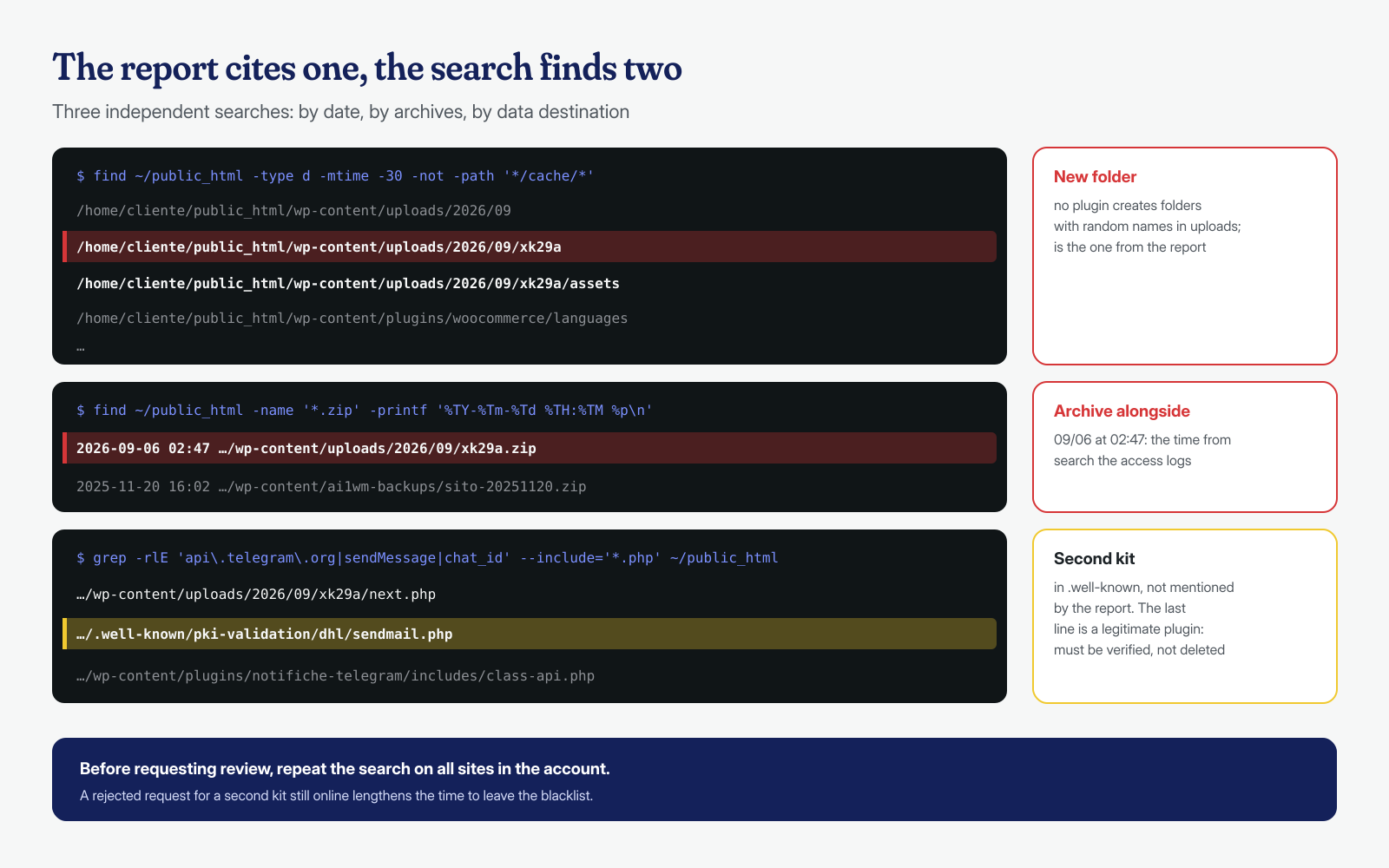
Preserving evidence before deleting
The temptation is to delete the folder right away and tell the host the problem is fixed. It is better to make a copy first, for three reasons. The first is to understand the vector: the dates of the files and of the zip, compared with the access logs, show which request uploaded the kit, and without that information the kit will come back. The second is the victims: the text file with the collected data and the logs of POST requests are needed to assess the scale of the incident, also to evaluate the notification obligations under Article 33 of the GDPR if data processed by the site was also involved. The third is a possible criminal complaint: the Telegram bot token, the destination email addresses and the IPs of whoever uploaded the kit are useful to the Polizia Postale (Italian cybercrime police) and to CERTs.
# Archive of the folder with original dates and permissions, outside the site
mkdir -p ~/incidente
tar -czpf ~/incidente/kit-xk29a.tar.gz -C ~/public_html/wp-content/uploads/2026/09 xk29a xk29a.zip
cp -p /var/log/nginx/access.log* ~/incidente/ 2>/dev/null
sha256sum ~/incidente/* > ~/incidente/SHA256SUMS
chmod -R go-rwx ~/incidente
The copy contains third parties’ personal data and must be treated accordingly: outside the public folder, with restricted access, and deleted when no longer needed. If the site is involved in an investigation, the acquisition procedure must be agreed with whoever is conducting it; the general method is the one described for the first hours after an attack. CERT-AgID, for example, provides a mailbox for submitting samples and reports, listed on its contacts page.
If the kit saved a local copy of the data, there is one more check to make: look in the access logs for GET requests to that file. A text file downloaded from addresses other than the victims’ means the collected data was taken from there, by the kit’s operator or by others who knew the path, and that information changes the assessment of the incident.
grep -h 'xk29a/result.txt' /var/log/nginx/access.log* | awk '{print $1, $4, $9}'Removal and closing the vector
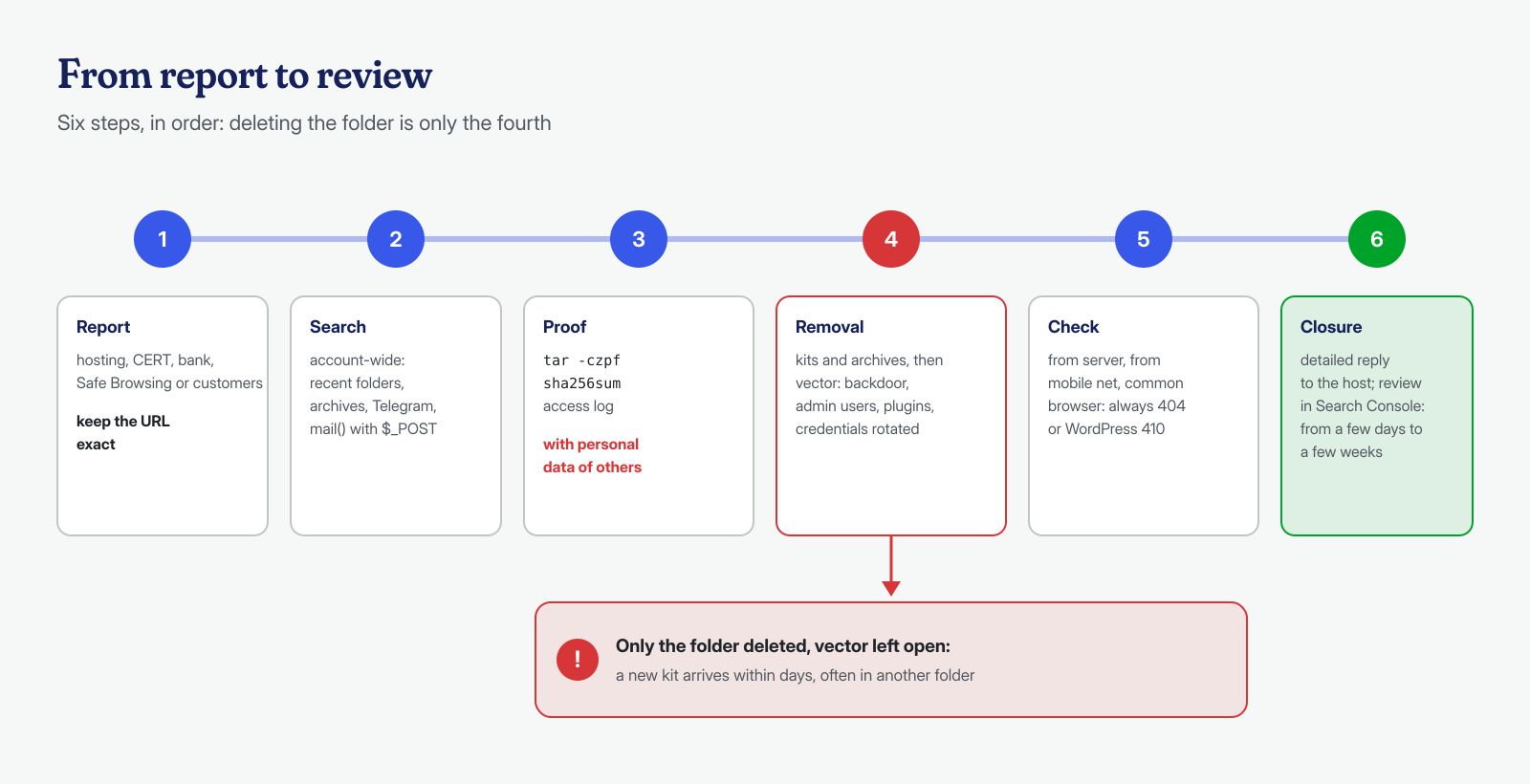
Removing the kit is the easy part: delete the folder, the zip and every file found with the previous searches. What matters is closing the route it came in through, otherwise the next kit arrives within days, perhaps in another folder. That means looking for the webshells and backdoors that allowed the upload, checking administrator users, verifying recently installed plugins, and rotating the WordPress, FTP, database and panel credentials. The kit is almost always the visible symptom of access that has existed for some time and must be treated as a full compromise.
To verify that the address no longer responds, check from several vantage points, because the antibot can distort the result: a command-line request from the server, one from a smartphone on a mobile network, one with a common browser’s user agent. All of them must return a 404 or a 410 generated by WordPress, not a blank page or a redirect. In the following days, keep an eye on the access logs: the phishing emails already sent keep bringing visitors to the old folder, and a sudden return of 200 responses on those paths means the kit has been uploaded again, so the vector is still open.
Closing the report and requesting a review
Once the kit has been removed and the vector closed, three parties remain. The host and whoever sent the report get a detailed reply: what was found, when it was removed, how the attacker got in and what was done to prevent it. A generic answer like “we cleaned it” is often what leads to suspension at the next report.
With Google, you request the review from the Security issues report in Search Console, describing the actions taken. According to the Search Console guide, a review can take from a few days to a few weeks; a request rejected because a second kit was left on the site lengthens the timeline, which is why the search must cover the entire site before submitting it. The full procedure is described in the article on blacklist removal.
A phishing kit is one of the cases where speed matters most: every hour online means new victims and a domain reputation that is harder to recover. In our engagements the search for kits extends to all the sites on the account and to the system, obfuscated files are also analyzed with AI models run locally, and evidence is preserved before removal. If you have received a phishing report for your site, the guaranteed cleanup in 6, 12 or 24 hours for each WordPress installation also includes preparing the review request: you can contact us by forwarding the text of the report you received.
