 WooCommerce
Background
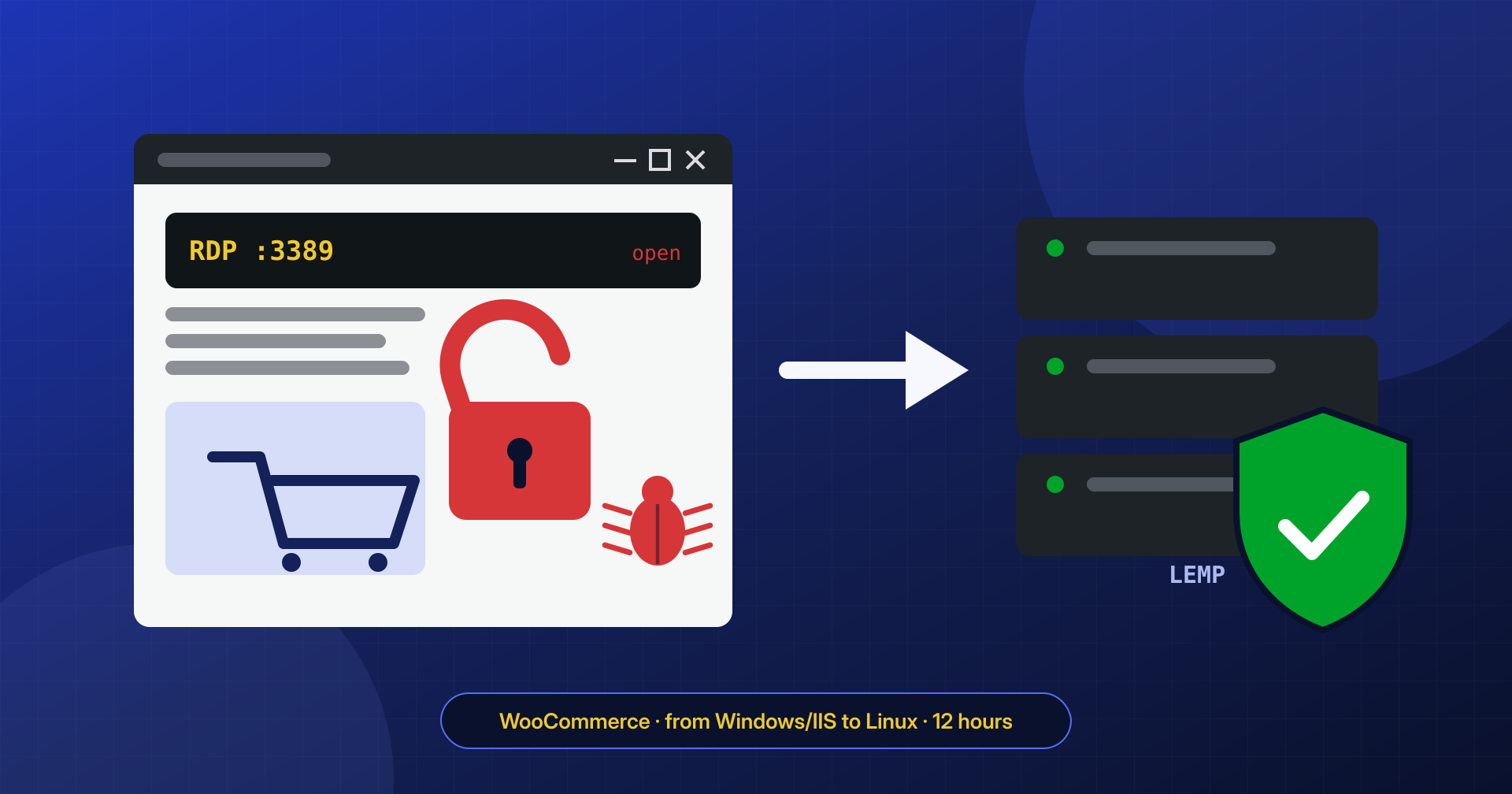
A small online store selling home goods, with a few hundred products on WooCommerce and a good volume of orders on weekends. Years earlier a vendor used to working with Microsoft environments had installed everything on a Windows virtual server: IIS as the web server, PHP through FastCGI, MySQL, and WordPress in the site folder. To manage it remotely, the vendor had left Remote Desktop (RDP) open to the Internet, with an administrator account that had a short password. Then the relationship ended, and since then nobody had updated either the system or the plugins. For confidentiality, the store’s name, products, and details that would allow it to be identified have been omitted or changed.
The symptoms
In early August the bank that handled payments had told the store about some fraud on cards recently used on the site. Around the same time the server had become extremely slow: the vendor’s panel showed the CPU constantly maxed out, even at night when the site had no visitors. The owner had tried running a scan with Windows antivirus, which found nothing. They contacted us and chose the service with intervention within 12 hours.
What we found at the application level
The fraud had a precise explanation: a skimmer on the payment page, of the kind described in the article on skimmers in the WooCommerce checkout. An obfuscated script, loaded only at checkout, copied the data entered in the card form and sent it to a domain imitating a JavaScript library’s. It was added to the site by a few lines slipped into a file of the payment plugin.
It was not the only presence. In the uploads there were three PHP files with double extensions and content encoded several times, like those described in the article on obfuscated files, and two more backdoors were hidden in deactivated plugins that nobody checked because “they’re switched off anyway.” The IIS logs traced the first upload to a product import plugin, idle for two years, with a known file upload vulnerability. It should have run into an obstacle in the permissions: instead, to fix a problem with image uploads, the previous vendor had given the IIS application pool full control over the entire site folder. With those permissions, a web shell in the uploads could modify any WordPress file.
What we found at the system level
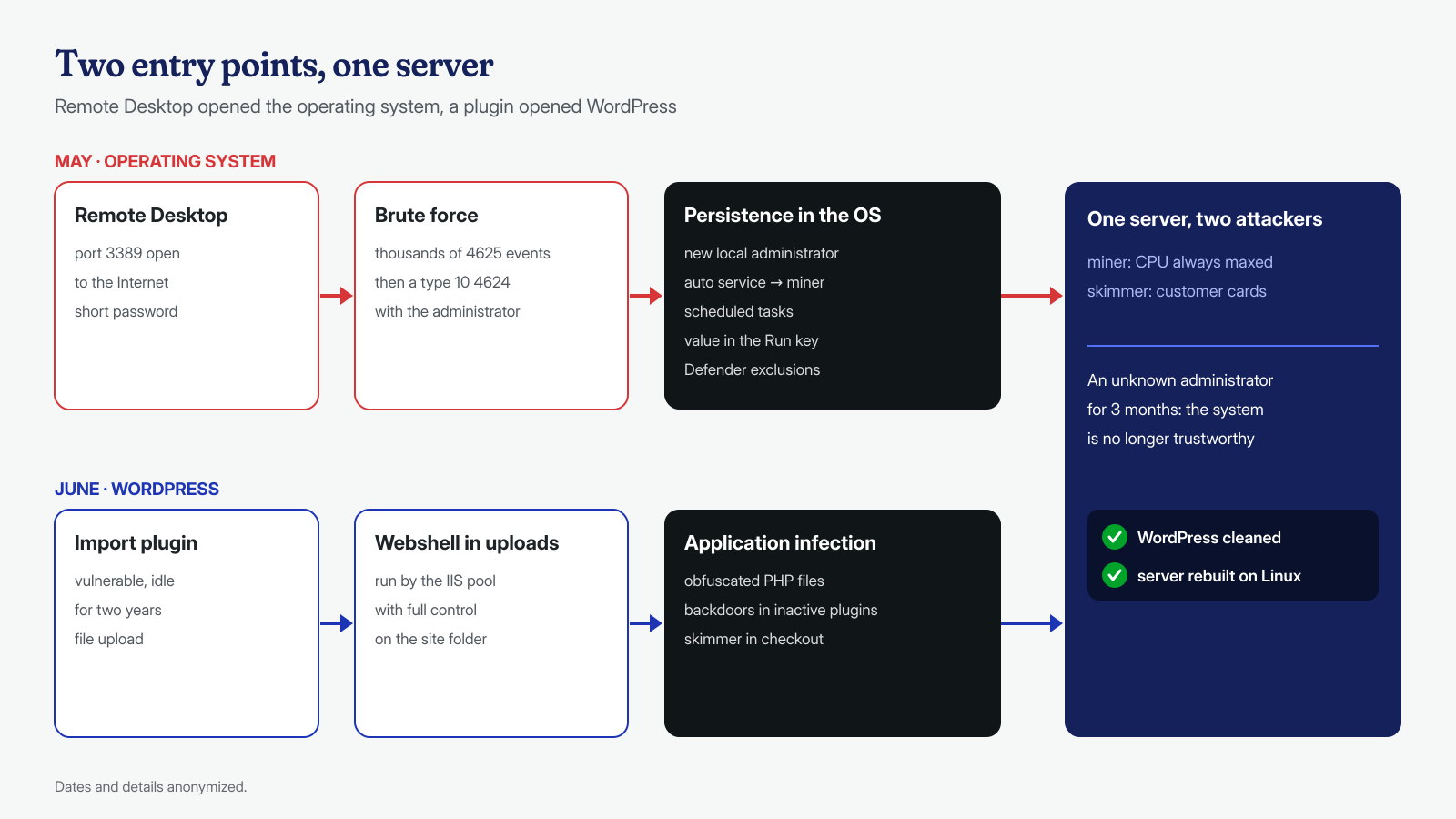
The CPU load did not come from the site. The Windows security log was full of failed RDP logins (event 4625) from dozens of different addresses and, among them, some successful RemoteInteractive logins (event 4624, type 10) with the administrator account, from foreign addresses, at times when nobody at the store was at the computer. The password had been guessed by brute force. Whoever got in had full control of the system, and used it:
- a new local user, with a service-account-style name, added to the administrators group;
- a Windows service set to start automatically, with a description copied from a system component, which launched a cryptocurrency miner hidden in
C:\ProgramData; - two scheduled tasks that every hour checked that the miner was running and, if not, downloaded it again with PowerShell;
- a value in one of the Run registry keys, which started a remote control program at login;
- above all, several exclusions added to Microsoft Defender for the miner’s and the remote tool’s folders. That is why the owner’s scan found nothing: exclusions tell the antivirus not to look right there, and anyone who is an administrator can add them with a single command,
Add-MpPreference.
# PowerShell as administrator: exclusions configured in Defender
Get-MpPreference | Select-Object -ExpandProperty ExclusionPath
Get-MpPreference | Select-Object -ExpandProperty ExclusionProcess

# Non-Microsoft scheduled tasks, with the command they run
Get-ScheduledTask | Where-Object TaskPath -notlike '\Microsoft\*' |
  Select-Object TaskName, TaskPath, @{n='Azione';e={$_.Actions.Execute + ' ' + $_.Actions.Arguments}}

# Auto-start services and the executable path
Get-CimInstance Win32_Service | Where-Object StartMode -eq 'Auto' |
  Select-Object Name, DisplayName, PathName

# Programs started by the Run keys and members of the Administrators group
Get-ItemProperty 'HKLM:\Software\Microsoft\Windows\CurrentVersion\Run'
Get-LocalGroupMember -Group 'Administrators'
The dates told two parallel stories. The RDP logins had started in May, the exploitation of the plugin in June: most likely two different attackers, one interested in the server’s computing power, the other in the customers’ cards, who had happened to find the same house left open. Reconstructing everything was not simple. The security log, left at its default size and filled by the login attempts, covered only the last few days: we derived the date of the first entry from the system log, which kept the installation of the malicious service (event 7045), and from file creation dates. And the server lacked the tools we take for granted on Linux. We worked on a copy of the logs and files, with the help of open-weight AI models run locally to sort and correlate tens of thousands of lines.
How we removed it
The first thing was to stop the skimmer: the checkout was put into maintenance mode and the store notified the bank, as expected when card data may have been stolen. Then we closed the RDP port at the vendor’s firewall, leaving it reachable only from our address, and saved the evidence: IIS logs, exported event logs, scheduled tasks, services, registry keys, the malicious executables, and the suspicious PHP files.
For the operating system there was no reasonable choice other than a rebuild. An attacker who has been a Windows administrator for three months may have left persistence anywhere: in WMI, in drivers, in other accounts, in Defender settings we did not see. Cleaning that server and declaring it trustworthy would not have been honest. So, as always, we separated two activities:
- the WordPress cleanup, covered by the 12-hour service: core rebuilt from the official packages, WooCommerce and the other plugins reinstalled from the official repository, deactivated plugins deleted, the vulnerable plugin replaced, the theme compared with the original, uploads cleared of every executable file, the database checked for users, options, and content. The result was verified on a new Linux server, at a test address;
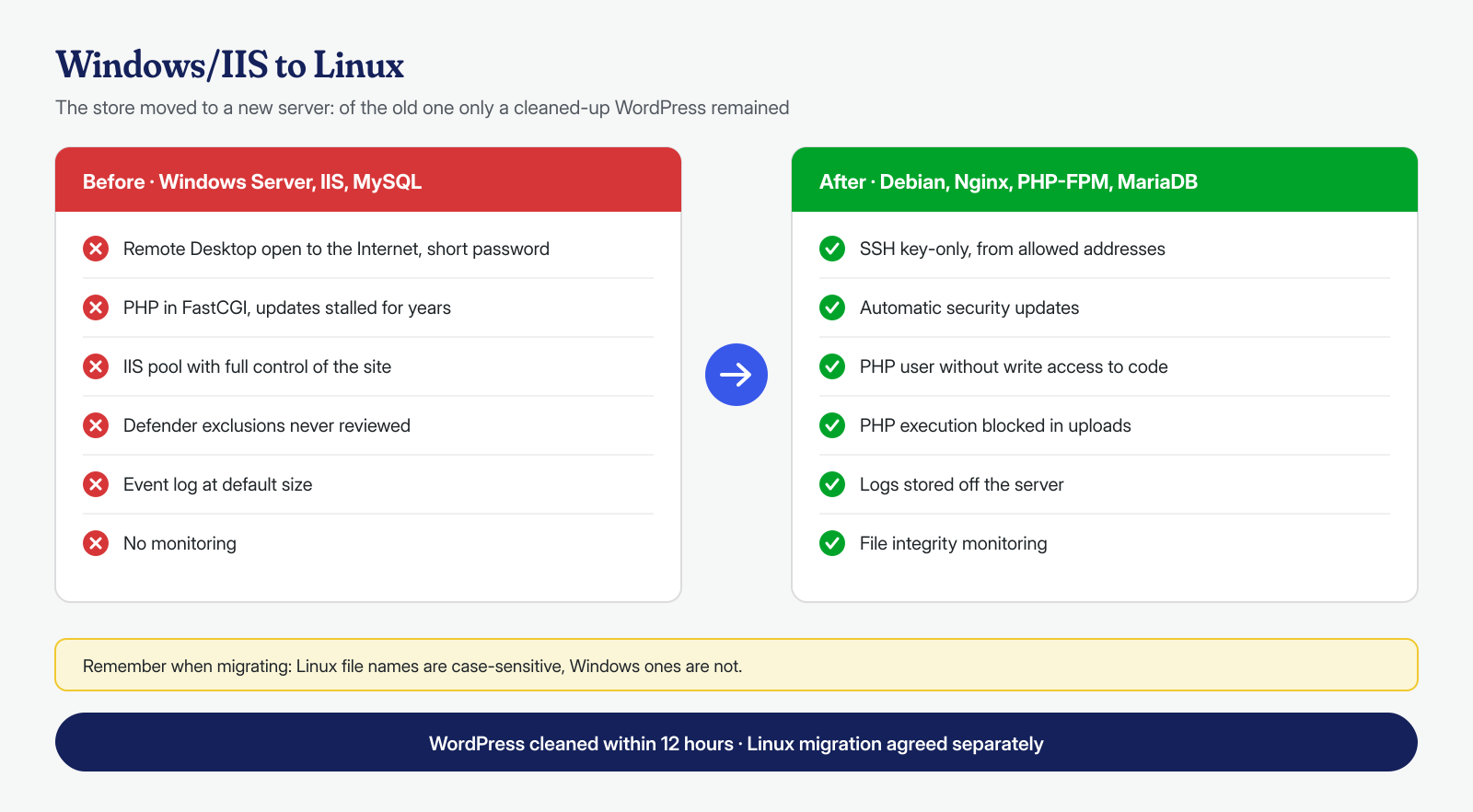
- the migration from Windows to Linux, agreed with the owner as a separate activity outside the guarantee: a new server with a stable Debian distribution and a LEMP stack (Nginx, MariaDB, PHP-FPM), the IIS
web.configrewrite rules translated into the Nginx configuration, the DNS change.
The migration held a typical surprise: the Windows file system is case-insensitive, while Linux’s is case-sensitive. About forty images, referenced in the database with a name spelled slightly differently from the file, showed up as missing on the new server. We found them by comparing the references in the database with the files present and fixed them before the DNS change.
Finally, the credentials: passwords of administrators and of customers with a management role, WordPress keys and salts, the database password, the payment service’s API keys, and access to the vendor’s panel. The old server was shut down and kept as evidence for thirty days, then deleted.
Why WordPress on Linux
It should be said honestly: WordPress on Windows works. The core even contains a function, iis7_supports_permalinks(), that checks whether IIS can handle “pretty” URLs, and WP-CLI has installation instructions for Windows too. The problem is not compatibility, but everything around it:
- the ecosystem: most WordPress installations run on Linux servers, and documentation, guides, security plugins, and analysis tools are designed and tested there. On Windows, many instructions have to be translated, and some have no direct equivalent;
- permissions: Linux’s model, with owner, group, and a dedicated user for PHP-FPM, is simple to set up and to verify. NTFS ACLs are powerful, but inherited and layered, and in practice they often end up as in this case, with a “full control” granted to fix a problem and never taken away;
- remote administration: a Linux server is managed with SSH and keys, which are easy to restrict. On Windows the most convenient route is Remote Desktop, and Microsoft’s own documentation warns that exposing it to the Internet is not recommended and that a VPN is preferable;
- expertise: people who host WordPress, ourselves included, have worked on Linux for years. A Windows server with IIS and PHP is a rare configuration, and what is rare is easier to misconfigure and harder to get reviewed by someone who knows it well.
Hardening
On the new server PHP-FPM runs as a dedicated user that can write only to the uploads and the cache, and PHP execution is blocked in uploads, as explained in the article on web shells in uploads. SSH accepts only keys and only from authorized addresses, no administrative access is exposed to the whole Internet, and the system’s security updates install themselves. WordPress, WooCommerce, and the plugins are updated through a procedure agreed with the owner, preceded by a backup. File integrity monitoring is in place, with a dedicated check on the checkout files, and a Content Security Policy limits the domains from which the payment page can load scripts and to which it can send data.
The result
The cleaned WordPress was ready and verified within the 12 hours the service provides. The migration to Linux, with order and payment tests in test mode, was completed in two days, and the checkout went live again only after the bank gave the go-ahead. In the following weeks no new fraud was reported, the new server’s CPU follows the pattern of visits, and the monitoring has recorded no unauthorized changes. The owner received a report with the two timelines, the indicators of compromise, and the elements needed to assess, with their own advisor, the obligations toward the customers involved.
What this case teaches
When an infection touches the operating system, cleaning WordPress is not enough, and that is as true for Linux as for Windows. But the choice of platform weighs on everything else: on how easy it is to set permissions correctly, on how many tools and how many people know how to analyze the system, on how natural it is to avoid exposing administrative access to the whole Internet. A Remote Desktop left open with a weak password is a door that sooner or later someone will try, and in this case two parties tried it.
Malwarecleanup.com is the WordPress malware removal service of Managed Server S.r.l., which has run servers and hosting since 2005. We work on both the application and the system, with guaranteed times of 6, 12, or 24 hours for each WordPress installation, counted from receipt of the access credentials; activities such as migrating a server are proposed and agreed separately. For a site that runs on a Windows server, or on any server you are no longer sure about, you can contact us.