 WordPress
The background
A mid-sized manufacturing company that makes components for industrial machinery and sells mostly to other businesses, in Italy and abroad. The site, on WordPress for about ten years, is its business card: product catalog, downloadable technical data sheets, pages in three languages and a quote request form that feeds the sales office’s work. It was run by a small outside design studio, which handled the content and, when it got around to it, the updates. For confidentiality, the company’s name, products and details that would make it identifiable have been omitted or changed.
For almost a year the site had been giving intermittent trouble. The old hosting provider had twice suspended outgoing mail from the server because spam messages were going out; some customers had reported that, when opening the site from their phones, they landed on lottery pages; the control panel showed load spikes with no obvious reason. Each time the design studio updated a few plugins, changed a password and the problem eased, only to come back a few weeks later.
The false restart
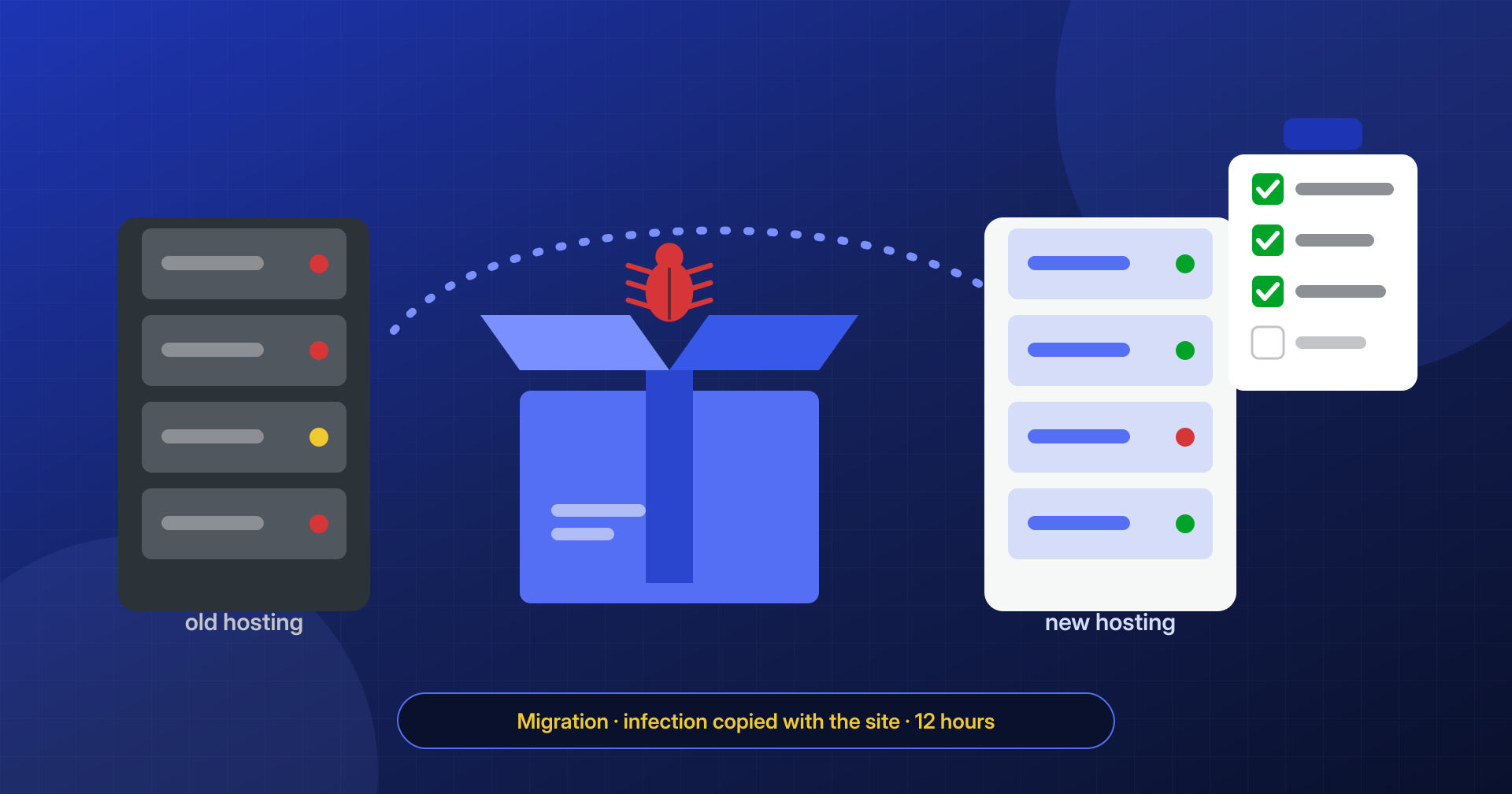
At the end of summer management made a decision that seemed reasonable: change provider. The idea, shared by everyone, was that the problems came from the old hosting, “an old, slow server”, and that a new, more modern space with good support would settle the matter. The design studio carried out the move in an afternoon, with a migration plugin: a single archive with all the files and the database, uploaded to the new space and restored exactly as it was. Once the DNS was changed, the site worked, it was faster, and for a few days nothing happened. Inside the company people spoke of a “clean restart”.
It is a widespread and understandable belief: if the problem shows up on one server, moving to another seems like the cure. But a WordPress infection almost always lives in the site’s files and in its database, which is exactly what a migration copies. Moving house while taking along the boxes without opening them does not rid you of the woodworm.
The symptoms
Eleven days after the move, the new provider blocked the account’s outgoing mail: hundreds of messages an hour were leaving the site for addresses nobody had seen before. Two days later the sales manager received from a foreign distributor a screenshot of a Google search in which, under the company’s name, pages in a foreign language selling pharmaceuticals appeared. The new hosting then asked for the site to be cleaned before re-enabling mail. Management contacted us with a precise question: “We changed everything, how is this possible?” They chose the service with intervention within 12 hours.
What we found at the application level
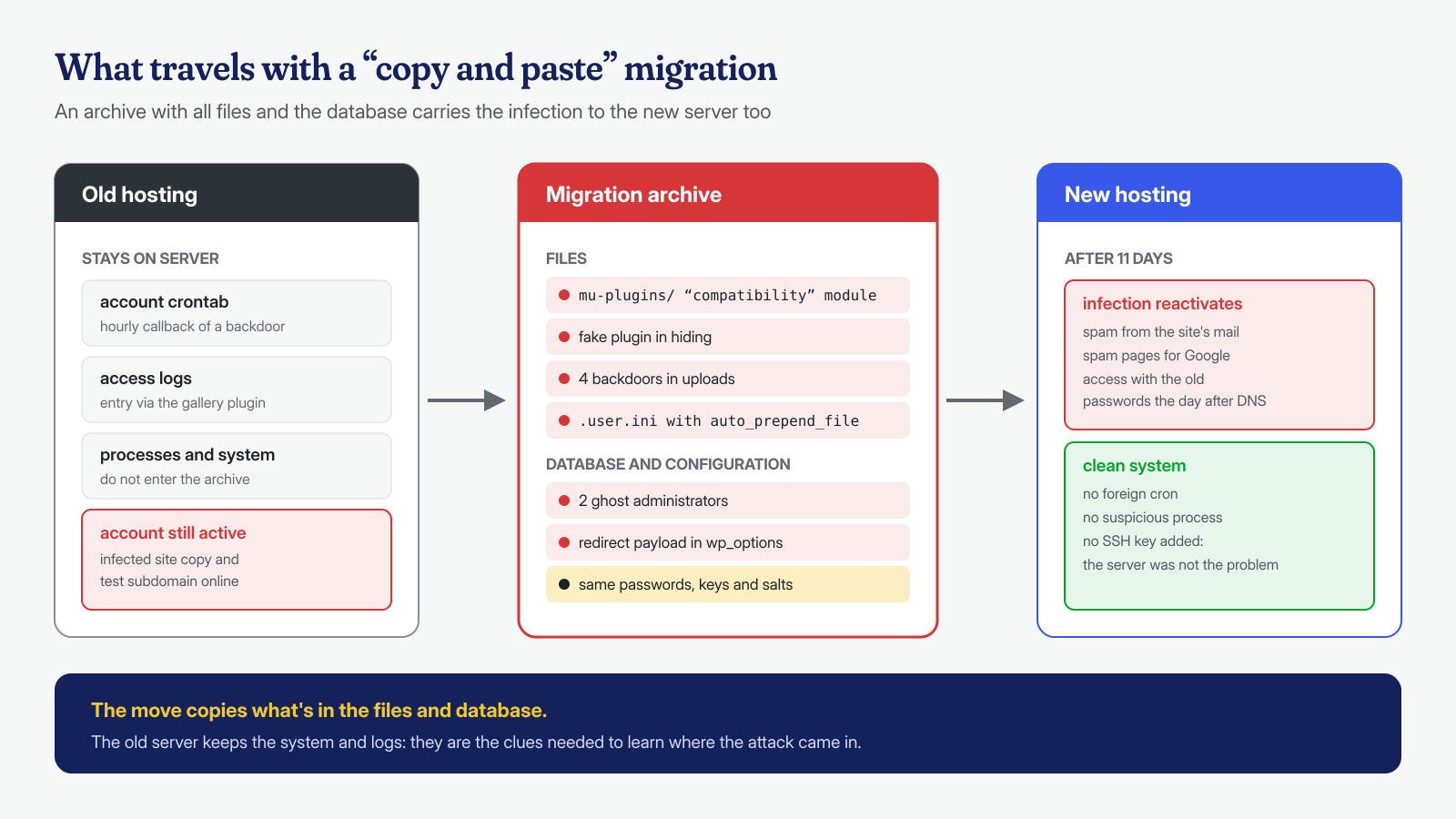
The answer came quickly, by comparing the migrated site with the original versions of WordPress, the theme and the plugins. Almost everything that did not add up had arrived inside the migration archive, with modification dates from the previous months:
- a file in the
mu-pluginsfolder, named like a compatibility module, which WordPress always loads and which does not appear in the list of active plugins, as described in the article on backdoors in mu-plugins and drop-ins; - a fake plugin, with header and description copied from a well-known security plugin, which hid itself from the dashboard list and generated on the fly the spam pages shown only to search engines;
- four PHP files in the uploads folder, scattered across folders from previous years, with content encoded multiple times: backdoors to get back in and a module for sending mail, the source of the spam messages;
- a
.user.inifile in the site root that made one of those files load before every page, a mechanism explained in the article on .htaccess, .user.ini and auto_prepend_file. The migration plugin had copied it like any other file, and the new server, which uses PHP-FPM, had obeyed it to the letter.
The database told the rest. Among the users were two administrators that nobody at the company or at the design studio knew, one of them created more than eight months earlier: the typical case of ghost administrators. In wp_options an option with an anonymous name contained a serialized block with the mobile-visitor redirect configuration and the list of destination domains, of the kind described in the article on serialized payloads in wp_options. These too had passed intact from one server to the other, because the migration had imported the database without anyone looking at it.
What we found at the system level
On the new server the system was clean: no foreign entries in the account’s crontab, no suspicious processes, no added SSH keys. That is an important detail, because it confirms that the problem had never been “the old server”. But at the system level there were still two discoveries that explained how quickly the infection came back.
The first was in the new server’s logs. The day after the DNS change, from a foreign address, there had been a successful login to the dashboard with the design studio’s account, followed by direct requests to one of the backdoors in the uploads. No forcing was needed: the password was the same as before, and in all likelihood it was already in the hands of whoever had infected the site. The database and SFTP passwords and the security keys in wp-config.php had also been copied over unchanged.
The second concerned the old hosting, to which the company gave us access. The account was still active, paid through the end of the year, and hosted both a copy of the site and an old test environment on a subdomain, both infected. Its crontab had an entry that called one of the backdoors every hour, and the logs showed that the initial entry, months earlier, had come through an image gallery plugin abandoned by its developer, with a known file upload vulnerability. The same plugin, of course, had been migrated and was active on the new server too.
How we removed it
Before intervening we saved the evidence from both accounts: a copy of the suspicious files, a database export, crontab and logs. Then, in agreement with management, we treated the cleanup as the migration it should have been:
- put the site in maintenance mode and blocked access to the dashboard, to close the door used with the old credentials;
- reinstalled the WordPress core, the theme and all plugins from official sources, instead of cleaning the existing files; the abandoned gallery plugin was replaced with a maintained one;
- copied back from the uploads only what should be there, that is images and documents, after checking them one by one by type and content, and removed
.user.ini,mu-pluginsand the backdoors; - cleaned the database: deleted the two ghost administrators and the option with the payload, and checked posts, autoloaded options, users and triggers;
- changed all credentials: user, database, SFTP and panel passwords, and generated new keys and salts in
wp-config.php; - verified the files and the database with a new scan and a checksum comparison, and checked that the spam pages returned an error even when requested as a search engine.
The old account, on our advice, was emptied and closed after keeping a copy for analysis: as long as it stayed online, with an infected copy and an active cron job, it was a foothold ready to use. The new provider re-enabled mail after receiving our report, and the design studio reported to Google, through Search Console, the addresses of the spam pages to be removed.
The right migration
The heart of the case is not technical but a matter of method. A migration is the ideal moment to really start from scratch, as long as you do not simply copy. The correct order is the one we followed, only ahead of time: first you verify and clean, then you move. With the design studio we wrote a checklist to follow for all future moves, including for other clients’ sites.
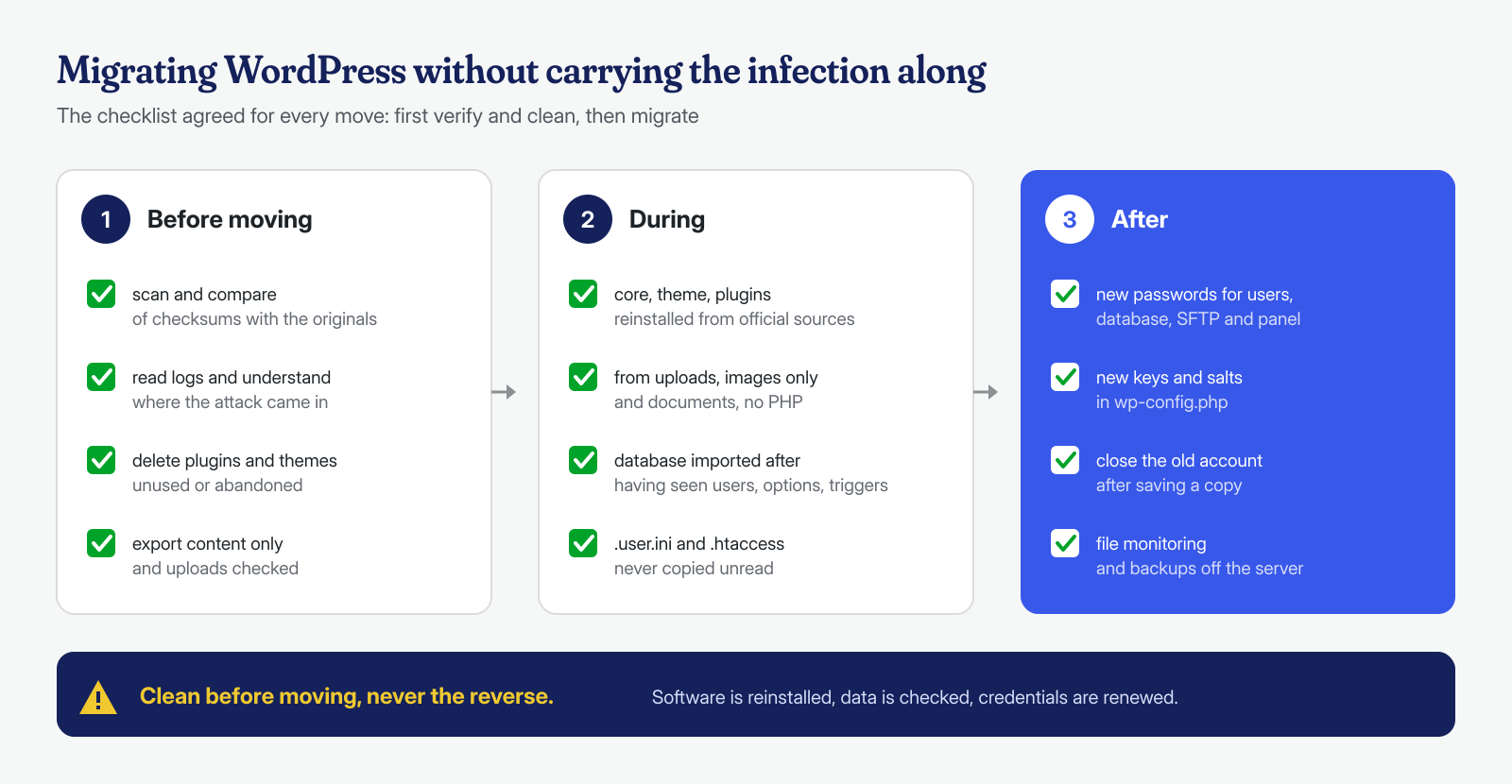
Three points, in particular, make the difference. Software is reinstalled, not copied: core, theme and plugins downloaded from official sources cannot contain an attacker’s changes, while a copy carries them along. The database is examined before it is imported, because users, options and triggers survive any change of server. And all credentials are renewed, because a site moved with the same passwords is a site whose keys someone else may already have.
The hardening
On the new account we prevented PHP execution in the uploads, blocked file editing from the dashboard and set the permissions of wp-config.php as described in the article on wp-config.php hardening. Users with the administrator role went from five to two, both with two-factor authentication; the design studio now works with an editor role and gets the highest privileges only when needed. Mail is sent through an authenticated SMTP service instead of the server’s mail function, so any abuse would be immediately visible. Finally, file integrity monitoring is active, with an alert for any new PHP file outside the expected folders.
The result
The site was declared clean within the 12 hours provided by the service, counted from receipt of the logins to both hosts. Mail was re-enabled the next day, and within three weeks the spam pages disappeared from search results for the company name. In the following two months monitoring recorded no unauthorized changes and no abnormal mail sending. For the first time in a year the problems did not “ease”: they ended. Management received a report with the reconstruction of the infection from the initial entry on the old server to the relapse on the new one, and the migration checklist.
What this case teaches
Changing hosting is often a good idea, but it is not a cleanup. When a site’s problems keep recurring, the question to ask is not “where is it?” but “what does it contain?”, and the answer must be sought before the move, not after. The case also teaches something about organization: nobody had ever asked the design studio to investigate the causes, only to make the symptoms go away, and the migration had been treated as a one-afternoon technical operation instead of an opportunity to verify everything. Finally, an old account left switched on “for safety” is the opposite of safety: it should be closed as soon as the new site is verified.
Malwarecleanup.com is the WordPress malware removal service of Managed Server S.r.l., which has been running servers and hosting since 2005. We work on both the application and the system, with guaranteed times of 6, 12 or 24 hours for every WordPress installation, counted from receipt of the logins. If you are about to change hosting and your site has had problems, or if it has them again after the move, you can contact us: better to check before moving it.