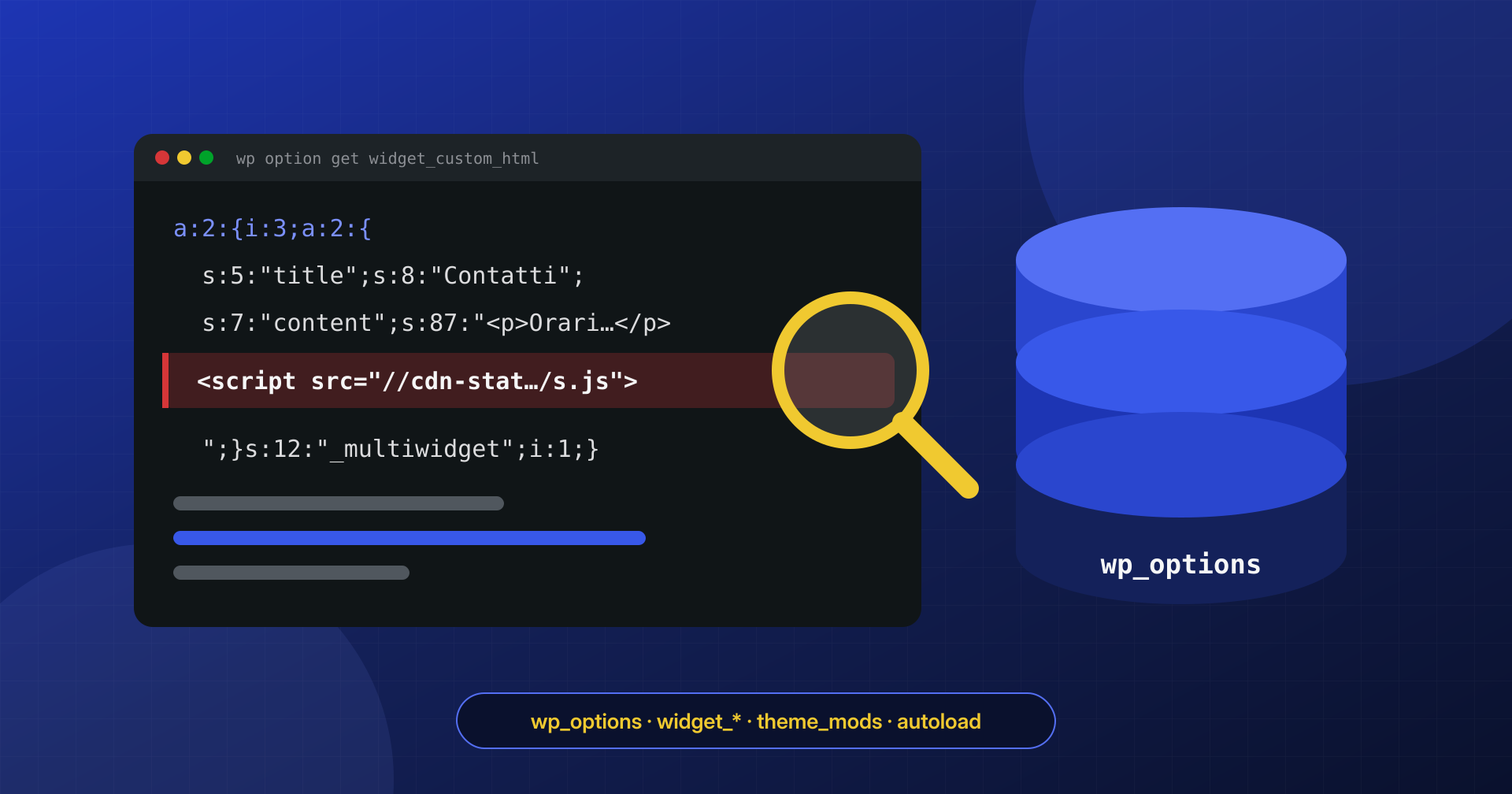
The site files have been compared against the originals, the core verified, the plugins reinstalled from scratch. Yet a script nobody wrote still shows up in the footer, and at the bottom of every page there is a block of hidden links. When the files are clean and the symptom remains, the answer is almost always in the database, and in one table in particular: wp_options.
A payload in the database survives any reinstallation of the files, and if it sits inside a serialized value it is not even visible to a text search done in a hurry.
In the article on SQL triggers and malware in the database we saw the basic queries for finding suspicious code in options. Here we go one level deeper: how PHP’s serialization format is structured, why fixes made with a simple search and replace break the site, where payloads nest (widgets, theme_mods, autoloaded options), and how to clean them without corrupting the data.
PHP’s serialized format
WordPress stores many values in wp_options that are not simple strings: settings arrays, widget lists, plugin configurations. To store them in a text column it uses PHP’s serialize() function, and it rebuilds them with maybe_unserialize() when it reads them. The result is a string in which every value is preceded by its type and, for strings, by its length:
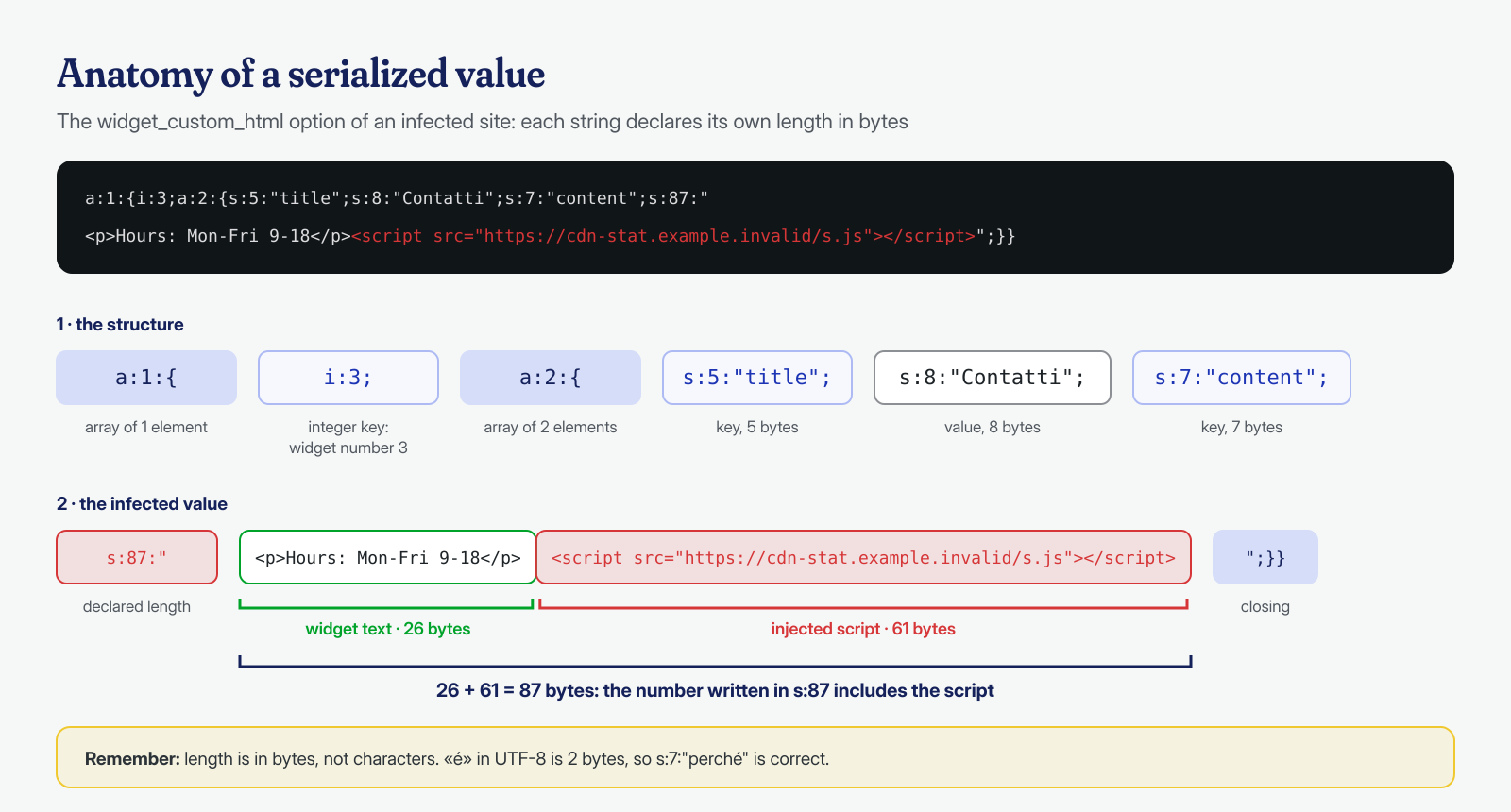
a:2:{s:5:"title";s:7:"Contatti";s:4:"text";s:22:"Via Roma 1, 00100 Roma";}Read one piece at a time: a:2:{…} is an array of two elements; s:5:"title" is a five-byte string used as a key; s:7:"Contatti"… and here there is already a deliberate error, because “Contatti” has eight characters, not seven. A serialized string with the wrong length can no longer be unserialized: unserialize() returns false and the whole value, not just that key, is lost. The other types you will meet are i: for integers, d: for decimals, b: for booleans, N; for null and O: for objects, with the class name and properties.
One decisive detail: the length is expressed in bytes, not characters. A string with accented letters in UTF-8 takes up more bytes than characters, and “café” is s:5, not s:4. That is why people who fix a serialized value by hand often get it wrong even when counting carefully.
Why search and replace breaks the site
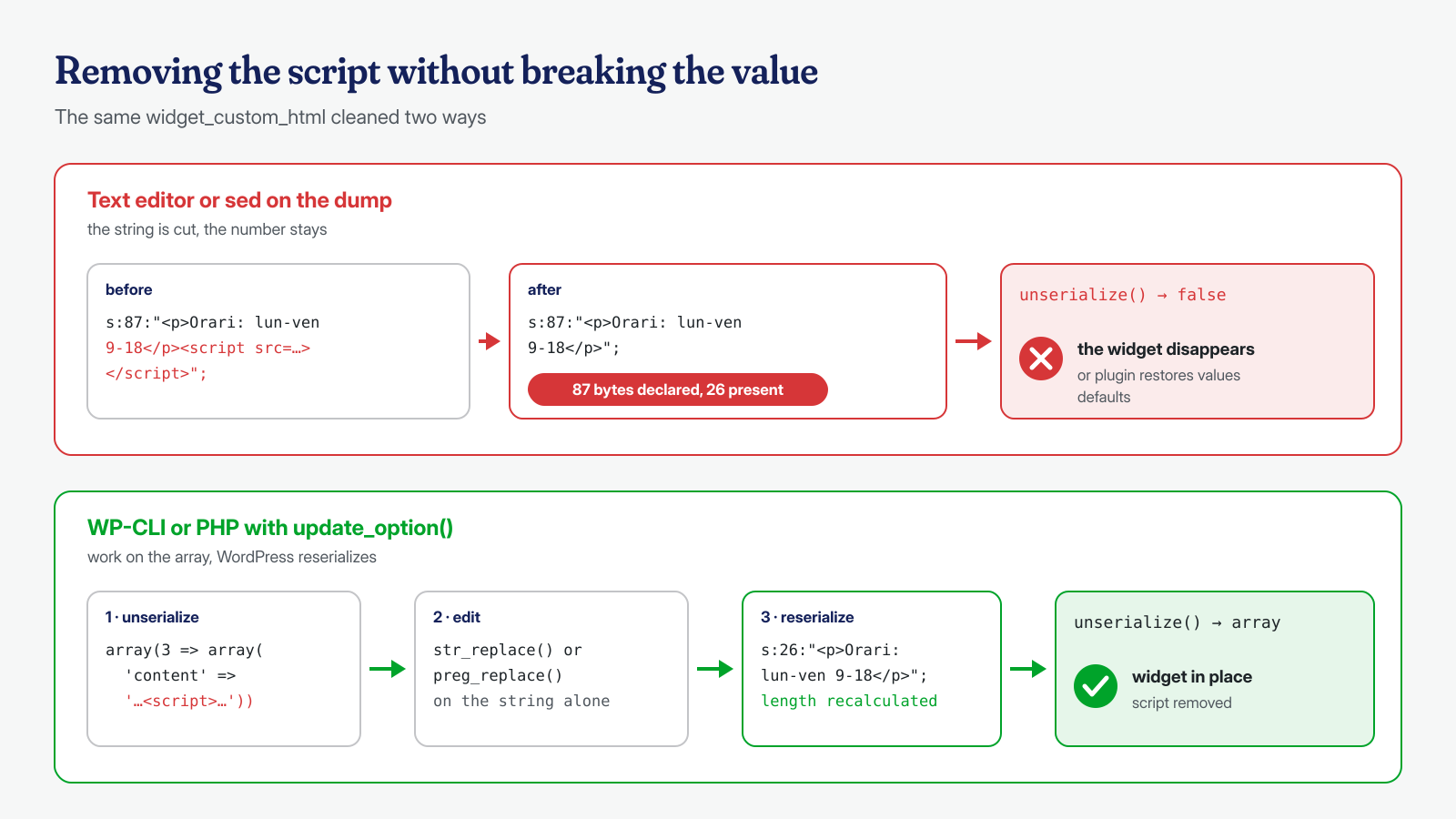
The most common reflex when faced with an injected script is to export the database, open the dump with an editor or with sed, delete the script wherever it appears, and reimport. On wp_posts content it works, because the text there is stored in plain form. On a serialized value, however, removing the 61 bytes of a script without fixing the number that precedes them produces an inconsistent string: WordPress can no longer read it, get_option() returns the raw value or false, and the visible result is an empty sidebar, a theme that falls back to default settings, a plugin that asks to be reconfigured.
Even worse, some plugins that find an unreadable option overwrite it with default values, and at that point the original data is lost. That is why, before any work on the database, you need a complete dump stored outside the site, and every change to serialized values must be made with tools that understand them.
The most common is WP-CLI’s wp search-replace, which for each serialized value unserializes it, applies the replacement and reserializes it with the correct lengths. Always try it first in dry-run mode:
# Full backup, outside the public folder
wp db export ~/backup/prima-della-pulizia.sql

# Dry run: how many rows would change, and in which tables
wp search-replace '<script src="https://cdn-stat.example.invalid/s.js"></script>' '' \
  --all-tables-with-prefix --precise --dry-run --report-changed-only

# Only after checking the list, the real replacement
wp search-replace '<script src="https://cdn-stat.example.invalid/s.js"></script>' '' \
  --all-tables-with-prefix --precise --report-changed-only
The limit of this approach is that it works only if the script is identical everywhere. Many campaigns generate variants for each site or each option, with different parameters or obfuscated fragments; there you need a value-by-value analysis, which we cover below.
Autoload: options read on every request
The autoload column of wp_options says whether an option should be loaded into memory when WordPress starts, along with all the others, in a single query. For an attacker this is a handy feature: an autoloaded option is always available, with no extra queries that might show up in a profiler, and a backdoor in the files can read it with a simple get_option() and execute its contents. The file on disk stays tiny and apparently harmless, while the real code lives in the database.
Since WordPress 6.6 the column no longer holds just yes and no, but also on, off, auto, auto-on and auto-off; search queries must account for that. A useful first look is the list of autoloaded options sorted by size, with the most recent ones highlighted:
-- Options loaded on every request, largest first
SELECT option_id, option_name, autoload, LENGTH(option_value) AS byte
FROM wp_options
WHERE autoload IN ('yes', 'on', 'auto-on', 'auto')
ORDER BY byte DESC
LIMIT 40;

-- The most recently created options: IDs grow with inserts
SELECT option_id, option_name, autoload, LENGTH(option_value) AS byte
FROM wp_options
ORDER BY option_id DESC
LIMIT 40;
The second query is underrated: wp_options has no modification date, but option_id is an increasing counter, and an option with an anonymous name created shortly before the infection stands out right away next to the day’s transients. Names to look at with suspicion are random ones, ones that imitate the core with small differences (wp_core_cache, _site_updates_data), and ones that belong to no installed plugin. With WP-CLI the same check looks like this:
# Autoloaded options with size in bytes
wp option list --autoload=on --fields=option_name,size_bytes --format=table

# Contents of a suspicious option, unserialized and readable
wp option get nome_opzione_sospetta --format=json
Widgets, theme_mods and additional CSS
Besides purpose-built options, malware likes to modify existing ones that end up directly in the page HTML. The most frequently hit fall into three families.
Widgets. Each widget type has a widget_* option that holds, serialized, all the widgets of that type: widget_text, widget_custom_html and, with the block-based widget editor introduced in WordPress 5.8, widget_block. An HTML widget with a script at the end is printed on every page that shows the sidebar or footer. Which widget is actually visible, and where, is stated by another option, sidebars_widgets; an infected widget may also have been moved to wp_inactive_widgets and left ready to be reactivated.
theme_mods. Theme customizations made through the Customizer are stored in theme_mods_{theme-name}. Many commercial themes offer fields for “header scripts” or “tracking code” that end up right here and are printed unfiltered. An attacker with database access only has to add their own code next to the Google Analytics snippet. The options of inactive themes should be checked too, because a future theme switch would reactivate them.
Additional CSS. CSS entered through the Customizer is not in wp_options but in wp_posts, with type custom_css; theme_mods holds only the custom_css_post_id reference. CSS does not execute code, but it is used to push blocks of SEO spam links off screen, visible to search engines and not to visitors.
-- Widgets, theme customizations and sidebars
SELECT option_name, LENGTH(option_value) AS byte
FROM wp_options
WHERE option_name LIKE 'widget\_%'
   OR option_name LIKE 'theme\_mods\_%'
   OR option_name = 'sidebars_widgets'
ORDER BY byte DESC;

-- Scripts, iframes and decoding functions in these values
SELECT option_name FROM wp_options
WHERE (option_name LIKE 'widget\_%' OR option_name LIKE 'theme\_mods\_%')
  AND option_value REGEXP '<script|<iframe|atob\\(|fromCharCode|document\\.write|display: ?none';

-- Additional CSS with off-screen positioning
SELECT ID, post_name, post_modified FROM wp_posts
WHERE post_type = 'custom_css'
  AND post_content REGEXP 'left: ?-[0-9]{3,}px|text-indent: ?-[0-9]{3,}';
Serialized objects and encoded payloads
There are two forms of payload that a search for <script will not find. The first is encoded code: the value of an option contains a long base64 string, compressed with gzdeflate or encrypted with a simple XOR, which a backdoor in the files decodes and executes. There is no trace of eval or HTML tags in the database: just seemingly random text. Here it helps to look for very long strings without spaces, or values that start with the typical base64 prefixes of compressed data.
The second is serialized objects. A value containing O: followed by a class name is turned into an object when WordPress unserializes it, and if the class has “magic” methods like __wakeup() or __destruct(), that code runs automatically. This is the PHP object injection mechanism: the core itself is not vulnerable to it, but a plugin with the wrong class turns a manipulated option into code execution. An option that contains an object where the plugin expects an array is a red flag.
-- Serialized objects in options (trace back to the plugin that uses them)
SELECT option_name, LEFT(option_value, 120) AS inizio
FROM wp_options
WHERE option_value LIKE 'O:%' OR option_value LIKE '%;O:%';

-- Long blocks without spaces: base64, hexadecimal, compressed data
SELECT option_name, LENGTH(option_value) AS byte
FROM wp_options
WHERE option_value REGEXP '[A-Za-z0-9+/=]{400,}'
  AND option_name NOT LIKE '\_transient\_%'
ORDER BY byte DESC;
Both queries produce false positives: some plugins legitimately store objects, encoded images or licenses in base64. The real work is tracing each result back to the component that reads it, by searching for the option name in plugin and theme files. An option that no installed file mentions, but that an obfuscated line in a mu-plugin reads under a name built in pieces, is exactly what you are looking for. In cases with many variants, comparing values against components is a task where we get help from AI models run locally, which classify suspicious values without the client’s data ever leaving our infrastructure.
Transients, multisite and metadata
The same techniques apply outside “classic” options. Transients, the temporary options prefixed _transient_ and _site_transient_, are often excluded from checks because they regenerate on their own; that is exactly why they make a good hiding place, especially those with no expiration, which lack the corresponding _transient_timeout_ row. Clearing them with wp transient delete --all is almost always harmless and removes some of the noise, but first it is worth looking at those with unusual names and very large values, because they can show which backdoor writes them.
On a multisite installation the network settings live in wp_sitemeta, and each site in the network has its own wp_N_options table: a search limited to wp_options checks only one. Finally, serialized values are not found only in options: wp_usermeta holds user capabilities (wp_capabilities), which malware modifies to promote an account to administrator, as we saw when discussing ghost administrators, and wp_postmeta hosts page builder data, often in serialized or JSON form. The queries seen so far must therefore be repeated on all the tables with the site prefix, and WP-CLI with --all-tables-with-prefix or --network helps make sure none is forgotten.
Finding values that are already corrupted
If someone has already tried to clean the database with a text editor, there are probably options with wrong lengths. Some malware, writing directly with SQL, also leaves inconsistent values behind. Finding them with SQL is hard; with a short script run by WP-CLI it is immediate, because it uses WordPress’s own function for recognizing serialized values:
<?php
// verifica-serializzati.php — run with: wp eval-file verifica-serializzati.php
global $wpdb;
$righe = $wpdb->get_results( "SELECT option_name, option_value FROM {$wpdb->options}" );
foreach ( $righe as $riga ) {
	if ( is_serialized( $riga->option_value ) && false === @unserialize( $riga->option_value, array( 'allowed_classes' => false ) )
		&& 'b:0;' !== $riga->option_value ) {
		WP_CLI::warning( "Serializzazione non valida: {$riga->option_name}" );
	}
}
The allowed_classes => false setting is important: it prevents objects from being instantiated during the check and any magic methods from running. Flagged options can often be recovered from a backup that predates the infection, or by rebuilding the lengths by hand with great attention to bytes.
Cleaning while keeping lengths valid
When the injected script changes from one value to the next, the safest way is to work on the already unserialized array, in PHP, and let WordPress reserialize it with update_option(). For an infected HTML widget, for example:
# See the widget structure and find the infected index
wp option get widget_custom_html --format=json | python3 -m json.tool

# Read only the content of widget number 3
wp option pluck widget_custom_html 3 content

# Replace the widget content: WP-CLI reserializes the option
wp option patch update widget_custom_html 3 content '<p>Orari: lun-ven 9-18</p>'

# An option created by the malware and used by no component
wp option delete nome_opzione_sospetta
For removals with regular expressions across many options, you write a script for wp eval-file that reads each option with get_option(), walks the array recursively, applies the fix only to string-type values, and saves with update_option(). In every case three rules apply: backup first, a dry run that prints the differences, and verification afterward with the serialization check script and a visit to the site’s pages.
Finally, the order of operations. Cleaning the database while the backdoor is still in the files, a reinfecting cron job or an SQL trigger remains means watching the same payload reappear a few hours later. In our engagements the database is analyzed together with the files and the system, and the infected option is only the last link in a chain that has to be traced back to the entry point. The guaranteed cleanup in 6, 12 or 24 hours for every WordPress installation includes this part too; if you suspect your site’s problem is in the database, contact us before running a search and replace on the dump.
