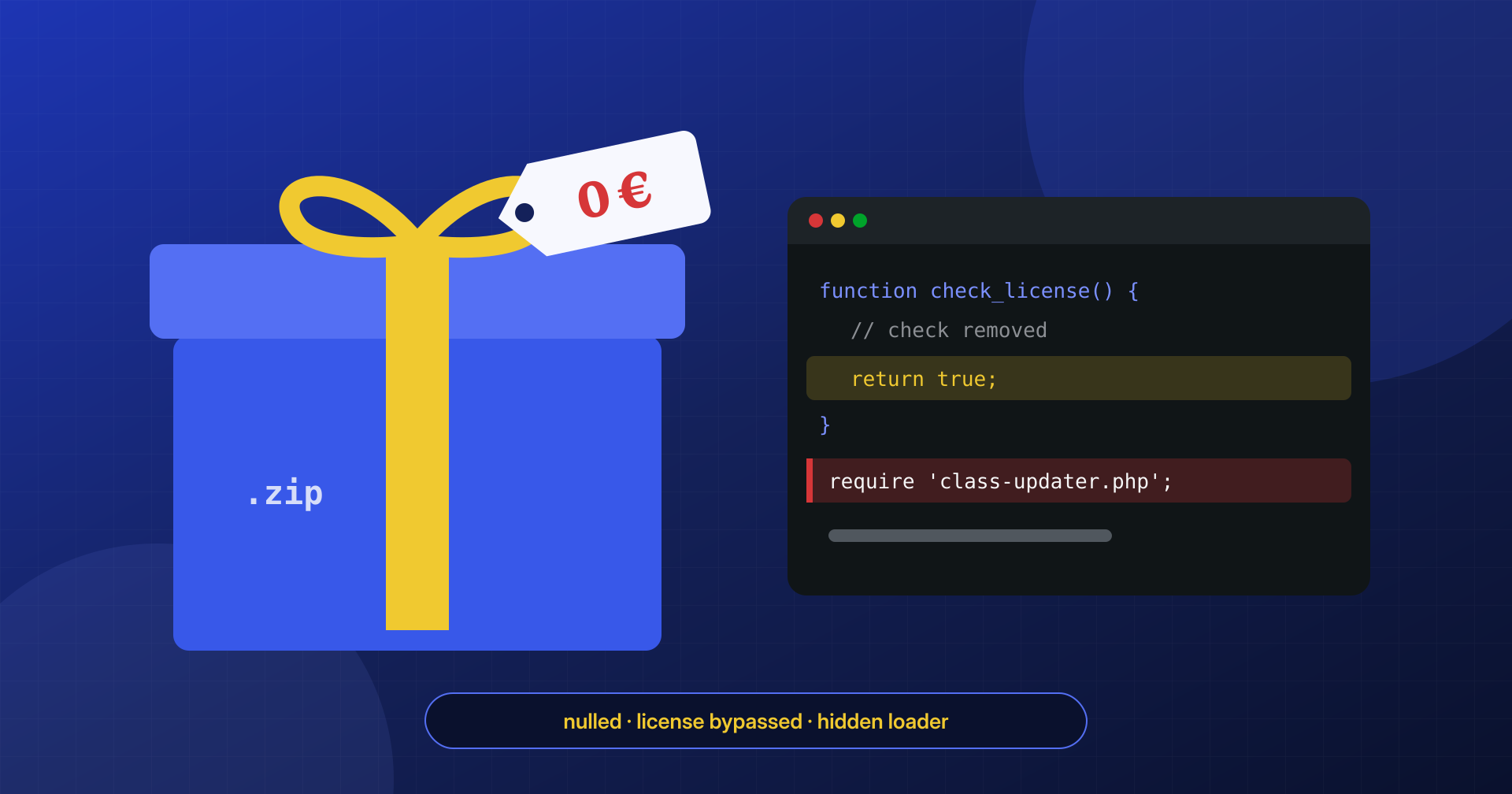
The premium theme costs a few dozen euros, the page builder has an annual subscription, the booking plugin another one. Then someone finds the same package on a download site, in a Telegram channel or on a forum, complete and “already activated,” for free. That’s how many WordPress sites infect themselves: not through a vulnerability discovered by a sophisticated attack, but because the malware was installed by the site’s own manager, with one click on “Activate.”
In this article we look at how this supply chain works, what a nulled package really contains, how to recognize the signs in the code and how to verify the integrity of plugins and themes against the vendor’s originals. We close with a note on the legal side, which is less obvious than you might think.
What nulled plugins are
A “nulled” plugin or theme is a copy of a commercial product from which the license check has been removed or defeated. The name comes from software piracy slang: the check is “nulled,” so the product runs with all its premium features without a valid key.
The sources vary: dedicated sites with thousands of titles, messaging groups and channels, shared archives, sometimes sellers offering whole catalogs on subscription at rock-bottom prices. Not all these sources are alike, but they share one problem: between the vendor and the installer’s site there is an unknown middleman who has handled the package, modified it, and doesn’t have to answer to anyone for what was added.
The same goes for “free” themes downloaded from sites that aren’t the official WordPress.org directory or the vendor’s own site. Here the problem is older than nulled packages: for years, free themes have circulated with an encoded footer that inserts hidden links to betting, pharmacy or loan sites, and that breaks the theme if anyone tries to remove them. Today those links are often joined by full-blown loaders. A free theme published on WordPress.org, by contrast, goes through review and automated checks, and its version is verifiable: it’s not an absolute guarantee, but it’s a substantial difference from a ZIP file of unknown origin.
Why someone gives them away
Whoever distributes a nulled package bears costs: buying the original, removing the license, maintaining a site with frequent updates, paying for bandwidth and servers. The return doesn’t come from the users who download, but from the sites where the package gets installed. Once inside, a WordPress site is worth quite a lot: it can host SEO spam pages, show intrusive ads, redirect mobile traffic to scams, send email, serve as a bridge for attacks on other sites.
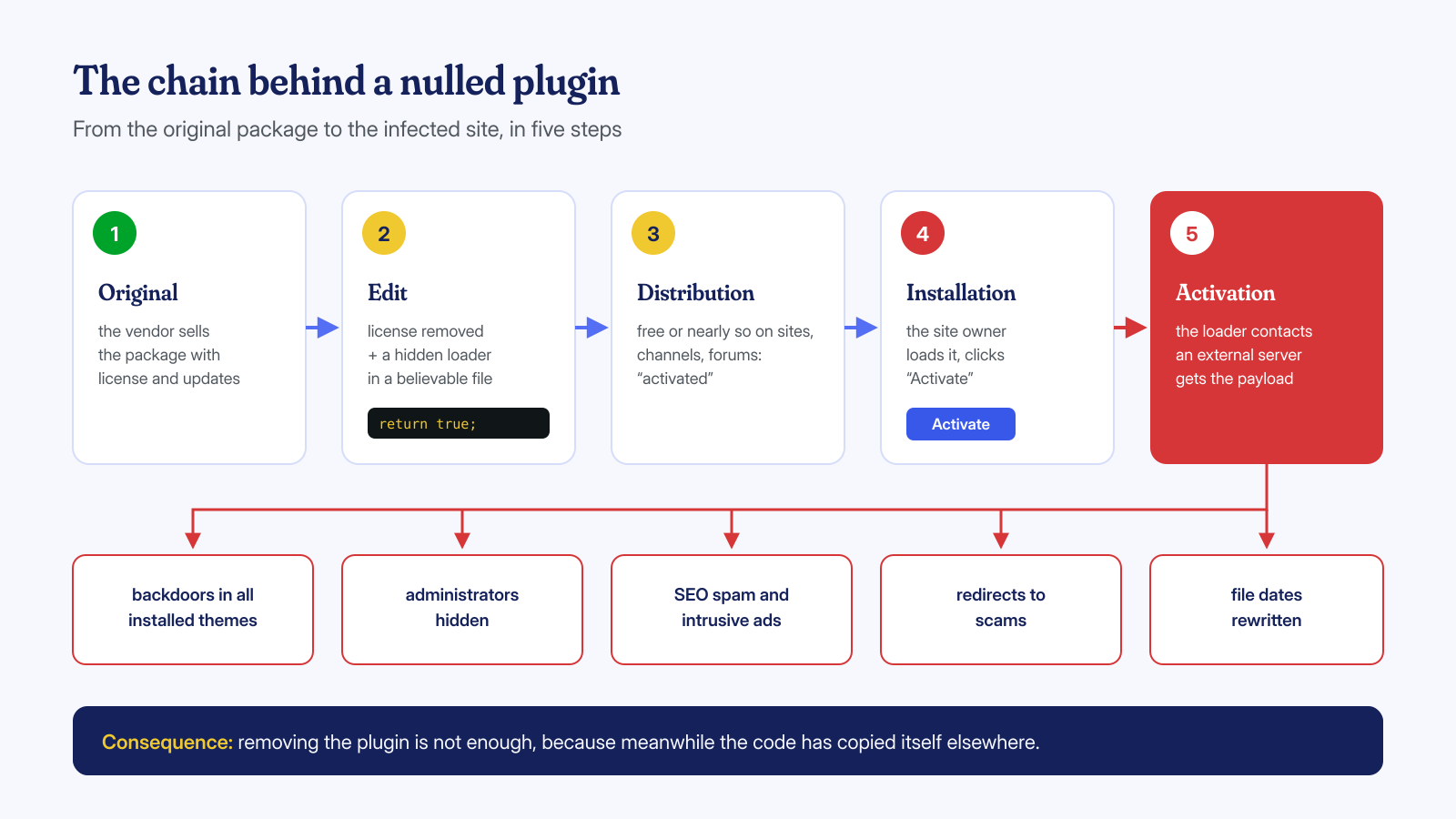
The best-documented case is WP-VCD, a malware family spread precisely through pirated themes and plugins. Wordfence described it as the malware you install on your own sites, and in its 2020 threat report it identified it as the most widespread family among the infected sites detected by its scanner, with malware from nulled components present on over 17% of those sites. The mechanism was textbook: on first load the package installed a backdoor in all the themes present, contacted a command-and-control server and set the modified files’ dates back to their previous values, to avoid attention.
How malware is hidden in the package
A nulled package almost always contains two kinds of modifications. The first is the declared one: removing the license. It usually amounts to a few lines: the function that checks the key always returns a positive result, or requests to the license server are intercepted and receive a fake response. A typical example of the second approach:
// Requests to the license server never go out:
// WordPress immediately receives a response saying "license valid"
add_filter( 'pre_http_request', function ( $pre, $args, $url ) {
    if ( str_contains( $url, 'licenze.produttore.example' ) ) {
        return array(
            'headers'  => array(),
            'body'     => '{"license":"valid","expires":"lifetime"}',
            'response' => array( 'code' => 200, 'message' => 'OK' ),
            'cookies'  => array(),
        );
    }
    return $pre;
}, 10, 3 );
This code isn’t malicious in itself: it only prevents the check. The problem is the second modification, the undeclared one. In the packages we analyze, the most frequent forms are:
- a loader in a file with a believable name, like
class-plugin-updater.phporcompat.php, included from one of the main files; - code in the activation hook, which runs only once, creates an administrator or downloads the real payload and then leaves no obvious traces;
- calls to external servers disguised as update checks, from which instructions or code to run arrive;
- spreading to other components: copies of the backdoor in the
functions.phpof all themes, in an mu-plugin or in core files, so that removing the plugin isn’t enough; - obfuscated code with chains of
base64_decode,gzinflateandstr_rot13, or hidden inside files that the original product already ships encoded with ionCube.
The last case is the most insidious: if the original plugin contains encoded files, one more encoded file, or a different one, doesn’t draw attention, and no scanner can read its contents. We cover this in more detail in the article on obfuscated and encoded files.
Signs to look for in the code
If a site has components of uncertain origin, a first manual search helps you tell whether there’s something to dig into. None of these patterns is proof in itself, because legitimate code uses them too, but finding them combined in an unexpected place is a good reason to look closer:
cd wp-content/plugins/nome-plugin

# Decoding and dynamic code execution
grep -rnE "(eval|assert)\s*\(|gzinflate|gzuncompress|str_rot13|create_function" --include='*.php' .

# Outbound requests: where do the "updates" come from?
grep -rnE "wp_remote_(get|post)|curl_init|fsockopen|file_get_contents\s*\(\s*['\"]https?://" --include='*.php' .

# Creating users or changing roles from a plugin's code
grep -rnE "wp_(insert|create)_user|set_role\s*\(\s*['\"]administrator" --include='*.php' .

# Code run at activation and interception of HTTP requests
grep -rnE "register_activation_hook|pre_http_request" --include='*.php' .

# PHP files with very long lines, typical of obfuscated code
find . -name '*.php' -exec awk 'length > 3000 { print FILENAME; nextfile }' {} +
Other clues lie outside the code: a plugin that doesn’t appear in the vendor’s customer area, a version that doesn’t exist in its changelog, a release date later than the last official version, a readme file that cites a download site as its source. And, at the system level, theme files with modification times identical to the second, a frequent sign of dates deliberately rewritten.
It’s worth looking in the database too. Many nulled packages store a fake license state among the options, or the address of an alternative update server from which to receive instructions. A list of the options with words like license, update or api in the name, read carefully, often reveals domains that have nothing to do with the vendor. The same goes for the WP-Cron events registered by the plugin: if a task shows up that no official documentation mentions, you need to understand what it runs.
# Options tied to licenses and updates, with their values
wp option list --search='*license*' --fields=option_name,option_value --skip-plugins --skip-themes
wp option list --search='*update*' --fields=option_name --skip-plugins --skip-themes

# Registered WP-Cron events, with next run
wp cron event list --fields=hook,next_run_relative,recurrence --skip-plugins --skip-themes
Verifying integrity against the original
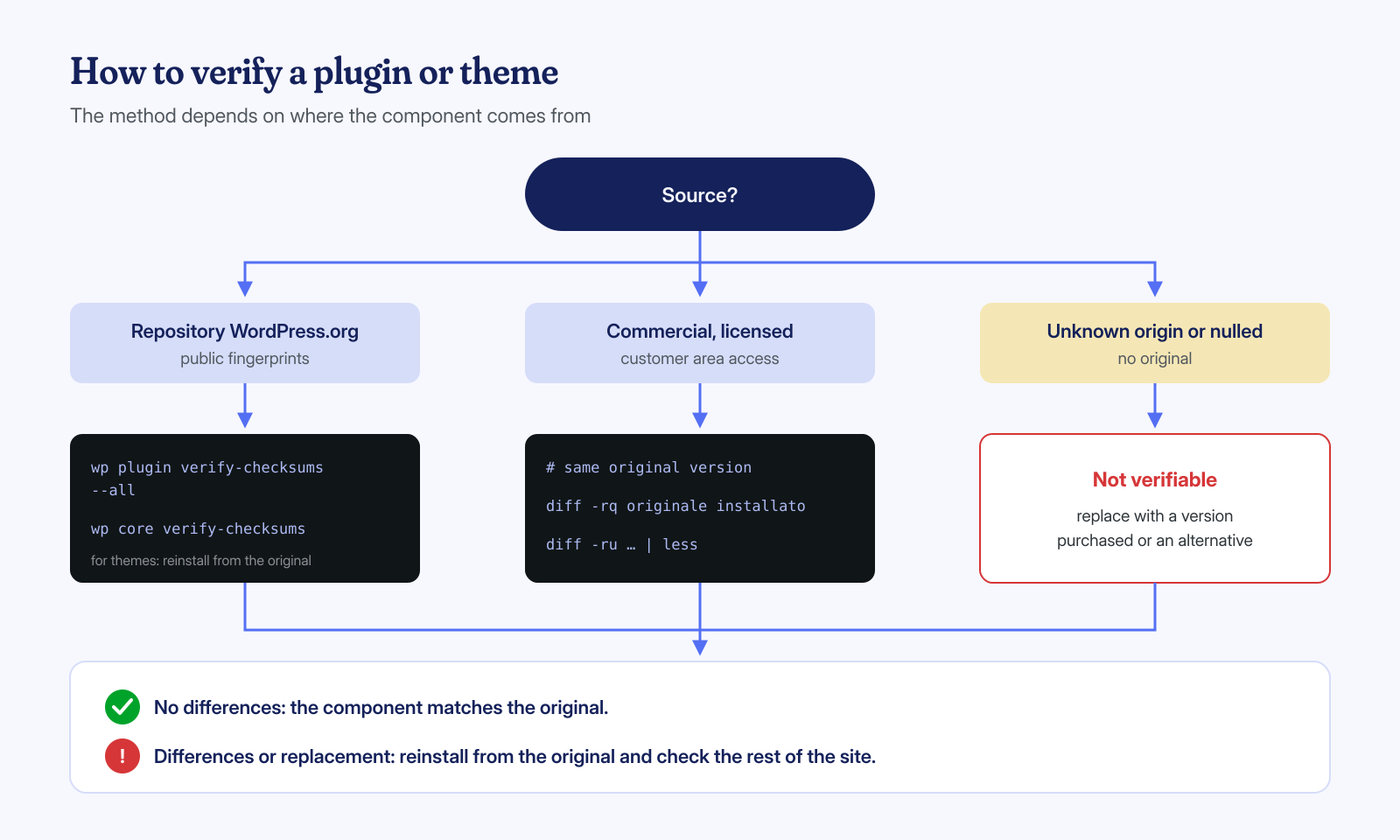
Pattern searching tells you where to look; the definitive answer comes from comparing with the original package. For components in the official WordPress.org repository the comparison is automatic, because WP-CLI downloads the published checksums and verifies them file by file:
# Installed versions
wp plugin list --fields=name,status,version --skip-plugins --skip-themes

# Core and plugins from the official repository, compared with WordPress.org checksums
wp core verify-checksums --skip-plugins --skip-themes
wp plugin verify-checksums --all --skip-plugins --skip-themes
For commercial plugins and themes there are no public checksums, and WP-CLI has no equivalent command for themes. You proceed by hand: download from the vendor’s customer area exactly the same version that’s installed and compare the two folders.
# Original package downloaded from the vendor's customer area
mkdir -p /tmp/originale && unzip -q nome-plugin-3.2.1.zip -d /tmp/originale

# Summary list: extra files, missing files, different files
diff -rq /tmp/originale/nome-plugin wp-content/plugins/nome-plugin

# Detail of the differences in modified PHP files
diff -ru /tmp/originale/nome-plugin wp-content/plugins/nome-plugin | less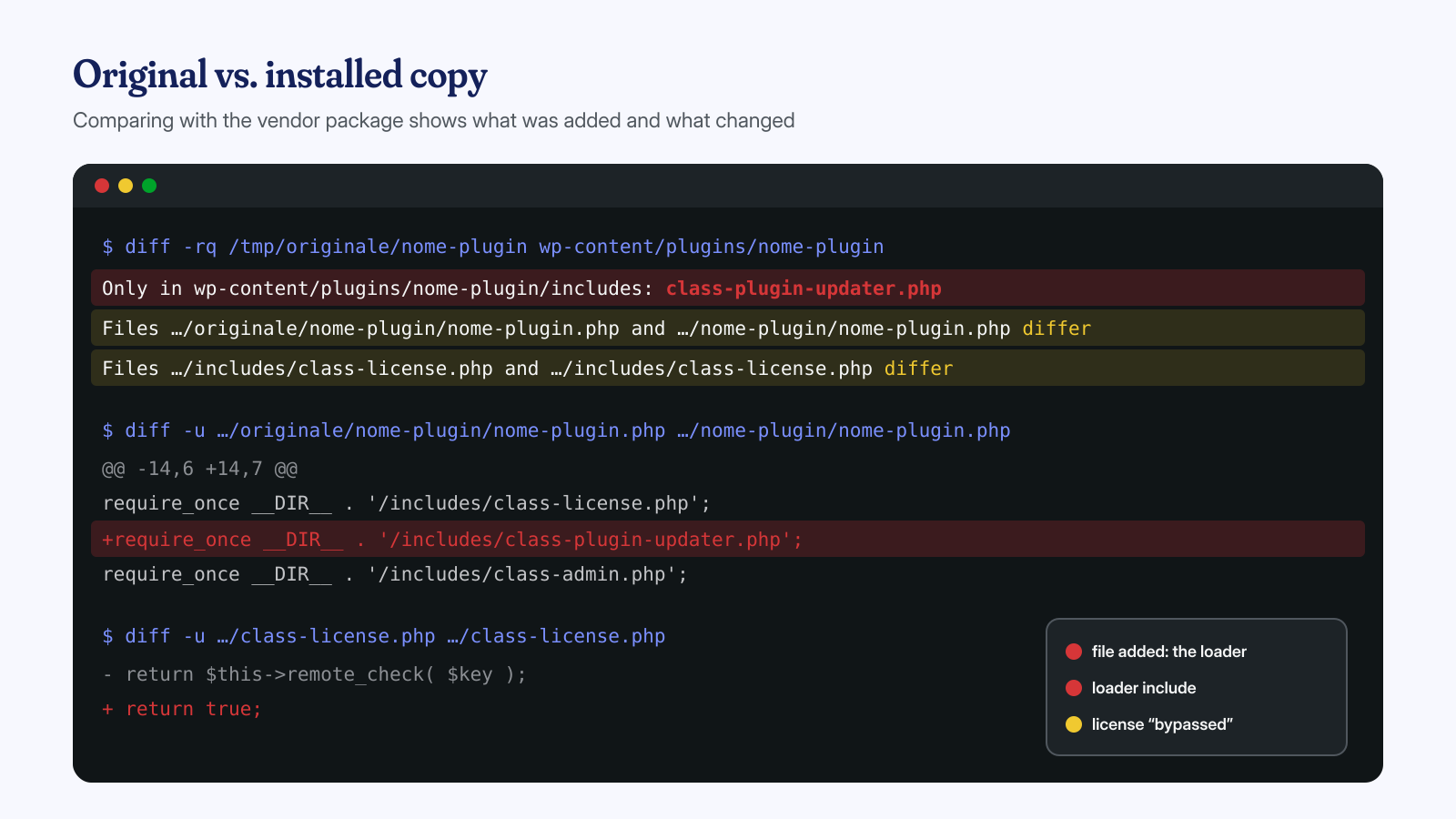
In the diff output three things matter most: files present only in the installed copy, which have no reason to exist; changes to the main files, where the loader’s include is usually added; and differences in encoded files, which can’t be read but can be compared byte for byte. If you manage many sites, keeping an archive of the original packages downloaded from the vendor, with their SHA-256 checksums, turns this check into a matter of minutes instead of hours, and lets you repeat it after every update.
If the original isn’t available, because the license was never purchased or the product no longer exists, there’s no way to establish with certainty that the package is intact. In that case the prudent choice is to replace it with a purchased version or an alternative, not to try to clean it line by line.
Cleaning a site that used nulled components
Once you’ve found the counterfeit package, the instinct is to delete it and install the official version. That’s necessary, but not sufficient. If the malicious code ran even once, you have to assume it did what it was written to do: leave other doors open. That’s why the cleanup has to start from the component’s installation date and include:
- all themes and plugins, even deactivated ones, because families like WP-VCD propagate to other components;
- core files, to be verified against the official checksums and reinstalled if modified;
- users, looking for administrators created by the code and hidden from the list;
- the database, including options with serialized code, triggers and events;
- WordPress and system scheduled tasks;
- credentials, starting with the database password and WordPress salts, which the code could read from the configuration file.
One last practical detail: nulled components don’t receive updates from the vendor, or they receive them from equally dubious sources. Even when they contain no malware, they stay frozen at versions with known vulnerabilities, which in turn become an entry point.
A legal and ethical note
On the legal side the question is more nuanced than it seems. WordPress is distributed under the GPL license, and many commercial plugins and themes release their PHP code under the same license, which allows copying and redistributing it. The GPL doesn’t always cover the whole package, though: stylesheets, scripts, images and fonts may have different licenses, and product trademarks remain protected. The commercial license you buy, moreover, usually covers updates, support and related services, which a copy doesn’t give you. And circumventing the licensing system of a proprietary product is something else entirely from redistributing GPL code. For concrete cases, talk to a lawyer, not a forum.
On the ethical side the argument is simpler. Behind many plugins there’s a small company, sometimes a single person, who lives off licenses and reinvests them in security and updates. And on the economic side the math is quick: the annual license cost for a typical site is a fraction of what a single day of downtime, a blacklist removal or a data breach notification costs.
A nulled plugin isn’t free: someone else sets the price, and collects it from your site.
If the damage is already done
It often happens that the nulled component was installed years earlier, by a previous vendor or a collaborator, and nobody remembers where it came from. In these cases comparing against the originals is the first step of our work: we identify the components that can’t be verified, replace them with the official versions in agreement with the client, and follow the malicious code wherever it has spread, in files, in the database and in the system. When a package contains encoded files or never-before-seen variants, the analysis is supported by AI models run locally and verified by an analyst.
Cleanup of a WordPress installation is guaranteed within 6, 12 or 24 hours depending on urgency. If you suspect your site has a theme or plugin of dubious origin, write to us: we can tell you with certainty whether it’s intact, before it becomes a problem.
