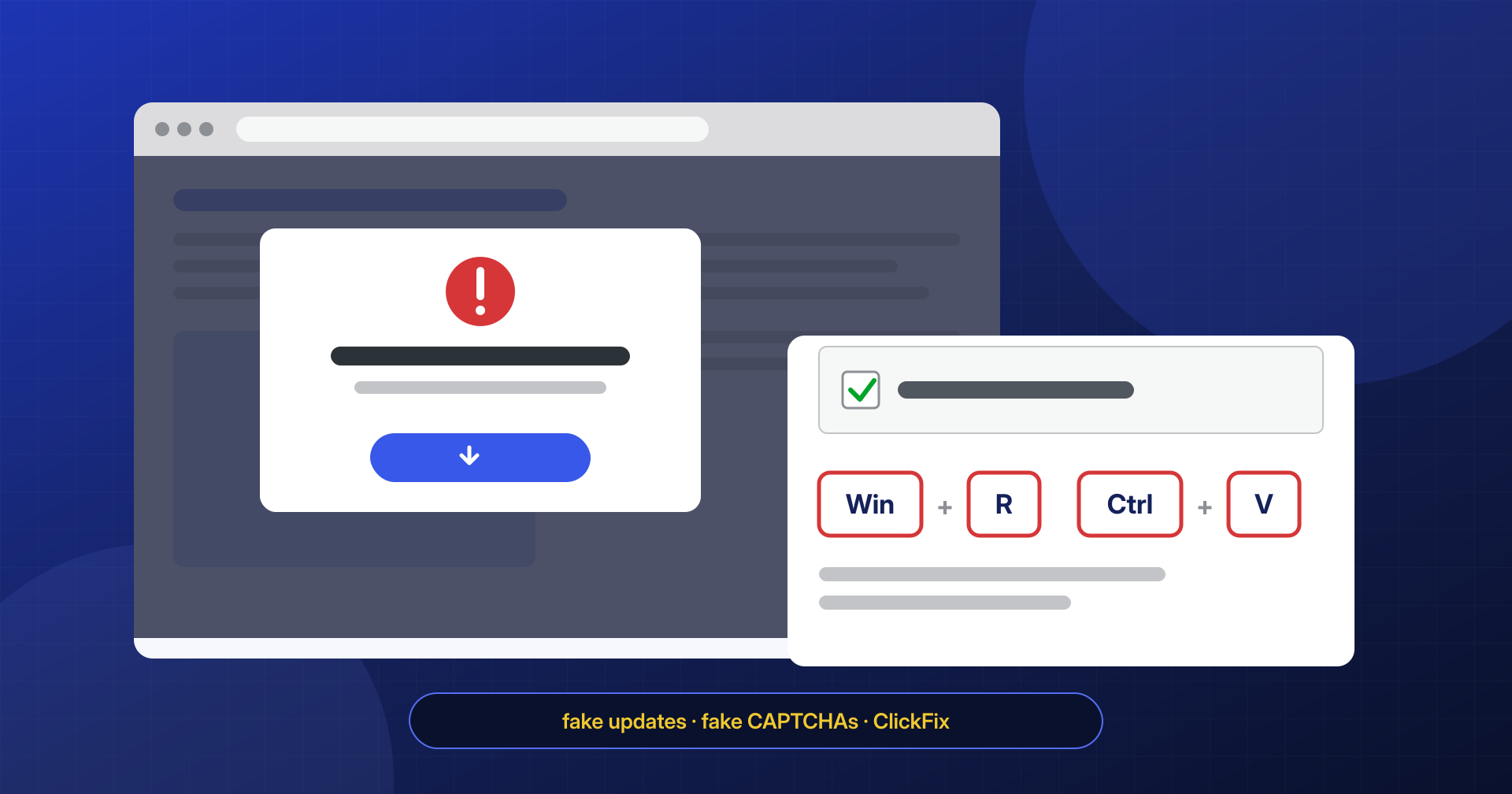
The site loads normally, the pages are the same as always, and the security plugin’s scanner reports nothing. Then an email arrives from a customer: when they opened the site, a notice asked them to update their browser, or an “I’m not a robot” check asked them to press a key combination. They followed the instructions, and now their antivirus is flagging malware. Or Google is showing the red Safe Browsing page warning of deceptive content.
This is not a problem with the customer’s computer. It is one of the most widespread infection families on compromised WordPress sites: an injected script that turns the site into a malware distribution point for visitors, and that does everything it can to stay out of the owner’s sight. In this article we describe how fake browser updates and fake CAPTCHA lures work, why the people running the site rarely see them, where the injection hides, and how to find and remove it. The descriptions are meant to help you recognize the problem: we do not publish working malicious code.
The site as a tool for hitting visitors
Most of the infections we cover on this blog use the site for something the attacker wants: placing spam pages, sending mail, stealing payment data. In this family the real target is the computers of the people who visit the site. The attacker does not need to convince anyone to visit a suspicious domain: they borrow the reputation of a legitimate site, one that visitors know and trust, to deliver a believable lure.
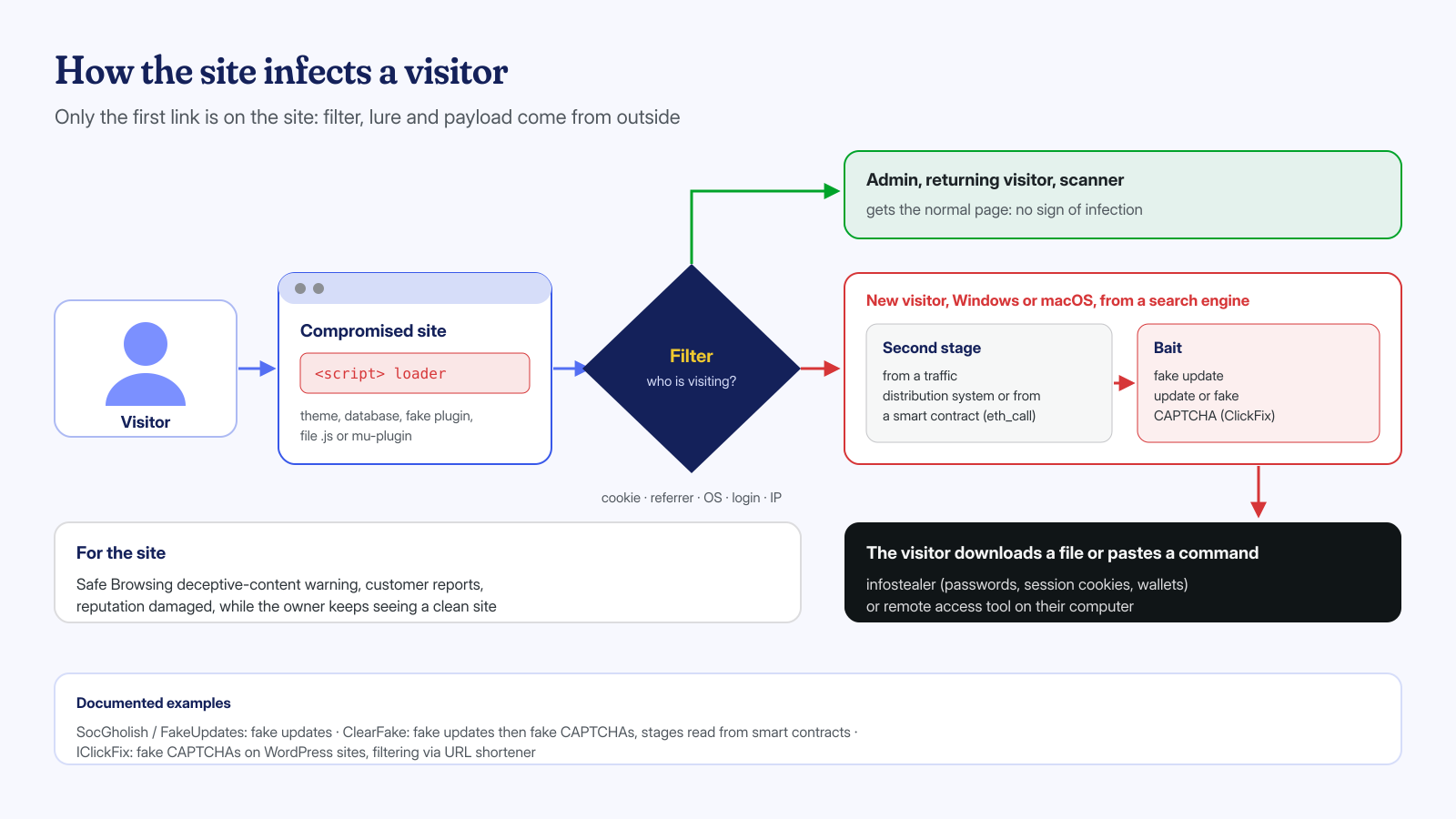
The pattern is always multi-stage. The compromised site holds only a small JavaScript loader; it contacts external infrastructure that decides whether the visitor is an interesting target and, if so, returns the actual lure; the lure persuades the person to download and run a file or a command; the final program is usually an infostealer, which steals passwords saved in the browser, session cookies, and cryptocurrency wallets, or a remote access tool. Separating the stages lets the attacker change lure and payload without touching the infected sites.
Fake browser updates: SocGholish and ClearFake
The longest-lived lure is the fake update: a page, or a layer overlaid on the page, that imitates the look of Chrome, Firefox, or Edge and warns that the browser is out of date and must be updated to display the content. The button downloads a file that has nothing to do with the browser. Proofpoint, in its October 2023 analysis of fake updates, described four distinct groups using this lure on compromised sites, with injected JavaScript or HTML that routes traffic to attacker-controlled domains.
The best known is SocGholish, also called FakeUpdates, which Proofpoint attributes to the group TA569 and which has been active for over five years. Sucuri, which sees it on the sites it cleans, has documented its spread on WordPress: in 2022 it described injections placed just before the closing </head> or at the top and bottom of legitimate .js files, with visitors selected from those on Windows arriving for the first time from a search engine. In 2024 Sucuri described a wave of infections through fake plugins, modified copies of real plugins installed with stolen administrator credentials, which inject the script only into pages viewed by non-administrator users.
ClearFake appeared in 2023 with the same lure but a more original infrastructure. Guardio Labs documented it under the name EtherHiding: the script injected into WordPress sites does not download the next stage from a server but reads it from a smart contract on the BNB Smart Chain with an eth_call request, a read-only operation that costs nothing and leaves no transactions behind. A contract cannot be seized or switched off the way a domain can, and the attacker can update its content whenever they like. A Trend Micro analysis from May 2026 describes a variant that uses the BNB Smart Chain test network, with the loader inserted in the <head> as a <script> tag with a data:text/javascript;base64 source, with no external domain visible in the page code.
Fake CAPTCHAs and ClickFix: the visitor infects themselves
Since 2024 a different lure has taken hold. Instead of having people download a file, which browsers and antivirus software have learned to block, the page shows a check that imitates Google reCAPTCHA or Cloudflare Turnstile. After clicking “I’m not a robot”, instructions appear for an “additional verification”: press Win+R, then Ctrl+V, then Enter. Meanwhile, the page has already copied an obfuscated PowerShell command to the clipboard. Anyone who follows the instructions opens the Windows Run dialog, pastes the command, and runs it with their own privileges. The technique is known as ClickFix.
Sekoia described the technique in a March 2025 report on ClearFake, which since December 2024 had been using fake reCAPTCHA and Turnstile and which, as of February 2025, was present on over 9,300 sites, mostly WordPress; the payloads observed included the Lumma and Vidar infostealers. Microsoft Threat Intelligence, in its August 2025 analysis of ClickFix, lists compromised sites among the distribution channels, alongside phishing and malicious ads, and reports macOS variants that ask the user to paste the command into Terminal. In January 2026 Sekoia documented IClickFix, a framework aimed at WordPress sites that counted over 3,800 compromised sites and distributed the NetSupport remote access tool.
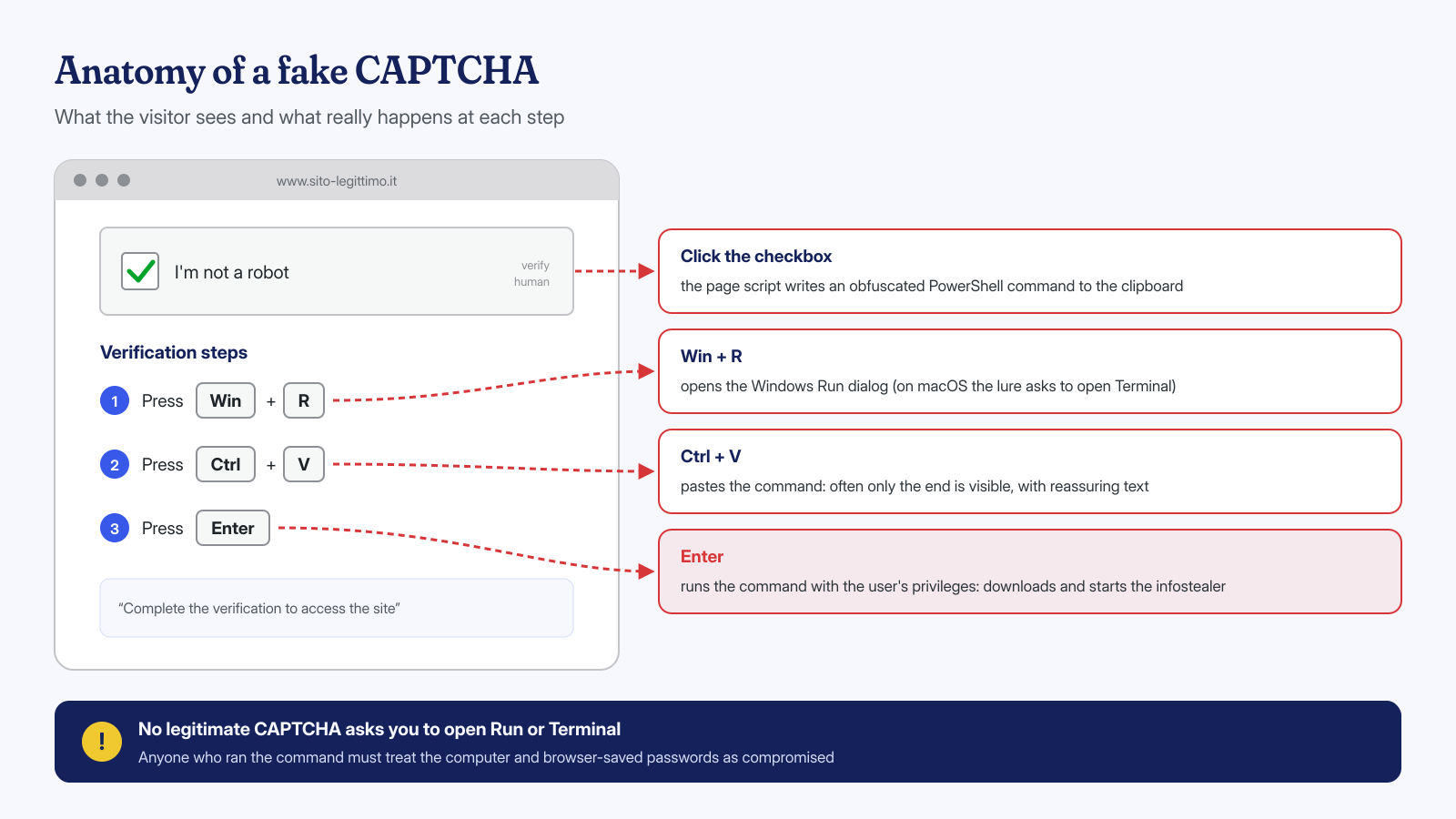
For the site, the consequence is the same as with the fake update, but worse from a reputation standpoint: the visitor ran the command themselves, often on a work computer, and will remember the site where it happened.
Why the owner sees nothing
These scripts are not designed to hit everyone. Showing the lure on every visit would get the infection discovered within hours; showing it only to the right visitors makes it last for weeks. The conditions documented in the analyses cited above can be combined with one another:
- user not logged in: anyone logged in to WordPress, which almost always means the owner or the agency, gets the clean page, because the PHP-side injection checks login cookies or user capabilities;
- first visit: after showing the lure once, the script sets a cookie or another value stored in the browser and does not show it again to the same browser;
- referrer: the lure appears only to people arriving from a search engine, not to those who type the address or use a bookmark;
- operating system and browser: Windows for PowerShell lures, macOS for Terminal ones, while mobile devices are often excluded;
- IP address and user agent: traffic distribution systems filter requests to exclude security scanners, crawlers, and visitors who have already been hit.
The result is that the owner, logged in to the dashboard and opening the site from their own computer by typing the address, meets almost every condition for not seeing the lure. It is the same mechanism as conditional redirects, applied to a more dangerous goal, and it is also why many security scanners that analyze the page from a single point of view find nothing.
Where the injection hides in WordPress
The loader has to end up on every page, or at least on the most visited ones, and there are many ways to achieve that. On the sites we clean, we most often find it in these places:
- theme files:
header.php,footer.php, orfunctions.php, with a function hooked towp_headorwp_footer; - legitimate JavaScript files: code added at the top or bottom of theme or plugin libraries, such as jQuery or slider scripts, which are loaded on every page;
- database: plugin options that insert code into the header, HTML widgets,
theme_mods,wp_postscontent, often as serialized values; - fake plugins: folders with plausible names that imitate real plugins, installed through a compromised administrator account;
- mu-plugins and drop-ins: automatically loaded files that do not appear in the plugin list, as explained in the article on mu-plugins used as backdoors.
The injection is often present in several places at once, and it always comes with a backdoor that lets the attacker put it back. Removing the script from footer.php without finding the rest means watching it reappear within hours, perhaps in a different form.
Viewing the site as a new visitor
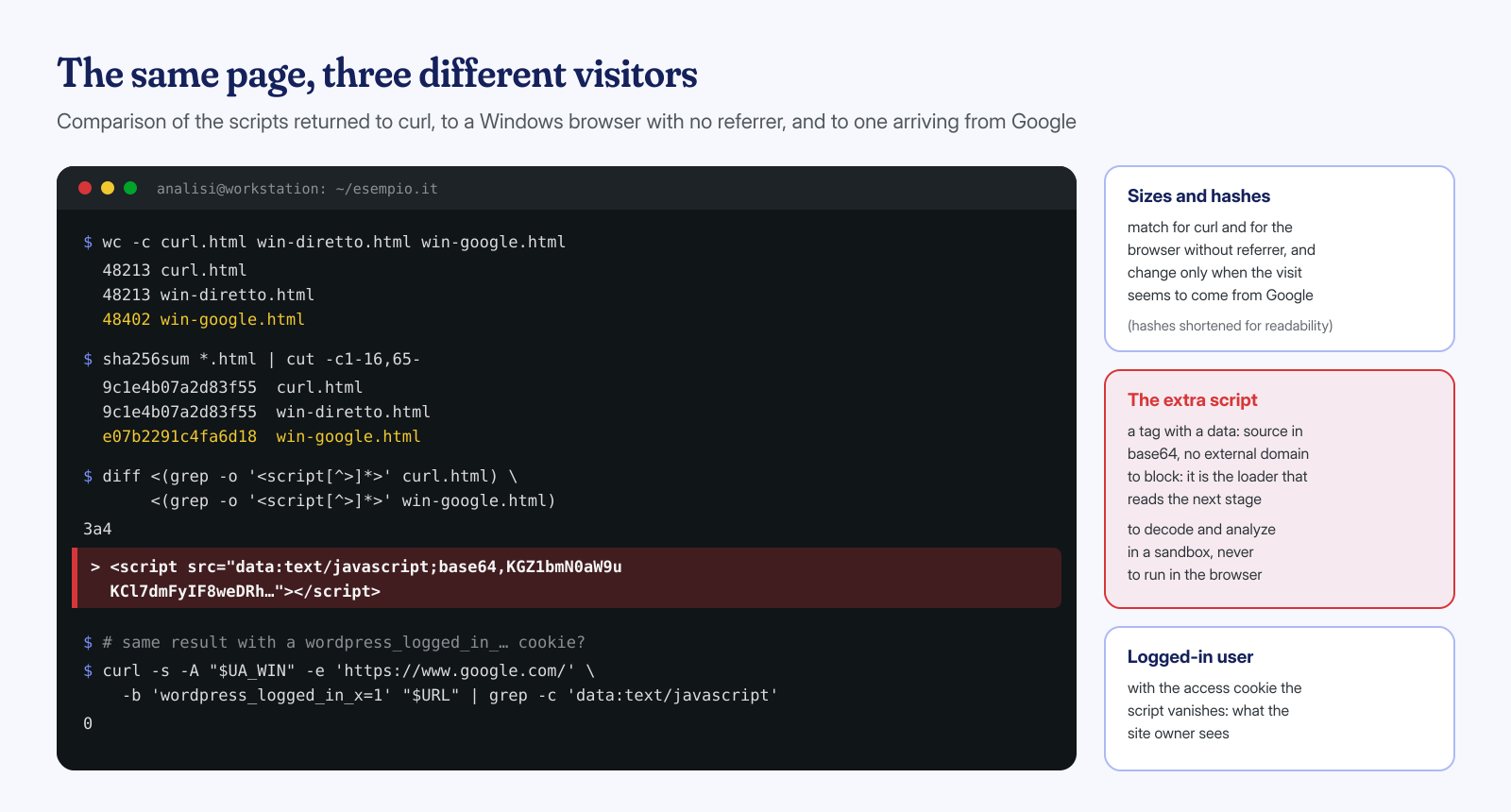
The first check is simple: download the page with no cookies, with different user agents, and with a search engine referrer, and compare the results. If the responses change depending on who asks, something on the site is deciding what to show. curl does not execute JavaScript, so it does not show the lure, but it does show the <script> tags in the returned HTML, and that is where the loader lives.
UA_WIN='Mozilla/5.0 (Windows NT 10.0; Win64; x64) AppleWebKit/537.36 (KHTML, like Gecko) Chrome/140.0.0.0 Safari/537.36'
URL='https://www.esempio.it/'

# New visitor on Windows arriving from Google
curl -s -A "$UA_WIN" -e 'https://www.google.com/' "$URL" -o win-google.html

# Same visitor with no referrer, and a generic client
curl -s -A "$UA_WIN" "$URL" -o win-diretto.html
curl -s "$URL" -o curl.html

# Sizes and fingerprints: unexpected differences need an explanation
sha256sum win-google.html win-diretto.html curl.html
diff <(grep -o '<script[^>]*>' curl.html) <(grep -o '<script[^>]*>' win-google.html)

# All scripts on the page: external sources and data URIs
grep -oE '<script[^>]*(src="[^"]*"|data:text/javascript[^"]*)' win-google.html | sort -u
Pages that contain cache or random numbers change fingerprint on every request, so the comparison should be done on the script lists, not just on the hashes. Every script must be traced back to a known component: a domain that no installed plugin accounts for, a tag with a base64 data: source, an obfuscated inline block using atob( or eval( are the candidates to examine. To see the actual lure, you need a real browser in an isolated environment, with no session, preferably with a residential IP address: do this only in a disposable virtual machine, and never run what the page asks you to.
Searching the database and the files
On the server side, the search does not depend on the visitor’s conditions, which makes it more reliable. In the database you look for script tags and traces of known infrastructure, such as the calls to blockchain RPC nodes used by ClearFake; in the files, for recent changes to themes, plugins, and JavaScript.
# Options and content with scripts, data URIs, or blockchain references
wp db query "SELECT option_id, option_name, LENGTH(option_value) FROM wp_options
  WHERE option_value REGEXP '<script|data:text/javascript|eth_call|bsc-|atob[(]'"
wp db query "SELECT ID, post_type, post_modified FROM wp_posts
  WHERE post_content REGEXP '<script|data:text/javascript|eth_call'"

# Integrity of core and plugins from the official repository
wp core verify-checksums
wp plugin verify-checksums --all

# PHP and JavaScript files modified in the last 30 days in themes and plugins
find wp-content/themes wp-content/plugins wp-content/mu-plugins \
  \( -name '*.php' -o -name '*.js' \) -mtime -30 -printf '%T+ %p\n' | sort

# Header hooks in the active theme's files
grep -rnE "add_action\(\s*'wp_(head|footer)'" wp-content/themes/$(wp theme list --status=active --field=name)/
Checksum verification covers only components distributed by the WordPress.org repository: commercial themes and plugins must be compared against a clean copy downloaded from the vendor. Fake plugins, in particular, have to be found by elimination: every folder in wp-content/plugins must match a component that someone installed knowingly. File dates are not proof, because malware often alters them to blend in with neighboring files; that is why in our analyses we cross-reference them with the server logs and with the status change time (ctime), which is much harder to forge.
Cleanup, Safe Browsing, and what to tell visitors
Removing the script is the last step, not the first. First you must find the backdoor and the entry vector: a vulnerable plugin, stolen administrator credentials, a compromised FTP login. Fake-plugin campaigns almost always start from stolen administrator passwords, and in that case changing credentials and the wp-config.php keys and reviewing users are an integral part of the cleanup. The rest follows the path described in the article on the first two hours after an attack.
If Google has detected the lure, the site may appear in Search Console’s security issues report as deceptive content or social engineering, and browsers show a full-page warning. The review request should be submitted only once all issues are resolved on all pages, as explained in the guide to removing Google blacklist warnings.
That leaves the most uncomfortable part: the visitors who may have followed the instructions. If someone reports having done so, they must treat their computer and all passwords saved in their browser as compromised, and contact their IT contact. If the site has registered users, customers, or employees who use it daily, a clear notice is an act of responsibility, and in some cases it may be worth discussing the data protection aspects with your own advisor too. The message to remember for everyone is simple: no legitimate site asks you to open the Run dialog or Terminal to prove you are human.
These infections are hard precisely because the site looks healthy to the person checking it. In our interventions we analyze the site’s responses from several points of view together with files, database, and server logs, and vectors not yet classified go through an analysis assisted by AI models run locally. Cleanup is guaranteed in 6, 12, or 24 hours for each WordPress installation; if a visitor has reported a fake update or a suspicious CAPTCHA on your site, contact us even if you cannot see it yourself.
