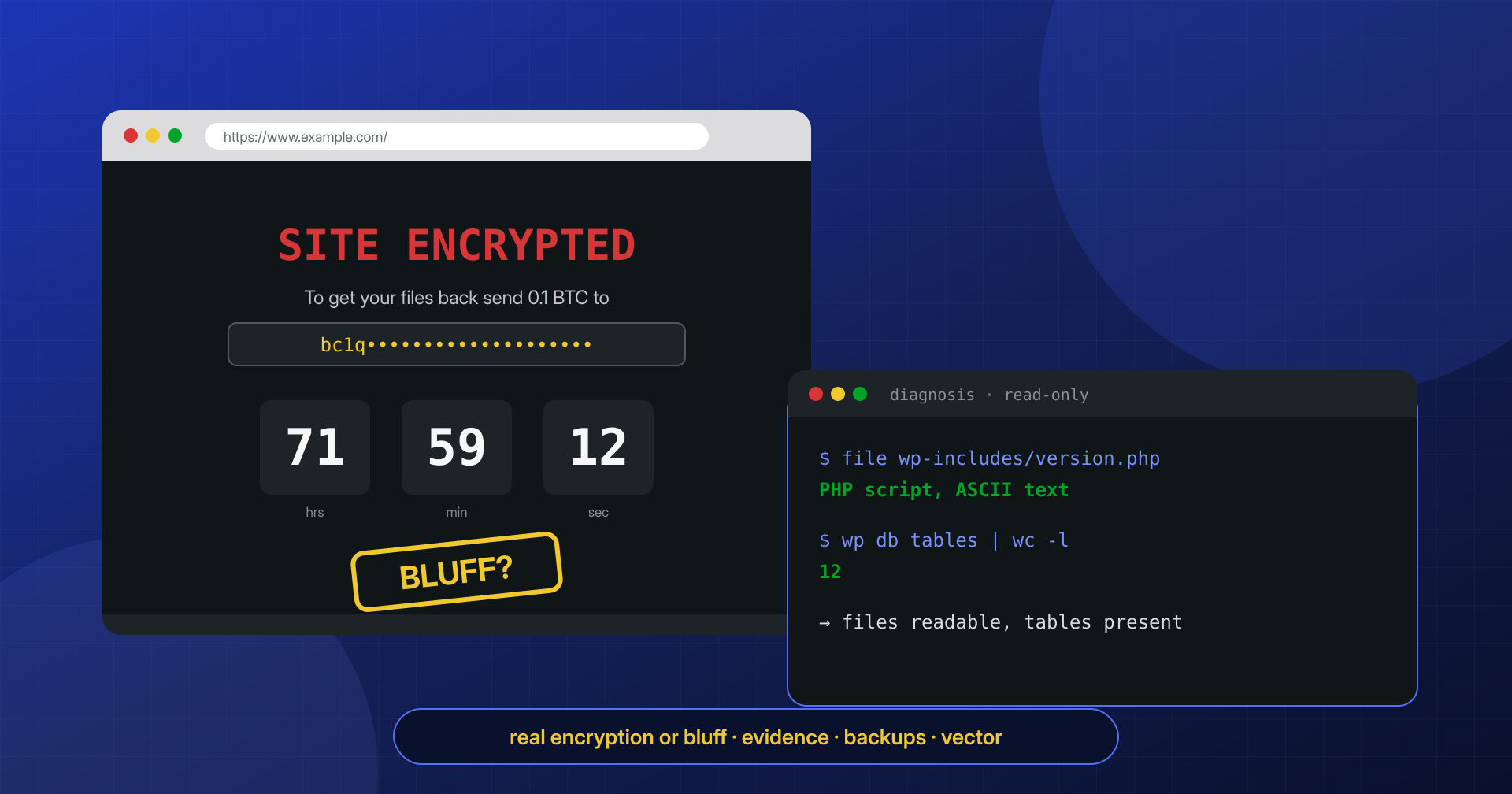
“Your site has been encrypted. Pay in bitcoin to get it back.” Reading a sentence like that in place of your own home page rattles even the coolest heads. The word ransomware evokes companies at a standstill for weeks, encrypted servers, data published on extortion sites. On WordPress, though, behind that sentence there is almost always something different and more manageable: sometimes real encryption but limited to the site’s files, sometimes a wiped database, very often just a page that lies.
The first question when facing a ransom demand is not “how much are they asking,” but “what really happened.” The answer is almost always found in under an hour, by looking at the files and the database instead of the page.
In this article we lay out the forms ransomware and defacement take on WordPress sites, the documented incidents that illustrate them, the checks for telling real encryption from a bluff, and the recovery sequence. It is a defensive article: we describe what you observe on the affected site, not how to build an attack.
What ransomware on WordPress really means
Classic ransomware is a program that runs on the victim’s computer or server, encrypts the data with a key only the attacker holds and demands payment to hand it over. On a WordPress site hosted on a Linux server, the attacker usually does not control the system: they control the user PHP runs as, obtained through a stolen password or a plugin vulnerability. From that position they can do three things, which in practice all go by the name of ransomware.
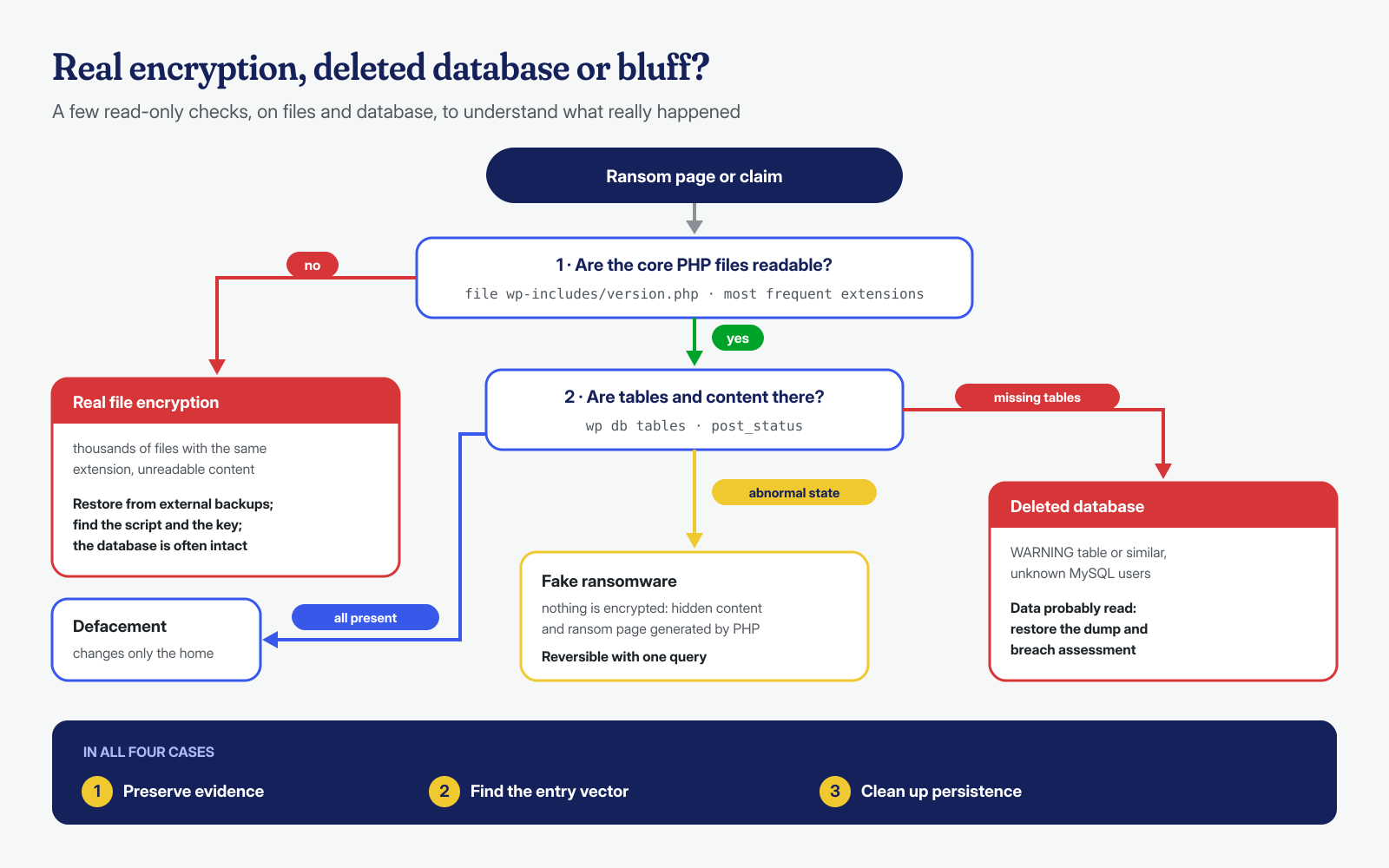
They can encrypt or rename the files of the site with a PHP script. They can delete or wipe the database and leave a table with the ransom demand in its place. Or they can simply display a message, touching nothing, counting on panic to do the rest. Added to these is defacement, which demands no money but replaces the home page with a claim-of-responsibility message. The four situations have very different consequences and remedies, which is why diagnosis comes before any other decision.
Files encrypted by a PHP script
File encryption exists and is documented. In 2017 Wordfence described a WordPress ransomware it called EV ransomware: a PHP script uploaded to the compromised site that encrypted files, added the .EV extension and created a “decryption” page together with an .htaccess that redirected every request to it. As also reported by Help Net Security, researchers noticed a decisive detail: the tool did not contain a working decryption mechanism, so even paying for the key would not have brought the files back on its own.
This type of attack has two characteristics worth knowing. The first is that the script runs with the PHP user’s permissions: it can encrypt what that user can write, that is the site’s files, but not backups stored elsewhere or system files. The second is that a PHP script has to stay functional to display the ransom page, so it often leaves some files intact or encrypts only certain extensions. In the cases we see most often, moreover, the “encryption” is a simple rename or a reversible encoding, with no secret key at all.
When files are truly encrypted and there is no external backup, all is not lost. WordPress core, plugins and public themes can be downloaded again in the same version; what matters is the content, which lives in the database and is usually not touched by a script that works on files, and the media in the uploads folder. For the latter, look for partial copies in the CDN cache, in plugin cache folders, on the computer of whoever uploaded the images or in an old development environment. A site rebuilt this way is often cleaner than the original, because it is made of freshly downloaded components instead of files whose history nobody knew.
Fake ransomware: a page and a countdown
At the opposite extreme is the pure bluff. In November 2021 Sucuri analyzed a fake ransomware campaign that displayed the text “SITE ENCRYPTED,” a bitcoin address and a countdown on the affected sites. No file was encrypted: the message was generated by code added to a file of the Directorist plugin, and an SQL command had changed the status of all published posts and pages to an invalid value, so that the site returned 404 errors and looked truly emptied. According to BleepingComputer, which relayed Sucuri’s data, the affected sites numbered about 291, and entry had been gained with administrator credentials.
Recovery, in that case, required removing the added code, restoring the content status to “published” with a query and changing all administrator passwords, deleting the unrecognized accounts. No payment would have changed anything, because there was nothing to decrypt. It is a perfect example of why a ransom page should never be taken at face value.
The wiped database and the note in a table
The third scenario hits the database, and does not even require going through WordPress. In 2020 Akamai documented the PLEASE_READ_ME campaign, which targeted MySQL servers exposed to the Internet with weak passwords: the data was exported and sent to the attackers, the database was deleted and replaced by a table called WARNING containing the ransom demand, and an additional MySQL user was created to keep access. According to the analysis, the stolen data was then put up for sale regardless of payment.
For a WordPress site the situation is recognizable at once: the site shows the installation screen or a database connection error, and among the tables there is one that does not belong to WordPress. Variants that go through WordPress access, on the other hand, delete the tables from the panel of a database management plugin or from a webshell. In both cases the key point is that the data was read before it was deleted: beyond recovery, there is a probable personal data breach to handle.
Defacement: the replaced home page
Defacement does not ask for money. The home page is replaced by a page with a name, a slogan, often a political message or a group’s claim of responsibility, and sometimes background music. Technically it is almost always one of three changes: an index.html file in the root, which many servers serve before index.php; a rewritten index.php; a DirectoryIndex directive added to the .htaccess file, like those described in the article on .htaccess and .user.ini. More rarely the siteurl and home options in the database are changed, or a featured post is published.
Defacement is loud by design, and that is exactly why it deceives: once the home page is restored, the site seems fine. But whoever could write index.php could write other things too, and the flashy page is often accompanied by webshells and added users, the same persistence tools we find in silent infections. Treating it as a graphics problem is the most common mistake.
Defacement also has an effect that goes beyond the site: the modified page is indexed by search engines and sometimes archived in public collections that groups use as a showcase. For this reason, after cleanup, it is worth requesting a new crawl of the main pages from Search Console and checking that the domain has not ended up on some reputation list, as described in the article on blacklist removal.
Real encryption or bluff: how to tell
A few commands are enough, run read-only on a copy or directly on the server without modifying anything. The first looks at the extensions: if thousands of files have the same unknown extension, something renamed them. The second looks at the content: a readable PHP file is in the clear, while a file that file identifies as binary data or as a single long base64 line may be encrypted. The third looks at the database: tables present, content statuses, foreign tables and users.
cd /var/www/esempio.it/public_html

# Most frequent extensions: a single odd extension across thousands of files is a signal
find . -type f | sed -n 's/.*\.\([^./]*\)$/\1/p' | sort | uniq -c | sort -rn | head

# Is the core version file still readable?
file wp-includes/version.php; head -c 300 wp-includes/version.php

# Files created or modified in the last 48 hours (the ransom note and the script)
find . -type f -mmin -2880 -printf '%TY-%Tm-%Td %TH:%TM  %p\n' | sort | tail -40

# Database: tables, content statuses and foreign MySQL users
wp db tables
wp db query "SELECT post_status, COUNT(*) FROM wp_posts GROUP BY post_status;"
mysql -e "SELECT user, host FROM mysql.user;"   # requires MySQL administrator privileges
The result places the case in one of the boxes of the diagram below. Even in cases of real encryption, it is worth searching the recently created files for the script that performed it: if the key is written in the code or in the request logs, as happens with the crudest tools, the files can be recovered without paying anyone. The No More Ransom project, backed by law enforcement and security companies, also collects free decryption tools for the ransomware families whose keys have been recovered.
Do not pay, and preserve the evidence
The advice not to pay is not moralism. As No More Ransom points out, paying confirms to the attackers that the method works and does not guarantee you will receive the key. In the cases described above, moreover, paying would have been pointless by definition: EV’s decryption did not work, the fake ransomware had encrypted nothing, and in the database campaign the data was sold anyway. Whoever has a reliable backup has no need to negotiate; whoever does not still has a good chance of recovering more than they think.
Before restoring or deleting anything, preserve the evidence. The state of the site at the time of discovery is needed to find the entry point, to understand which data was read and, if you decide to file a report with the Italian Postal Police (Polizia Postale), to document what happened:
INC=/root/incidente-$(date +%F); mkdir -p "$INC"

# Site files with permissions, owners and dates
tar --numeric-owner -czpf "$INC/sito.tar.gz" -C /var/www/esempio.it public_html

# Database in its current state, even if wiped
mysqldump --single-transaction --routines --triggers --events esempio_wp > "$INC/db.sql"

# Web server and PHP-FPM logs, before rotation deletes them
cp -a /var/log/nginx /var/log/php*-fpm* "$INC/" 2>/dev/null

# Checksums to prove the copies have not been altered
sha256sum "$INC"/* > "$INC/SHA256SUMS"
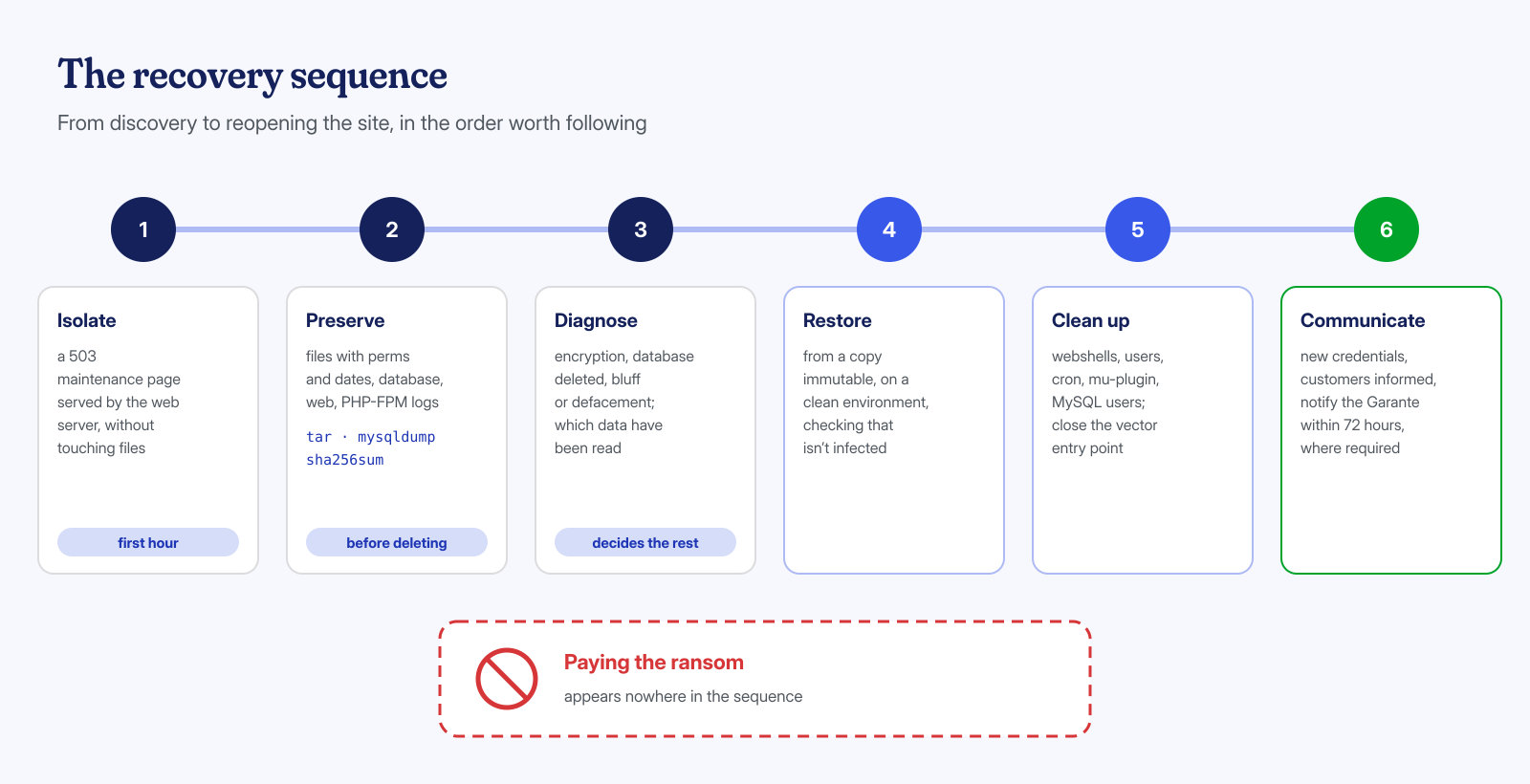
In the meantime the site should be taken out of public view without touching the files: a maintenance page served directly by the web server, with a 503 status code, keeps visitors from seeing the ransom demand and search engines from indexing it, and leaves the scene intact. Immediately deleting the ransom page or the defacement’s index.html file is understandable, but it destroys exactly the dates and contents needed to trace the entry.
The full order of the first moves, from taking the site offline to changing credentials, is described in the article on the first two hours after an attack.
Recovering: backups, cleanup, vector and communication
Recovery has four components, and skipping one means seeing the same message again in a few weeks. The first is restoring the data: files and database from a copy the attacker could not touch. Here you see the difference between a backup in the same folder as the site, often encrypted along with everything else, and an immutable off-site copy like those described in the article on ransomware-proof backups. The restore must be done in a clean environment and with the precautions in the article on backups that bring the malware back, because the copy may already contain the backdoor that started it all.
The second is cleanup: webshells, added administrator users, cron jobs, mu-plugins, MySQL users created by the attackers. The third is the vector: the vulnerability or credential that allowed access, to be closed before putting the site back online. The fourth is communication, and it is not only about visitors. If the database contained personal data and it was read, deleted or made unavailable, it may be a breach to be assessed and, if the conditions apply, notified to the Italian Data Protection Authority (Garante) within 72 hours, as we explain in the article on GDPR and a hacked site. Customers and suppliers prefer to hear from the company what happened, in simple words and without downplaying it, rather than find out from others.
If your site shows a ransom demand or a claim-of-responsibility page, do not delete anything and write to us. We diagnose, preserve the evidence, restore from the available backups and clean up every WordPress installation at both the application and system level, with guaranteed times of 6, 12 or 24 hours from receiving the necessary access, delivering a report that is also useful for any required notifications.
